
external hard drive file corruption?

briligg

New member
Member
Local time
9:11 AM
Messages
64
We have an external hard drive for back ups. Usually it is in storage, or it is connected to my machine via usb. Occasionally my husband connects it to his xp machine to do back ups or copy a file. After he uses it, when i next connect it to my machine, windows asks me if i want to scan and fix the drive, or open it without scanning. I have always said just open it. I thought win xp left some artifacts on the drive maybe.

Now i see some mysterious files have appeared on the drive, and i can't delete them. I tried doing it from the command prompt, but unless i'm doing something wrong, i get the same error i get when i try deleting them from windows explorer - the file names aren't valid.

Is this indeed because of the sharing of the drive across systems? Is it normal for win7 to ask for a scan and fix of a drive after it has been on a win xp system? How do i delete these files? Should i be concerned about a larger issue?
 

Attachments
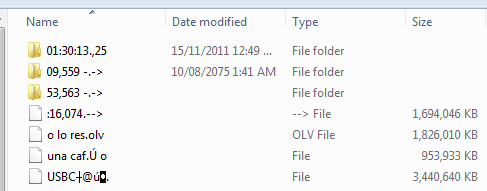
  • undeletable files.PNG
    undeletable files.PNG
    4.9 KB · Views: 18

My Computer

OS
windows 7 x64
CPU
intel core i7 920
Motherboard
gigabyte x58a-ud3r
Memory
6 Gb ocz pc3 12800 DDR3, 1600mHz, set @ 1066mHz
Graphics Card(s)
nvidia geforce gt240
Hard Drives
2x80 Gb western digital
Other Info
wacom intuos 3
Hi,

Those do look odd. Please do the following before you go any further:

Download, install, update and run a FULL scan of all your hard drives and your external USB drives using Malwarebytes. Please post back the log that is created once the scan is finished.

What ant-virus software is currently installed on:

1. Your PC; and
2. Your husbands XP PC?

Regards,
Golden
 

My Computer

Computer type
PC/Desktop
Computer Manufacturer/Model Number
Golden Mk. I.4
OS
Windows 10 Pro x64 ; Xubuntu x64
CPU
Intel i7 860 @ 2.80 GHz O/C'ed to 4.0GHz
Motherboard
Gigabyte P55A-UD3R Rev.1. Award BIOS F13
Memory
16GB Corsair Vengance DDR3 @ 661 MHz Dual Channel (9-9-9-24)
Graphics Card(s)
EVGA NVidia GTX 560 1024MB
Sound Card
Realtek Integrated
Monitor(s) Displays
Dual Samsung SyncMaster 2494HS
Screen Resolution
1920*1080 and 1920*1080
Hard Drives
1*Samsung 840 EVO 120GB SSD;
1*OCZ Vertex 2 60GB SSD;
2*Samsung F3 SpinPoint 1TB in RAID0;
1*Samsung F1 SpinPoint 1TB;
2*Western Digital 1TB External USB 3.0
1*Western Digital 500GB External USB 3.0
1*Seagate 500GB External USB 2.0
PSU
Thermaltake ToughPower QFan 750W
Case
Thermaltake Element S VK60001W2Z
Cooling
Corsair H60 Water Cooling, 2*230mm and 2*80mm case fans
Keyboard
Logitech G110
Mouse
Logitech MX518
What did MalwareBytes report?
 

My Computer

Computer Manufacturer/Model Number
Toshiba Satellite S875D-S7239 laptop
OS
MS Windows 7 Ultimate SP1 64-bit
CPU
AMD A10-4600M
Motherboard
AMD Pumori (Socket FT1)
Memory
6.00 GB Dual-Channel DDR3 @ 798MHz (11-11-12-28)
Graphics Card(s)
AMD Radeon HD 7660G
Sound Card
High Definition Audio Device
Monitor(s) Displays
Generic PnP Monitor (1600x900@60Hz)
Screen Resolution
1600x900@60Hz
Hard Drives
SSD 119GB Corsair CSSD-V128GB2 ATA Device
Keyboard
Standard PS/2 Keyboard
Mouse
HP Wireless Optical Mobile Mouse Model FHA-3410
Internet Speed
What the local pub, local coffee shop offers.
Other Info
Optical Drive:MATSHITA BD-CMB UJ160B ATA Device


Also have an Asus ha1002xp netbook with Win 7 Ultimate installed.
Hi - sorry for not getting back earlier. I'm in a Mexican town, we lose our internet connection regularly.
Both of our computers have Avast, the free version. I just let Avast run in the background, i haven't done a scan in quite a while :o . Hubby's computer never gets scanned unless i run it for him.

I'll go get malwarebytes now and do that scan.
 

My Computer

OS
windows 7 x64
CPU
intel core i7 920
Motherboard
gigabyte x58a-ud3r
Memory
6 Gb ocz pc3 12800 DDR3, 1600mHz, set @ 1066mHz
Graphics Card(s)
nvidia geforce gt240
Hard Drives
2x80 Gb western digital
Other Info
wacom intuos 3
Avast caught ElistarA on hubby's machine, then i ran it again during boot and it caught 3 PUP's and 1 malware, although it didn't specify what - i could check the report to find out.
Avast run during boot didn't find anything on my machine. I also had it check the external drive from within Windows because i didn't know if that was part of the boot scan - nothing. Malwarebytes had previously found 2 old keygens, which i deleted. I'm happier with Avast, i think i'm going to stick with it, so i took Malwarebytes off the machine again.

So i tried running CCleaner. It looked like it was going to take a few hours to wipe the free space on drive F: (the external), so i shut it down and took another look at F: to decide if the free space wipe was a good time investment. The drive no longer lists the mystery files that were causing me concern. I had moved them to a folder of there own in my attempts to delete them, and that folder is now a 32kb file, it's no longer a folder. The first time i tried to delete it, Windows said its recycle bin was corrupted (what recycle bin?) and i terminated the process from task manager when it hung. I just went back and tried to delete it again, this time there was no problem.

So... for the moment everything seems fine... but do i need to worry about this happening again?
 

My Computer

OS
windows 7 x64
CPU
intel core i7 920
Motherboard
gigabyte x58a-ud3r
Memory
6 Gb ocz pc3 12800 DDR3, 1600mHz, set @ 1066mHz
Graphics Card(s)
nvidia geforce gt240
Hard Drives
2x80 Gb western digital
Other Info
wacom intuos 3
next time you run CCleaner.

Just use its default settings. Wipe is an unusual situation, and yes, does require much time.

MSE is FREE! Updated very regularly. The same anti-virus that Microsoft uses in Forefront, the enterprise security software.

MSE is the only anti-virus that I will and do install on my own and other computers.
 

My Computer

Computer Manufacturer/Model Number
Toshiba Satellite S875D-S7239 laptop
OS
MS Windows 7 Ultimate SP1 64-bit
CPU
AMD A10-4600M
Motherboard
AMD Pumori (Socket FT1)
Memory
6.00 GB Dual-Channel DDR3 @ 798MHz (11-11-12-28)
Graphics Card(s)
AMD Radeon HD 7660G
Sound Card
High Definition Audio Device
Monitor(s) Displays
Generic PnP Monitor (1600x900@60Hz)
Screen Resolution
1600x900@60Hz
Hard Drives
SSD 119GB Corsair CSSD-V128GB2 ATA Device
Keyboard
Standard PS/2 Keyboard
Mouse
HP Wireless Optical Mobile Mouse Model FHA-3410
Internet Speed
What the local pub, local coffee shop offers.
Other Info
Optical Drive:MATSHITA BD-CMB UJ160B ATA Device


Also have an Asus ha1002xp netbook with Win 7 Ultimate installed.
Hi,

You need to consider keeping Malwarebytes on your PC, and updating and running it regularly. This is why:

There isn't a single anti-virus software that will cover every possible bit of malicious code, so by having both and doing scans regularly you minimise your exposure to most (but not all) the evil code out there. We refer to this as a layered security approach : its the simplest and easiest way to protect yourself from this stuff. The same needs to go for your husbands PC, since you swap USB storage devices between yours and his PC.

I'm not entirely sure, but Elistara appears to be either:

1. A legitimate Spanish based anti-virus product, or
2. Fakeware anti-virus product

A lot of my google hits produce poorly rated sites, or my Spanish isn't up to scratch. To be on the safe side, I recommend attempting to uninstall this (unless someone else that is familiar with this product can offer better advice), and re-running scans using free Microsoft Stand Alone System Sweeper.

This tutorial by Brink will show you how to burn the download to a DVD, and use the tool to scan your systems:

http://www.sevenforums.com/tutorials/166445-microsoft-standalone-system-sweeper.html

Do this on:

1. Your PC,
2. Your husband's PC
3. Any and all external USB devices.

If it comes up clean, then ensure both your PC's have current and up-to-date anti-virus products (Avast or MSE will be just fine, don't forget Malwarebytes!). Until you do this, you continue to run the risk of cross-infection between your PC's

Post back here if you need more help.

Regards,
Golden
 

My Computer

Computer type
PC/Desktop
Computer Manufacturer/Model Number
Golden Mk. I.4
OS
Windows 10 Pro x64 ; Xubuntu x64
CPU
Intel i7 860 @ 2.80 GHz O/C'ed to 4.0GHz
Motherboard
Gigabyte P55A-UD3R Rev.1. Award BIOS F13
Memory
16GB Corsair Vengance DDR3 @ 661 MHz Dual Channel (9-9-9-24)
Graphics Card(s)
EVGA NVidia GTX 560 1024MB
Sound Card
Realtek Integrated
Monitor(s) Displays
Dual Samsung SyncMaster 2494HS
Screen Resolution
1920*1080 and 1920*1080
Hard Drives
1*Samsung 840 EVO 120GB SSD;
1*OCZ Vertex 2 60GB SSD;
2*Samsung F3 SpinPoint 1TB in RAID0;
1*Samsung F1 SpinPoint 1TB;
2*Western Digital 1TB External USB 3.0
1*Western Digital 500GB External USB 3.0
1*Seagate 500GB External USB 2.0
PSU
Thermaltake ToughPower QFan 750W
Case
Thermaltake Element S VK60001W2Z
Cooling
Corsair H60 Water Cooling, 2*230mm and 2*80mm case fans
Keyboard
Logitech G110
Mouse
Logitech MX518
Golden,
good advice.

I do recommend putting the System Sweeper on a USB stick because updating of the System Sweeper is much easier when using a USB stick.

since new malware / root kits / viruses are continually appearing, then updating of the System Sweeper before use is rather much a necessity.
 

My Computer

Computer Manufacturer/Model Number
Toshiba Satellite S875D-S7239 laptop
OS
MS Windows 7 Ultimate SP1 64-bit
CPU
AMD A10-4600M
Motherboard
AMD Pumori (Socket FT1)
Memory
6.00 GB Dual-Channel DDR3 @ 798MHz (11-11-12-28)
Graphics Card(s)
AMD Radeon HD 7660G
Sound Card
High Definition Audio Device
Monitor(s) Displays
Generic PnP Monitor (1600x900@60Hz)
Screen Resolution
1600x900@60Hz
Hard Drives
SSD 119GB Corsair CSSD-V128GB2 ATA Device
Keyboard
Standard PS/2 Keyboard
Mouse
HP Wireless Optical Mobile Mouse Model FHA-3410
Internet Speed
What the local pub, local coffee shop offers.
Other Info
Optical Drive:MATSHITA BD-CMB UJ160B ATA Device


Also have an Asus ha1002xp netbook with Win 7 Ultimate installed.
Excellent advice - thanks Karl
 

My Computer

Computer type
PC/Desktop
Computer Manufacturer/Model Number
Golden Mk. I.4
OS
Windows 10 Pro x64 ; Xubuntu x64
CPU
Intel i7 860 @ 2.80 GHz O/C'ed to 4.0GHz
Motherboard
Gigabyte P55A-UD3R Rev.1. Award BIOS F13
Memory
16GB Corsair Vengance DDR3 @ 661 MHz Dual Channel (9-9-9-24)
Graphics Card(s)
EVGA NVidia GTX 560 1024MB
Sound Card
Realtek Integrated
Monitor(s) Displays
Dual Samsung SyncMaster 2494HS
Screen Resolution
1920*1080 and 1920*1080
Hard Drives
1*Samsung 840 EVO 120GB SSD;
1*OCZ Vertex 2 60GB SSD;
2*Samsung F3 SpinPoint 1TB in RAID0;
1*Samsung F1 SpinPoint 1TB;
2*Western Digital 1TB External USB 3.0
1*Western Digital 500GB External USB 3.0
1*Seagate 500GB External USB 2.0
PSU
Thermaltake ToughPower QFan 750W
Case
Thermaltake Element S VK60001W2Z
Cooling
Corsair H60 Water Cooling, 2*230mm and 2*80mm case fans
Keyboard
Logitech G110
Mouse
Logitech MX518
Avast removed ElistarA.exe. So my guess is it was fakeware.

I wonder at what point the mystery files on F: disappeared. It wasn't during the virus scans. It was connected to my machine the whole time. I ran CCleaner's file and registry cleaning programs before i got into the free memory wipe thing, and memory wipe ran for a few minutes before i decided to cancel it. I suppose one of those processes got rid of the weird files.

The layered security approach makes a lot of sense. I worry a bit about different antivirus programs interfering with each other or slowing down my machine. I like it that Avast runs in the background, but i don't know that i would want another antivirus running in the background too. Won't they gum each other up and slow everything down? Malwarebytes seems to run only when intentionally opened, so adding it wouldn't seem to be a problem. MSE? I don't know. I'm going to try to find some more info. Normally, Windows products don't play nice with rival products.
 

My Computer

OS
windows 7 x64
CPU
intel core i7 920
Motherboard
gigabyte x58a-ud3r
Memory
6 Gb ocz pc3 12800 DDR3, 1600mHz, set @ 1066mHz
Graphics Card(s)
nvidia geforce gt240
Hard Drives
2x80 Gb western digital
Other Info
wacom intuos 3
Your problem will not be with MSE.

I can not stress MSE enough.

Use MSE.

Do NOT install a 2nd anti-virus. This will just slow you computer down and bring you NADA.

MalwareBytes, the free version, is not an anti-virus program that runs in the background and monitors things like MSE is.

MalwareBytes, and System Sweeper, are the guns you call in to clean up a system.

When you install MSE you are getting continual protection. Windows Firewall will be turned on and run without you even knowing it is there.
The Malicious Software Removal tool, which unearths and removes such things as root kits, will be run once and then ever after on a monthly basis, once again automatically and you won't even know its happening. The Malicious Software Removal Tool gets rid of rootkits and real stubborn malware. Of course, I'm assuming that have Windows Update set to update. If you don't update regularly, then you will never be secure with any software.
 

My Computer

Computer Manufacturer/Model Number
Toshiba Satellite S875D-S7239 laptop
OS
MS Windows 7 Ultimate SP1 64-bit
CPU
AMD A10-4600M
Motherboard
AMD Pumori (Socket FT1)
Memory
6.00 GB Dual-Channel DDR3 @ 798MHz (11-11-12-28)
Graphics Card(s)
AMD Radeon HD 7660G
Sound Card
High Definition Audio Device
Monitor(s) Displays
Generic PnP Monitor (1600x900@60Hz)
Screen Resolution
1600x900@60Hz
Hard Drives
SSD 119GB Corsair CSSD-V128GB2 ATA Device
Keyboard
Standard PS/2 Keyboard
Mouse
HP Wireless Optical Mobile Mouse Model FHA-3410
Internet Speed
What the local pub, local coffee shop offers.
Other Info
Optical Drive:MATSHITA BD-CMB UJ160B ATA Device


Also have an Asus ha1002xp netbook with Win 7 Ultimate installed.
Cnet recommended Panda Cloud antivirus , so i uninstalled Avast and switched to that.
Av-Test.org also gives it a good score - there was a link to that page from the Cnet review of Panda. It looks like a great page to visit once a year to see how your anti-virus software stacks up.
For a second layer, i think i'm going to go with an online service like Bitdefender's online scan. That way i know the database is always up to date, and Bitdefender is one of the best in the field.
 

My Computer

OS
windows 7 x64
CPU
intel core i7 920
Motherboard
gigabyte x58a-ud3r
Memory
6 Gb ocz pc3 12800 DDR3, 1600mHz, set @ 1066mHz
Graphics Card(s)
nvidia geforce gt240
Hard Drives
2x80 Gb western digital
Other Info
wacom intuos 3
MSE will give you superior protection and performance.
 

My Computer

Computer Manufacturer/Model Number
Toshiba Satellite S875D-S7239 laptop
OS
MS Windows 7 Ultimate SP1 64-bit
CPU
AMD A10-4600M
Motherboard
AMD Pumori (Socket FT1)
Memory
6.00 GB Dual-Channel DDR3 @ 798MHz (11-11-12-28)
Graphics Card(s)
AMD Radeon HD 7660G
Sound Card
High Definition Audio Device
Monitor(s) Displays
Generic PnP Monitor (1600x900@60Hz)
Screen Resolution
1600x900@60Hz
Hard Drives
SSD 119GB Corsair CSSD-V128GB2 ATA Device
Keyboard
Standard PS/2 Keyboard
Mouse
HP Wireless Optical Mobile Mouse Model FHA-3410
Internet Speed
What the local pub, local coffee shop offers.
Other Info
Optical Drive:MATSHITA BD-CMB UJ160B ATA Device


Also have an Asus ha1002xp netbook with Win 7 Ultimate installed.
Malwarebyte and/or System Sweeper do sound like good ideas if there is a problem Panda doesn't handle, especially if my internet connection is down. Sweeper is still in beta, so i'll reinstall Malwarebyte to have the backup. It would indeed be nice to have something that runs during boot, but i don't have the tech level to be comfortable installing a beta.
 

My Computer

OS
windows 7 x64
CPU
intel core i7 920
Motherboard
gigabyte x58a-ud3r
Memory
6 Gb ocz pc3 12800 DDR3, 1600mHz, set @ 1066mHz
Graphics Card(s)
nvidia geforce gt240
Hard Drives
2x80 Gb western digital
Other Info
wacom intuos 3

My Computer

OS
windows 7 x64
CPU
intel core i7 920
Motherboard
gigabyte x58a-ud3r
Memory
6 Gb ocz pc3 12800 DDR3, 1600mHz, set @ 1066mHz
Graphics Card(s)
nvidia geforce gt240
Hard Drives
2x80 Gb western digital
Other Info
wacom intuos 3
My opinion is not the opinion of a commercial organization that makes money when you download a product from them.

My opinion is that of the vast majority of security experts.
 

My Computer

Computer Manufacturer/Model Number
Toshiba Satellite S875D-S7239 laptop
OS
MS Windows 7 Ultimate SP1 64-bit
CPU
AMD A10-4600M
Motherboard
AMD Pumori (Socket FT1)
Memory
6.00 GB Dual-Channel DDR3 @ 798MHz (11-11-12-28)
Graphics Card(s)
AMD Radeon HD 7660G
Sound Card
High Definition Audio Device
Monitor(s) Displays
Generic PnP Monitor (1600x900@60Hz)
Screen Resolution
1600x900@60Hz
Hard Drives
SSD 119GB Corsair CSSD-V128GB2 ATA Device
Keyboard
Standard PS/2 Keyboard
Mouse
HP Wireless Optical Mobile Mouse Model FHA-3410
Internet Speed
What the local pub, local coffee shop offers.
Other Info
Optical Drive:MATSHITA BD-CMB UJ160B ATA Device


Also have an Asus ha1002xp netbook with Win 7 Ultimate installed.
PC Mag, and AV comparatives also give Panda a better rating. The Wikipedia article on both products indicates Panda received more favourable reviews than MSE. Cnet Downloads offers a whole slew of antivirus products, i don't think they have much motivation to plug one over the others if they don't really consider it better. AV Test is an independent lab whose entire business model depends on them having a reputation for accuracy.

Everyone has their favourites. That's why when i have to choose on something like this, i go to a bunch of sources before deciding. It just seems like the best way to make a decision of this kind.
 

My Computer

OS
windows 7 x64
CPU
intel core i7 920
Motherboard
gigabyte x58a-ud3r
Memory
6 Gb ocz pc3 12800 DDR3, 1600mHz, set @ 1066mHz
Graphics Card(s)
nvidia geforce gt240
Hard Drives
2x80 Gb western digital
Other Info
wacom intuos 3

My Computer

Computer Manufacturer/Model Number
Toshiba Satellite S875D-S7239 laptop
OS
MS Windows 7 Ultimate SP1 64-bit
CPU
AMD A10-4600M
Motherboard
AMD Pumori (Socket FT1)
Memory
6.00 GB Dual-Channel DDR3 @ 798MHz (11-11-12-28)
Graphics Card(s)
AMD Radeon HD 7660G
Sound Card
High Definition Audio Device
Monitor(s) Displays
Generic PnP Monitor (1600x900@60Hz)
Screen Resolution
1600x900@60Hz
Hard Drives
SSD 119GB Corsair CSSD-V128GB2 ATA Device
Keyboard
Standard PS/2 Keyboard
Mouse
HP Wireless Optical Mobile Mouse Model FHA-3410
Internet Speed
What the local pub, local coffee shop offers.
Other Info
Optical Drive:MATSHITA BD-CMB UJ160B ATA Device


Also have an Asus ha1002xp netbook with Win 7 Ultimate installed.
Back
Top