EXTERNAL HARD DRIVE: No System Files

Roswell1701

New member
Member
Local time
3:44 PM
Messages
24
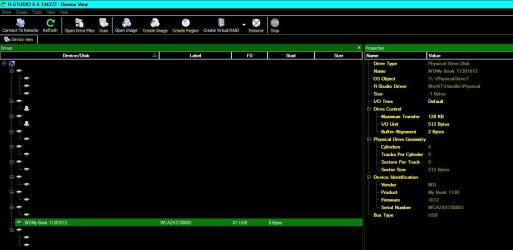
Greetings, W7F Community. When I started moving files from one external drive to another, the SOURCE DRIVE suddenly became non-existent. That is, it disappeared and Windows said that it "no longer exists." The TARGET DRIVE was just added a week ago, bringing my number of external drives to 3. Part of the reason for the transfer was that with the installation of the new drive, the SOURCE DRIVE had changed it's drive letter on it's own. I have tried to reach the drive using Windows Disk Management, R-Studio 5.4.1 and Hiren's Boot CD 15 on a Linux USB Pendrive. The programs on the Boot CD yield the same results as the screen shots I have included. The Boot CD has some programs I have not tried, because they are run from the Linux Command Line and I have no real experience with Linux, and I'm afraid of making things worse (if that's humanly possible). I have recovered files from drives with lost partitions and have restored partitions in the past. But this disk does not even register as "raw". Is it at all possible to access the disk (my data), or has this drive become nothing more than a paperweight? Please help...:cry:
 

Attachments

  • 1.JPG
    1.JPG
    70.8 KB · Views: 6
  • 2.JPG
    2.JPG
    28 KB · Views: 8
  • 3.JPG
    3.JPG
    12.2 KB · Views: 164
  • 4.JPG
    4.JPG
    42.9 KB · Views: 7
  • 5.JPG
    5.JPG
    30.3 KB · Views: 7

My Computer

Computer Manufacturer/Model Number
Gateway DX4831-01e
OS
Windows 7 Home Premium 64 bit
CPU
Intel Core i3 Processor 530
Motherboard
?
Memory
6GB DDR3
Graphics Card(s)
Integrated Intel GMA HD Graphics
Sound Card
?
Monitor(s) Displays
LG 23" HD
Hard Drives
Hard Drive: 1TB
2 DVD-Super Multi Drive Optical Drives
PSU
?
Case
?
Cooling
Internal
Can you see the drive in the BIOS?
Have you tried this drive on another machine.
Have you checked inside the caddy to ensure the drive has not slipped off the USB to SATA interface (this can happen)
 

My Computer

Computer Manufacturer/Model Number
Self built
OS
Windows 7 64bit home premium
CPU
I5 3570K
Motherboard
Gigabyte Z77-DS3H
Memory
4 x 4GB Crucial Ballistix Sport DDR3 1600 Mhz
Graphics Card(s)
Gigabyte Geforce 660 TI
Sound Card
creative x-fi
Monitor(s) Displays
Primary CiBox 22" Widescreen LCD ,Secondary Dell 22" Widescr
Screen Resolution
Both 1680 x 1050
Hard Drives
2 x 500G HD (SATA) 1 x 2 TB USB
PSU
Corsair HX 620W ATX2.2 Modular SLI Complient PSU
Case
Antec 900 Ultimate Gaming Case
Cooling
3xfront 1xside 1xrear blue fan, 1 200mm blue top fan 1
Keyboard
Trust ds-3200 Wireless keyboard and mouse
Mouse
Trust ds-3200 Wireless keyboard and mouse
Internet Speed
288 / 4000
Other Info
Creative Inspire 7.1 T7900 Speakers
Trust Graphics Tablet
Hi, Roy. I haven't tried the drive on another computer, and I won't be able to do that immediately. As to the BIOS and the Caddy, now you're going beyond me. I have no real technical background in computer systems.
 

My Computer

Computer Manufacturer/Model Number
Gateway DX4831-01e
OS
Windows 7 Home Premium 64 bit
CPU
Intel Core i3 Processor 530
Motherboard
?
Memory
6GB DDR3
Graphics Card(s)
Integrated Intel GMA HD Graphics
Sound Card
?
Monitor(s) Displays
LG 23" HD
Hard Drives
Hard Drive: 1TB
2 DVD-Super Multi Drive Optical Drives
PSU
?
Case
?
Cooling
Internal
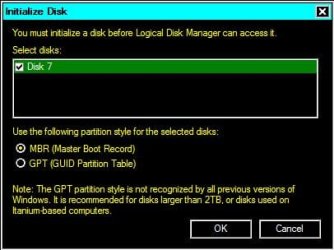
In that second pic above it asks you to initialize the disk. Did you do that? If you did not: DON'T.
 

My Computer

Computer type
PC/Desktop
Computer Manufacturer/Model Number
Home Built - Jan 2013
OS
Windows 7 64 Bit Home Premium SP1
CPU
i7-3820
Motherboard
Asus P9X79-PRO - Bios 4608
Memory
GSkill F3-14900CL9Q - 16GB
Graphics Card(s)
EVGA GeForce GTX660 - Driver 352.86
Sound Card
On board Realtek ALC898
Monitor(s) Displays
Acer S271HL
Screen Resolution
1920 x 1080
Hard Drives
#1- Samsung 840 Pro Series
#2- Western Digital WD1002FAEX Sata3 Black
#3- Western Digital WD1002FAEX Sata3 Black
PSU
Corsair CMPSU-850TX-V2 - 850 watt (by Seasonic)
Case
Corsair Obsidian 550D
Cooling
Standard 3 120mm case fans, Cooler Master Hyper 212 EVO
Keyboard
MS KC-0405
Mouse
Intellimouse 5-button
Internet Speed
56 Mbits/Sec (on a good day)
Antivirus
Avast & Malwarebytes
Browser
Firefox
Other Info
Asus DVD - DRW-24B1ST 24X
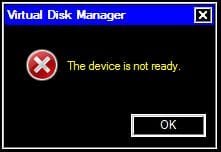
Hi, TVeblen. I did try the Initialize Disk, as a last effort to gain some kind of access. Even though this procedure is to ready the disk for repartitioning and drive association, it does give you the option to cancel. I was told "The Disk Is Not Ready." ... By they way, cool avatar.
 

My Computer

Computer Manufacturer/Model Number
Gateway DX4831-01e
OS
Windows 7 Home Premium 64 bit
CPU
Intel Core i3 Processor 530
Motherboard
?
Memory
6GB DDR3
Graphics Card(s)
Integrated Intel GMA HD Graphics
Sound Card
?
Monitor(s) Displays
LG 23" HD
Hard Drives
Hard Drive: 1TB
2 DVD-Super Multi Drive Optical Drives
PSU
?
Case
?
Cooling
Internal
Disk initialization performs a type of quick format. If you did that you now need to focus on recovering files. Once you have (hopefully) recovered them, then you can work on restoring the drive functionality.

You can use the free program RECUVA, or any other, like EaseUS, to try and recover files from a formatted disk.

To increase the likelihood that recovery will go well you should not do anything else with the drive until that job is done.
 

My Computer

Computer type
PC/Desktop
Computer Manufacturer/Model Number
Home Built - Jan 2013
OS
Windows 7 64 Bit Home Premium SP1
CPU
i7-3820
Motherboard
Asus P9X79-PRO - Bios 4608
Memory
GSkill F3-14900CL9Q - 16GB
Graphics Card(s)
EVGA GeForce GTX660 - Driver 352.86
Sound Card
On board Realtek ALC898
Monitor(s) Displays
Acer S271HL
Screen Resolution
1920 x 1080
Hard Drives
#1- Samsung 840 Pro Series
#2- Western Digital WD1002FAEX Sata3 Black
#3- Western Digital WD1002FAEX Sata3 Black
PSU
Corsair CMPSU-850TX-V2 - 850 watt (by Seasonic)
Case
Corsair Obsidian 550D
Cooling
Standard 3 120mm case fans, Cooler Master Hyper 212 EVO
Keyboard
MS KC-0405
Mouse
Intellimouse 5-button
Internet Speed
56 Mbits/Sec (on a good day)
Antivirus
Avast & Malwarebytes
Browser
Firefox
Other Info
Asus DVD - DRW-24B1ST 24X
If you did not initialize the drive you might recover it simply by giving it a drive letter manually. This kind of problem is common when using multiple removable drives.

This page here:
My External Hard Drive is not recognized by my computer | External Drives FAQ
Gives a good step by step.

Another tip: shut off the computer. Disconnect all external drives. Start up and then connect the drives one at a time. This may sort out the drive letter conflict.
 

My Computer

Computer type
PC/Desktop
Computer Manufacturer/Model Number
Home Built - Jan 2013
OS
Windows 7 64 Bit Home Premium SP1
CPU
i7-3820
Motherboard
Asus P9X79-PRO - Bios 4608
Memory
GSkill F3-14900CL9Q - 16GB
Graphics Card(s)
EVGA GeForce GTX660 - Driver 352.86
Sound Card
On board Realtek ALC898
Monitor(s) Displays
Acer S271HL
Screen Resolution
1920 x 1080
Hard Drives
#1- Samsung 840 Pro Series
#2- Western Digital WD1002FAEX Sata3 Black
#3- Western Digital WD1002FAEX Sata3 Black
PSU
Corsair CMPSU-850TX-V2 - 850 watt (by Seasonic)
Case
Corsair Obsidian 550D
Cooling
Standard 3 120mm case fans, Cooler Master Hyper 212 EVO
Keyboard
MS KC-0405
Mouse
Intellimouse 5-button
Internet Speed
56 Mbits/Sec (on a good day)
Antivirus
Avast & Malwarebytes
Browser
Firefox
Other Info
Asus DVD - DRW-24B1ST 24X
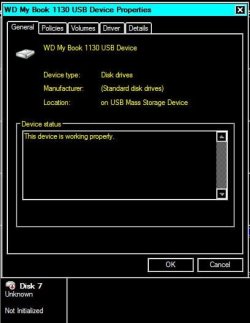
As I understand the OP's problem, he was copying files from a source drive to a target drive - both externals - and midway through the copying process, the source drive suddenly lost its recognition.( From the screenshot it became "Not initialised")

The question is why would it happen? If one can answer this question, then I would think a solution or fix can be offered. Otherwise we will all be shooting in the dark. ;)

And that is what exactly I am going to do now.:)

On a hinch, I would think of the possibility of a drive letter conflict. But then why would a conflict arise in the middle of the process? May be the OP plugged in his third drive inbetween and that could have precipitated the conflict.

I would advise the OP to plug that source drive into another working PC. If it shows up in the new PC without any problem, then it is almost certain that it is a drive letter conflict. He has to do a drive cleanup on his PC to remove all old entries and non-present devices and allow the PC to assign drive letters afresh.

Ok, even without trying the external drive on a different PC, he can do a drive cleanup on his PC and then connect the source drive.

For now I shall take a break till I search and find the right post on it.
 

My Computer

OS
Windows 7 Home Premium 32 bit
The drive is as you see it from the moment it was lost. It was never re-formatted. There is absolutely no access to the "raw" drive. That's why I hit INITIALIZE, just to see if it would access the drive in order to reformat it. If the initialization command had gone through, I simply would have hit cancel. But I'll give Recuva a try.
 

My Computer

Computer Manufacturer/Model Number
Gateway DX4831-01e
OS
Windows 7 Home Premium 64 bit
CPU
Intel Core i3 Processor 530
Motherboard
?
Memory
6GB DDR3
Graphics Card(s)
Integrated Intel GMA HD Graphics
Sound Card
?
Monitor(s) Displays
LG 23" HD
Hard Drives
Hard Drive: 1TB
2 DVD-Super Multi Drive Optical Drives
PSU
?
Case
?
Cooling
Internal
Hi Rosewell1701,

Now do this drive cleanup.

1. Remove all non-present storage volumes:

Download drivecleanup.zip v 0.8.1 from Drive Tools for Windows. Unzip it to a folder, select the 32bit or 64bit drivecleanup.exe depending on your OS and copy it to the c > windows > system32 folder.

Shut down your Comp, Unplug all USB devices from your computer.( you may keep USB KB and mouse plugged)

Reboot.

On an elevated command prompt type drivecleanup.exe and Enter. After the
cleanup close the window.

Shut down your comp and reboot.

Now plug in your external drive one at a time, in the sequence you would like the drive letters to be assigned to those.

Check whether all your external drives are recognised and got the drive letters. (if not assign the drive letters in Disk Management)
 

My Computer

OS
Windows 7 Home Premium 32 bit
Hi, Jumanji. I really did it now. TVeblen suggested Recuva, and it actually accessed the drive. I should have recovered my files when I had the chance. I tried your method, thinking I could just go back to Recuva if it didn't work. Well, I guess it cleaned up a little too much. Now, Windows Management no longer reads the drive at all, and neither does Recuva. I forgot to make a system restore point before using the Drivecleanup, and there are no restore points listed.
 

My Computer

Computer Manufacturer/Model Number
Gateway DX4831-01e
OS
Windows 7 Home Premium 64 bit
CPU
Intel Core i3 Processor 530
Motherboard
?
Memory
6GB DDR3
Graphics Card(s)
Integrated Intel GMA HD Graphics
Sound Card
?
Monitor(s) Displays
LG 23" HD
Hard Drives
Hard Drive: 1TB
2 DVD-Super Multi Drive Optical Drives
PSU
?
Case
?
Cooling
Internal
Hi, Jumanji. TVeblen suggested Recuva, and it actually accessed the drive. I should have recovered my files when I had the chance. I tried your suggestion, thinking that Recuva would still work if the drive cleanup didn't. Well, the cleanup must have cleaned up a little too much. Recuva no longer recognizes the drive, and it doesn't even show as a device in Windows Disk Management any more. I screwed up. If there are no other suggestions, stick a fork in me because I guess I'm done.

P.S. Tried a system restore to recover from the file cleanup, but there was no restore point.

P.S.S. Sorry for making the same post twice, but it didn't show when I saved it the first time.:)
 

My Computer

Computer Manufacturer/Model Number
Gateway DX4831-01e
OS
Windows 7 Home Premium 64 bit
CPU
Intel Core i3 Processor 530
Motherboard
?
Memory
6GB DDR3
Graphics Card(s)
Integrated Intel GMA HD Graphics
Sound Card
?
Monitor(s) Displays
LG 23" HD
Hard Drives
Hard Drive: 1TB
2 DVD-Super Multi Drive Optical Drives
PSU
?
Case
?
Cooling
Internal
Update: Windows Disk Management is now reading the device as Disk 1, but Recuva still does not read it at all. Recuva must have accessed the raw drive from a file that was wiped in the drive cleanup.
 

My Computer

Computer Manufacturer/Model Number
Gateway DX4831-01e
OS
Windows 7 Home Premium 64 bit
CPU
Intel Core i3 Processor 530
Motherboard
?
Memory
6GB DDR3
Graphics Card(s)
Integrated Intel GMA HD Graphics
Sound Card
?
Monitor(s) Displays
LG 23" HD
Hard Drives
Hard Drive: 1TB
2 DVD-Super Multi Drive Optical Drives
PSU
?
Case
?
Cooling
Internal
I am certain about one thing. Doing a drive cleanup cannot make a drive disappear. Past records is not necessary to recognise a device introduced afresh. I do this cleanup routinely as part of my periodic maintenance.

If your other two drives are getting recognised and getting drive letters assigned after the cleanup, and this drive only is not, then the problem is certainly with the drive. I do agree that once Recuva saw it you should have tried data recovery - that should always take precedence.

Just this morning in another thread the OP put a screenshot where his drive was shown as RAW. I just told him to install Partition Wizard and run the Partiion Recovery Wizard. After installing Partition Wizard, he found the drive no longer appeared in Disk Management. Neither was it accessible to Partition Wizard to carry out the recovery. Again these two events are not related in any way - for installing Partition Wizard cannot make a drive disappear.

Perhaps the drives are failing faster than our thoughts could catch up.

So what now?

1. Check if the drive appears in the Bios. If it does not I wonder if any of the following will help but still I would list them.

2. Try the drive on another PC.

3. Try to access your drive with Live Linux. Since you will be booting and running Linux from the CD/pendrive, Windows is kept out of the loop. So you need not worry.

4. Partition Recovery Wizard is not going to help, if Disk Management does not see the drive.Try Test Disk, again running it from a bootable CD/pendrive.
 

My Computer

OS
Windows 7 Home Premium 32 bit
Try the drive in another computer or on its own on your system, (with no other USB drives connected) if it can not be found, then list the make and model and I will try to look into it a bit more for you.
 

My Computer

Computer Manufacturer/Model Number
Self built
OS
Windows 7 64bit home premium
CPU
I5 3570K
Motherboard
Gigabyte Z77-DS3H
Memory
4 x 4GB Crucial Ballistix Sport DDR3 1600 Mhz
Graphics Card(s)
Gigabyte Geforce 660 TI
Sound Card
creative x-fi
Monitor(s) Displays
Primary CiBox 22" Widescreen LCD ,Secondary Dell 22" Widescr
Screen Resolution
Both 1680 x 1050
Hard Drives
2 x 500G HD (SATA) 1 x 2 TB USB
PSU
Corsair HX 620W ATX2.2 Modular SLI Complient PSU
Case
Antec 900 Ultimate Gaming Case
Cooling
3xfront 1xside 1xrear blue fan, 1 200mm blue top fan 1
Keyboard
Trust ds-3200 Wireless keyboard and mouse
Mouse
Trust ds-3200 Wireless keyboard and mouse
Internet Speed
288 / 4000
Other Info
Creative Inspire 7.1 T7900 Speakers
Trust Graphics Tablet
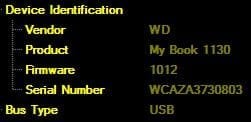
Thanks, Roy. It's made by Western Digital. See the attachment for the numbers... I tried your suggestion. Same results. The device is seen by Windows Disk Manager as an "unknown" and "not ready" device. If you check out the screenshots I first put up of R-Studio, you'll see that the drive only has the one icon on the directory tree. When a drive looses it's primary partition, the tree still shows two icons. In this case, there is only one, and the entire volume is listed at "0" bytes. Obviously, there is nothing to boot on to, but some of the recovery programs still read the device with it's product name: MY BOOK. I just can't figure it out...
 

Attachments

  • 1.JPG
    1.JPG
    12.9 KB · Views: 14

My Computer

Computer Manufacturer/Model Number
Gateway DX4831-01e
OS
Windows 7 Home Premium 64 bit
CPU
Intel Core i3 Processor 530
Motherboard
?
Memory
6GB DDR3
Graphics Card(s)
Integrated Intel GMA HD Graphics
Sound Card
?
Monitor(s) Displays
LG 23" HD
Hard Drives
Hard Drive: 1TB
2 DVD-Super Multi Drive Optical Drives
PSU
?
Case
?
Cooling
Internal
Back
Top