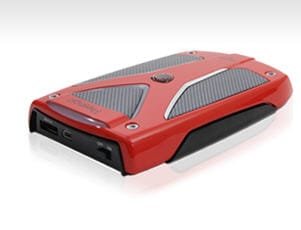
External Hard Drive question

Warlock1

New member
Local time
8:06 PM
Messages
8
Hey, i have an external hard disk of 500gb its a prestigio data racer II.Anyway i have two questions:

.Is it good to always have it connected to my computer?

.i have it connected with both usb and esata,can u explain to me the difference and if i should have boh plugged in?

Thanks,btw great work with this forum.
 

My Computer

Computer Manufacturer/Model Number
Acer Aspire R3600
OS
Windows 7 ultimate 32 bit
Hey, i have an external hard disk of 500gb its a prestigio data racer II.Anyway i have two questions:

.Is it good to always have it connected to my computer?

.i have it connected with both usb and esata,can u explain to me the difference and if i should have boh plugged in?

Thanks,btw great work with this forum.

Hi and welcome

Having it connected is fine. Connect with either. If you have USB 2.0 transfers are guicker

Ken J++
 

My Computer

Computer Manufacturer/Model Number
HP Pavillion dv-7 1005 Tx
OS
Win 8 Release candidate 8400
CPU
[email protected]
Memory
4 gigs
Graphics Card(s)
Nvidia 9600M
Sound Card
HD built-in
Monitor(s) Displays
17" Wxga
Screen Resolution
1440x900
Cooling
none
Internet Speed
45Mb down 5Mb up
It's only good to have connected if you regularly access it, just in terms of your carbon footprint LOL!

USB and eSATA are just two different interfaces. Both are hotswap (if AHCI is enabled for your mainboard and the board supports eSATA hot swapping). USB will be significantly slower than using eSATA.
 

My Computer

Computer Manufacturer/Model Number
Custom built machine
OS
W7 x64
CPU
Intel Q9300 2.5Ghz Quad LGA775 (Would like Q9650)
Motherboard
Gigabyte GA-EP45T-UD3R (F6 Bios)
Memory
4Gb OCZ Gold 1,333Mhz
Graphics Card(s)
Palit HD4850 O/C Sonic 512Mb DDR3, Dual DViD's
Sound Card
Azalia to twin Samson 50w Studio Monitors
Monitor(s) Displays
Twin Dell (E-IPS) U2311H 23.6" Screens
Screen Resolution
1920 x 1080 @ 60Hz
Hard Drives
Crucial M4 SSD, archives on twin Western Digital Caviar Black WD2002FAEX, 2TB, 7200rpm HDD's, Samsung Ritemaster CD/DVD Burner...
PSU
OCZ 600w
Case
Lian-Li PC8 acoustifoamed' aluminium tower
Cooling
Scythe 140mm Zipang
Keyboard
Cherry PS/2 custom model
Mouse
Lenovo USB laser "Thinkpad" Mouse
Internet Speed
ADSL2+ @14Mbps downstream & Cat6 Gigabit Ethernet
Antivirus
NOD32
Browser
Opera
Other Info
Silicon Dust HD Homerun Dual FTA (Ethernet) TV Tuners, Dray Tek Vigor 2850Vn router and 8x HP Gigabit Switch. Lian-Li CR26 Card Reader, Canon MF4430 iSensys laser printer/scanner.
Wow, that is one good looking external hard drive!

SNAG-0077.jpg

Never saw that one before. Looks like the Ferrari auto wallpaper images I use on my Win7 desktop.

Whether you keep it plugged in all the time or not depends (IMO) on what you use it for. If you use it strictly for backups you lower your risk of damage to the data on the external hard drive from virus or other malware by leaving it unplugged until you need to run your backups.

Conversely, if you use your drive for serving up digital media such as videos or music, or if you have automated backup routines that need the drive plugged in, there is no harm in having it plugged in all the time. I use my external drive to do both functions so I leave it plugged in permanently.

As far as plugs go, choose one or the other but not both. From what I understand the eSata plug should provide you with a faster transfer speed from drive to computer so you should use that connection and unplug the USB.
 

My Computer

Computer Manufacturer/Model Number
Dell Vostro 420
OS
Windows 7 Pro x64
CPU
3.00 GHz Intel Core2 Quad Q9650
Memory
4 GB
Graphics Card(s)
ATI Radeon HD 3400 Series
Monitor(s) Displays
DELL 2405FPW
Screen Resolution
1920x1200
Hard Drives
System: 80GB WDC WD800JD-22MSA1
Data: 500GB Hitachi HDP725050GLA360
Internet Speed
Verizon FiOS 20/5 mbps
Other Info
Computing is primarily business use with off-time troubleshooting practice: Remote desktop, scanning and producing invoices, some minor graphics work.

My Computer

Computer Manufacturer/Model Number
Dell Vostro 420
OS
Windows 7 Pro x64
CPU
3.00 GHz Intel Core2 Quad Q9650
Memory
4 GB
Graphics Card(s)
ATI Radeon HD 3400 Series
Monitor(s) Displays
DELL 2405FPW
Screen Resolution
1920x1200
Hard Drives
System: 80GB WDC WD800JD-22MSA1
Data: 500GB Hitachi HDP725050GLA360
Internet Speed
Verizon FiOS 20/5 mbps
Other Info
Computing is primarily business use with off-time troubleshooting practice: Remote desktop, scanning and producing invoices, some minor graphics work.
Plugged in is fine but you should turn the power off when not in use.

Externals tend to get too hot and have inadequate cooling methods. If you are constantly accessing the drive, mount it in the case. Externals are made as backup devices or for easy portability.
 

My Computer

Computer Manufacturer/Model Number
Homebrewed
OS
7 RTM
CPU
Core Duo E8400 3 GHZ
Motherboard
Gigabyte EP45 - DS4P
Memory
4 g
Graphics Card(s)
ATI Radeon HD 3600
Sound Card
Onboard
Monitor(s) Displays
Dell 2007WFP
Screen Resolution
1680 x 1050
Hard Drives
2 - 320g Seagate
1 - 500g Seagate
PSU
Antec 425 watt
Case
Antec Piano Case
Cooling
standard fans - 4ea
Keyboard
wired
Mouse
wired
Internet Speed
DSL
I agree with the post above .... my external hard drive is plugged in, but turned off until I need it. It tends to get too hot when left on.
 

My Computer

Computer type
PC/Desktop
Computer Manufacturer/Model Number
Bruce ... somewhere in his 40's
OS
Windows 7 Ultimate 32bit SP1
CPU
Intel(R) Core(TM)2 Quad CPU @ 2.40GHz, 2400 MHz
Motherboard
INTEL/D975XBX2
Memory
4 GB
Graphics Card(s)
ATI Radeon HD 2600 Pro
Monitor(s) Displays
Samsung SyncMaster 914v
Screen Resolution
1280 x 1024
Hard Drives
2/500GB each ... ST3500630AS ATA Device.
One is not connected
PSU
Rocketfish 700 W
Case
G.Skill Gigabyte Chassis
Keyboard
Standard PS/2 Keyboard
Mouse
Microsoft PS/2 Mouse
Internet Speed
DSL
Antivirus
Avira Internet Security
Browser
IE 11
Other Info
ATI HDMI Audio
I'm surprised you don't have any issues with it, considering both plugs are connected. I would use the interface that fits what you need to do. If you plan to leave it running all the time, use eSATA. If you plan to just use it occasionally, the USB 2.0 would definitely hot swap it, regardless of internal SATA port configurations.
 

My Computer

OS
Windows 7 Ultimate x64 SP1
CPU
Intel Core i7-2600
Motherboard
Gigabyte GA-P67A-UD3P-B3
Memory
12 GB Patriot Extreme DDR3-1333
Graphics Card(s)
Nvidia GTX 470
Monitor(s) Displays
Dell UltraSharp 2209WA
Hard Drives
OCZ Agility3 240 GB, WD5001AALS, WD7501AALS
PSU
OCZ ModStream 700W
Case
CoolerMaster HAF 912 Advanced
Cooling
CoolerMaster Hyper 212 Plus
I agree with the post above .... my external hard drive is plugged in, but turned off until I need it. It tends to get too hot when left on.

Perhaps this is a brand nuance?

I have a Western Digital MyBook and it spins down or, for lack of a more accurate description, sleeps when not accessed by the computer. Thus it remains cool and draws very limited power while it is plugged in.
 

My Computer

Computer Manufacturer/Model Number
Dell Vostro 420
OS
Windows 7 Pro x64
CPU
3.00 GHz Intel Core2 Quad Q9650
Memory
4 GB
Graphics Card(s)
ATI Radeon HD 3400 Series
Monitor(s) Displays
DELL 2405FPW
Screen Resolution
1920x1200
Hard Drives
System: 80GB WDC WD800JD-22MSA1
Data: 500GB Hitachi HDP725050GLA360
Internet Speed
Verizon FiOS 20/5 mbps
Other Info
Computing is primarily business use with off-time troubleshooting practice: Remote desktop, scanning and producing invoices, some minor graphics work.
Some have a USB power lead and a seperate USB data transfer lead, they can run without the power lead. Are you sure it is not what yours has?
 

My Computer

OS
Win7 7600 x64
Memory
8gig
Graphics Card(s)
Nvidia
Monitor(s) Displays
dual wide screen 22inch each
Hard Drives
2x 500gig
I finally found a reason to keep my external plugged in, when Win7 backup asked me what I wanted to save to it, and when. I already had Win7 backup images stored there for all seven home machines but thought I should get in the habit of backing up my selected files automatically on a schedule, when the computer is idle.

I liked this arrangement so well I programmed our other six networked home computers to backup their selected files (active folders used) and HDD images over the network to the same external plugged into my PC. It works fine and even sorts each into its own folder, and auto-detects the given machine's files and image over the network when I want to apply backups. (I tend to forget the point of the external is I can move it around!:rolleyes:)

Just set it and forget it!
 
I leave my external HD plugged in but turned off. :cool:
 

My Computer

Computer type
PC/Desktop
Computer Manufacturer/Model Number
Custom Built
OS
Win7/Win8 32bit Dual Boot
CPU
3.60 gigahertz AMD FX-4100 Quad-Core
Motherboard
ASUST M5A78L-M LX PLUS AM3+ MATX
Memory
4 GB DDR3-1333 CL9 Dual
Graphics Card(s)
NVIDIA GeForce 8400 GS
Sound Card
Onboard
Monitor(s) Displays
HP 2159m 21.5-inch Diagonal 16:9 Full HD Widescreen Monitor
Screen Resolution
1920 X 1080
Hard Drives
320 GB Hard Drive
PSU
450w
Case
XION Solaris ATX CASE
Keyboard
Dynex USB
Mouse
Logitech TrackMan Wheel
Internet Speed
Download: 28.23Mb/s Upload 1.84Mb/s Ping 13 ms
Antivirus
Microsoft Security Essentials
Browser
Firefox 21.0
I wonder how USB3 will impact on the portable storage device market, you can now get one or two compliant motherboards and NEC make a USB3 chipset on a PCiE card with a two port interface.

Not seen any storage devices as of right now.
 

My Computer

Computer Manufacturer/Model Number
Custom built machine
OS
W7 x64
CPU
Intel Q9300 2.5Ghz Quad LGA775 (Would like Q9650)
Motherboard
Gigabyte GA-EP45T-UD3R (F6 Bios)
Memory
4Gb OCZ Gold 1,333Mhz
Graphics Card(s)
Palit HD4850 O/C Sonic 512Mb DDR3, Dual DViD's
Sound Card
Azalia to twin Samson 50w Studio Monitors
Monitor(s) Displays
Twin Dell (E-IPS) U2311H 23.6" Screens
Screen Resolution
1920 x 1080 @ 60Hz
Hard Drives
Crucial M4 SSD, archives on twin Western Digital Caviar Black WD2002FAEX, 2TB, 7200rpm HDD's, Samsung Ritemaster CD/DVD Burner...
PSU
OCZ 600w
Case
Lian-Li PC8 acoustifoamed' aluminium tower
Cooling
Scythe 140mm Zipang
Keyboard
Cherry PS/2 custom model
Mouse
Lenovo USB laser "Thinkpad" Mouse
Internet Speed
ADSL2+ @14Mbps downstream & Cat6 Gigabit Ethernet
Antivirus
NOD32
Browser
Opera
Other Info
Silicon Dust HD Homerun Dual FTA (Ethernet) TV Tuners, Dray Tek Vigor 2850Vn router and 8x HP Gigabit Switch. Lian-Li CR26 Card Reader, Canon MF4430 iSensys laser printer/scanner.
My own experience: I am anal obsessive about backups, so have an ESATA Ext drive and it performs much faster with the ESATA cable than when using the optional USB port. Do NOT use both at the same time. In my Western Digital docs, they print that warning in bold letters: one or the other, but not both!

Secondly, if you have dual boot [like me] it is possible for Windows to confuse drive letters.

Avoid this:
1:Turn off computer, then turn off ESATA and reboot. The computer is 'looking' for that esata drive that was working when you shut down. Depending on your drive letters [with dual boot] windows can get confused and not find windows. [happened to me twice]

I have connnected\disconnected, turned on/off my ESATA drive while running with no problems.
 

My Computer

Computer Manufacturer/Model Number
Asus G50 and Toshiba L505
OS
Win 7 - 64 Pro
CPU
2.28
Motherboard
?- asus laptop
Memory
4 gb
Graphics Card(s)
? laptop
Sound Card
? laptop
Monitor(s) Displays
dual display, laptop and 24" Samsung
Hard Drives
two 250gb drives in laptop and one 250 Esata
PSU
laptop
Case
laptop
Cooling
laptop
My external hard drives also power down when not in use. In fact they came with a management app (Seagate Managerl, recent versions are W7 and x64 compatible) that allows one to configure whatever period of inactivity you want before they "sleep." So they stay nice and cool and draw very little power when not in use, even though still connected.
 

My Computer

Computer Manufacturer/Model Number
HP DV8t quad
OS
Windows 7 Ultimate x64 (Retail)
CPU
i7-Q 720
Motherboard
Motherboard Chipset Intel Ibex Peak-M PM55, Intel Lynnfield
Memory
6 GB
Graphics Card(s)
nVidia GeForce GT 230M (1GB)
Sound Card
IDT High Definition Audio CODEC
Monitor(s) Displays
18.4 inch HP Infinity FHD (Samsung 184HT03-001)
Screen Resolution
1920 x 1080
Hard Drives
Hitachi 500GB 7200 rpm (x2)
Seagate FreeAgent 1.5 TB External USB (x2)
Thermaltake BlacX eSATA/USB 2.0 3.5/2.5 HD dock
Cooling
Zalman NC-2000 notebook cooling pad
Keyboard
laptop
Mouse
Logitech VX Revolution
Other Info
Backup Unit: Lenovo T61p
Back
Top