External Harddrive problems!

Debbie

New member
Local time
2:59 PM
Messages
20
Hi,

I have an external HDD storage device called Buffalo Mini-Station.

I recently connected it to my computer and although I can see it as a directory, a message appears telling me that i needed to format it to see files!!!!:cry:

I have loads of stuff on it and I don't want to format.

I have searched online and have tried a program called "Testdisk"

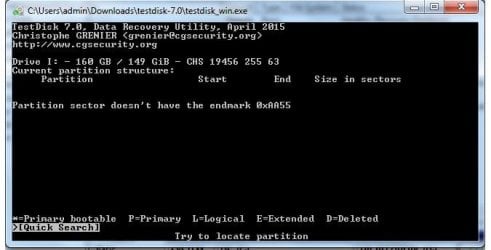
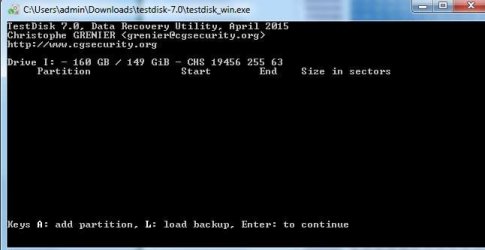
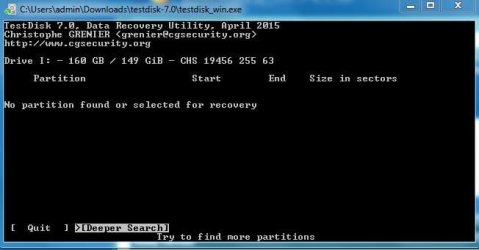
However, I am lost as to how to use it! I have attached pending results so far.

Can anyone please help!!!

Debbie
 

Attachments

My Computer

Computer type
PC/Desktop
Computer Manufacturer/Model Number
ASUS
OS
windows 7 64bit

My Computers

System One System Two

  • Computer type
    PC/Desktop
    Computer Manufacturer/Model Number
    custom build
    OS
    Windows 7 HP 64
    CPU
    i5 6600K - 800MHz to 4200MHz
    Motherboard
    GA-Z170-HD3P
    Memory
    4+4G GSkill DDR4 3000
    Graphics Card(s)
    IG - Intel 530
    Monitor(s) Displays
    Samsung 226BW
    Screen Resolution
    1680x1050
    Hard Drives
    (1) -1 SM951 – 128GB M.2 AHCI PCIe SSD drive for Windows 7 and Lubuntu
    (2) -1 WD SATA 3 - 1T for Data
    (3) -1 WD SATA 3 - 1T for backup
    PSU
    Thermaltake 450W TR2 gold
    Keyboard
    Old and good Chicony mechanical keyboard
    Mouse
    Logitech mX performance - 9 buttons (had to disable some)
    Internet Speed
    500Mb/s
    Browser
    Firefox 64
    Other Info
    TinyWall firewall
  • Computer type
    Laptop
    System Manufacturer/Model Number
    Asus Q550LF
    OS
    Windows 7 Pro
    CPU
    i7-4500U 800MHz to 3.0GHz
    Motherboard
    Asus Q550LF
    Memory
    (4+4)G DDR3 1600
    Graphics Card(s)
    IG intel 4400 + NVIDIA GeForce GT 745M
    Sound Card
    Realtek
    Monitor(s) Displays
    LG Display LP156WF4-SPH1
    Screen Resolution
    1920 x 1080
    Hard Drives
    BX500 120G SSD for Windows and programs +
    1T HDD for data
    Internet Speed
    500 Mb/s
    Browser
    Firefox
    Other Info
    TinyWall firewall
Hi Megahertz

Thanks for your fast reply.
How do I contact Jumanji?
 

My Computer

Computer type
PC/Desktop
Computer Manufacturer/Model Number
ASUS
OS
windows 7 64bit
Do you happen to know exactly what manufacturer/make and model the hard-drive is?
 
Last edited:

My Computer

Computer type
PC/Desktop
Computer Manufacturer/Model Number
Antec desktop; Acer Aspire laptops
OS
Windows 7 Professional 64-bit
CPU
Desktop i5; Acers i5 & i7
Memory
desktop 16GB; 1 Acer 8GB & 1 Acer 16GB
Hard Drives
1TB split into 2 equal partitions [OS and data] usable by RJS
Internet Speed
AT&T DSL
Browser
FF, GChrome, msIE
Other Info
Windows 7 Firewall, Emsisoft AM/AV, MSE [scan-only], SpywareBlaster, Ruiware/BillP combine
Hi Roland,

Yes its a Buffalo Mini-station 160GB Model HD-PS160U2
 

My Computer

Computer type
PC/Desktop
Computer Manufacturer/Model Number
ASUS
OS
windows 7 64bit
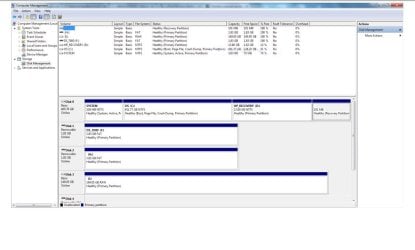
Attached is a screenshot of Disk Management info.
 

Attachments

My Computer

Computer type
PC/Desktop
Computer Manufacturer/Model Number
ASUS
OS
windows 7 64bit
To contact Jumanji click on the link and send him a message.
You should take a snapshot with snipping tool of the entire page of disk manager. Expand the columns so we can read them.
Post it as an attachment (go advanced tab)

Have a look at this similar post
Disk structure is corrupt and unreadable
 

My Computers

System One System Two

  • Computer type
    PC/Desktop
    Computer Manufacturer/Model Number
    custom build
    OS
    Windows 7 HP 64
    CPU
    i5 6600K - 800MHz to 4200MHz
    Motherboard
    GA-Z170-HD3P
    Memory
    4+4G GSkill DDR4 3000
    Graphics Card(s)
    IG - Intel 530
    Monitor(s) Displays
    Samsung 226BW
    Screen Resolution
    1680x1050
    Hard Drives
    (1) -1 SM951 – 128GB M.2 AHCI PCIe SSD drive for Windows 7 and Lubuntu
    (2) -1 WD SATA 3 - 1T for Data
    (3) -1 WD SATA 3 - 1T for backup
    PSU
    Thermaltake 450W TR2 gold
    Keyboard
    Old and good Chicony mechanical keyboard
    Mouse
    Logitech mX performance - 9 buttons (had to disable some)
    Internet Speed
    500Mb/s
    Browser
    Firefox 64
    Other Info
    TinyWall firewall
  • Computer type
    Laptop
    System Manufacturer/Model Number
    Asus Q550LF
    OS
    Windows 7 Pro
    CPU
    i7-4500U 800MHz to 3.0GHz
    Motherboard
    Asus Q550LF
    Memory
    (4+4)G DDR3 1600
    Graphics Card(s)
    IG intel 4400 + NVIDIA GeForce GT 745M
    Sound Card
    Realtek
    Monitor(s) Displays
    LG Display LP156WF4-SPH1
    Screen Resolution
    1920 x 1080
    Hard Drives
    BX500 120G SSD for Windows and programs +
    1T HDD for data
    Internet Speed
    500 Mb/s
    Browser
    Firefox
    Other Info
    TinyWall firewall
On the face of it it looks like the filesystem in your Buffalo drive seems to have gone corrupt.

But I am not going to give you any instructions unless you post proper screenshots as outlined in the previous posts. Repeated here.

1.Use Windows Snipping Tools to take the screenshots in jpg. Read this: How to Use the Snipping Tool in Vista

2. Upload the jpg images to Seven Forums. Read this: Screenshots and Files - Upload and Post in Seven Forums

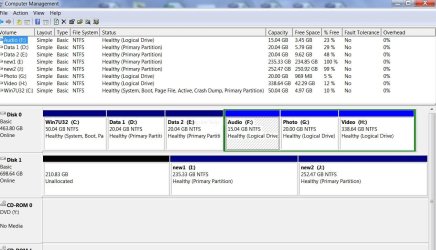
3. If asked to post the screenshots of Windows Disk Management, adhere to the Guidelines here so that we can see all the information. Disk Management - Post a Screen Capture Image

See the following screenshots: The JPG images show up in the post directly. No need to open pdf which is a pain.

WDM.JPG

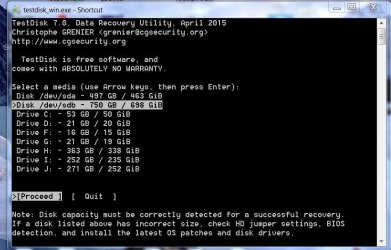
TestDisk.JPG

We may most probably use TestDisk and you will be asked to post every screen or the screen I ask for and unless it is in the above format and clearly readable it is not going to help.

Now answer these questions.

1. How many partitions did you have in the 149.05 GB drive?

2. Is that capacity 149.05 GB correct?

Caution: Do not use TestDisk blindly on your own, unless you know what you are doing or rather what it will do for that particular command. :).
 

My Computer

OS
Windows 7 Home Premium 32 bit
TESTDISK2.JPG

TESTDISK1.JPG

DISKMANAGEMENT.JPG
 

My Computer

Computer type
PC/Desktop
Computer Manufacturer/Model Number
ASUS
OS
windows 7 64bit
Hi Jumanji,

Sorry about the attachments earlier.
 

My Computer

Computer type
PC/Desktop
Computer Manufacturer/Model Number
ASUS
OS
windows 7 64bit
Hi,

I'm not sure about partitions. I did not actively create any.
The advertised capacity was 160gb
 

My Computer

Computer type
PC/Desktop
Computer Manufacturer/Model Number
ASUS
OS
windows 7 64bit
I also used EASEUS and could see all my files in the search.
 

My Computer

Computer type
PC/Desktop
Computer Manufacturer/Model Number
ASUS
OS
windows 7 64bit
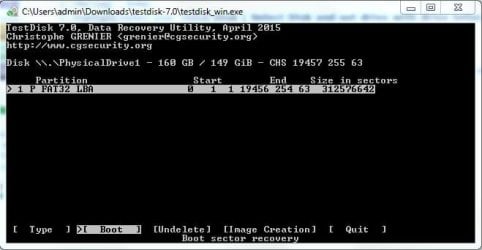
Testdisk3.JPG
 

My Computer

Computer type
PC/Desktop
Computer Manufacturer/Model Number
ASUS
OS
windows 7 64bit
OK, I shall give the instructions tomorrow. It is already late for me today considering I was awake till 2AM today..
 

My Computer

OS
Windows 7 Home Premium 32 bit
Thank you so much Jumanji...I look forward to hearing from you
 

My Computer

Computer type
PC/Desktop
Computer Manufacturer/Model Number
ASUS
OS
windows 7 64bit
Plug in only your faulty drive ( Make sure you have no other external HDD/Flash drive/ Card Reader/USB hub/Printer with USB ports is plugged in)

Run TestDisk.
1. [No Log] - Enter
2. Highlight/Select your 160GB Disk ( Select Disk and not drive with drive letter) [Proceed] Enter
3. Highlight/Select [Intel] Intel/PC partition Enter
4. Highlight/Select [Advanced] File System Utils Enter

Post the screenshot of the 5th screen that appears. Further Instructions will depend upon what appears in it. Close TestDisk and wait for it.
 

My Computer

OS
Windows 7 Home Premium 32 bit
Testdisk advanced tools.JPG
 

My Computer

Computer type
PC/Desktop
Computer Manufacturer/Model Number
ASUS
OS
windows 7 64bit
My trial drive Seagate GoFlex 750GB seems to have breathed its last. The screenshots at post#10 which I took yesterday night was the last of it. I had left it connected to my PC after taking the screenshots. Today it is not there. Now I have to buy another drive exclusively for my experiments.

Anyway, coming to your drive, [Boot] is highlighted. Press Enter and then post that screenshot. We will know the status of your boot records.
 

My Computer

OS
Windows 7 Home Premium 32 bit
Back
Top