External hardrive not "loading".

Skulblaka

Are you Alive?
Guru
VIP
Local time
10:43 PM
Messages
1,105
Location
Minnesota
Greeting everyone,

I ran into a problem again, it's my external 2TB hard drive. Yesterday it worked fine. Now, I connect my hard drive, then I go to "My Computer", the window is blank, it's loading... for a while, most of the time Windows becomes unresponsive, I'm starting to get a "little" frustrated. All of my programs become unresponsive and I have to end them. I received an error earlier, I'll try to recreate it.

I cannot access my external hard drive. It's a "Seagate Free Agent." The data on it is crucial, I cannot lose any of it, 1TB of data!

If you need more things about this situation, please ask.
 

My Computer

Computer Manufacturer/Model Number
Custom
OS
Windows 8 Professional 64-bit
CPU
Intel Core i3-2100
Motherboard
ASRock Intel Z68M/USB3
Memory
4GB
Graphics Card(s)
GeForece GTX 550 Ti
Screen Resolution
1680 x 1050
PSU
750w
Hello there, Skul!

Are you connecting the HDD to the same USB port as always?

Have you tried accessing the HDD in Safe Mode? There's no need to panic, i know your data is important and let's try to solve the issue :D
 

My Computer

Computer type
PC/Desktop
OS
Windows
Hello there, Skul!

Are you connecting the HDD to the same USB port as always?

Have you tried accessing the HDD in Safe Mode? There's no need to panic, i know your data is important and let's try to solve the issue :D
Thanks for your quick response, I like your avatar by the way, I'm not panicking. Heheh, "Don't Panic!". Anyway, I'll try you suggestion.

Also, it's the same USB port as always, also, the external drive isn't making the "usual" clicking sound when I access it. I hear the disks spin up, but no major clicking... strange.
 

My Computer

Computer Manufacturer/Model Number
Custom
OS
Windows 8 Professional 64-bit
CPU
Intel Core i3-2100
Motherboard
ASRock Intel Z68M/USB3
Memory
4GB
Graphics Card(s)
GeForece GTX 550 Ti
Screen Resolution
1680 x 1050
PSU
750w
Hehe thanks :p in the worst case you could just try to access it via Ubuntu Live CD, also.. could you check the HDD in Device Manager? to see if something unusual comes up :huh:
Did you install any programs since yesterday when the HDD was working?
 

My Computer

Computer type
PC/Desktop
OS
Windows
I tried safe mode, same thing, no luck. No new programs installed, the last task I was performing was a defrag which I stopped later on when I came home. The program was TuneUp Utilities, a trustworthy application. Nothing is unusual with the Device Manager.

Huh, the system confirms there is a device connected. "Safely Remove Hardware and Eject Media" shows up, when right clicking it shows the hardware that I try to access, my external drive.
 

My Computer

Computer Manufacturer/Model Number
Custom
OS
Windows 8 Professional 64-bit
CPU
Intel Core i3-2100
Motherboard
ASRock Intel Z68M/USB3
Memory
4GB
Graphics Card(s)
GeForece GTX 550 Ti
Screen Resolution
1680 x 1050
PSU
750w
Waaaaaaaaaaaaaaaaaaaaait :shock: i usually don't trust TuneUp Utilities, i said that to another guy on the forums and you'll find here a lot of member who share the same feelings...

Were you defragging the HDD with TuneUp??
 

My Computer

Computer type
PC/Desktop
OS
Windows
Waaaaaaaaaaaaaaaaaaaaait :shock: i usually don't trust TuneUp Utilities, i said that to another guy on the forums and you'll find here a lot of member who share the same feelings...

Were you defragging the HDD with TuneUp??
Yes, but I don't see much of a problem, I had done it multiple times with no problems.

I don't see the problem with defragging. Besides, I've used TuneUp for quite a while.
 

My Computer

Computer Manufacturer/Model Number
Custom
OS
Windows 8 Professional 64-bit
CPU
Intel Core i3-2100
Motherboard
ASRock Intel Z68M/USB3
Memory
4GB
Graphics Card(s)
GeForece GTX 550 Ti
Screen Resolution
1680 x 1050
PSU
750w
Nono, defragging it's OK :D it's just that i don't like TuneUp Utilities at all hehe :p but hey! it works for some, it doesn't for some...

Any news yet? have you been able to access the HDD?
 

My Computer

Computer type
PC/Desktop
OS
Windows
I haven't been able to access it, I fear the worst. I have two possible ways, one I will try right now, try to access through Ubuntu and/or from an other computer. The last option is to try use some sort of software to try to salvage what I can if at all possible.

I'll still try to take suggestions or ideas on what I can do, any help will be appreciated.

--- EDIT ---

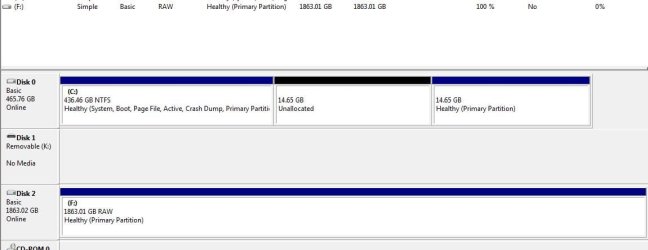
Well, I really need this explained. Right now I'm on Disk Management, look at the image included, I need to know what that means, there should be 980GB free from this external hard drive (F).

This possibly means... I've lost... about four months of work... this isn't happening. :shock:
 

Attachments

  • Capture.JPG
    Capture.JPG
    40.2 KB · Views: 32

My Computer

Computer Manufacturer/Model Number
Custom
OS
Windows 8 Professional 64-bit
CPU
Intel Core i3-2100
Motherboard
ASRock Intel Z68M/USB3
Memory
4GB
Graphics Card(s)
GeForece GTX 550 Ti
Screen Resolution
1680 x 1050
PSU
750w
Wait, why is there a "RAW" partition on the 2TB drive, and why is it empty?! :shock: now that's scary...

Boot from a Ubuntu Live CD and try to access the HDD.. that'd be my last option :huh:
 

My Computer

Computer type
PC/Desktop
OS
Windows
I have the same question, I need someone to explain it to me, perhaps someone here may know.
 

My Computer

Computer Manufacturer/Model Number
Custom
OS
Windows 8 Professional 64-bit
CPU
Intel Core i3-2100
Motherboard
ASRock Intel Z68M/USB3
Memory
4GB
Graphics Card(s)
GeForece GTX 550 Ti
Screen Resolution
1680 x 1050
PSU
750w
I think this is the answer :(

A RAW file system defines a situation when your operating system fails to recognize the associated volume because the file system extension has been deleted. The system cannot access data from such partitions. When Windows reports this error, it could be because you haven't initialized the partition, haven't formatted the drive or you are trying to access a partition that is corrupt. In such situations, various errors may appear, the most common being is discussed further.

Cause

The file system type is defined at least two different locations: partition table (or LDM in case of dynamic disks) or volume boot sector. The above situation can occur in one of the following possibilities:

Both volume boot sector and partition table possess incorrect file system type information The file system type information contained at these two locations contradict with each other Neither of the two locations contain the correct file system type information

These conditions arise when the partition table, volume boot sector and/or LDM database is corrupt. In NTFS volumes, damage to MFT can also cause this behavior.

Solution

Check for the latest backup you have and restore your data if it fulfills your requirements. Later, you can reformat the drive to solve the error.

In case when no valid backup is available, Windows Partition Recovery utilities can work. The partition recovery utilities are highly competent tools, equipped with graphically rich features, that can recover lost data from corrupt, lost, inaccessible or formatted disk partitions.
 

My Computer

Computer type
PC/Desktop
OS
Windows
Dear Skulblaka,
Hi there! One thing is clear: you are connected to the "Seagate free agent pro" (i too have it ,but of 750GB cap.) If our eyes have not deceived us it shows the "space" on the EXTN.HDD.

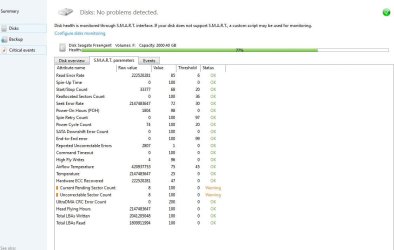
Though the Seagate is shown as "healthy", let us probe this further! There is a tool called the "ACRONIS DRIVE MONITOR", which gives a fairly accurate statistics based on the S.M.A.R.T. TECH. Website to download : Acronis corporate backup solutions: backup or clone hard drive on servers and workstations

I request you to kindly post the monitor results, for all of us to view! Hope is what keeps the flame from dying! My philosophy is"hope for the best but prepare for the worst"! I hope you have not been tinkering with the registry UNLESS you are an expert geek!;)
Regards,
DR.Sreedhav.
 

My Computer

Computer Manufacturer/Model Number
Sony Vaio C series VPCCB35FN laptop
OS
MS Windows 7 Home Premium 64-bit SP1
CPU
IntelCore [email protected]; Sandy Bridge 32nm Tech.
Motherboard
Sony Vaio Version:C609NJYJ
Memory
4096Mb RAM; Single ChannelDDR3@665MHz; DRAM Freq:662MHz
Graphics Card(s)
AMD Radeon HD 6630M; GPU:Whistler;BIOS Core&mem Clock:123.36
Sound Card
REALTEK High Definition Audio Device; INTEL Display Card
Monitor(s) Displays
Generic PnP Intel HD;Resolution:1920*1040 Pixels; BPP:32bits
Screen Resolution
Current Resolution:1920*1080 Pixels; Monitor Frequency:60Hz
Hard Drives
Internal HD:TOSHIBA MK5061GSY; Real Size:488 GB;NTFS; 3 Partitions; SATA; HEADS:16

External HDD: WD Elements 1023 PORTABLE; Estimated Size: 1TB; NTFS; 3 Partitions
Cooling
Lateral Exhaust with a Cooling Pad Placed Beneath.
Keyboard
Logitech Bluetooth+ Generic Integrated K-B
Mouse
Logitech Bluetooth
Internet Speed
2MBPS
Other Info
1)Trend Micro Titanium Maximum Security Suite Version:3
2)SAS-PRO

3)MBAM--PRO


4)WATERFOX+IE9 +WOT+LINKEXTEND+ DRWEBCUREIT LINK CHECKER

5)SPYWAREBLASTER

6) WINPATROL PLUS

7) SANDBOXIE and
8) A BIT OF COMMON SENSE.
I'll try it out, I've downloaded one of the Seagate utilities which is supposed to diagnose errors, but it failed to even start the scan. Hopefully this may at least show us something. Also, no, I don't "tinker" unless I'm very confident and know what I'm doing. I haven't touched the registry.

--- EDIT ---

There is a lot of "red", this can't be good. I'm not sure if this is what I have to post, but here it it, the image included.
 

Attachments

  • Capture1.JPG
    Capture1.JPG
    65.1 KB · Views: 20

My Computer

Computer Manufacturer/Model Number
Custom
OS
Windows 8 Professional 64-bit
CPU
Intel Core i3-2100
Motherboard
ASRock Intel Z68M/USB3
Memory
4GB
Graphics Card(s)
GeForece GTX 550 Ti
Screen Resolution
1680 x 1050
PSU
750w
...Also, it's the same USB port as always, also, the external drive isn't making the "usual" clicking sound when I access it. I hear the disks spin up, but no major clicking... strange.
Healthy drives do not make a clicking sound.

Unhealthy drives make a clicking sound.
 

My Computer

OS
Windows 7 Ultimate x64
CPU
P4 3.2
Motherboard
Intel 815GM
Memory
DDR 400
Graphics Card(s)
ATI HD3850
Sound Card
C-Media 7.1
Monitor(s) Displays
SyncMaster 244T
Screen Resolution
1920*1200
Hard Drives
Several
PSU
500
Case
PowerSpec $24
Cooling
ThermalTake copper
Internet Speed
Blazing
Dear Skulblaka,
My apologies to Punkster, because being a slow typer i missed His/Her post! The post was educative. I have cultivated a habit of "creating" system restore points, before installing or any major change! I do not want to insult your intelligence by explaining as to how to go about creating them!

I have a seperate power connection to the EXTN.HD,but the connection via USB to the CPU is untouched! This is b'cause, repeated inserting and removing the USB plug-in WILL damage the hardware! I recently bought a Transcend 8GB pen drive and it is already loose after repeatedly connecting to the USB dongle (the one which has 4-6 usb slots)! When did you buy the Seagate Free Agent Pro? Usual life span of any HD is 5-7 years and beyond it is a blessing!
Regards,
Sreedhav
 

My Computer

Computer Manufacturer/Model Number
Sony Vaio C series VPCCB35FN laptop
OS
MS Windows 7 Home Premium 64-bit SP1
CPU
IntelCore [email protected]; Sandy Bridge 32nm Tech.
Motherboard
Sony Vaio Version:C609NJYJ
Memory
4096Mb RAM; Single ChannelDDR3@665MHz; DRAM Freq:662MHz
Graphics Card(s)
AMD Radeon HD 6630M; GPU:Whistler;BIOS Core&mem Clock:123.36
Sound Card
REALTEK High Definition Audio Device; INTEL Display Card
Monitor(s) Displays
Generic PnP Intel HD;Resolution:1920*1040 Pixels; BPP:32bits
Screen Resolution
Current Resolution:1920*1080 Pixels; Monitor Frequency:60Hz
Hard Drives
Internal HD:TOSHIBA MK5061GSY; Real Size:488 GB;NTFS; 3 Partitions; SATA; HEADS:16

External HDD: WD Elements 1023 PORTABLE; Estimated Size: 1TB; NTFS; 3 Partitions
Cooling
Lateral Exhaust with a Cooling Pad Placed Beneath.
Keyboard
Logitech Bluetooth+ Generic Integrated K-B
Mouse
Logitech Bluetooth
Internet Speed
2MBPS
Other Info
1)Trend Micro Titanium Maximum Security Suite Version:3
2)SAS-PRO

3)MBAM--PRO


4)WATERFOX+IE9 +WOT+LINKEXTEND+ DRWEBCUREIT LINK CHECKER

5)SPYWAREBLASTER

6) WINPATROL PLUS

7) SANDBOXIE and
8) A BIT OF COMMON SENSE.
...Also, it's the same USB port as always, also, the external drive isn't making the "usual" clicking sound when I access it. I hear the disks spin up, but no major clicking... strange.
Healthy drives do not make a clicking sound.

Unhealthy drives make a clicking sound.
Not really, this drive does that when reading data. It's a rather cheap drive. I don't like it, but I got it during August.

Dear Skulblaka,
My apologies to Punkster, because being a slow typer i missed His/Her post! The post was educative. I have cultivated a habit of "creating" system restore points, before installing or any major change! I do not want to insult your intelligence by explaining as to how to go about creating them!

I have a seperate power connection to the EXTN.HD,but the connection via USB to the CPU is untouched! This is b'cause, repeated inserting and removing the USB plug-in WILL damage the hardware! I recently bought a Transcend 8GB pen drive and it is already loose after repeatedly connecting to the USB dongle (the one which has 4-6 usb slots)! When did you buy the Seagate Free Agent Pro? Usual life span of any HD is 5-7 years and beyond it is a blessing!
Regards,
Sreedhav

No, I don't make those mistakes, this is a "bit" more serious. The drive is always connected.

Check above post for what you have asked.

Also, I'm going to bed, I'm tired and have school tomorrow. I'll respond asap.
 

My Computer

Computer Manufacturer/Model Number
Custom
OS
Windows 8 Professional 64-bit
CPU
Intel Core i3-2100
Motherboard
ASRock Intel Z68M/USB3
Memory
4GB
Graphics Card(s)
GeForece GTX 550 Ti
Screen Resolution
1680 x 1050
PSU
750w
Clicking sounds from a hard disk drive may emanate from the head actuator as the drive repetitively tries to recover from one or more errors. The clicking sounds can be the heads repetitively loading or unloading, or they can be the sounds of the actuator striking a stop, or both.

See Failing hard drive sounds - Datacent.com - Datacent for audible samples.
 

My Computer

OS
Windows 7 Ultimate x64
CPU
P4 3.2
Motherboard
Intel 815GM
Memory
DDR 400
Graphics Card(s)
ATI HD3850
Sound Card
C-Media 7.1
Monitor(s) Displays
SyncMaster 244T
Screen Resolution
1920*1200
Hard Drives
Several
PSU
500
Case
PowerSpec $24
Cooling
ThermalTake copper
Internet Speed
Blazing
Clicking sounds from a hard disk drive may emanate from the head actuator as the drive repetitively tries to recover from one or more errors. The clicking sounds can be the heads repetitively loading or unloading, or they can be the sounds of the actuator striking a stop, or both.

See Failing hard drive sounds - Datacent.com - Datacent for audible samples.
So you're saying I could have received a defective product?
 

My Computer

Computer Manufacturer/Model Number
Custom
OS
Windows 8 Professional 64-bit
CPU
Intel Core i3-2100
Motherboard
ASRock Intel Z68M/USB3
Memory
4GB
Graphics Card(s)
GeForece GTX 550 Ti
Screen Resolution
1680 x 1050
PSU
750w
All that I am saying is that healthy drives do not make a clicking sound.

Defective product is a loaded term. The facts, as you have provided, are that a working formatted drive now presents as raw.

You are in the warranty period and should exercise it. Prior to doing so, you should also use a tool like File Scavenger to recover your data to the extent possible.

Many experts on this site will afford you their opinions as to the better, more cost effective, options for data recovery software.

It is possible that the drive mfgr will guide you through the process necessary to remove the drive from its assembly so that you can attach it directly to a working system SATA/IDE port.
 

My Computer

OS
Windows 7 Ultimate x64
CPU
P4 3.2
Motherboard
Intel 815GM
Memory
DDR 400
Graphics Card(s)
ATI HD3850
Sound Card
C-Media 7.1
Monitor(s) Displays
SyncMaster 244T
Screen Resolution
1920*1200
Hard Drives
Several
PSU
500
Case
PowerSpec $24
Cooling
ThermalTake copper
Internet Speed
Blazing
Back
Top