External HD works fine via USB but needs to be INTIALIZED via eSATA

eSATAdrive

New member
Local time
8:41 AM
Messages
5
Hi All,

I am using an external hardrive via a usb enclosure. It works fine. However, when i purchased an eSATA enclosure and placed that same hardrive into the eSATA eclosure, windows 7 stops seeing it and requires it to be intialized according to disk manager.

1. Is there anyway to make it work without initializing it? (It continues to work fine when i connect via USB)
2. If i have to intialize, is there anyway to save the data?

Thank you! Please come back with good news!!!!!
 

My Computer My Computer

At a glance

Windows 7 Home PremiumIntel(R) Core(TM)i7 720QM CPU @ 1.60GHz Chips...6 GigsNVIDIA GeForce GT 230M
Computer Manufacturer/Model Number
HP Pavilion dv7 3085dx (Laptop)
OS
Windows 7 Home Premium
CPU
Intel(R) Core(TM)i7 720QM CPU @ 1.60GHz Chipset ID 3B03
Memory
6 Gigs
Graphics Card(s)
NVIDIA GeForce GT 230M
Hard Drives
WD Caviar Green 2.0TB SATA/32MB Cache WD20EADS (Placed in enclosure see "Other Info" for details
Other Info
USB Enclosure - HP Simplesave
eSATA Multi RAID HD Enclosure - INFOSAFE Startech SAT3540ER
eSATA ExpressCard Adapter - Startech ECESATA22
PLEASE SOMEONE HELP!!!! or At least point me to a thread with a similar issue...
 

My Computer My Computer

At a glance

Windows 7 Home PremiumIntel(R) Core(TM)i7 720QM CPU @ 1.60GHz Chips...6 GigsNVIDIA GeForce GT 230M
Computer Manufacturer/Model Number
HP Pavilion dv7 3085dx (Laptop)
OS
Windows 7 Home Premium
CPU
Intel(R) Core(TM)i7 720QM CPU @ 1.60GHz Chipset ID 3B03
Memory
6 Gigs
Graphics Card(s)
NVIDIA GeForce GT 230M
Hard Drives
WD Caviar Green 2.0TB SATA/32MB Cache WD20EADS (Placed in enclosure see "Other Info" for details
Other Info
USB Enclosure - HP Simplesave
eSATA Multi RAID HD Enclosure - INFOSAFE Startech SAT3540ER
eSATA ExpressCard Adapter - Startech ECESATA22

My Computer My Computer

At a glance

WinXP / Win 7 / Win 8.1 64bit Dual Booti7-4770K16 gb G.Skill Ripjawson board 4600
Computer type
PC/Desktop
Computer Manufacturer/Model Number
custom build
OS
WinXP / Win 7 / Win 8.1 64bit Dual Boot
CPU
i7-4770K
Motherboard
Asus Z87-A
Memory
16 gb G.Skill Ripjaws
Graphics Card(s)
on board 4600
Sound Card
On Board Soundmax HD
Monitor(s) Displays
Dell 19" Flat Panel
Screen Resolution
1280x1024
Hard Drives
Samsung 840 Pro 512gb SSD
WD1001 Caviar Win 7 Boot
WD500 Caviar Win XP Boot
2xWD500 Caviar (Raid 0)
WD750 Caviar (Backup)
PSU
Aerocool StrikeX 800w x2
Case
Aerocool Strike X
Cooling
Air
Keyboard
Microsoft Wireless
Mouse
Microsoft Wireless
Internet Speed
Cable
Other Info
Asus 12x Blu-ray writer
That should not be happening .. Checking the eSATA cable is a good idea.
The eSATA must be connected and turned on .. BEFORE you boot the computer
 

My Computer My Computer

At a glance

XP MCE .... XP Pro 64 .... W7 U x64E6750, 2.67GHz C2D4GB, PC2 6400GeForce 9400GT
Computer Manufacturer/Model Number
HP d4996t (upgraded)
OS
XP MCE .... XP Pro 64 .... W7 U x64
CPU
E6750, 2.67GHz C2D
Memory
4GB, PC2 6400
Graphics Card(s)
GeForce 9400GT
Monitor(s) Displays
Twin Samsung 2443BWT
Screen Resolution
1920x1200
Hard Drives
Many .. 3 Installed
PSU
460W
Internet Speed
Cable
Thanks guys! But my computer is seeing the HDs in Disk Management, but it is telling me that I must initialize the drives to access them. If it was a cable or bios issue I wouldn't see the drives at all, correct?

I appreciate your responses. Keep them coming. I truly hope we resolve this.
 
Last edited:

My Computer My Computer

At a glance

Windows 7 Home PremiumIntel(R) Core(TM)i7 720QM CPU @ 1.60GHz Chips...6 GigsNVIDIA GeForce GT 230M
Computer Manufacturer/Model Number
HP Pavilion dv7 3085dx (Laptop)
OS
Windows 7 Home Premium
CPU
Intel(R) Core(TM)i7 720QM CPU @ 1.60GHz Chipset ID 3B03
Memory
6 Gigs
Graphics Card(s)
NVIDIA GeForce GT 230M
Hard Drives
WD Caviar Green 2.0TB SATA/32MB Cache WD20EADS (Placed in enclosure see "Other Info" for details
Other Info
USB Enclosure - HP Simplesave
eSATA Multi RAID HD Enclosure - INFOSAFE Startech SAT3540ER
eSATA ExpressCard Adapter - Startech ECESATA22
What controller are you using to acess the eSATA? How old is the driver?
What mode setting are you using in the BIOS.... AHCI, IDE, etc..,?

If you could fill out your system specs in your user control panel, it would help, with less guessing on our part.;)
 

My Computer My Computer

At a glance

Windows 7 Professional 64i7 8608GB Corsair CMX4GX3M2A1600C9 DDR3 1600(2) Nvidia EVGA GTX 470 SLI
Computer Manufacturer/Model Number
self built
OS
Windows 7 Professional 64
CPU
i7 860
Motherboard
ASUS P7P55D-E Pro /onboard SATA 6Gb/s USB 3.0
Memory
8GB Corsair CMX4GX3M2A1600C9 DDR3 1600
Graphics Card(s)
(2) Nvidia EVGA GTX 470 SLI
Sound Card
Onboard VIA VT1828S 8 channels
Monitor(s) Displays
ASUS VW266H 25.5" HDMI Widescreen LCD and HP vs19 LCD 19"
Screen Resolution
1920 x 1200 : 1280 X 1024 dual
Hard Drives
Intel X25-M 80GB SSD (boot)
Seagate Barracuda 80GB
Western Digital Caviar Black 500GB
Asus DRW-24B1ST/BLK/B/AS
PSU
COOLER MASTER Silent Pro 1000W
Case
LIAN LI Lancool PC-K62
Cooling
Prolimatech Megahalems with Scythe "ULTRA KAZE" 120
Keyboard
Saitek
Mouse
Microsoft Optical comfort mouse 3000
Internet Speed
Comcast Ultra tier 30/5
System Specs Update! Thanks Sanvean. I didn't know there was a system spec area. According to the manufacture website the drivers I currenlty have installed are the latest and most up to date. As for the Bios, I have no such option to toggle between AHCI and IDE. Unless there is a ultra secret Bios screen. According to HP tech support there is no such option. They believe AHCI is automatically configured on my laptop. Also keep in mind, that the drives show up in Disk Manager. To my knowledge, if AHCI was not configured, they wouldn't even show up there.

As for system specs, please via the page you requested I fill out. Please feel free to contact me if you need additional information.

I hope you can help! Thank you for your support!
 

My Computer My Computer

At a glance

Windows 7 Home PremiumIntel(R) Core(TM)i7 720QM CPU @ 1.60GHz Chips...6 GigsNVIDIA GeForce GT 230M
Computer Manufacturer/Model Number
HP Pavilion dv7 3085dx (Laptop)
OS
Windows 7 Home Premium
CPU
Intel(R) Core(TM)i7 720QM CPU @ 1.60GHz Chipset ID 3B03
Memory
6 Gigs
Graphics Card(s)
NVIDIA GeForce GT 230M
Hard Drives
WD Caviar Green 2.0TB SATA/32MB Cache WD20EADS (Placed in enclosure see "Other Info" for details
Other Info
USB Enclosure - HP Simplesave
eSATA Multi RAID HD Enclosure - INFOSAFE Startech SAT3540ER
eSATA ExpressCard Adapter - Startech ECESATA22
I checked the instruction manual for the enclosure that you have the drive installed in. According to the instruction book, it only supports 1 TB drives. See page 35, here:

http://www.startech.com/Data/ProductManuals/SAT3540ER.pdf

If you're trying to use a 2 TB drive, as your specs say, it might not work without a firmware upgrade to the enclosure - IF Startech has one available.

EDIT: There seems to be a "different" version available from Startech, that supports up to 8 TB, meaning your 2 TB drive would work. See the specs here:

http://accessories.us.dell.com/sna/...us&l=en&dgc=SS&cid=39715&lid=1003762#Overview

There might be a firmware upgrade from Startech after all. I haven't had much luck with their drivers over the years, but it might work for you.
 

My Computer My Computer

At a glance

Win 7 Pro x64/Win 10 Pro x64 dual bootAMD FX 8350 Vishera @ 420016 GB Mushkin Blackline DDR3-2400 @ 1866 (9-1...XFX Radeon R9 280 Double D Black Edition
Computer type
PC/Desktop
Computer Manufacturer/Model Number
Mellon Labs (custom build)
OS
Win 7 Pro x64/Win 10 Pro x64 dual boot
CPU
AMD FX 8350 Vishera @ 4200
Motherboard
ASUS M5A97 R2.0
Memory
16 GB Mushkin Blackline DDR3-2400 @ 1866 (9-10-10-10-31)
Graphics Card(s)
XFX Radeon R9 280 Double D Black Edition
Sound Card
Realtek HD Audio on MB. Sounds great.
Monitor(s) Displays
Acer 24", Acer 22"
Screen Resolution
3840 x 1080
Hard Drives
1 x Mushkin Chronos 120 GB SSD (Win 10)
1 x Samsung 850 EVO 250 GB SSD (Win 7)
1 x WD 1TB SATA Blue
1 x WD 1TB SATA Green
PSU
Corsair TX-750
Case
CoolerMaster HAF 912+
Cooling
Coolermaster Seidon 240M Liquid AIO. 6 case fans
Keyboard
Logitech G710+
Mouse
Logitech G500s
Internet Speed
Much better since I got fiber, but still way overpriced.
Antivirus
MSE, Malware Bytes for scanning
Browser
Firefox
Other Info
Corsair VOID USB headphones.

A Mellon Labs X-1 - LCD Smartie driven system status display.

Brought to you by the letter E
I think Mellon might have hit the nail on the head! Enclosures can gimp drives.
Thanks for the specs.
 

My Computer My Computer

At a glance

Windows 7 Professional 64i7 8608GB Corsair CMX4GX3M2A1600C9 DDR3 1600(2) Nvidia EVGA GTX 470 SLI
Computer Manufacturer/Model Number
self built
OS
Windows 7 Professional 64
CPU
i7 860
Motherboard
ASUS P7P55D-E Pro /onboard SATA 6Gb/s USB 3.0
Memory
8GB Corsair CMX4GX3M2A1600C9 DDR3 1600
Graphics Card(s)
(2) Nvidia EVGA GTX 470 SLI
Sound Card
Onboard VIA VT1828S 8 channels
Monitor(s) Displays
ASUS VW266H 25.5" HDMI Widescreen LCD and HP vs19 LCD 19"
Screen Resolution
1920 x 1200 : 1280 X 1024 dual
Hard Drives
Intel X25-M 80GB SSD (boot)
Seagate Barracuda 80GB
Western Digital Caviar Black 500GB
Asus DRW-24B1ST/BLK/B/AS
PSU
COOLER MASTER Silent Pro 1000W
Case
LIAN LI Lancool PC-K62
Cooling
Prolimatech Megahalems with Scythe "ULTRA KAZE" 120
Keyboard
Saitek
Mouse
Microsoft Optical comfort mouse 3000
Internet Speed
Comcast Ultra tier 30/5
Hey guys, I spoke with Startech and they said that the SAT3540ER will take 2TB drives popukated in all 4 bays. When I questioned how come (since the spec indicated otherwise), they stated that the limitation is based on my operating system and that Windows 7 and the SAT3540ER will allow for 4 x 2TB slots to be populated.

CONFRIMATION: I put the WD HD into a Thermaltaker Black Widow PC Gaming Blac X Hard Drive eSATA + USB Docking Station and I have the same issue. Worked fine via USB but required initializatinon when connected via eSATA.

I greatly appreciate all your help. Let me know if there is any other information I can provide you with.
 

My Computer My Computer

At a glance

Windows 7 Home PremiumIntel(R) Core(TM)i7 720QM CPU @ 1.60GHz Chips...6 GigsNVIDIA GeForce GT 230M
Computer Manufacturer/Model Number
HP Pavilion dv7 3085dx (Laptop)
OS
Windows 7 Home Premium
CPU
Intel(R) Core(TM)i7 720QM CPU @ 1.60GHz Chipset ID 3B03
Memory
6 Gigs
Graphics Card(s)
NVIDIA GeForce GT 230M
Hard Drives
WD Caviar Green 2.0TB SATA/32MB Cache WD20EADS (Placed in enclosure see "Other Info" for details
Other Info
USB Enclosure - HP Simplesave
eSATA Multi RAID HD Enclosure - INFOSAFE Startech SAT3540ER
eSATA ExpressCard Adapter - Startech ECESATA22
Hi eSATA,
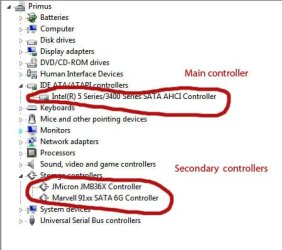
Could you go into device manager and see what controllers are enabled.
This is an example of mine (desktop), yours will be similar.
My Jmicron is my external eSATA controller.

An eSATA connection can be a real pain, as you already know. Cable lengths, power issues, enclosure limitations, the list goes on.

Just for info, is there a reason why you don't want to use the usb? No worries just wondering! I'll post back if I can think of anything else.
 

Attachments

  • esata.jpg
    esata.jpg
    29.2 KB · Views: 3

My Computer My Computer

At a glance

Windows 7 Professional 64i7 8608GB Corsair CMX4GX3M2A1600C9 DDR3 1600(2) Nvidia EVGA GTX 470 SLI
Computer Manufacturer/Model Number
self built
OS
Windows 7 Professional 64
CPU
i7 860
Motherboard
ASUS P7P55D-E Pro /onboard SATA 6Gb/s USB 3.0
Memory
8GB Corsair CMX4GX3M2A1600C9 DDR3 1600
Graphics Card(s)
(2) Nvidia EVGA GTX 470 SLI
Sound Card
Onboard VIA VT1828S 8 channels
Monitor(s) Displays
ASUS VW266H 25.5" HDMI Widescreen LCD and HP vs19 LCD 19"
Screen Resolution
1920 x 1200 : 1280 X 1024 dual
Hard Drives
Intel X25-M 80GB SSD (boot)
Seagate Barracuda 80GB
Western Digital Caviar Black 500GB
Asus DRW-24B1ST/BLK/B/AS
PSU
COOLER MASTER Silent Pro 1000W
Case
LIAN LI Lancool PC-K62
Cooling
Prolimatech Megahalems with Scythe "ULTRA KAZE" 120
Keyboard
Saitek
Mouse
Microsoft Optical comfort mouse 3000
Internet Speed
Comcast Ultra tier 30/5
In Disk Management does it say NTFS or RAW for the drive?
 

My Computer My Computer

At a glance

Windows 7 Professional 64i7 8608GB Corsair CMX4GX3M2A1600C9 DDR3 1600(2) Nvidia EVGA GTX 470 SLI
Computer Manufacturer/Model Number
self built
OS
Windows 7 Professional 64
CPU
i7 860
Motherboard
ASUS P7P55D-E Pro /onboard SATA 6Gb/s USB 3.0
Memory
8GB Corsair CMX4GX3M2A1600C9 DDR3 1600
Graphics Card(s)
(2) Nvidia EVGA GTX 470 SLI
Sound Card
Onboard VIA VT1828S 8 channels
Monitor(s) Displays
ASUS VW266H 25.5" HDMI Widescreen LCD and HP vs19 LCD 19"
Screen Resolution
1920 x 1200 : 1280 X 1024 dual
Hard Drives
Intel X25-M 80GB SSD (boot)
Seagate Barracuda 80GB
Western Digital Caviar Black 500GB
Asus DRW-24B1ST/BLK/B/AS
PSU
COOLER MASTER Silent Pro 1000W
Case
LIAN LI Lancool PC-K62
Cooling
Prolimatech Megahalems with Scythe "ULTRA KAZE" 120
Keyboard
Saitek
Mouse
Microsoft Optical comfort mouse 3000
Internet Speed
Comcast Ultra tier 30/5
Back
Top