External HDD Cyclic Redundancy / CHKDSK not available for RAW drives

boweasel

New member
Power User
Local time
6:23 PM
Messages
678
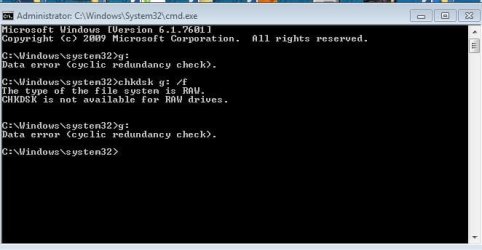
All of a sudden, one of my external drives is inaccessible. Anybody know how to retrieve data from it? I took the drive (WD Elements) out of the case, intending to hook it up to a SATA enclosure, but it's got what seems to be unremovable hardware blocking access.
 

Attachments
  • Gdrive.JPG
    Gdrive.JPG
    31.1 KB · Views: 18

My Computer My Computer

At a glance

Windows 7 home premium 64 bitAMD K103.00GB Dual-Channel DDR3 @ 532MHzATI AMD M880G with ATI Mobility Radeon HD 425...
Computer type
Laptop
OS
Windows 7 home premium 64 bit
CPU
AMD K10
Motherboard
Hewlett-Packard 1444 (Socket S1G4)
Memory
3.00GB Dual-Channel DDR3 @ 532MHz
Graphics Card(s)
ATI AMD M880G with ATI Mobility Radeon HD 4250 (HP)
Sound Card
Realtek
Screen Resolution
1366 x 768
Hard Drives
465GB Western Digital
Antivirus
MSE
Hello boweasel!

The WD Elements doesn't have hardware encryption. It is, though, in RAW format. The cyclic redundancy check would be confirming it. This means it has had errors/damage to its partition table, hence the system can't read it correctly and doesn't allow access to it. The problem therefore has not been in the enclosure. But from removing the drive now the warranty has bee voided and the device can't be RMA-ed for replacement. :/

A RAW drive is hard to retrieve data from. You could a data recovery software on your own but it has risks to your drive and the data on it. You could try booting into an Ubuntu/Linux Live CD to try and access the drive. If the data is truly valuable then may be you should consider professional data recovery. WD has partners in the field.

Best of luck!

CK_WD
 

My Computer My Computer

At a glance

Windows 7 Home Premium x64
Computer type
PC/Desktop
OS
Windows 7 Home Premium x64
Hi boweasel,

Put the drive back into the enclosure, plug it in and post a screenshot of how your drive looks in Windows Disk Management and MiniTool Partition Wizard 9.1 Free Edition.
Free download Magic Partition Manager Software, partition magic alternative, free partition magic, partition magic Windows 7 and server partition software - Partition Wizard Online

If partitions had been lost or the MBR code has been corrupted we can try recovering the partitions/ writing the MBR with Partition Wizard.

If it doesn't work then we can try other data recovery software.

At the moment I don't see the need for professional data recovery.
 

My Computer My Computer

At a glance

Windows 7 Home Premium 32 bit
OS
Windows 7 Home Premium 32 bit
Hi boweasel,

Put the drive back into the enclosure, plug it in and post a screenshot of how your drive looks in Windows Disk Management and MiniTool Partition Wizard 9.1 Free Edition.
Free download Magic Partition Manager Software, partition magic alternative, free partition magic, partition magic Windows 7 and server partition software - Partition Wizard Online

If partitions had been lost or the MBR code has been corrupted we can try recovering the partitions/ writing the MBR with Partition Wizard.

If it doesn't work then we can try other data recovery software.

At the moment I don't see the need for professional data recovery.
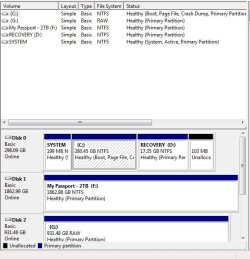
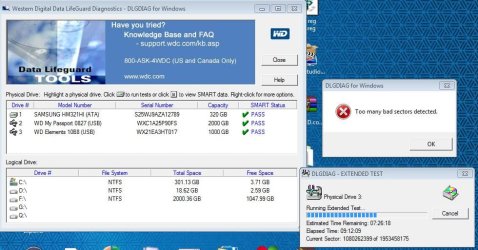
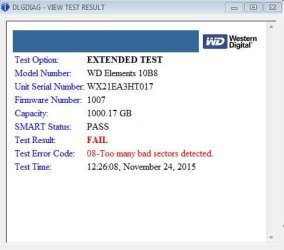
Okay, here's a shot of Disk Management plus a few from Western Digital Data LifeGuard Diagnostics. It is the G: drive.

Why I took the drive apart - Years ago I'd had success with a similar problem by removing the drive, removing some bracketing piece of hardware and connecting the Female data port on the drive to a male SATA attachment on my own enclosure. This particular drive has what seems like permanent hardware preventing access to the power and data connectors. I don't care about voiding any warranty since every piece of failed computer equipment I've owned always seems to wait until one month after the warranty expiration.

Downloading the MiniTool Partition Wizard now - will post back with results. And thanks.
 

Attachments

  • Gdrive5.JPG
    Gdrive5.JPG
    55 KB · Views: 16
  • Gdrive3.JPG
    Gdrive3.JPG
    90.3 KB · Views: 0
  • Gdrive4.JPG
    Gdrive4.JPG
    30.8 KB · Views: 17

My Computer My Computer

At a glance

Windows 7 home premium 64 bitAMD K103.00GB Dual-Channel DDR3 @ 532MHzATI AMD M880G with ATI Mobility Radeon HD 425...
Computer type
Laptop
OS
Windows 7 home premium 64 bit
CPU
AMD K10
Motherboard
Hewlett-Packard 1444 (Socket S1G4)
Memory
3.00GB Dual-Channel DDR3 @ 532MHz
Graphics Card(s)
ATI AMD M880G with ATI Mobility Radeon HD 4250 (HP)
Sound Card
Realtek
Screen Resolution
1366 x 768
Hard Drives
465GB Western Digital
Antivirus
MSE
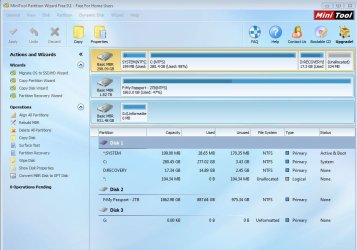
Mini Tool Partition Wizard
 

Attachments

  • Gdrive6.JPG
    Gdrive6.JPG
    93.8 KB · Views: 0

My Computer My Computer

At a glance

Windows 7 home premium 64 bitAMD K103.00GB Dual-Channel DDR3 @ 532MHzATI AMD M880G with ATI Mobility Radeon HD 425...
Computer type
Laptop
OS
Windows 7 home premium 64 bit
CPU
AMD K10
Motherboard
Hewlett-Packard 1444 (Socket S1G4)
Memory
3.00GB Dual-Channel DDR3 @ 532MHz
Graphics Card(s)
ATI AMD M880G with ATI Mobility Radeon HD 4250 (HP)
Sound Card
Realtek
Screen Resolution
1366 x 768
Hard Drives
465GB Western Digital
Antivirus
MSE
For heaven's sake remove all other external drives from your machine.

Run Partition Recovery Wizard , on your faulty drive Do a Quick Scan. At the end of the quick scan if partitions are found, post the screenshot of the "partitions found" Window. Select the partitions by putting a tick mark against those. View the preview map at the bottom of that Window. Does it show your drive as before? If yes click on Finish and then Apply.

If you can't carryout anything, close Partition Wizard and safely remove your faulty drive.

I shall see your post after another eight hours and we shall continue thereafter.
 

My Computer My Computer

At a glance

Windows 7 Home Premium 32 bit
OS
Windows 7 Home Premium 32 bit
For heaven's sake remove all other external drives from your machine.
That's a bit of a quandary - first off I assumed I'd need another drive for some sort of recovery, and I have little DASD left on my C: drive. Secondly, I'm currently using the 2TB drive to download the entire second season of the show 24, which we plan to watch non-stop on Thanksgiving. Will disconnecting that external drive make the download start from the beginning? We're about 6 hours into a 30+GB download.

Can I still do the quick scan with the other external still attached?
Run Partition Recovery Wizard , on your faulty drive Do a Quick Scan.
The screenshot I posted above for Partition Recovery Wizard is what I see when I open the tool. I see nothing listed anywhere that's called Quick Scan. Perhaps it's really now called something else?
At the end of the quick scan if partitions are found, post the screenshot of the "partitions found" Window. Select the partitions by putting a tick mark against those. View the preview map at the bottom of that Window. Does it show your drive as before? If yes click on Finish and then Apply.

If you can't carryout anything, close Partition Wizard and safely remove your faulty drive.

I shall see your post after another eight hours and we shall continue thereafter.
 
Last edited:

My Computer My Computer

At a glance

Windows 7 home premium 64 bitAMD K103.00GB Dual-Channel DDR3 @ 532MHzATI AMD M880G with ATI Mobility Radeon HD 425...
Computer type
Laptop
OS
Windows 7 home premium 64 bit
CPU
AMD K10
Motherboard
Hewlett-Packard 1444 (Socket S1G4)
Memory
3.00GB Dual-Channel DDR3 @ 532MHz
Graphics Card(s)
ATI AMD M880G with ATI Mobility Radeon HD 4250 (HP)
Sound Card
Realtek
Screen Resolution
1366 x 768
Hard Drives
465GB Western Digital
Antivirus
MSE
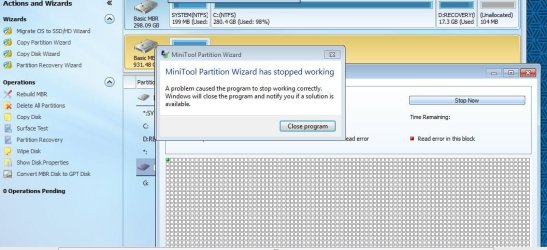
I'm 'guessing' that what you mean by Quick Scan is the Surface Test. I disconnected the other external and attempted to run that test on the problem drive. I attempted it multiple times, always with the same result about 3 seconds after I hit 'start'.
 

Attachments

  • MTPW.JPG
    MTPW.JPG
    106.3 KB · Views: 0

My Computer My Computer

At a glance

Windows 7 home premium 64 bitAMD K103.00GB Dual-Channel DDR3 @ 532MHzATI AMD M880G with ATI Mobility Radeon HD 425...
Computer type
Laptop
OS
Windows 7 home premium 64 bit
CPU
AMD K10
Motherboard
Hewlett-Packard 1444 (Socket S1G4)
Memory
3.00GB Dual-Channel DDR3 @ 532MHz
Graphics Card(s)
ATI AMD M880G with ATI Mobility Radeon HD 4250 (HP)
Sound Card
Realtek
Screen Resolution
1366 x 768
Hard Drives
465GB Western Digital
Antivirus
MSE
I think you should have completed whatever you wanted to download. If not you may resume the download and complete it. Afterwards plug in your faulty drive only and attempt a Partition Recovery.

In your case it is more or less clear that it is the bad sectors which prevents access to the drive.You may need to do a sector to sector cloning to another good drive and perform data recovery on the cloned drive.

Before that we want to make sure that partition loss is not the cause. With your faulty drive plugged in run MiniTool Partition Wizard. On the left pane under Actions and Wizards, you will see Partition Recovery Wizard listed. Click on Partition Recovery Wizard > Next > select your external drive to be recovered > next > Full Disk > Next > Quick Scan.

Allow Quick scan to complete and post the screenshot of Partitions Found.

If Quick Scan moves slowly and takes more than five minutes, do not persist. Cancel it and quit Partition Wizard.

You should now have a more than 1TB formatted good drive for cloning. I would recommend a 1.5 TB or a 2TB drive so that the drive can be identified easily during the cloning. When you are ready with an empty drive start cloning using System Rescue CD.

Read this and understand. http://www.sevenforums.com/general-...d-tool-cloning-failing-hdd-data-recovery.html

If you have any doubts ask for help.
 
Last edited:

My Computer My Computer

At a glance

Windows 7 Home Premium 32 bit
OS
Windows 7 Home Premium 32 bit
I think you should have completed whatever you wanted to download. If not you may resume the download and complete it. Afterwards plug in your faulty drive only and attempt a Partition Recovery.

In your case it is more or less clear that it is the bad sectors which prevents access to the drive.You may need to do a sector to sector cloning to another good drive and perform data recovery on the cloned drive.

Before that we want to make sure that partition loss is not the cause. With your faulty drive plugged in run MiniTool Partition Wizard. On the left pane under Actions and Wizards, you will see Partition Recovery Wizard listed. Click on Partition Recovery Wizard > Next > select your external drive to be recovered > next > Full Disk > Next > Quick Scan.

Allow Quick scan to complete and post the screenshot of Partitions Found.

If Quick Scan moves slowly and takes more than five minutes, do not persist. Cancel it and quit Partition Wizard.
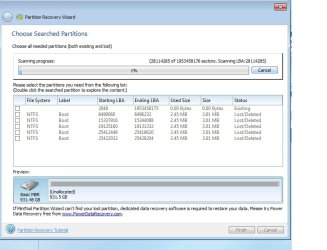
Yes, it was moving slowly so I cancelled after 5 minutes. Screenshot below
You should now have a more than 1TB formatted good drive for cloning. I would recommend a 1.5 TB or a 2TB drive so that the drive can be identified easily during the cloning. When you are ready with an empty drive start cloning using System Rescue CD.

Read this and understand. http://www.sevenforums.com/general-...d-tool-cloning-failing-hdd-data-recovery.html

If you have any doubts ask for help.
Wow... quite a lot to digest in that link. You said 'Read this and understand'. The 'reading' went just fine. The understanding... was not total.

An empty 1.5 to 2TB drive is not something I have hanging around just waiting to be used. I rather thought the 1TB+ free space I have on my 2TB drive would be used for recovery, but I bow to your much greater knowledge. I'll have to brave the Black Friday crowds (Wednesday won't work for me to do any shopping) and buy a new one.

'If you have any doubts ask for help'. I can almost guarantee that questions and doubts are gonna come up. Meanwhile I'll download and burn System Rescue CD.

So, if I understand, we're not attempting any recovery; we're just using a tool to copy the viable data from the failed drive to a brand new one. What gives me pause is the incessant read errors I got when running the MiniTool Partition Wizard surface test. However I previously downloaded another tool called M3 RAW Drive Recovery, and it looked like everything was there. I'm really only interested in the documents and pictures of the failed drive, and I could do previews of the pictures and they were fine. The previews of the documents were partly unreadable because the original documents were in Word and the previews were in wordpad. The fly in the ointment there was the 79 bucks they wanted for a license to get the previews recovered to another drive.

The Linux thing is also interesting. I've got a Windows 7 desktop in the basement with a non-genuine OS. I don't see why I couldn't download LinuxLive onto it and see if I could access the drive data through it.
 

Attachments

  • PRW.jpg
    PRW.jpg
    56.5 KB · Views: 0

My Computer My Computer

At a glance

Windows 7 home premium 64 bitAMD K103.00GB Dual-Channel DDR3 @ 532MHzATI AMD M880G with ATI Mobility Radeon HD 425...
Computer type
Laptop
OS
Windows 7 home premium 64 bit
CPU
AMD K10
Motherboard
Hewlett-Packard 1444 (Socket S1G4)
Memory
3.00GB Dual-Channel DDR3 @ 532MHz
Graphics Card(s)
ATI AMD M880G with ATI Mobility Radeon HD 4250 (HP)
Sound Card
Realtek
Screen Resolution
1366 x 768
Hard Drives
465GB Western Digital
Antivirus
MSE
From the Quickscan result, I see that the partition is not lost. The partition table is intact in sector 0. However the bad sectors seem to have damaged your File System.

You need to have a drive exclusively for cloning.

(ddrescue will be doing a sector to sector cloning. Sector 0 of your faulty drive which contains the MBR code and the partition table will be copied to sector 0 of the other drive. If you use a drive with data on it, Sector 0 of that drive which contains the MBR code and partition table of that drive will be wiped off and replaced with Sector 0 of the faulty drive. You will then lose all existing data on that drive.)

Software that claim to do data recovery from a RAW drive mostly rebuild the files from scratch if the File System is not found/corrupt. If ddrescue is unable to extract data from the bad sectors even after three passes or unable to deal with the bad sectors because they are irrecoverably bad and gives up, one may have to finally resort to such software :). We shall be doing it with PhotoRec and if it fails with GetDataback Simple for such a contingency.

So we are only making a best effort which may click or buckle. Keep your fingers crossed.

Download SystemRescueCd-x86-4.6.1 (449 MiB) Download - SystemRescueCd and create your bootable pendrive with Rufus. https://rufus.akeo.ie/

When you are ready with a new 1.5TB/2TB external HDD (Don't buy any drive larger than 2TB) just give a call here for further instructions.

Keep your faulty drive safely unplugged and under rest till then. Don't tax it further.
 

My Computer My Computer

At a glance

Windows 7 Home Premium 32 bit
OS
Windows 7 Home Premium 32 bit
Back
Top