External HDD disconnecting from PC

Ellendway

New member
Local time
5:31 PM
Messages
19
Hello,

I bought new external USB 3 harddisk (Verbatim External Hard Drive 2TB USB 3.0) this christmas and I've got a little problem. Sometimes disk just disconnect from computer. When I turn on computer everything is ok but sometimes after hours it just disconnect. I tried to change USB slot but it's still same. I was thinking about their "sleep" mode but it can't be possible because I'm still using it - I've got music there.

I have got the latest USB 3 drivers from Asus website.
 

My Computer

OS
Windows 7 Ultimate x64
CPU
AMD Phenom II X6 1090T Black Edition
Motherboard
ASUS M4A88TD-V EVO/USB3
Memory
Kingston HyperX Blu XMP 4GB (kit 4x 2GB) 1600MHz
Graphics Card(s)
Gigabyte GTX460 1GB DDR5 GV-N460OC-1GI
Sound Card
Asus Xonar DG
Screen Resolution
1680x1050
Hard Drives
WD Caviar Black WD1002FAEX 3.5" 1TB
Verbatim Desktop USB 3.0 - 2TB
Mouse
Razer Naga Epic
Internet Speed
100mbps
are you using it as a plug and play device, or is it managed by 3rd party software?
 

My Computer

Computer type
PC/Desktop
Computer Manufacturer/Model Number
Built by badgers!!!
OS
Windows 7 Ultimate x64, & Mac OS X 10.9.2
CPU
Intel Core i5 2500k
Motherboard
Asus P8z68 LE
Memory
Corsair Vengence 8gb 1866mhz
Graphics Card(s)
Nvidia GTX 770 OC
Monitor(s) Displays
2x ASUS LED 22" IPS
Screen Resolution
3840x1080
Hard Drives
240GB Crucial M500 SSD
120gb Corsair Force 3 SSD
1TB Western Digital
PSU
Corsair HX650w Modular
Case
Corsair Air 540
Cooling
Corsair H60 Push/Pull
Keyboard
Corsair K70/ Logitech G27 wheel
Mouse
Saitek R.A.T 9
Internet Speed
Too slow!
Other Info
AMD fusion E350N Home server-Windows Home Server 2011 (also made by badgers!)
2011 Macbook 2.4ghz Core2Duo, 4gb ddr3, 120gb Ocz Vertex SSD
See what's going on from Windows point of view.

Open Event viewer (Control Panel > Administrative Tools > Event viewer).

Find the Applications and Services logs, open that branch. Then open Microsoft. Then Windows. Now, scroll down and look for Driverframeworks/Operational (something very similar, can't recall off the top of my head).

Within that one, the right-hand pane will now show every little USB event. However, ironically, I opened a post a while back trying to discuss why a USB flash/thumb drive WILL have half a dozen events in this part of event viewer, but an external portable hard drive, does NOT log any events.

Anyway, worth a try.
 

My Computer

Computer type
PC/Desktop
Computer Manufacturer/Model Number
Custom
OS
Windows 7
CPU
AMD Phenom II X2 (dual-core)
Motherboard
GA-MA785GM-US2H
Memory
4G
Graphics Card(s)
integrated ATI HD 4200
Sound Card
integrated
Monitor(s) Displays
Samsung 24"
Screen Resolution
1920x1080
Hard Drives
1 SSD - Samsung 840 - 500 GB - OS and DATA partitions
1 SSD - Intel 320 - 120 GB (used for backups) - Misc/BACKUP
1 SATA HD - WD, 500 GB - BACKUP
PSU
Ultra X4 500W
Case
Ultra X-blaster
Keyboard
Microsoft Digital Media Pro
Mouse
Logitech WIRED!
Internet Speed
15 Mbps FIOS
I have some WD MyBook Essential HDDs USB 3 and have the same affect.
Related to the previous question I use them as PNP and not install their Smartware (Dumbware actually). I believe when the Dumbware is installed you can wake up the drives. I unplug and replug. A better solution would be nice but I think it is a firmware issue.
 

My Computer

Computer type
PC/Desktop
Computer Manufacturer/Model Number
Own build
OS
Windows 7x64 Home Premium SP1
CPU
Intel i7 2600k
Motherboard
ASUS P8Z68 Deluxe
Memory
G.Skill Ripjaws (DDR3-1600) 2x4GB
Graphics Card(s)
Nvidia GeForce GTS 450; Intel HD Graphics 3000(GT2+)
Monitor(s) Displays
Dell Ultrasharp IPS panel U2311H, Samsung SyncMaster P2350
Screen Resolution
1920x1080
Hard Drives
Samsung 850 Pro SSD 256GB, Samsung SSD 840 120GB, Seagates 1TB Barracuda ST31000528AS x2
PSU
Seasonic M12II 520W
Case
Lian Li Lancool PC-K60
Cooling
Case: 1x120mm, 3x140mm CPU: Hyper 212+
Keyboard
Logitech MK520 (wireless)
Mouse
Logitech MK520
Internet Speed
6-7 Mbps
Antivirus
Norton Security Premium, Malwarebytes on 2 (MSE on 3rd PC)
Browser
FireFox
Other Info
Audio: Logitech Z523 2.1
are you using it as a plug and play device, or is it managed by 3rd party software?
It's plug and play. I haven't got any 3rd party software for it.

JimLewandowski I will check it.

// Edit: Okey, I found it in Log. Text is "An error was detected on device \Device\Harddisk1\DR1 during a paging operation"

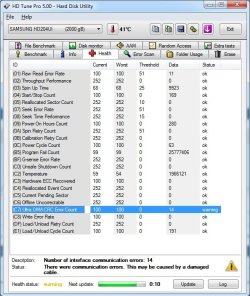
// Edit2: HD Tune found this.
 

Attachments

  • Bez názvu.jpg
    Bez názvu.jpg
    76 KB · Views: 205
Last edited:

My Computer

OS
Windows 7 Ultimate x64
CPU
AMD Phenom II X6 1090T Black Edition
Motherboard
ASUS M4A88TD-V EVO/USB3
Memory
Kingston HyperX Blu XMP 4GB (kit 4x 2GB) 1600MHz
Graphics Card(s)
Gigabyte GTX460 1GB DDR5 GV-N460OC-1GI
Sound Card
Asus Xonar DG
Screen Resolution
1680x1050
Hard Drives
WD Caviar Black WD1002FAEX 3.5" 1TB
Verbatim Desktop USB 3.0 - 2TB
Mouse
Razer Naga Epic
Internet Speed
100mbps
Ouch. I assume the screen shot is for the 2TB external Verbatim (internally a Samsung disk).

The other error about an I/O error during a paging operation. Is the Device\harddisk1\DR1 identified in the paging error your C/OS physical drive?

Note the cable warning (at the bottom).
 

My Computer

Computer type
PC/Desktop
Computer Manufacturer/Model Number
Custom
OS
Windows 7
CPU
AMD Phenom II X2 (dual-core)
Motherboard
GA-MA785GM-US2H
Memory
4G
Graphics Card(s)
integrated ATI HD 4200
Sound Card
integrated
Monitor(s) Displays
Samsung 24"
Screen Resolution
1920x1080
Hard Drives
1 SSD - Samsung 840 - 500 GB - OS and DATA partitions
1 SSD - Intel 320 - 120 GB (used for backups) - Misc/BACKUP
1 SATA HD - WD, 500 GB - BACKUP
PSU
Ultra X4 500W
Case
Ultra X-blaster
Keyboard
Microsoft Digital Media Pro
Mouse
Logitech WIRED!
Internet Speed
15 Mbps FIOS
Yes, it's from my external Verbatim disk. They're using Samsung disks inside.

And that error must be from external HDD because I found this in log after HDD disconnected.

// Edit: Yes, I saw it. It can't be a truth... I bought it 20 days ago... why the hell I've got so many disasters with my pc :-/
// Edit2: bad thing is I can't go back to the shop because I bought it in Scotland...
 

My Computer

OS
Windows 7 Ultimate x64
CPU
AMD Phenom II X6 1090T Black Edition
Motherboard
ASUS M4A88TD-V EVO/USB3
Memory
Kingston HyperX Blu XMP 4GB (kit 4x 2GB) 1600MHz
Graphics Card(s)
Gigabyte GTX460 1GB DDR5 GV-N460OC-1GI
Sound Card
Asus Xonar DG
Screen Resolution
1680x1050
Hard Drives
WD Caviar Black WD1002FAEX 3.5" 1TB
Verbatim Desktop USB 3.0 - 2TB
Mouse
Razer Naga Epic
Internet Speed
100mbps
You say the HDD is new. Yes your HDD and or your USB cable could be faulty but your initial post suggested another issue.

HDTune will report on the SMART data. You need to run the manufacturers disk diagnostics or Windows own CHKDSK.
 

My Computer

Computer type
PC/Desktop
Computer Manufacturer/Model Number
Own build
OS
Windows 7x64 Home Premium SP1
CPU
Intel i7 2600k
Motherboard
ASUS P8Z68 Deluxe
Memory
G.Skill Ripjaws (DDR3-1600) 2x4GB
Graphics Card(s)
Nvidia GeForce GTS 450; Intel HD Graphics 3000(GT2+)
Monitor(s) Displays
Dell Ultrasharp IPS panel U2311H, Samsung SyncMaster P2350
Screen Resolution
1920x1080
Hard Drives
Samsung 850 Pro SSD 256GB, Samsung SSD 840 120GB, Seagates 1TB Barracuda ST31000528AS x2
PSU
Seasonic M12II 520W
Case
Lian Li Lancool PC-K60
Cooling
Case: 1x120mm, 3x140mm CPU: Hyper 212+
Keyboard
Logitech MK520 (wireless)
Mouse
Logitech MK520
Internet Speed
6-7 Mbps
Antivirus
Norton Security Premium, Malwarebytes on 2 (MSE on 3rd PC)
Browser
FireFox
Other Info
Audio: Logitech Z523 2.1
Back
Top