External HDD Enclosure Problem

prodgod

New member
Local time
9:23 PM
Messages
21
Location
Wi
I bought a Western Digital Caviar Green internal hard drive and a generic hard drive enclosure. I installed the hard drive in the enclosure just fine and when I plugged it my computer, it installed the driver just fine, but when I go into "Computer" there is no drive listed for me to format. I know the enclosure works fine because I have another internal hard drive from an old computer which I put in there and it showed up just fine (already formatted though.) Is there something that I am missing and how would I format the hard drive so I can use it?

Thanks,
Mike
 

My Computer

Computer Manufacturer/Model Number
Dell 1721
OS
Win 7 HP 32-Bit
CPU
AMD Athlon 64x2 2.2GHz
Memory
2GB
Graphics Card(s)
ATI Radeon X1270
Screen Resolution
1440x900
Hard Drives
320GB (2x160GB)
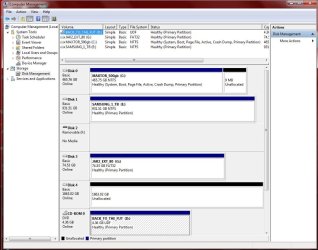
Start :ar: Computer Management :ar: Disk Management :ar:

See if HD shows up here
 

Attachments

  • Disk_Management_New_2tbHD.JPG
    Disk_Management_New_2tbHD.JPG
    108.7 KB · Views: 144

My Computer

Computer type
PC/Desktop
Computer Manufacturer/Model Number
Built them myself, Science Experiments !
OS
Win7 Enterprise, Win7 x86 (Ult 7600), Win7 x64 Ult 7600, TechNet RTM on AMD x64 (2.8Ghz)
CPU
AMD fx8350 4ghz, AMD-32 2400mhz, AMD-64 3200mhz, AMDx64 2.8G
Motherboard
SIS 755, ECS-K8M890M-M (Ult 7600), GigaByte & others
Memory
2gb, 4gb on the Ult 7600, 4gb on Technet RTM, 32gb on FX8350
Graphics Card(s)
Draw my own Graphics, several nVidia cards
Sound Card
on motherboard
Monitor(s) Displays
19" flat scr, 28" I-Inc widescr,22" Emprex Widescr, 23" Acer
Screen Resolution
1280 x 1024, 1440 x 900, 1920 x 1080
Hard Drives
6 pata Ide HD's & 2 Sata HD's
added 80gb external on Ult 7600 computer,
numerous extra 1tb, 2TB, 3Tb SATA HD's
A collection of ext HD Docks w/ HDs
PSU
430w, 550w, 600w, 700, 800, etc
Case
All Generic Full Towers
Cooling
Open Air & a few fans, some w/ colored LEDs
Keyboard
Compaq & Dell recycled from GoodWill
Mouse
Made in China Optical Wired Mouse
Internet Speed
Fast Cable InterNet
Antivirus
AVG Free on 24 different Desktops, NO Problems!
Browser
IE 8 is preferred, but use FireFox sometimes
Other Info
Linksys Routers, switches, & Hubs
Too Many USB Flash Drives to count, Biggest is 64GB !
Eight computers in my home network.
Sixteen computers at my business network.
Linked via TeamViewer !
Lots of old used spare computer parts everywhere!
There is a "Disk 1" in there that says it is unallocated and is 1863.02GB (the HDD is 2tb). Is that it?
 

My Computer

Computer Manufacturer/Model Number
Dell 1721
OS
Win 7 HP 32-Bit
CPU
AMD Athlon 64x2 2.2GHz
Memory
2GB
Graphics Card(s)
ATI Radeon X1270
Screen Resolution
1440x900
Hard Drives
320GB (2x160GB)
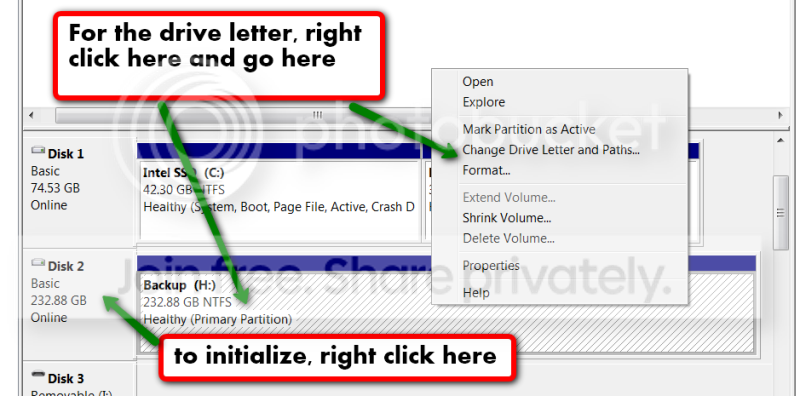
It probably has no drive letter. Maybe it is not even initialized. Go to Disk Management and assign a drive letter.

2010-04-09_1537.png
 

My Computer

Computer Manufacturer/Model Number
HP, Dell, Gateway, Toshiba - 4 laptops and 2 desktops
OS
Vista, Windows7, Mint Mate, Zorin, Windows 8
CPU
from 1.6GHz Duo to i7
Monitor(s) Displays
2x HP w2207
Hard Drives
5x HDD, 7x SSD, 12x Externals
Keyboard
with trackball - no mices
Mouse
Trackball mice
Internet Speed
DSL 6000
How do you initialize it? I'll try that when I get home from work and add a letter and see if I can format it then.
 

My Computer

Computer Manufacturer/Model Number
Dell 1721
OS
Win 7 HP 32-Bit
CPU
AMD Athlon 64x2 2.2GHz
Memory
2GB
Graphics Card(s)
ATI Radeon X1270
Screen Resolution
1440x900
Hard Drives
320GB (2x160GB)
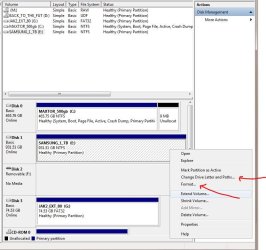
Just follow what whs shows above.

Here is another snip from mine of the sub menu
 

Attachments

  • Disk_management_Sub_Menu.JPG
    Disk_management_Sub_Menu.JPG
    80.4 KB · Views: 68

My Computer

Computer type
PC/Desktop
Computer Manufacturer/Model Number
Built them myself, Science Experiments !
OS
Win7 Enterprise, Win7 x86 (Ult 7600), Win7 x64 Ult 7600, TechNet RTM on AMD x64 (2.8Ghz)
CPU
AMD fx8350 4ghz, AMD-32 2400mhz, AMD-64 3200mhz, AMDx64 2.8G
Motherboard
SIS 755, ECS-K8M890M-M (Ult 7600), GigaByte & others
Memory
2gb, 4gb on the Ult 7600, 4gb on Technet RTM, 32gb on FX8350
Graphics Card(s)
Draw my own Graphics, several nVidia cards
Sound Card
on motherboard
Monitor(s) Displays
19" flat scr, 28" I-Inc widescr,22" Emprex Widescr, 23" Acer
Screen Resolution
1280 x 1024, 1440 x 900, 1920 x 1080
Hard Drives
6 pata Ide HD's & 2 Sata HD's
added 80gb external on Ult 7600 computer,
numerous extra 1tb, 2TB, 3Tb SATA HD's
A collection of ext HD Docks w/ HDs
PSU
430w, 550w, 600w, 700, 800, etc
Case
All Generic Full Towers
Cooling
Open Air & a few fans, some w/ colored LEDs
Keyboard
Compaq & Dell recycled from GoodWill
Mouse
Made in China Optical Wired Mouse
Internet Speed
Fast Cable InterNet
Antivirus
AVG Free on 24 different Desktops, NO Problems!
Browser
IE 8 is preferred, but use FireFox sometimes
Other Info
Linksys Routers, switches, & Hubs
Too Many USB Flash Drives to count, Biggest is 64GB !
Eight computers in my home network.
Sixteen computers at my business network.
Linked via TeamViewer !
Lots of old used spare computer parts everywhere!
You can also use a program like Partition Wizard to fix this issue. Disk Management should work just fine, but Partition Wizard has a few more features. If you do use Partition Wizard, open the program with the hard drive connected and then click on the unallocated space. Click Create Partition and then choose whatever size and formatting you want. Once you hit ok, you also have to hit apply on the left hand side of the program. You can also set a drive letter via Partition Wizard.
 

My Computer

Computer Manufacturer/Model Number
Apple Macbook Pro (April 2009)
OS
W7 Ult. x64 | OS X
CPU
Intel Mobile Core 2 Duo 2.93Ghz [T9800 Penryn]
Motherboard
NVIDIA nForce 730i Rev. B1 [Mac-F2268EC8 (U2E1)]
Memory
4096MB Samsung DDR3 Dual Channel [PC3-8500F 1066Mhz]
Graphics Card(s)
NVIDIA GeForce 9600M GT 512MB [G96M Rev. C1]
Sound Card
SB X-Fi Surround 5.1 USB | Onboard Realtek (Disabled)
Monitor(s) Displays
Acer x223wbd 22" | Apple Anti-Glare 17" (Disabled)
Screen Resolution
{Current} 1440x900 {Acer} 1680x1050 {Apple} 1920x1200
Hard Drives
{Internal}
Seagate Momentus 320GB 2.5" 7200RPM [ST9320421AS]

{Externals}
LaCie 320GB USB 2.0 HDD [301284UR]
LaCie 750GB USB 2.0 FW400 eSATA HDD [301314U]
LaCie 1TB USB 2.0 HDD [301304UR]
PSU
Magsafe
Case
Aluminum/Unibody (MBP52)
Cooling
2 x 6000 RPM Fans
Keyboard
Logitech G-15v2 [PN 920-000379]
Mouse
Logitech G-9 [PN 910-000338]
Internet Speed
12Mbps/2.5Mbps w/ 24Mbps Speed Boost [Comcast]
Other Info
Logitech X-540 Speakers [PN 970223-0122]
Sennheiser PC-151 Headset
If it's a USB connected external enclosure, it still may not work with Disk Management, but I'm not sure about Partition Wizard. I used to have a USB enclosure, and I put a new 320 GB WD drive in it, and no way would that thing initialize. I had to take it out and connect it to a SATA port on the motherboard and do the partition and format, then put it back in the enclosure. It worked fine after that.

It's in an eSATA enclosure now, so no problem, but the OP might be having the same initialization problem I had. That was my work around, and it can be used as a last resort if necessary.
 

My Computer

Computer type
PC/Desktop
Computer Manufacturer/Model Number
Mellon Labs (custom build)
OS
Win 7 Pro x64/Win 10 Pro x64 dual boot
CPU
AMD FX 8350 Vishera @ 4200
Motherboard
ASUS M5A97 R2.0
Memory
16 GB Mushkin Blackline DDR3-2400 @ 1866 (9-10-10-10-31)
Graphics Card(s)
XFX Radeon R9 280 Double D Black Edition
Sound Card
Realtek HD Audio on MB. Sounds great.
Monitor(s) Displays
Acer 24", Acer 22"
Screen Resolution
3840 x 1080
Hard Drives
1 x Mushkin Chronos 120 GB SSD (Win 10)
1 x Samsung 850 EVO 250 GB SSD (Win 7)
1 x WD 1TB SATA Blue
1 x WD 1TB SATA Green
PSU
Corsair TX-750
Case
CoolerMaster HAF 912+
Cooling
Coolermaster Seidon 240M Liquid AIO. 6 case fans
Keyboard
Logitech G710+
Mouse
Logitech G500s
Internet Speed
Much better since I got fiber, but still way overpriced.
Antivirus
MSE, Malware Bytes for scanning
Browser
Firefox
Other Info
Corsair VOID USB headphones.

A Mellon Labs X-1 - LCD Smartie driven system status display.

Brought to you by the letter E
Back
Top