External HDD is detected but not accessable.

Erchamion

New member
Local time
4:18 AM
Messages
11
Hi,

I've a problem with my external HDD. It's WD 1 My Passport Ultra, 1 TB and I had no problem with it until 4-5 days ago. It's formatted as NTFS and I'm using Windows 7, 32 bit.

Firstly, I couldn't copy files from pc to HDD, couldn't crate a new folder etc. So, I'd tried to do an error-checking. Right clicked onto the HDD, properties, Tools tab, check now, check both then start. I'd waited around 36 hours to complete, but it had stopped around 1/10 of the bar to complete. So, I'd clicked cancel. After that I couldn't access to the files anymore.

The HD light is always bright or blinks, changes. I can see it in the BIOS, device manager, control panel and even Computer without a name, but can't access to the files in it. When it plugged-in, it corrupt my internet and programs like when I scan the pc with antivirus programs.

When I tried to double-click or right click onto the HDD, it shows the circle that indicates loading but nothing happens. If I click other parts of windows explorer, it goes to not responding.

Of course I've tried to unplug and re-plug it, with other USB connections and another computer. Didn't work.
I've tried to scan it with Kaspersky and Avast, couldn't find anything. (Well, avast found 3-4 files then quarantied it but didn't solve the problem.) But I only could scan the pc because when HDD plugged-in, programs have paused.
I've tried http://www.sevenforums.com/tutorials/1538-sfc-scannow-command-system-file-checker.html , couldn't find any integrity violations.
I've tried to assign a new drive letter for it in disk management, It can't be seen there.
I've tried to uninstall driver in device manager then reboot the computer, it installed the drivers normally, still unaccessable.
I've tried http://www.sevenforums.com/tutorials/165554-usb-driver-general-fix-problems.html , didn't help.
I've read this thread http://www.sevenforums.com/hardware-devices/285134-external-hdd-can-t-open-but-can-partially-detected.html , didn't seem like a shortcut virus when I tried winrar solution.

Can you help me to solve this? Thank you.
 
Last edited:

My Computer My Computer

Computer type
PC/Desktop
Computer Manufacturer/Model Number
Asus
OS
Windows 7 Ultimate x86
CPU
Intel Core 2 Duo T9550
If it misbehaves in more than one USB port, I'd download Western Digital's diagnostic tools and see what it says. I think it's called Data Lifeguard. There's a couple of tests---short and extended, something like that. Try the short one first.
 

My Computer My Computer

Computer type
PC/Desktop
Computer Manufacturer/Model Number
Ignatz Special; 4 speed manual gearbox; factory air conditioning; one of one
OS
Windows 7 Home Premium SP1, 64-bit
CPU
Intel Skylake i5-6600K, not overclocked
Motherboard
AsRock Z170M Extreme 4, micro ATX
Memory
8 GB HyperX DDR4-2666 (2 x 4 GB)
Graphics Card(s)
none; graphics are integrated on CPU
Sound Card
onboard: Realtek ALC1150; external: USB Behringer UF0-202
Monitor(s) Displays
Dell S2340M 23 inch IPS
Screen Resolution
1600 x 900
Hard Drives
System: Crucial MX100 series SSD, 128 GB;
Data: Samsung Spinpoint 103SJ, 1 TB;
Backup: WD Caviar Green WD30EZRX-00D8PB0, 3 TB
PSU
Rosewill SilentNight 500 watt fanless, semi-modular
Case
Antec Solo II
Cooling
Noctua NH-U12S; Noctua F12 intake, Noctua S12A exhaust
Keyboard
Microsoft 200 6JH-00001 USB
Mouse
Dell or Microsoft optical wired; USB
Antivirus
Microsoft Security Essentials and Malwarebytes Premium
Browser
Pale Moon
Other Info
All fans PWM; speeds at idle: CPU circa 500 rpm; intake circa 600 rpm; exhaust circa 600 rpm; CPU temps 27 idle and 47 C load in a warm room (27 C/81 F) when running Intel Extreme Tuning Utility stress test.
Thank you for quick response.

The program couldn't run if the HDD is plugged in, so I unplugget it, still it can't detect the HDD (though it can detect another flash drive) and causes not responding problem for the program.
 

My Computer My Computer

Computer type
PC/Desktop
Computer Manufacturer/Model Number
Asus
OS
Windows 7 Ultimate x86
CPU
Intel Core 2 Duo T9550
Hi, Erchamion


You have done some pretty good troubleshooting, leaving us with so few suggestions. Do you experience the same issues on the other PC you checked on? I would try defragmentation to see if the situation will get better. In addition I would remove and reinstall the USB controllers. You can find more information in the thread I linked below. You have done the USB fix, but anyway you could find something useful. You can also try the chkdsk/r or chkdsk/f commands. If you have issues running Data Lifeguard Diagnostics, you can try it in DOS mode.
If you get access to your files on your PC or on another, I recommend you to do a backup and format the drive.


http://www.sevenforums.com/general-discussion/253138-harddisk-can-t-accessed-freeze-my-com.html – similar topic, reinstall USB controllers.
http://www.microsoft.com/resources/documentation/windows/xp/all/proddocs/en-us/chkdsk.mspx?mfr=true – chkdsk commands
http://support.wdc.com/product/download.asp?groupid=606&sid=2&lang=en – Data Lifeguard Diagnostics for DOS


Hope this helps
 

My Computer My Computer

Computer type
PC/Desktop
OS
Windows 7
Hi,...........I've read this thread http://www.sevenforums.com/hardware-devices/285134-external-hdd-can-t-open-but-can-partially-detected.html , didn't seem like a shortcut virus when I tried winrar solution.......

Were you able to explore the drive and see its contents in WinRAR?

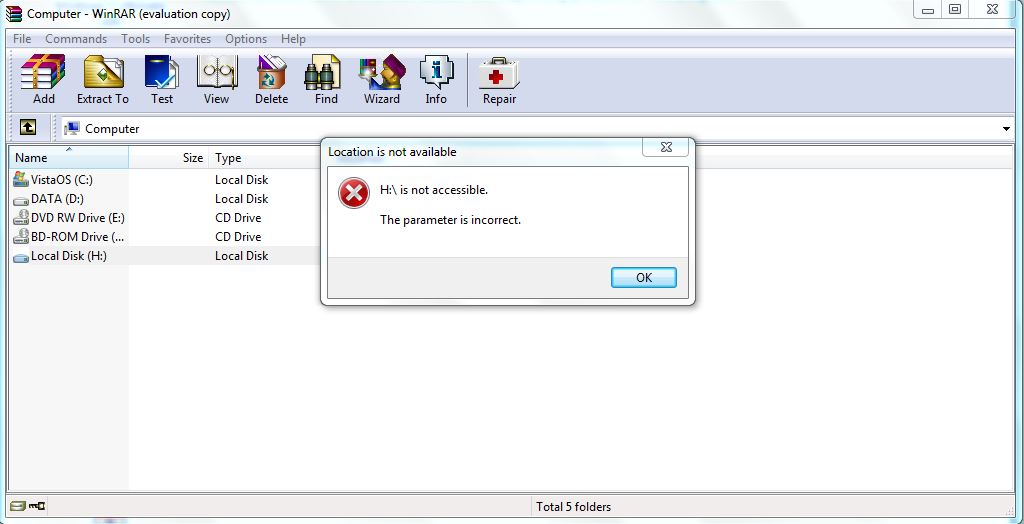
Nope. I can't access it. Like windows explorer the loading thing happens, nothing more. If I unplug it, it says "H:\ is not accessible. The parameter is incorrect."

w7ogwaQ.jpg


When I click Ok, this message shows up:

ohelpmO.jpg


And, I don't think that it's a shurtcut virus because the other guy's hdd type on the other thread is "Shortcut", while mine is "Local Disk."

Hi, Erchamion...

Do you experience the same issues on the other PC you checked on?

If you get access to your files on your PC or on another, I recommend you to do a backup and format the drive.

Hope this helps

Yes, I experience the same issues on the other PC. But I didn't try the solutions that I'd tried on my pc on it.

I can't access the files from anywhere. These times "Format the disk" message shows up frequently, so If I could have backed up the files, I would have tried it, then formatted the disk.

I'll try those links you've provided. Let's see if there will be anything.
 

My Computer My Computer

Computer type
PC/Desktop
Computer Manufacturer/Model Number
Asus
OS
Windows 7 Ultimate x86
CPU
Intel Core 2 Duo T9550

Hi again.

Sorry for taking long. I was trying different options to try the solutions you've provided, but couldn't accomplish.

*Reinstalling usb drives came with same results as before. No changes.

*chkdsk command can't run if hdd is plugged-in. Actually even computer doesn't shut down or windows doesn't start if it's plugged-in. I don't understand this, it corruptsprograms running.

*And for Data Lifeguard program, we need to reboot the computer in order to use it. But, if the hdd is plugged-in, it doesn't reboot, so I need to remove it then select other removable disk in boot options. After that, command prompt opens, I plug the hdd in but it can't be detect by Data Lifeguard.
 

My Computer My Computer

Computer type
PC/Desktop
Computer Manufacturer/Model Number
Asus
OS
Windows 7 Ultimate x86
CPU
Intel Core 2 Duo T9550
Hi again,


It is quite unfortunate none of my suggestions helped. I had so much faith in the chkdsk command. Check the latest firmware update from the link I leave below. Apart from that, I fear you don't have many options left. In order to save your data, you should contact a Data Recovery Company. I leave you a link below.
If I were you, I would try one more thing. I have seen many users having luck using Linux live CD, or Ubuntu to make their devices accessible enough to save their data. Sadly, I can not provide you with some Linux guidance, but I can assure you that there is a success chance.
http://support.wdc.com/recovery/index.asp?lang=en – WD Data Recovery Partners
WD Support / Downloads / My Passport - Western Digital My Passport download section

Good luck! I hope you will find a solution
 

My Computer My Computer

Computer type
PC/Desktop
OS
Windows 7
Hi there

If you have a powered USB hub try connecting it to that -- sometimes these drives need a little more power than the computer port alone can supply -- especially on a Laptop.

As far as Linux is concerned download any decent LIVE distro - choose the KDE version since it's almost "More Windows like than Windows" - so you might not have any trouble using it.

http://software.opensuse.org/131/en

Another idea - download the bootable copy of GPARTED - fire it up and see if it recognizes the USB HDD. It has a decent GUI so you shouldn't have any trouble in using it either.

http://gparted.org/

Cheers
jimbo
 

My Computer My Computer

Computer type
PC/Desktop
Computer Manufacturer/Model Number
Custom built, several laptops HP/ASUS
OS
Linux CENTOS 7 / various Windows OS'es and servers
CPU
Intel i7 Intel i5
Memory
8GB, 16GB
Graphics Card(s)
On Motherboard
Sound Card
Realtek HD audio
Monitor(s) Displays
Apple Cinema display, Samsung LCD
Screen Resolution
1920 X 1080
Hard Drives
4 X 1TB SATA
Mouse
Toshiba wireless laser
Internet Speed
> 20MB up
Hi, just a novice here, but something that worked for me a few years ago when an external usb drive appeared to fail. I removed it from the original case and put it in a new (USB2) case, which I got from a computer store for about $20. It's been working normally ever since. From what I've read, the "failure" of external usb drives is not uncommonly actually a failure of the enclosure.

Just a thought as a possibility before going to an expensive data retrieval service.
 

My Computer My Computer

Computer type
PC/Desktop
Computer Manufacturer/Model Number
Dell XPS 9000/435T
OS
Win 7 Pro x 64
CPU
Intell Core i7 920 @2.67GHz
Motherboard
Board: DELL Inc. 0X501H A02
Memory
8184 Megabytes Usable Installed Memory
Graphics Card(s)
ATI Radeon HD 5700 Series [Display adapter]
Hard Drives
ST1000DM003-1CH162 [Hard drive] (1000.20 GB) -- drive 0, s/n S1D7JSM1, SMART Status: Healthy
ST31000528AS [Hard drive] (1000.20 GB) -- drive 1, s/n 6VPAZ1H2, rev CC3E, SMART Status: Healthy
Antivirus
AVG
Browser
Firefox
Generally speaking, removing a drive from the enclosure and connecting it to the SATA cable of the PC is possible, but, talking about WD My Passport, you should know that the drive is hardware encrypted and will not work away from the enclosure. In addition, removing the drive will void the warranty.


http://wdc.custhelp.com/app/answers/detail/a_id/916/ - What will void the warranty of a WD drive.
 

My Computer My Computer

Computer type
PC/Desktop
OS
Windows 7
Back
Top