Solved External HDD not recognised by comouter

Sanda

New member
Local time
11:15 PM
Messages
9
Hi,
I just had an upgrade to my computer. I had a HDD installed replacing 3 older drives. I need some of the information on the older drives so instead of purchasing 3 sata enclosures I purchased a docking station. But my problem is the computer does not see any of the drives in the docking station. I'm not sure what I should do next. Should I just go out ans spend more one on drive enclosures or is there another way around it?
Thanks
Sandra
 

My Computer

Computer type
PC/Desktop
Computer Manufacturer/Model Number
I had it built
OS
window 7 64bit sp1
CPU
Intel(R) Core(TM) i5-3570 CPU @ 3.40GHz
Motherboard
ASRock Z77 Pro4-M
Memory
16.00 GB
Graphics Card(s)
(1) Intel(R) HD Graphics (2) NVIDIA GeForce GTX 660
Sound Card
(1) NVIDIA Virtual Audio Device (Wave Extensible) (WDM) (2
Monitor(s) Displays
Samsung W2252TQ
Hard Drives
(1) Samsung SSD 840 EVO 250G (2) TOSHIBA DT01ACA200 ATA Device (3) WDC WD20EARX-00PASB0 (4) Generic Storage Device USB Device
PSU
500w
Keyboard
Microsoft wireless
Mouse
Logitec Performance MX
Antivirus
Trend Micro Titanium Maxium Security
Browser
Firefox
Other Info
Intuos 2 graphics tablet
Right click on computer and select manage, in the left column select disk management, look in the lower portion of the window. Do you see a drive with no drive letter assigned? If so, right click the drive, select change drive letter or path, next window select add, and add a drive letter. If it is a new drive, there should be nothing on it. it may want to 'initialize' it and format it. If it does and there is no data on it, do so, select new simple volume, and when finished it will be usable.

When you first get to Disk Management, you may very well be met with a pop up window that says a drive needs to be initialized, if that happens, click OK and follow the steps of creating a New Simple Volume.
 

My Computers

System One System Two

  • Computer type
    PC/Desktop
    Computer Manufacturer/Model Number
    ALWAYS UNDER CONSTRUCTION
    OS
    Windows 11 Pro
    CPU
    Ryzen 9 5900X
    Motherboard
    Asus X570 Crosshair Viii Hero
    Memory
    32GB G Skill DDR4-3600
    Graphics Card(s)
    EVGA RTX 3080 FTW 3 Ultra
    Sound Card
    On Board/Sennheiser PC37X Headset
    Monitor(s) Displays
    3 X Asus 27"
    Screen Resolution
    2560x1440
    Hard Drives
    2 X 1 TB NVME drives
    PSU
    EVGA 850
    Case
    Phanteks Eclipse P400A
    Cooling
    EVGA 280 AIO
    Keyboard
    Logitech G510s/ Logitech G13
    Mouse
    Logitech G502
    Internet Speed
    24/1
    Antivirus
    ESET/MBAM Pro/SAS Pro
    Browser
    Chrome/ Firefox/ Edge
  • Computer type
    Laptop
    System Manufacturer/Model Number
    Dell 16 Plus
    OS
    Windows 11 Pro
    CPU
    Intel Ultra 9 288V
    Memory
    32 GB LPDDR5X 8533
    Monitor(s) Displays
    16" Mini-LED HDR600 Touch 90 Hz
    Screen Resolution
    2560X1600
    Hard Drives
    1 TB NVME
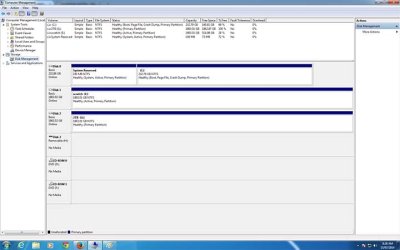
The drive is visible under disk management and has a drive letter but there is no blue like the others for an active partition and is says "no media"
 

My Computer

Computer type
PC/Desktop
Computer Manufacturer/Model Number
I had it built
OS
window 7 64bit sp1
CPU
Intel(R) Core(TM) i5-3570 CPU @ 3.40GHz
Motherboard
ASRock Z77 Pro4-M
Memory
16.00 GB
Graphics Card(s)
(1) Intel(R) HD Graphics (2) NVIDIA GeForce GTX 660
Sound Card
(1) NVIDIA Virtual Audio Device (Wave Extensible) (WDM) (2
Monitor(s) Displays
Samsung W2252TQ
Hard Drives
(1) Samsung SSD 840 EVO 250G (2) TOSHIBA DT01ACA200 ATA Device (3) WDC WD20EARX-00PASB0 (4) Generic Storage Device USB Device
PSU
500w
Keyboard
Microsoft wireless
Mouse
Logitec Performance MX
Antivirus
Trend Micro Titanium Maxium Security
Browser
Firefox
Other Info
Intuos 2 graphics tablet

My Computers

System One System Two

  • Computer type
    PC/Desktop
    Computer Manufacturer/Model Number
    ALWAYS UNDER CONSTRUCTION
    OS
    Windows 11 Pro
    CPU
    Ryzen 9 5900X
    Motherboard
    Asus X570 Crosshair Viii Hero
    Memory
    32GB G Skill DDR4-3600
    Graphics Card(s)
    EVGA RTX 3080 FTW 3 Ultra
    Sound Card
    On Board/Sennheiser PC37X Headset
    Monitor(s) Displays
    3 X Asus 27"
    Screen Resolution
    2560x1440
    Hard Drives
    2 X 1 TB NVME drives
    PSU
    EVGA 850
    Case
    Phanteks Eclipse P400A
    Cooling
    EVGA 280 AIO
    Keyboard
    Logitech G510s/ Logitech G13
    Mouse
    Logitech G502
    Internet Speed
    24/1
    Antivirus
    ESET/MBAM Pro/SAS Pro
    Browser
    Chrome/ Firefox/ Edge
  • Computer type
    Laptop
    System Manufacturer/Model Number
    Dell 16 Plus
    OS
    Windows 11 Pro
    CPU
    Intel Ultra 9 288V
    Memory
    32 GB LPDDR5X 8533
    Monitor(s) Displays
    16" Mini-LED HDR600 Touch 90 Hz
    Screen Resolution
    2560X1600
    Hard Drives
    1 TB NVME
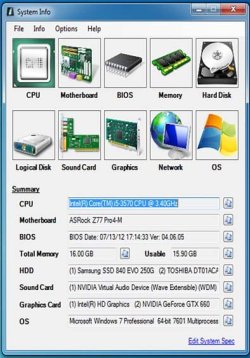
I hope this image is large enough for you to see. I've also attached a system specs if you need them
Please excuse the time it takes for me to reply I'm, half way around the world in Australia and our time zones clash.
Thank you
Sandra
 

Attachments

  • Untitled-2.jpg
    Untitled-2.jpg
    44.5 KB · Views: 9
  • sys.jpg
    sys.jpg
    68.3 KB · Views: 21

My Computer

Computer type
PC/Desktop
Computer Manufacturer/Model Number
I had it built
OS
window 7 64bit sp1
CPU
Intel(R) Core(TM) i5-3570 CPU @ 3.40GHz
Motherboard
ASRock Z77 Pro4-M
Memory
16.00 GB
Graphics Card(s)
(1) Intel(R) HD Graphics (2) NVIDIA GeForce GTX 660
Sound Card
(1) NVIDIA Virtual Audio Device (Wave Extensible) (WDM) (2
Monitor(s) Displays
Samsung W2252TQ
Hard Drives
(1) Samsung SSD 840 EVO 250G (2) TOSHIBA DT01ACA200 ATA Device (3) WDC WD20EARX-00PASB0 (4) Generic Storage Device USB Device
PSU
500w
Keyboard
Microsoft wireless
Mouse
Logitec Performance MX
Antivirus
Trend Micro Titanium Maxium Security
Browser
Firefox
Other Info
Intuos 2 graphics tablet
Sanda, don't worry about the time differences, we are used to it. In the bottom left of your post, please click 'My System Specs' the system specs shown there do not match what you are showing, there will be a link there to update your system specs. Please fill that out to your current system and be sure to click save at the bottom of the page.

I assume you are having problems with drive 3. Right click it and if the option is there select new simple volume. Follow the prompts. If that option is not available, please tell us what options you do have. Assuming the disk is empty, if you have the option select format, you will want NTFS as a file system.

Also, unless it holds another operating system, Disk 1 should not be marked Active.
 

My Computers

System One System Two

  • Computer type
    PC/Desktop
    Computer Manufacturer/Model Number
    ALWAYS UNDER CONSTRUCTION
    OS
    Windows 11 Pro
    CPU
    Ryzen 9 5900X
    Motherboard
    Asus X570 Crosshair Viii Hero
    Memory
    32GB G Skill DDR4-3600
    Graphics Card(s)
    EVGA RTX 3080 FTW 3 Ultra
    Sound Card
    On Board/Sennheiser PC37X Headset
    Monitor(s) Displays
    3 X Asus 27"
    Screen Resolution
    2560x1440
    Hard Drives
    2 X 1 TB NVME drives
    PSU
    EVGA 850
    Case
    Phanteks Eclipse P400A
    Cooling
    EVGA 280 AIO
    Keyboard
    Logitech G510s/ Logitech G13
    Mouse
    Logitech G502
    Internet Speed
    24/1
    Antivirus
    ESET/MBAM Pro/SAS Pro
    Browser
    Chrome/ Firefox/ Edge
  • Computer type
    Laptop
    System Manufacturer/Model Number
    Dell 16 Plus
    OS
    Windows 11 Pro
    CPU
    Intel Ultra 9 288V
    Memory
    32 GB LPDDR5X 8533
    Monitor(s) Displays
    16" Mini-LED HDR600 Touch 90 Hz
    Screen Resolution
    2560X1600
    Hard Drives
    1 TB NVME
Yes it's drive 3 I need to get to. It should not be empty it should have a lot of data on it, at least I hope so.
I will do the updates to the system specs
 

My Computer

Computer type
PC/Desktop
Computer Manufacturer/Model Number
I had it built
OS
window 7 64bit sp1
CPU
Intel(R) Core(TM) i5-3570 CPU @ 3.40GHz
Motherboard
ASRock Z77 Pro4-M
Memory
16.00 GB
Graphics Card(s)
(1) Intel(R) HD Graphics (2) NVIDIA GeForce GTX 660
Sound Card
(1) NVIDIA Virtual Audio Device (Wave Extensible) (WDM) (2
Monitor(s) Displays
Samsung W2252TQ
Hard Drives
(1) Samsung SSD 840 EVO 250G (2) TOSHIBA DT01ACA200 ATA Device (3) WDC WD20EARX-00PASB0 (4) Generic Storage Device USB Device
PSU
500w
Keyboard
Microsoft wireless
Mouse
Logitec Performance MX
Antivirus
Trend Micro Titanium Maxium Security
Browser
Firefox
Other Info
Intuos 2 graphics tablet
Have you tried mounting the drive inside the computer? What type of dock is it? USB esata?
 

My Computers

System One System Two

  • Computer type
    PC/Desktop
    Computer Manufacturer/Model Number
    ALWAYS UNDER CONSTRUCTION
    OS
    Windows 11 Pro
    CPU
    Ryzen 9 5900X
    Motherboard
    Asus X570 Crosshair Viii Hero
    Memory
    32GB G Skill DDR4-3600
    Graphics Card(s)
    EVGA RTX 3080 FTW 3 Ultra
    Sound Card
    On Board/Sennheiser PC37X Headset
    Monitor(s) Displays
    3 X Asus 27"
    Screen Resolution
    2560x1440
    Hard Drives
    2 X 1 TB NVME drives
    PSU
    EVGA 850
    Case
    Phanteks Eclipse P400A
    Cooling
    EVGA 280 AIO
    Keyboard
    Logitech G510s/ Logitech G13
    Mouse
    Logitech G502
    Internet Speed
    24/1
    Antivirus
    ESET/MBAM Pro/SAS Pro
    Browser
    Chrome/ Firefox/ Edge
  • Computer type
    Laptop
    System Manufacturer/Model Number
    Dell 16 Plus
    OS
    Windows 11 Pro
    CPU
    Intel Ultra 9 288V
    Memory
    32 GB LPDDR5X 8533
    Monitor(s) Displays
    16" Mini-LED HDR600 Touch 90 Hz
    Screen Resolution
    2560X1600
    Hard Drives
    1 TB NVME
that was something I was thinking of. I will try that tonight and let you know what happens. It may be the docking station which is not working properly as it's brand new and I've never used it before so I don't know that it is working as it should.
I'll let you know what happens when I try the drive inside.
Thanks for your help
 

My Computer

Computer type
PC/Desktop
Computer Manufacturer/Model Number
I had it built
OS
window 7 64bit sp1
CPU
Intel(R) Core(TM) i5-3570 CPU @ 3.40GHz
Motherboard
ASRock Z77 Pro4-M
Memory
16.00 GB
Graphics Card(s)
(1) Intel(R) HD Graphics (2) NVIDIA GeForce GTX 660
Sound Card
(1) NVIDIA Virtual Audio Device (Wave Extensible) (WDM) (2
Monitor(s) Displays
Samsung W2252TQ
Hard Drives
(1) Samsung SSD 840 EVO 250G (2) TOSHIBA DT01ACA200 ATA Device (3) WDC WD20EARX-00PASB0 (4) Generic Storage Device USB Device
PSU
500w
Keyboard
Microsoft wireless
Mouse
Logitec Performance MX
Antivirus
Trend Micro Titanium Maxium Security
Browser
Firefox
Other Info
Intuos 2 graphics tablet
I hope it works out well for you. If it's the docking station, take it back to where you bought it and tell them it doesn't work and you want a refund or a replacement that does work.
 

My Computers

System One System Two

  • Computer type
    PC/Desktop
    Computer Manufacturer/Model Number
    ALWAYS UNDER CONSTRUCTION
    OS
    Windows 11 Pro
    CPU
    Ryzen 9 5900X
    Motherboard
    Asus X570 Crosshair Viii Hero
    Memory
    32GB G Skill DDR4-3600
    Graphics Card(s)
    EVGA RTX 3080 FTW 3 Ultra
    Sound Card
    On Board/Sennheiser PC37X Headset
    Monitor(s) Displays
    3 X Asus 27"
    Screen Resolution
    2560x1440
    Hard Drives
    2 X 1 TB NVME drives
    PSU
    EVGA 850
    Case
    Phanteks Eclipse P400A
    Cooling
    EVGA 280 AIO
    Keyboard
    Logitech G510s/ Logitech G13
    Mouse
    Logitech G502
    Internet Speed
    24/1
    Antivirus
    ESET/MBAM Pro/SAS Pro
    Browser
    Chrome/ Firefox/ Edge
  • Computer type
    Laptop
    System Manufacturer/Model Number
    Dell 16 Plus
    OS
    Windows 11 Pro
    CPU
    Intel Ultra 9 288V
    Memory
    32 GB LPDDR5X 8533
    Monitor(s) Displays
    16" Mini-LED HDR600 Touch 90 Hz
    Screen Resolution
    2560X1600
    Hard Drives
    1 TB NVME
Just hooked up the drive internally and it works perfectly. I can now get all the information I need off it. I will test the docking station on a friends computer and if there is still no happiness I will return it.

When I unplugged one of the drives so that I could put the old one in one of the plugs was broken and fell apart in in fingers. Would I just look at replacing that cable with another?
 

My Computer

Computer type
PC/Desktop
Computer Manufacturer/Model Number
I had it built
OS
window 7 64bit sp1
CPU
Intel(R) Core(TM) i5-3570 CPU @ 3.40GHz
Motherboard
ASRock Z77 Pro4-M
Memory
16.00 GB
Graphics Card(s)
(1) Intel(R) HD Graphics (2) NVIDIA GeForce GTX 660
Sound Card
(1) NVIDIA Virtual Audio Device (Wave Extensible) (WDM) (2
Monitor(s) Displays
Samsung W2252TQ
Hard Drives
(1) Samsung SSD 840 EVO 250G (2) TOSHIBA DT01ACA200 ATA Device (3) WDC WD20EARX-00PASB0 (4) Generic Storage Device USB Device
PSU
500w
Keyboard
Microsoft wireless
Mouse
Logitec Performance MX
Antivirus
Trend Micro Titanium Maxium Security
Browser
Firefox
Other Info
Intuos 2 graphics tablet
That's good news that you can get your data from that drive. As for replacing the cable, that's a judgment call, I guess. The cable may have been what was wrong all along, but then again, if you paid for it to work, it should work and may be the tip of the iceberg, as they say. What brand is it?
 

My Computers

System One System Two

  • Computer type
    PC/Desktop
    Computer Manufacturer/Model Number
    ALWAYS UNDER CONSTRUCTION
    OS
    Windows 11 Pro
    CPU
    Ryzen 9 5900X
    Motherboard
    Asus X570 Crosshair Viii Hero
    Memory
    32GB G Skill DDR4-3600
    Graphics Card(s)
    EVGA RTX 3080 FTW 3 Ultra
    Sound Card
    On Board/Sennheiser PC37X Headset
    Monitor(s) Displays
    3 X Asus 27"
    Screen Resolution
    2560x1440
    Hard Drives
    2 X 1 TB NVME drives
    PSU
    EVGA 850
    Case
    Phanteks Eclipse P400A
    Cooling
    EVGA 280 AIO
    Keyboard
    Logitech G510s/ Logitech G13
    Mouse
    Logitech G502
    Internet Speed
    24/1
    Antivirus
    ESET/MBAM Pro/SAS Pro
    Browser
    Chrome/ Firefox/ Edge
  • Computer type
    Laptop
    System Manufacturer/Model Number
    Dell 16 Plus
    OS
    Windows 11 Pro
    CPU
    Intel Ultra 9 288V
    Memory
    32 GB LPDDR5X 8533
    Monitor(s) Displays
    16" Mini-LED HDR600 Touch 90 Hz
    Screen Resolution
    2560X1600
    Hard Drives
    1 TB NVME
The computer is a purpose built computer for my work, I do photo restoration. I have taken what I need off the old drive and changed the cable I found that I had an adapter cable for the sata drive and all is well now.
I will test that docking station on a friend's computer over the weekend and that will decide if I need to take it back. Although I have been told that the docking station may have an issue with the WD drive. I am surprised by that and will try a different brand drive in it at my friend's place on the weekend.
Thank you for your help it is much appreciated.
Sandra
 

My Computer

Computer type
PC/Desktop
Computer Manufacturer/Model Number
I had it built
OS
window 7 64bit sp1
CPU
Intel(R) Core(TM) i5-3570 CPU @ 3.40GHz
Motherboard
ASRock Z77 Pro4-M
Memory
16.00 GB
Graphics Card(s)
(1) Intel(R) HD Graphics (2) NVIDIA GeForce GTX 660
Sound Card
(1) NVIDIA Virtual Audio Device (Wave Extensible) (WDM) (2
Monitor(s) Displays
Samsung W2252TQ
Hard Drives
(1) Samsung SSD 840 EVO 250G (2) TOSHIBA DT01ACA200 ATA Device (3) WDC WD20EARX-00PASB0 (4) Generic Storage Device USB Device
PSU
500w
Keyboard
Microsoft wireless
Mouse
Logitec Performance MX
Antivirus
Trend Micro Titanium Maxium Security
Browser
Firefox
Other Info
Intuos 2 graphics tablet
Please take note.
If the cable connector crumbled in your hand, that could be a sign that it overheated.
Does that connector look burnt in any fashion or smell like it's been burnt.

From post #11

When I unplugged one of the drives so that I could put the old one in one of the plugs was broken and fell apart in in fingers. Would I just look at replacing that cable with another?
 

My Computer

Computer type
PC/Desktop
Computer Manufacturer/Model Number
Home made Desktop
OS
Windows 10 Pro. 64/ version 1709 Windows 7 Pro/64
CPU
Intel i7-6800K @ 4.3
Motherboard
ASUS X-99 Deluxe II
Memory
Corsair Platinum 16 gig @2400
Graphics Card(s)
EVGA GTX 1070 OC
Monitor(s) Displays
Asus 27" LED LCD/VE278Q
Screen Resolution
1920-1080 or 1280-720 HDMI
Hard Drives
INTEL SSD 730-240 Gb Sata 3.0/
PSU
EVGA Platium 1200W
Case
Phanteks Luxe Tempered Glass 8 fans/ one radiator
Cooling
XSPC/ Water Cooled CPU
Keyboard
Das 4 Professional
Mouse
Logitech M705/MX Anywhere 2-S
Internet Speed
100 mbits
Antivirus
Microsoft Security Essentials/ Malwarebytes Premium 3.0/ SAS
Browser
I.E. 11 default/Firefox/ ISP Time Warner Cable/Spectrum
Other Info
LG BluRay Burner/
Sound system-KLipsch-THX/
Icy Dock ssd Hot Swap bays.
You're very welcome. We were glad to be able to help. If you feel this has solved your problem, please mark the thread as solved.
 

My Computers

System One System Two

  • Computer type
    PC/Desktop
    Computer Manufacturer/Model Number
    ALWAYS UNDER CONSTRUCTION
    OS
    Windows 11 Pro
    CPU
    Ryzen 9 5900X
    Motherboard
    Asus X570 Crosshair Viii Hero
    Memory
    32GB G Skill DDR4-3600
    Graphics Card(s)
    EVGA RTX 3080 FTW 3 Ultra
    Sound Card
    On Board/Sennheiser PC37X Headset
    Monitor(s) Displays
    3 X Asus 27"
    Screen Resolution
    2560x1440
    Hard Drives
    2 X 1 TB NVME drives
    PSU
    EVGA 850
    Case
    Phanteks Eclipse P400A
    Cooling
    EVGA 280 AIO
    Keyboard
    Logitech G510s/ Logitech G13
    Mouse
    Logitech G502
    Internet Speed
    24/1
    Antivirus
    ESET/MBAM Pro/SAS Pro
    Browser
    Chrome/ Firefox/ Edge
  • Computer type
    Laptop
    System Manufacturer/Model Number
    Dell 16 Plus
    OS
    Windows 11 Pro
    CPU
    Intel Ultra 9 288V
    Memory
    32 GB LPDDR5X 8533
    Monitor(s) Displays
    16" Mini-LED HDR600 Touch 90 Hz
    Screen Resolution
    2560X1600
    Hard Drives
    1 TB NVME
Please take note.
If the cable connector crumbled in your hand, that could be a sign that it overheated.
Does that connector look burnt in any fashion or smell like it's been burnt.

From post #11

When I unplugged one of the drives so that I could put the old one in one of the plugs was broken and fell apart in in fingers. Would I just look at replacing that cable with another?


It was more like the plug had been broken off rather than anything else. I'm thinking the computer guy tried to force it the wrong way up or something. Thank you for you advice.
Sandra
 

My Computer

Computer type
PC/Desktop
Computer Manufacturer/Model Number
I had it built
OS
window 7 64bit sp1
CPU
Intel(R) Core(TM) i5-3570 CPU @ 3.40GHz
Motherboard
ASRock Z77 Pro4-M
Memory
16.00 GB
Graphics Card(s)
(1) Intel(R) HD Graphics (2) NVIDIA GeForce GTX 660
Sound Card
(1) NVIDIA Virtual Audio Device (Wave Extensible) (WDM) (2
Monitor(s) Displays
Samsung W2252TQ
Hard Drives
(1) Samsung SSD 840 EVO 250G (2) TOSHIBA DT01ACA200 ATA Device (3) WDC WD20EARX-00PASB0 (4) Generic Storage Device USB Device
PSU
500w
Keyboard
Microsoft wireless
Mouse
Logitec Performance MX
Antivirus
Trend Micro Titanium Maxium Security
Browser
Firefox
Other Info
Intuos 2 graphics tablet
Back
Top