Solved External HDD Not Working - Doesn't Open/Load At All

FoLieADeUx

New member
Local time
4:02 PM
Messages
3
Good day!

I have 2TB WD Elements External Hard Drive.
I was using it (playing a visual novel) then after using it I safely removed the device.

Later that day, I connected the device to my laptop and I can't access my HDD.
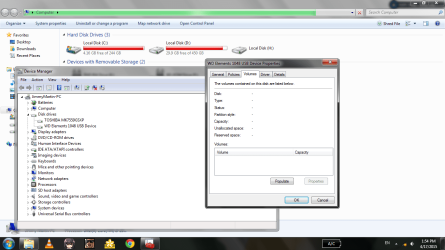
If I open the device through Windows Explorer, it'll only load but doesn't actually open the HDD.
Screenshots are provided at the attachments.

If possible, I would like to return my HDD to normal and working state.
If not, I would like to know how to recover files in the HDD.

Thank you for your response and time.


- A certain user whose part of his life is in the HDD
 

Attachments
  • Screenshot_4.2.png
    Screenshot_4.2.png
    62.2 KB · Views: 9
  • Screenshot_4.3.png
    Screenshot_4.3.png
    68.1 KB · Views: 5

My Computer

Computer type
Laptop
Computer Manufacturer/Model Number
Acer
OS
Windows 7 Ultimate 32bit
First off you are not going to get much done with Windows 7 with the drive/partition being that full.

Windows 7 want 10 to 15% free space to work properly. Windows 7 needs some elbow room to work properly.

In the picture above see the little box which states Populate; tick on it and wait.
 

My Computer

Computer type
PC/Desktop
Computer Manufacturer/Model Number
Home made Desktop
OS
Windows 10 Pro. 64/ version 1709 Windows 7 Pro/64
CPU
Intel i7-6800K @ 4.3
Motherboard
ASUS X-99 Deluxe II
Memory
Corsair Platinum 16 gig @2400
Graphics Card(s)
EVGA GTX 1070 OC
Monitor(s) Displays
Asus 27" LED LCD/VE278Q
Screen Resolution
1920-1080 or 1280-720 HDMI
Hard Drives
INTEL SSD 730-240 Gb Sata 3.0/
PSU
EVGA Platium 1200W
Case
Phanteks Luxe Tempered Glass 8 fans/ one radiator
Cooling
XSPC/ Water Cooled CPU
Keyboard
Das 4 Professional
Mouse
Logitech M705/MX Anywhere 2-S
Internet Speed
100 mbits
Antivirus
Microsoft Security Essentials/ Malwarebytes Premium 3.0/ SAS
Browser
I.E. 11 default/Firefox/ ISP Time Warner Cable/Spectrum
Other Info
LG BluRay Burner/
Sound system-KLipsch-THX/
Icy Dock ssd Hot Swap bays.
Try to access your cranky external drive with a Linux distro bootable from a pendrive and check whether you can see the drive and data.

Have an empty formatted drive ready to connect so that you can instantly copy your data if seen. This is absolutely essential. If you are not ready defer doing this till you get an empty drive.

While I don't want to scare you, once a drive has developed a fault - exactly what we still do not know - it can die any moment. So you should be ready to grab the data at the first instance. For this reason, I am not even recommending running Datalifeguard Diagnostics for DOS for checking the integrity of your drive which may accelerate its end. So until you are ready, plug out your faulty drive and keep it aside without taxing it.

Download lupu-528.005.iso (132.6 MB) from http://puppylinux.org/main/Long-Term-Supported%20Puppy.htm#lucidpuppy

Create your bootable Lucid Puppy pendrive with this ISO using Rufus 2.1 (788KB) https://rufus.akeo.ie/ (All data on the pendrive will be lost when rufus formats the pendrive before writing the ISO and so backup any data on the pendrive elsewhere before running Rufus)

Boot your PC with this pendrive using the onetime boot menu after plugging in your faulty drive and the empty drive . Check whether that faulty drive is shown and you can access it and see your data. If seen copy all data to the empty drive.

Guide on how to use Lucid Puppy :Go to the topic Recovering files from the non-bootable Internal Drive: (In your case it will be your inaccessible external drive) in my thread
http://www.sevenforums.com/software/198909-lucid-puppy-way-recover-files-non-bootable-computer.html

NOTE: Whatever is stated before this particular heading explains how I made the drive inaccessible, created my Lucid puppy to try it. Your drive is already inaccessible and you are going to create your bootable pendrive with Rufus.. So give it a pass and go direct to the topic mentioned in bold letters.)
 

My Computer

OS
Windows 7 Home Premium 32 bit
Hello FoLieADeUx and I am sorry you are having this problem!

Jumanji has given you a very good advice and I do suggest you follow it. Through Linux you have a chance to see the data on your drive.

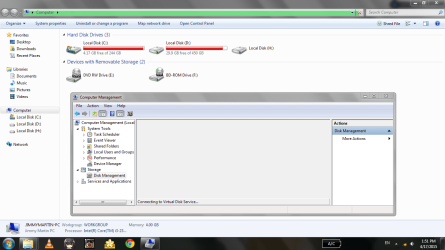
What does it say in your Disk Management, how is the drive presented? Could you post a screenshot from there as well?

If you aren't able to pull your data off the drive through jumanji's method, you may have a couple of option left that are about data recovery. First one is to use a Data Recovery company, I can post a list of WD's partners, the other is to try and recover the data yourself using a data recovery program. Still, the second option is very risky and even by trying you could unintentionally damage the drive more and make it impossible even for professionals to recover your information.

Just in case, this is the list WD's Data Recovery partners:

Support Answers

Good luck!

CK_WD
 

My Computer

Computer type
PC/Desktop
OS
Windows 7 Home Premium x64
CKWD said:
Jumanji has given you a very good advice and I do suggest you follow it. Through Linux you have a chance to see the data on your drive.

First of all, sorry for the late reply...

Yeah, I'm going to try Jumanji's method soon because I'm still finding to borrow either an external drive from someone else or other person's computer to recover files in my external drive (as you can see in my screenshots my drives are nearly full)...

CKWD said:
What does it say in your Disk Management, how is the drive presented? Could you post a screenshot from there as well?

http://www.sevenforums.com/attachme...rking-doesnt-open-load-all-screenshot_4.2.png

As you can see, the disk management only states "Connecting to Virtual Disk Service" without actually loading any of the hard drives...

CKWD said:
If you aren't able to pull your data off the drive through jumanji's method, you may have a couple of option left that are about data recovery. First one is to use a Data Recovery company, I can post a list of WD's partners, the other is to try and recover the data yourself using a data recovery program. Still, the second option is very risky and even by trying you could unintentionally damage the drive more and make it impossible even for professionals to recover your information.

Just in case, this is the list WD's Data Recovery partners:

Support Answers

Good luck!

CK_WD

Thanks! I'm to use that as the Plan B...
 

My Computer

Computer type
Laptop
Computer Manufacturer/Model Number
Acer
OS
Windows 7 Ultimate 32bit
Hey, you're welcome!

Yeah, Disk Management seems to be freezing on loading drives. I suppose this happens only when the problematic drive is connected, which would mean it's malfunctioning the system somehow.

So basically, there aren't any other options than the ones already presented. So good luck!

CK_WD
 

My Computer

Computer type
PC/Desktop
OS
Windows 7 Home Premium x64
Hi FoLieADeUx,

From your rep I understand that you managed to access your drive.Good. We will be happier if we know how you did it. Is it through the Lucid Puppy way recommended or you did it in some other way. That should help others looking for a solution to such problems.

Till such time, I am not recommending this thread to be marked as solved.:)

( Oh! it is already marked as solved.:rolleyes: )
 

My Computer

OS
Windows 7 Home Premium 32 bit
@jumanji

I used the Lucid Puppy method to access the faulty external HDD and I'm currently recovering files from there...

The next problem is, how to reformat the faulty external HDD? Do you have any idea/s on how to do that?
 

My Computer

Computer type
Laptop
Computer Manufacturer/Model Number
Acer
OS
Windows 7 Ultimate 32bit
Most probably your drive has developed many bad sectors.

Once you have made sure that you had recovered all data - make sure - you can install and run WD Data Lifeguard Diagnostics for Windows. Do the Quick Test and the Extended Test. If the tests pass, write zeros to all sectors using the same utility and then format it in Windows

((If the number of bad sectors found is large I would advise not to use the drive any further even if the bad sectors are repaired and the test gives a Pass. It is likely to fail sooner than later. You can however use the drive for storing non-critical data that you may not mind losing if and when it fails.In such an event you have run this utility periodically and keep monitoring its health.)

NOTE: If it was the bad sectors which was causing the problem, some of the recovered data that was in those bad sectors will still be corrupt. So check the recovered data with a hawk's eye.If all data is fine pat yourself. You are lucky.:)

CAUTION: Always make sure that you are running the utility on the correct external drive. Plug out all other external drives to ensure that you do not accidentally run it on a wrong drive.
 

My Computer

OS
Windows 7 Home Premium 32 bit
Back
Top