External HDD showing full but it is impossible

Do it slowly at your leisure and calmly. TestDisk is absolutely safe if you scrupulously follow my instructions and do not click on any other command without knowing what it does. So do not worry about it. If in doubt, stop, post the screenshot for clarification and quit TestDisk to continue after obtaining the clarification.I shall be peeping into SevenForums every now and then and will catch you.

Regarding Cloning: In all cases where it is evident that the HDD has developed bad sectors and deteriorating further we advise to stop using the HDD and clone the drive.It is not so in your case.

Further this WD external drive uses hardware encryption by the inside electronics. The data in the HDD is encrypted. Cloning this encrypted data is absolutely useless. Cloning in your case is ruled out.
 

My Computer My Computer

At a glance

Windows 7 Home Premium 32 bit
OS
Windows 7 Home Premium 32 bit
Sorry for the long delay jumanji, I have too much work at the moment.
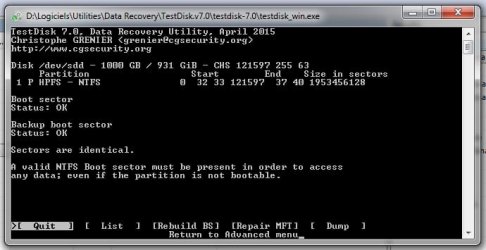
Nonetheless, I finally managed to do as you asked. Here's the screenshot you wanted.
I will not do anything more until I receive your next instruction.
 

Attachments

  • TDisk.jpg
    TDisk.jpg
    32.1 KB · Views: 9

My Computer My Computer

At a glance

Windows 7 Ultimate x64i7 Q8408 GB2 x ATI Radeon H5780
Computer Manufacturer/Model Number
Alienware M17x R2
OS
Windows 7 Ultimate x64
CPU
i7 Q840
Motherboard
M17x
Memory
8 GB
Graphics Card(s)
2 x ATI Radeon H5780
Sound Card
ATI HD Audio
Hard Drives
2 x 500 GB in RAID 0
OK, your bootSectors are OK.

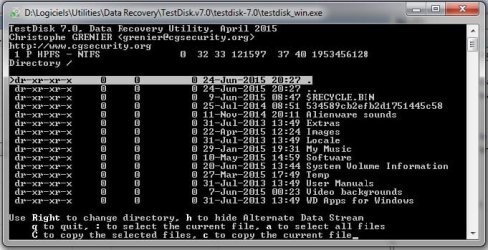
Now move to List in that Window and ENTER.

Check whether you can see the files.
 

My Computer My Computer

At a glance

Windows 7 Home Premium 32 bit
OS
Windows 7 Home Premium 32 bit
Yes, all folders appear to be there. Of course, I don't know if they contain anything now.
What is the next step please?
 

Attachments

  • TDisk.jpg
    TDisk.jpg
    55.3 KB · Views: 8

My Computer My Computer

At a glance

Windows 7 Ultimate x64i7 Q8408 GB2 x ATI Radeon H5780
Computer Manufacturer/Model Number
Alienware M17x R2
OS
Windows 7 Ultimate x64
CPU
i7 Q840
Motherboard
M17x
Memory
8 GB
Graphics Card(s)
2 x ATI Radeon H5780
Sound Card
ATI HD Audio
Hard Drives
2 x 500 GB in RAID 0
Do you have the other empty drive connected? Was it seen by TestDisk when you started it?

Are you prepared to copy all the files to that drive?

If yes, then press a (lower case a ) to select all files and then and then C ( Shift+c) to copy. ( as you can see the instructions in that window) You may get into another screen asking for the destination. With the left, right, up and down arrow keys you may have to move to disks/directories and select the correct destination drive. (Again you will find the instructions at the bottom of the Window) You may have to struggle a bit to get to the destination drive but not to worry. You will get it. When you get the right destination drive press Enter. Copy will begin.

This is only a precautionary measure. At the first opportunity we shall copy all the files.

Then we shall continue with TestDisk and check whether we can recover the faulty drive itself.
 

My Computer My Computer

At a glance

Windows 7 Home Premium 32 bit
OS
Windows 7 Home Premium 32 bit
Do you have the other empty drive connected? Was it seen by TestDisk when you started it?

Are you prepared to copy all the files to that drive?

Yes, Yes, and Yes (I bought the 2 TB drive specifically for that purpose). :)

If yes, then press a (lower case a ) to select all files and then and then C ( Shift+c) to copy. ( as you can see the instructions in that window) You may get into another screen asking for the destination. With the left, right, up and down arrow keys you may have to move to disks/directories and select the correct destination drive. (Again you will find the instructions at the bottom of the Window) You may have to struggle a bit to get to the destination drive but not to worry. You will get it. When you get the right destination drive press Enter. Copy will begin.

This is only a precautionary measure. At the first opportunity we shall copy all the files.

Then we shall continue with TestDisk and check whether we can recover the faulty drive itself.

Ok, I will start that procedure now. Keep fingers crossed!
 

My Computer My Computer

At a glance

Windows 7 Ultimate x64i7 Q8408 GB2 x ATI Radeon H5780
Computer Manufacturer/Model Number
Alienware M17x R2
OS
Windows 7 Ultimate x64
CPU
i7 Q840
Motherboard
M17x
Memory
8 GB
Graphics Card(s)
2 x ATI Radeon H5780
Sound Card
ATI HD Audio
Hard Drives
2 x 500 GB in RAID 0
I am retiring for the day now.

Not to worry if you are unable to copy. You are not going to lose anything.

Quit Test Disk and then create a directory called Recovery in your 2TB destination drive.

Then read this post http://www.sevenforums.com/hardware...suddenly-became-unllocated-3.html#post2395385 Copying files listed by TestDisk during Recovery

Run Test Disk again to reach the Recovery folder in the Destination drive.

It may also help if you note the drive letter of your Destination drive when TestDisk starts.

I shall see you tom.
 

My Computer My Computer

At a glance

Windows 7 Home Premium 32 bit
OS
Windows 7 Home Premium 32 bit
It looks as though everything is going well. Nearly 2000 files have been recovered with 0 failed, so far.
Can I open one of the folders on the destination drive to see what has been recovered or should I not touch anything until the copying process has completed?

Update: Whoops! It appears we cross-posted. The file copying looks as though it is working ok so I won't quit TestDisk. They are going straight into the destination drive's root but that doesn't matter as this drive is new and has basically nothing on it other than the files and programs supplied by Samsung.

Have a nice evening jumanji!
 

My Computer My Computer

At a glance

Windows 7 Ultimate x64i7 Q8408 GB2 x ATI Radeon H5780
Computer Manufacturer/Model Number
Alienware M17x R2
OS
Windows 7 Ultimate x64
CPU
i7 Q840
Motherboard
M17x
Memory
8 GB
Graphics Card(s)
2 x ATI Radeon H5780
Sound Card
ATI HD Audio
Hard Drives
2 x 500 GB in RAID 0
Don't interrupt. You can check the files after copying is complete. Have a good day.

(Just peeped in after my before bed coffee. :))
 

My Computer My Computer

At a glance

Windows 7 Home Premium 32 bit
OS
Windows 7 Home Premium 32 bit
Good morning jumanji,

I regret the news is not so good today. Some files were recovered. Many had 0 bytes. The entire music collection is empty. And the image collection lists folders down to the letter 'L' only.

After TestDisk had completed last night, I made a new directory called Recovery as you asked and performed the whole procedure again leaving the program to run overnight. This morning's result in the Recovery folder is identical to last night's. :(
 

My Computer My Computer

At a glance

Windows 7 Ultimate x64i7 Q8408 GB2 x ATI Radeon H5780
Computer Manufacturer/Model Number
Alienware M17x R2
OS
Windows 7 Ultimate x64
CPU
i7 Q840
Motherboard
M17x
Memory
8 GB
Graphics Card(s)
2 x ATI Radeon H5780
Sound Card
ATI HD Audio
Hard Drives
2 x 500 GB in RAID 0
OK, now we shall make an attempt to recover the faulty drive itself and see where we stand.

Go upto the screen you showed in Post #62.

Instead of List move to [MFT Repair] and press Enter

If it says MFT and MFT mirror matches perfectly, then quit TestDisk. We have nothing else to do with it.

Do the following:

Run check disk from command prompt.

Open Command prompt. Start > All programs > Accessories > Right click on Command Prompt and run as administrator

Type
CHKDSK K: /f /v /r /x Press enter. Note: Replace K: with the actual drive letter of the faulty external drive. Note the space before each /.

Allow check disk to complete. Reboot your computer. (Don't forget to unlock your WD external drive.)

See whether you can access the drive now and the files in good shape.

If you get any other message other than "MFT and MFT mirror matches perfectly" please post the screenshot and quit Test Disk. Again we will have nothing else to do with TestDisk. TestDisk cannot usually repair MFT.

In such a case the author of Test Disk himself recommends using the commercial software GetDataback or Zero Assumption Recovery.

In our dealings, we have found Getdataback works admirably and the OPs had had successful recovery.

You can download the demo version of Getdataback simple here https://www.runtime.org/data-recovery-software.htm Run it and see whether it shows all your folders/files. You can also preview the files and satisfy your data is there and seen.. If everything is OK you have to buy the license to copy those data. GetDataback does not write anything to your drive. So you need not worry about trying it.

As far as Zero Assumption Recovery is concerned the module to recover Digital media data like jpgs is free.

If you do not want to buy any software, then you can try PhotoRec in TestDisk. Again PhotoRec does not write anything to your drive. So you can try it without any worries. The only limitation is that it can recover only file formats here File Formats Recovered By PhotoRec - CGSecurity
Further you will only get a bunch of renamed files without the folder structure whereas GetDataback if successful can recover all data with the original structure as it was there.

Now I am keeping my fingers crossed. :D
 
Last edited:

My Computer My Computer

At a glance

Windows 7 Home Premium 32 bit
OS
Windows 7 Home Premium 32 bit
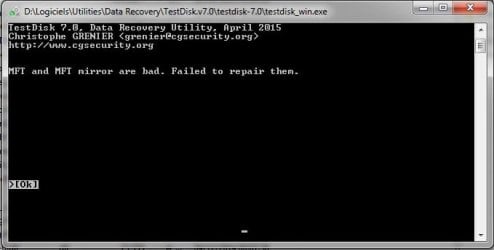
MFT repair failed (see screenshot). I will now download GetDataBack but I will not run it until you have given me your next instruction. Should I still run CHKDSK?
 

Attachments

  • TDisk.jpg
    TDisk.jpg
    18.6 KB · Views: 9

My Computer My Computer

At a glance

Windows 7 Ultimate x64i7 Q8408 GB2 x ATI Radeon H5780
Computer Manufacturer/Model Number
Alienware M17x R2
OS
Windows 7 Ultimate x64
CPU
i7 Q840
Motherboard
M17x
Memory
8 GB
Graphics Card(s)
2 x ATI Radeon H5780
Sound Card
ATI HD Audio
Hard Drives
2 x 500 GB in RAID 0
MFT and MFT mirror are bad. Check disk will not resolve the issue in this case.(It will, only if MFT and MFT mirror match perfectly.)

Your only hope now is Getdataback simple. Run it and scan. If your files are shown complete with the folder structure, open every folder and file , preview it and satisfy yourself that you will get everything intact before buying it.

As I said PhotoRec also can recover most file formats but you will lose the filenames/folder structure.It will also take a lot of time to scan and reconstruct the files abinitio. That will be the last resort.
 

My Computer My Computer

At a glance

Windows 7 Home Premium 32 bit
OS
Windows 7 Home Premium 32 bit
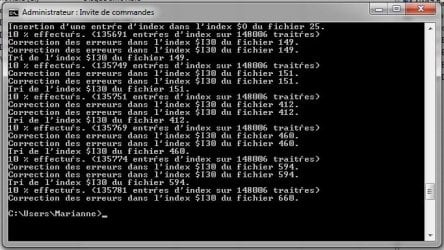
Well I may have wrecked everything. I was keen to move onwards and we had guests arriving so I couldn't wait for your reply. Hence I let ChKDSK do its thing (screenshot attached). It seems to indicate it made some corrections. :o

Anyway, I rebooted and am now waiting for GetDataBack to allow me to scan the drive. So far, it has identified the drive but is not allowing access. This is usual due to the drive being in RAW state. I will just have to be patient. Eventually, it will respond and then I can begin scanning the drive.

I would rather use GetDataBack than PhotoRec as I do not want to lose the filenames and folder structure. I will of course update you once I have more information.
 

Attachments

  • ChkDsk.jpg
    ChkDsk.jpg
    60.4 KB · Views: 8

My Computer My Computer

At a glance

Windows 7 Ultimate x64i7 Q8408 GB2 x ATI Radeon H5780
Computer Manufacturer/Model Number
Alienware M17x R2
OS
Windows 7 Ultimate x64
CPU
i7 Q840
Motherboard
M17x
Memory
8 GB
Graphics Card(s)
2 x ATI Radeon H5780
Sound Card
ATI HD Audio
Hard Drives
2 x 500 GB in RAID 0
GetDataBack has listed all the folders however, The MyMusic folder is in grey rather than black like all the others. If I try opening this folder and all its subdirectories, everything appears to be there. So what does the grey mean?

Also, while scanning, it kept on throwing up reading errors so I eventually checked the option to ignore all. I fear I am probably not going to recover any more than I did with TestDisk although when I opened the Images folder, all subdirectories were displayed whereas TestDisk only managed to find folders down to the letter 'L'.
 

My Computer My Computer

At a glance

Windows 7 Ultimate x64i7 Q8408 GB2 x ATI Radeon H5780
Computer Manufacturer/Model Number
Alienware M17x R2
OS
Windows 7 Ultimate x64
CPU
i7 Q840
Motherboard
M17x
Memory
8 GB
Graphics Card(s)
2 x ATI Radeon H5780
Sound Card
ATI HD Audio
Hard Drives
2 x 500 GB in RAID 0
I can't say much details about using GetDataback. You may refer to the help file, How-to-Guides and documentation on their website. You may also talk to their tech support for any queries. As a prospective customer, they should be more than willing to address your queries.

Whatever, preview and if you are satisfied go ahead. Otherwise try PhotoRec . In any case you have only these two options. More than what I have done so far, I may not be able to do better.:)
 

My Computer My Computer

At a glance

Windows 7 Home Premium 32 bit
OS
Windows 7 Home Premium 32 bit
I am in contact with Runtime support. I will let you know how this develops.
 

My Computer My Computer

At a glance

Windows 7 Ultimate x64i7 Q8408 GB2 x ATI Radeon H5780
Computer Manufacturer/Model Number
Alienware M17x R2
OS
Windows 7 Ultimate x64
CPU
i7 Q840
Motherboard
M17x
Memory
8 GB
Graphics Card(s)
2 x ATI Radeon H5780
Sound Card
ATI HD Audio
Hard Drives
2 x 500 GB in RAID 0
8 hours ago they replied asking me if I could open the greyed-out MyMusic folder to which I replied affirmatively. I'm still waiting for their reply.

jumanji, why do you say that GetDataBack and PhotoRec are my only options?
Yesterday you talked about Zero Assumption Recovery so what happened to that?
 

My Computer My Computer

At a glance

Windows 7 Ultimate x64i7 Q8408 GB2 x ATI Radeon H5780
Computer Manufacturer/Model Number
Alienware M17x R2
OS
Windows 7 Ultimate x64
CPU
i7 Q840
Motherboard
M17x
Memory
8 GB
Graphics Card(s)
2 x ATI Radeon H5780
Sound Card
ATI HD Audio
Hard Drives
2 x 500 GB in RAID 0
Still no reply from Runtime support, jumanji. I think I probably need to try something else.
 

My Computer My Computer

At a glance

Windows 7 Ultimate x64i7 Q8408 GB2 x ATI Radeon H5780
Computer Manufacturer/Model Number
Alienware M17x R2
OS
Windows 7 Ultimate x64
CPU
i7 Q840
Motherboard
M17x
Memory
8 GB
Graphics Card(s)
2 x ATI Radeon H5780
Sound Card
ATI HD Audio
Hard Drives
2 x 500 GB in RAID 0
Back
Top