Solved External HDD showing as local disk

Wamfie

New member
Local time
6:53 AM
Messages
12
Hi all

I have a 1TB Seagate expansion drive which has started giving me problems. In my computer it is referenced by local disk K: . Usually it is Seagate Expansion K: . I cannot access it,right-clicking on the drive causes explorer to crash. I have tried changing the drive letter but when opening disk management a blank screen comes up with the words "Connecting to virtual disk service". Nothing will show in disk management until the drive is disconnected form the laptop. I downloaded minitool partition wizard and using that I can see all the properties of drive. What should i do because the data is extremely important and sending it to Seagate would be too expensive:(
 

My Computer

Computer type
PC/Desktop
Computer Manufacturer/Model Number
HP
OS
Windows 7 Ultimate x64
CPU
Intel Core I5-3230M
Memory
8192MB
Graphics Card(s)
Nvidia 820m
We could give you some ideas but since data is extremely important:
Remove the disk and don't do anything until an expert (like Jumanji) responds.
 

My Computer

Computer type
PC/Desktop
Computer Manufacturer/Model Number
Custom Build
OS
Windows 7 Ultimate x64 SP1
CPU
AMD Phenom 2 1090T
Motherboard
Gigabyte GA-890FXA-UD5
Memory
2x8GB Kingston HyperX Fury Black 1600Mhz Unganged
Graphics Card(s)
MSI GTX 970 Gaming 4G
Sound Card
Realtek On-Board HD 7.1 Audio / Logitech G35
Monitor(s) Displays
3xAcer GD245HQ
Screen Resolution
1920x1080
Hard Drives
Samsung 850 Pro 512GB SSD - OS /
WD Caviar Black SATA 3 - 1 TBx2 - Dynamic RAID 0 /
WD Caviar Green SATA 2 - 640GBx2 - Dynamic RAID 0 /
WD Caviar Green SATA 2 - 640GB - Internal Backup /
Seagate Barracude SATA 3 - 3TB - External Backup/ Sync
PSU
HighPower 1000W
Case
Cooler Master HAF 932
Cooling
Noctua NH-D14
Keyboard
Logitech G19
Mouse
Logitech G500
Internet Speed
100/4 Mbit Cable (100GB quota)
Antivirus
ZoneAlarm Extreme Security / MBAM Pro / MBAE Free / SAS Free
Browser
IE 11 - Firefox - Chrome
Other Info
Logitech F710/ G27/ G940/ Z5500 // TrackIR 5 // Nvidia 3D Surround Vision
Okay thanks. I will wait till he responds
 

My Computer

Computer type
PC/Desktop
Computer Manufacturer/Model Number
HP
OS
Windows 7 Ultimate x64
CPU
Intel Core I5-3230M
Memory
8192MB
Graphics Card(s)
Nvidia 820m
OK, I presume you created a bootable PW pendrive using Rufus and then booted your comp with it to run Partition Wizard. Right?

When you launch the application, are you seeing your System drive and the 1TB Seagate drive in the disk map?

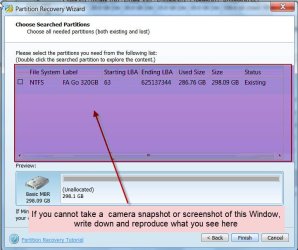
Left click on the Seagate 1TB drive icon leftmost in the drive map to select it, then right click on it. Now click on Partition Recovery in the right click menu > Full Disk > Next > Quick Scan > Next . Allow Quick scan to complete.

At the end of it, you will get a screen like the one shown below showing all the partitions found - if found.

01-06-2015 18-22-29.jpg

Just take a camera snapshot/screenshot and upload it and wait for further instructions. http://www.sevenforums.com/tutorials/9733-screenshots-files-upload-post-seven-forums.html

If you are unable to do that note down all the information verbatim and post it.

Having done that click on Cancel in that Window and close PW. ( You can run it again if necessary after getting the instructions)
 

My Computer

OS
Windows 7 Home Premium 32 bit
I made a bootable pendrive using Rufus and when i tried to boot from Partition wizard i got this message
 

Attachments

  • IMG-20150601-00484.jpg
    IMG-20150601-00484.jpg
    177.7 KB · Views: 1

My Computer

Computer type
PC/Desktop
Computer Manufacturer/Model Number
HP
OS
Windows 7 Ultimate x64
CPU
Intel Core I5-3230M
Memory
8192MB
Graphics Card(s)
Nvidia 820m
In your first post you said "I downloaded minitool partition wizard and using that I can see all the properties of drive"

Can you post the screenshot in which you saw all the properties?
 

My Computer

OS
Windows 7 Home Premium 32 bit
I will upload the screenshot now. When i said I saw all the properties I meant i could see the Drive name,Capacity,Used space,Unused space,File Sysem,Type and status. I am having trouble opening partition wizard with the drive connected,but when I run partition wizard with drive disconnected it runs just fine.
 

Attachments

  • PW.jpg
    PW.jpg
    132.9 KB · Views: 6
Last edited:

My Computer

Computer type
PC/Desktop
Computer Manufacturer/Model Number
HP
OS
Windows 7 Ultimate x64
CPU
Intel Core I5-3230M
Memory
8192MB
Graphics Card(s)
Nvidia 820m
So your running Partition Wizard in Windows. Fine.

Everything looks fine in Partition Wizard - except your external drive is active.

You are again confusing now by stating "I am having trouble opening partition wizard with the drive connected,but when I run partition wizard with drive disconnected it runs just fine."

Then how did you take this screenshot?Partition Wizard is running fine with the drive connected.
 

My Computer

OS
Windows 7 Home Premium 32 bit
I disconnected the drive,then i started PW. When PW was open and running I connected the drive and refreshed PW. When i did that it showed a message about updating the drives for about 10-15 minutes. When it was done i took the screenshot and uploaded it here

Sorry for the confusion
 

My Computer

Computer type
PC/Desktop
Computer Manufacturer/Model Number
HP
OS
Windows 7 Ultimate x64
CPU
Intel Core I5-3230M
Memory
8192MB
Graphics Card(s)
Nvidia 820m
Ok. Now we shall forget about Partition Wizard. Close it.

Shut down and reboot your computer. Plug in your external drive.

Right click on My computer > Manage > Disk Management

Tell us what happens. Does your external drive appear in Disk Management?
 

My Computer

OS
Windows 7 Home Premium 32 bit
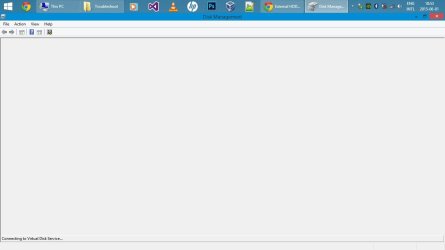
When i open disk management,this is all I see. It stays like this till I disconnect the drive
 

Attachments

  • jumanji.jpg
    jumanji.jpg
    29.5 KB · Views: 2

My Computer

Computer type
PC/Desktop
Computer Manufacturer/Model Number
HP
OS
Windows 7 Ultimate x64
CPU
Intel Core I5-3230M
Memory
8192MB
Graphics Card(s)
Nvidia 820m
Hmmm.... Strange.

From when did this problem start? Have you made any changes after which this happened? What is your OS? I see your system drive as a GPT drive. An OEM system with UEFI. Were you using the drive on this system before?

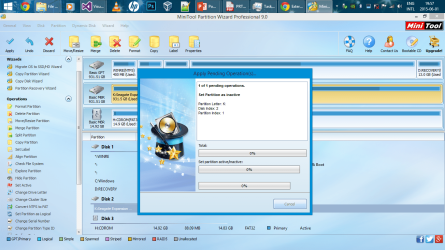
Run Partition Wizard with the drive connected. Select the external drive volume, right click > Set inactive. Apply changes.

Check whether the problem is resolved.
 

My Computer

OS
Windows 7 Home Premium 32 bit
It started on Saturday(the day before yesterday). My OS is Windows 8.1. Yes I have used the drive with this system before. Now PW shows something completely different. My drive the K: shows that it is unformatted.

Shortly after uploading the screenshot PW crashed. So I ran it again with the drive disconnected and connected the drive when PW was open and running. It showed like the previous screenshots where you could see the drive as "K:Seagate Expansion". I then did what you asked and set the drive as inactive. This is the screenshot. It is still applying pending operation
 

Attachments

  • jumanji 3.png
    jumanji 3.png
    240.9 KB · Views: 4
Last edited:

My Computer

Computer type
PC/Desktop
Computer Manufacturer/Model Number
HP
OS
Windows 7 Ultimate x64
CPU
Intel Core I5-3230M
Memory
8192MB
Graphics Card(s)
Nvidia 820m
What is the status now?

Your system specs says Windows 7 Ultimate. Now you are saying Windows 8.1. Your problem should have been posted in Windows 8 Forums to be dealt with people familiar with it.

Now I know why you got an error message when trying to run the Bootable PW. If your system is UEFI with Windows 8.1, you have to disable secure boot and enable legacy boot to be able to boot from the USB device.

Do you still have the Windows 7 System and can you change over to it?

Or wait till some one who is familiar with Windows 8 to assist you here.

( There is something strange in your case and I am unable to decipher yet.)

I am now retiring for the day.
 

My Computer

OS
Windows 7 Home Premium 32 bit
It has successfully applied the changes. The drive has been set inactive. Before i actually joined seven and eight forums I saw in a thread you are helping a other user that has the the same problem as me,only difference is he has a a windows 7 system and I have a 8.1 system and that he did not mind his drive being formatted where I do. So i joined seven forums hoping you would help me(which you are doing :) ). I also joined eightforums but we were unable to help me with my problem. Now I am here hoping that we could figure out what is the problem and how it could be solved.
 

My Computer

Computer type
PC/Desktop
Computer Manufacturer/Model Number
HP
OS
Windows 7 Ultimate x64
CPU
Intel Core I5-3230M
Memory
8192MB
Graphics Card(s)
Nvidia 820m
I was asked by Jumanji to look at this.

Run SFC /SCANNOW Command it seems either the OS or your drive (or both) has corruption.

Test the external hard drive using it's maker's HD Diagnostic preferably the bootable scan, followed by a full Disk Check.

The external was incorrectly set Active. Only the partition booting an OS should ever be Active. Was the external previously made bootable?
 
Externals and flash drives come marked active from the factory. I`ve seen it.

Why, I have no clue.
 

Attachments

  • Capture.JPG
    Capture.JPG
    34.1 KB · Views: 3

My Computer

Computer type
PC/Desktop
Computer Manufacturer/Model Number
Skylake Special #666
OS
Windows 10 Pro x64
CPU
Intel Core i7 6700K
Motherboard
Asus Sabertooth Z170 Mark 1
Memory
GSkill TridentZ RGB 16GB 3600 16-16-16-36
Graphics Card(s)
EVGA GTX 980 Ti SC x2
Sound Card
Realtek High Definition
Monitor(s) Displays
AOC G2460PG
Screen Resolution
1920 x 1080 144Hz
Hard Drives
Samsung 860 Pro 256GB, Seagate Barracuda 4TB x2
PSU
EVGA 1000 P2, EVGA White Custom Braided Cables
Case
Corsair Vengeance C70 Gunmetal Black
Cooling
Corsair H100i v2, Corsair ML120 x2, Thermal Grizzly Kryonaut
Keyboard
Logitech G910 Orion Spectrum
Mouse
Logitech G700s
Internet Speed
Verizon Fios Quantum Gateway 75/75
Antivirus
Windows Defender, Malwarebytes Free 3.8.3
Browser
Chrome
Other Info
Corsair SP120 x4, LG Blu-ray Drive, Durabrand HT-395 100 Watt Dolby Digital Amp, Corsair H2100 Wireless 7.1 Headset
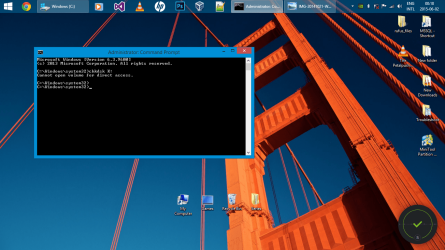
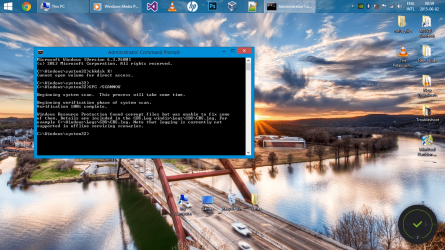
I ran the SFC command and it gave me this. I also ran a full disk check. I am not sure on how to test the HDD using Seagate's HD Diagnostic. No the external was not made bootable before.
 

Attachments

  • CHKDSK.png
    CHKDSK.png
    296.6 KB · Views: 5
  • SFC.png
    SFC.png
    447.5 KB · Views: 4

My Computer

Computer type
PC/Desktop
Computer Manufacturer/Model Number
HP
OS
Windows 7 Ultimate x64
CPU
Intel Core I5-3230M
Memory
8192MB
Graphics Card(s)
Nvidia 820m
Hi Wamfie,

You are in good hands to resolve any issues in Windows. Go by their instructions in resolving the issues..

I shall be out of town for the next three days and shall return to this thread on return.
 

My Computer

OS
Windows 7 Home Premium 32 bit
Thanks Jumanji

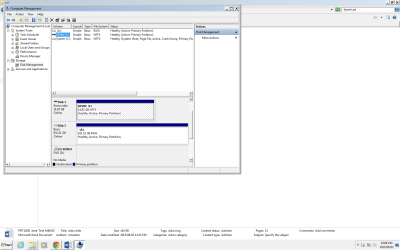
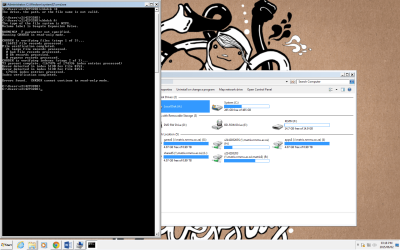
So I decided to see if my external would work on one of the university's PC's and i could actually view my external in the disk management section but the file system is RAW. I also ran check disk. I hope the screenshot will be of assistance.
 

Attachments

  • Troubleshoot3.png
    Troubleshoot3.png
    36.2 KB · Views: 4
  • CHK4.png
    CHK4.png
    270.7 KB · Views: 8

My Computer

Computer type
PC/Desktop
Computer Manufacturer/Model Number
HP
OS
Windows 7 Ultimate x64
CPU
Intel Core I5-3230M
Memory
8192MB
Graphics Card(s)
Nvidia 820m
Back
Top