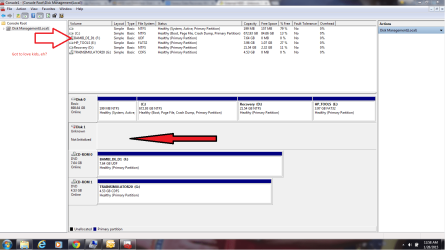
External HDD - Unkown, Not Initiated and not Allocated

Airious

New member
Local time
5:45 PM
Messages
6
Good Evening,

I have been trying for a few days to get my External Hard Drive working. The HD is out of another laptop. I only mention this because when i removed the HD about a year ago it was fully functionable.

In windows Disk Management, I am able to see the drive in question, however it says that it is not initiated, and unknown. All of the other threads that I have seen about this the HDD reads "Not Allocated" to the right of the drive. However this is not the case with mine.

I have also tried a recovery program, 2 actually, Photorec and MiniTool Partition - Free. Neither of these two programs were able to see the External Drive. Furthermore I have also tried the external drive on another PC which yielded the same results, as well as plugging the drive directly into my laptop, as the primary drive, however the drive failed to load, claiming that there was not an OS found.

I havent tried formatting the drive yet, as I need 1 particular file off of the drive that holds my license keys to all my software.

Any and all help/suggestions would be appreciated :)
 

My Computer My Computer

At a glance

Win7 Pro X646G
Computer type
Laptop
Computer Manufacturer/Model Number
HP
OS
Win7 Pro X64
Motherboard
i5-2450M @2.5Ghz
Memory
6G
Antivirus
AVG
Browser
Chrome
Screen Shot attached
 

Attachments

  • disk management.png
    disk management.png
    56.3 KB · Views: 7

My Computer My Computer

At a glance

Win7 Pro X646G
Computer type
Laptop
Computer Manufacturer/Model Number
HP
OS
Win7 Pro X64
Motherboard
i5-2450M @2.5Ghz
Memory
6G
Antivirus
AVG
Browser
Chrome
Hi Airious,

Welcome onboard.

You are presenting a double whammy :). An external case(?) + the device of interest, the laptop HDD inside. ( How are we to know that the external case is not faulty? Yep, it might have been functional only the other day just like your laptop HDD :). Hope you understand the problem)

To be able to deal exclusively with the laptop HDD, please remove it from the external case, hook it up as a second drive on a desktop and post a screenshot of Windows Disk Management. That would remove another "unknown" device interface inbetween.

Also tell us the manufacturer, model No. and the capacity of the laptop HDD and whether you can hear/feel it spinning inside the case.( Touch only the metal/plastic and not the electronics.)
 

My Computer My Computer

At a glance

Windows 7 Home Premium 32 bit
OS
Windows 7 Home Premium 32 bit
Thanks for the reply :)

Unfortunately I do not have a cable long enough to attach the HD as a secondary drive, which is why i went with the enclosure.

Now, not that I believe this, but I have heard more absurd. When I went to purchase a chord I was told that it was available direct through HP only as it was a proprietary chord. The one that I do have is not long enough to reach the second HD bay.

At any rate I will see if I can get it connected for a few moments to capture the DM screen shot. Stay tuned...
 

My Computer My Computer

At a glance

Win7 Pro X646G
Computer type
Laptop
Computer Manufacturer/Model Number
HP
OS
Win7 Pro X64
Motherboard
i5-2450M @2.5Ghz
Memory
6G
Antivirus
AVG
Browser
Chrome
Scrap that, I am not able to find my sata cable :(

The HDD Specs are :

Make: Seagate
Model: Momentus 7200
Capacity: 500G
 

My Computer My Computer

At a glance

Win7 Pro X646G
Computer type
Laptop
Computer Manufacturer/Model Number
HP
OS
Win7 Pro X64
Motherboard
i5-2450M @2.5Ghz
Memory
6G
Antivirus
AVG
Browser
Chrome
If you don't care about the data on that diskl, you can just initialize it. Another attempt worth making is to use a live Linux CD and see whether that can deal with it.
 

My Computer My Computer

At a glance

Vista, Windows7, Mint Mate, Zorin, Windows 8from 1.6GHz Duo to i7
Computer Manufacturer/Model Number
HP, Dell, Gateway, Toshiba - 4 laptops and 2 desktops
OS
Vista, Windows7, Mint Mate, Zorin, Windows 8
CPU
from 1.6GHz Duo to i7
Monitor(s) Displays
2x HP w2207
Hard Drives
5x HDD, 7x SSD, 12x Externals
Keyboard
with trackball - no mices
Mouse
Trackball mice
Internet Speed
DSL 6000
There is only 1 file i know I need off of the drive, containing all of my software license keys. BackTrack 5 should work just fine as an alternate method, right?

I also just downloaded SeaTools and ran the test:

Short Drive Self Test: Passed
Short Generic: Failed
Long Generic: Failed

When viewing the log file, for the Long Generic test i got "Bad LBA" 199 times ( 1 - 199 )

Two interesting factors here; I was expecting the Long Generic test to take some time, but it completed in less than a minute. Also SeaTools is showing the serial number as 1000000000000000CA (I didnt count the 0's, there is just a bunch of them)
 

My Computer My Computer

At a glance

Win7 Pro X646G
Computer type
Laptop
Computer Manufacturer/Model Number
HP
OS
Win7 Pro X64
Motherboard
i5-2450M @2.5Ghz
Memory
6G
Antivirus
AVG
Browser
Chrome
This disk must have been knocked or dropped at some time. So many bad sectors is unusual. Seatools can probably not repair it because the default list is full (there are more bad sectors than it can relocate).

If you want to venture into a Linux repair attempt, try this.
 

My Computer My Computer

At a glance

Vista, Windows7, Mint Mate, Zorin, Windows 8from 1.6GHz Duo to i7
Computer Manufacturer/Model Number
HP, Dell, Gateway, Toshiba - 4 laptops and 2 desktops
OS
Vista, Windows7, Mint Mate, Zorin, Windows 8
CPU
from 1.6GHz Duo to i7
Monitor(s) Displays
2x HP w2207
Hard Drives
5x HDD, 7x SSD, 12x Externals
Keyboard
with trackball - no mices
Mouse
Trackball mice
Internet Speed
DSL 6000
There is only 1 file i know I need off of the drive, containing all of my software license keys. BackTrack 5 should work just fine as an alternate method, right?

I also just downloaded SeaTools and ran the test:

Short Drive Self Test: Passed
Short Generic: Failed
Long Generic: Failed

When viewing the log file, for the Long Generic test i got "Bad LBA" 199 times ( 1 - 199 )

Two interesting factors here; I was expecting the Long Generic test to take some time, but it completed in less than a minute. Also SeaTools is showing the serial number as 1000000000000000CA (I didnt count the 0's, there is just a bunch of them)

Assuming that your external case is not faulty, the prognosis for your laptop HDD is not good. The fact that the long test did not run itself - it wound up in a minute - sounds like the death knell.

( You can check your external case by putting a working HDD in it. If you can read the drive the above statement is valid.)

As whs suggested, you may try a live Linux just not to leave any stone unturned.

Another option is to put the laptop back in its original slot ( laptop) and run Seatools for DOS. Seagate Momentus is a hybrid drive. Just make sure that you can run the regular SeaTools on it from Seagate website support for Momentus drives.
 

My Computer My Computer

At a glance

Windows 7 Home Premium 32 bit
OS
Windows 7 Home Premium 32 bit
Most annoying clean install I have ever done, I swear. Well, im not even to the install part yet, still in the backup stages. For years I only had a minimal amount to backup, maybe 10 gig or so. This backup, about 500G, figured this was as good as time as ever to save some time and set up a backup system that didnt rely on DVD's. My mistake lol.

My Linux (BT5) image I had disappeared. So I grabbed another distro. Couldn't get it to burn. Honestly I think its because the laptop was on my lap while the burn was active. I have NEVER had a successful burn of anything unless i put the machine on a hard, flat, undisturbed surface. That one is my fault.

Now, my external wont even spool up. Not sure if the drive quit or if the enclosure did; all I know is I could have taken better precautions to prevent either failure, let this be a lesson to anyone else reading, dont take hardware shortcuts to save time. IE make sure to put the cover BACK on your case EVERY TIME. I got so sick of unscrewing and re screwing those damn screws i just left the HD out of its case, plugged in.

I am almost 100% positive its the HDD that is screwed, because it was board side down for a good hour or so while i tried and tried. At any rate, I am going to continue to work on my hardware issue, if any one wants to continue trying to troubleshoot my original issue if for no other reason than to leave a record of thoughts for anyone else who might experience similar issues... Ill be around, but likely with a new drive lol
 

My Computer My Computer

At a glance

Win7 Pro X646G
Computer type
Laptop
Computer Manufacturer/Model Number
HP
OS
Win7 Pro X64
Motherboard
i5-2450M @2.5Ghz
Memory
6G
Antivirus
AVG
Browser
Chrome
And so you were screwing in and out many HDDs in one external case.

In such a scenario, anything could happen to the external case and HDDs since both contain static-averse electronics.

(And so I said in my post#3, "Yep, it might have been functional only the other day just like your laptop HDD")

This is more pronounced in U.S. wood houses with carpeted floors where static builds up like hell on your body with no leakage path to the ground. Just an accidental soft touch is enough to bide a good-bye. :D

(And so I said in my post #3 "( Touch only the metal/plastic and not the electronics.)")

And the Seagate momentus is a hybrid drive with its memory chips exposed I presume. It does not require a drop to the ground to kill it but only a softtouch or any contact with a static-built surface.

Handle all computer electronics with care. When removed always put those back into the antistatic bags in which those were delivered. Get an anti-static wrist strap from the nearest Radio Shack.
 

My Computer My Computer

At a glance

Windows 7 Home Premium 32 bit
OS
Windows 7 Home Premium 32 bit
Back
Top