Solved External Microphone Being Detected as Headphones

Will1306

New member
Local time
6:55 PM
Messages
3
Hi,
I have a Lenovo laptop (windows 7) with Conexant smartaudio HD drivers. The internal mic and speakers work fine. But when I plug in a microphone to the 3.5mm aux jack (it’s a combo port with a headset symbol on it) the system thinks it is headphones that I plugged in, and says that no mic is connected. Even if I go into smart audio HD manager and re-task the audio jack to microphone or line-in, it still doesn’t detect it being plugged in. It’s not a problem with the mic as I have tried with my friends windows 10 laptop with Realtek drivers and it works fine. Any ideas? Thanks,
- Will
 

My Computer My Computer

At a glance

Windows 7 Ultimate 32bit
Computer type
Laptop
Computer Manufacturer/Model Number
Lenovo
OS
Windows 7 Ultimate 32bit
Browser
Chrome
Hi Will1306,

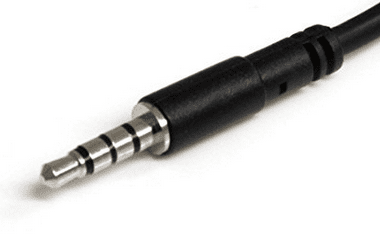
The plug on your combo headset mic should have three plastic rings to separate stereo left right, and mic. If the female jack on your computer is not the same i.e. does not have 3 plastic ring separators, that's your problem.

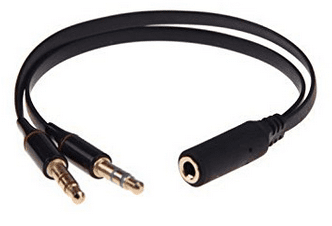
Combo jack.PNG Splitter.PNG

Maeline 3.5mm Female to 2 Male Gold Plated Headphone Mic Audio Y Splitter Flat Cable $5.99 US

BTW: You can use Prime to ship for free two day or less, then cancel your membership within 30 days, and they refund the initial installment next day or two (I do this all the time). No prohibition from Amazon in doing so, as many times a you wish, at least for now anyway.

Nic
 

My Computer My Computer

At a glance

Win 10 x64, Linux Lite, Win 7 x64, BlackArch,...
Computer type
PC/Desktop
Computer Manufacturer/Model Number
HP Desktop & Compaq Laptop
OS
Win 10 x64, Linux Lite, Win 7 x64, BlackArch, & Kali
Hard Drives
Samsung 850 Pro 256Gb,
Hitachi HDD 1Tb,
Crucial MX SSD 250Gb
Segate 3Tb USB 3.0 Ext. Backup HDD
Internet Speed
150Mbps dn, 20Mbps up
Antivirus
Avast Free, Malwarebytes Anti-Exploit & Anti-Ransomware
Browser
Firefox, Chrome, Opera, & VPN
Getting there

Hi,
I just tried plugging in my headset (which has 3 rings on the connector) into my laptop and it detected the mic on the headset! Does this mean if i want to use my aux microphone (with only one ring) i would have to use it through an audio splitter which splits the port into microphone and headphones ports? Something like this?:
3.5mm Stereo Audio Male to 2 Female Headphone/Mic Y Splitter Cable Adapter USA! | eBay
Thanks for the help,
- Will
 
Last edited:

My Computer My Computer

At a glance

Windows 7 Ultimate 32bit
Computer type
Laptop
Computer Manufacturer/Model Number
Lenovo
OS
Windows 7 Ultimate 32bit
Browser
Chrome
if its one ring its mono not stero you can some times fiddle with the plug in and out a bit and catch it but splitter is best idea
 

My Computer My Computer

At a glance

win 8 32 bit
Computer type
PC/Desktop
OS
win 8 32 bit

My Computer My Computer

At a glance

Win 10 x64, Linux Lite, Win 7 x64, BlackArch,...
Computer type
PC/Desktop
Computer Manufacturer/Model Number
HP Desktop & Compaq Laptop
OS
Win 10 x64, Linux Lite, Win 7 x64, BlackArch, & Kali
Hard Drives
Samsung 850 Pro 256Gb,
Hitachi HDD 1Tb,
Crucial MX SSD 250Gb
Segate 3Tb USB 3.0 Ext. Backup HDD
Internet Speed
150Mbps dn, 20Mbps up
Antivirus
Avast Free, Malwarebytes Anti-Exploit & Anti-Ransomware
Browser
Firefox, Chrome, Opera, & VPN
Thanks

Thanks for the help guys, I’m ordering a splitter now so everything will work fine. Thanks again,
- Will

EDIT: The splitter worked fine, although I now bought a USB mic so I use that. Thanks for the help guys!
 
Last edited:

My Computer My Computer

At a glance

Windows 7 Ultimate 32bit
Computer type
Laptop
Computer Manufacturer/Model Number
Lenovo
OS
Windows 7 Ultimate 32bit
Browser
Chrome
Back
Top