External Monitor Display Looks Very Bad Quality/Color Issues

paulyjames

New member
Member
VIP
Local time
9:37 PM
Messages
657
This monitor is called Samsung Syncmaster t240hd. Its an hdtv monitor with 1920 x1200 resolution for monitor. I believe if used as a TV, its 1920 x 1080 though but i wont use it for tv. Anyways, the first thing i noticed was the monitor isn't straight. If you look at it from the side, it looks like its slouching. Is there a way to fix this? Thus adjust it a bit higher?


The other thing is when i look at numbers/words, its a lot harder to read than my old monitor? Thus you see its much easier to read the same thing on my laptop screen compared to this monitor. My laptop is dell xps 15 9550 and very nice. But its just harder to read on this hdtv. I tried making brightness higher than 45 and this makes it much worst. The lower it is, a bit better but its just harder to read on it. Basically its looks very yellowish? For example when i go to a site on another forum, where most of it is white... if i open the same page on this monitor, its yellow. Its a really ugly color and just hard to look at the screen.


Can someone tell me how i can fix this issue? Also i wasn't aware of this but this hdtv monitor has glass over the monitor. Is this how all hdtv monitors are? Is that the reason why its harder to read on this as oppose to a regular monitor?


Are there settings i can change that i can make reading words and letters much easier?


These are the settings when i click on the menu button


Mode: Standard
Backlight: 8
Contrast: 95
Brightness: 45
Sharpess: 50 (can't change)
Color : 60 (can't change)
tint: 50 (can't change)


Picture options

Color tone: normal
size: width


sound

Mode: music
auto volume: on
tv speaker: on


setup:


melody: medium
light effect: when watching tv
light level: 5


The Asus-VS24AH-P is my original monitor that worked very good. Display looked great. I did not make any changes to brightness or contrast etc. But this monitor no longer works.


Amazon.com: ASUS VS24AH-P 24.1" WUXGA 1920x1200 HDMI DVI VGA Eye Care Monitor: Computers & Accessories


So basically the settings of the monitor now, thats how the person who used it set it as. So im wondering what are the default settings for this. I mean, its fine but for me... its a lot harder to read the letters and numbers. So im surprised he kept the settings like this if you know what i mean. Unless this is possibly the best settings? And is it true if you use an hdtv as a monitor, it will always be like this? I do like that its 1920 x 1200 resolution but its just a lot harder to read letters and things on it. Like if i look at my laptop monitor, the picture is unbelievable. This monitor its like much harder to read.
 

My Computer My Computer

At a glance

Windows 10 Pro
Computer type
Laptop
OS
Windows 10 Pro
Example on this same page... if i open it on my laptop monitor and on this external monitor, you see how the sides of it are blue on the laptop. But this one is like a fading light blue color. And the area where there is nothing written on, it looks white on the laptop screen... yet this one looks yellowish/fading color.
 

My Computer My Computer

At a glance

Windows 10 Pro
Computer type
Laptop
OS
Windows 10 Pro
hi your old monitor was led and the one you got is LCD. and from your other thread you said it was 8 years old so it probably degraded over that time period. that probably why they where selling it. plus it is a tv it will not look as good as a monitor would.
 

My Computer My Computer

At a glance

win 10
Computer type
PC/Desktop
Computer Manufacturer/Model Number
dell xps 9000
OS
win 10
yes its lcd monitor.


Here are the pictures.


Here is google.com on my laptop screen which is white and very clear


The 2nd picture shows google.com on this samsung syncmaster t240hd. Notice how its very yellowish? Is this called yellow tint?


Basically its very hard to read any page because of this...
 

Attachments

  • IMG_2689.JPG
    IMG_2689.JPG
    408 KB · Views: 1
  • IMG_2691.JPG
    IMG_2691.JPG
    352.2 KB · Views: 1

My Computer My Computer

At a glance

Windows 10 Pro
Computer type
Laptop
OS
Windows 10 Pro
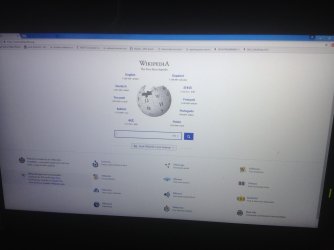
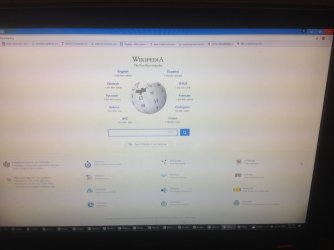
Picture one is wikipedia on my laptop screen.


Picture two is wikipedia on the samsung screen. Its very yellowish.


What can i do here? I will ask the guy tomorrow about this issue. He said there was no screen issues but this is really noticeable.


Is there anyway to fix this? Basically its very hard to use the monitor because of this.
 

Attachments

  • IMG_2685.JPG
    IMG_2685.JPG
    462.5 KB · Views: 2
  • IMG_2687.JPG
    IMG_2687.JPG
    411.3 KB · Views: 1

My Computer My Computer

At a glance

Windows 10 Pro
Computer type
Laptop
OS
Windows 10 Pro
the only thing I can think of is does the tv have any color contrast settings that you can try adjusting?
 

My Computer My Computer

At a glance

win 10
Computer type
PC/Desktop
Computer Manufacturer/Model Number
dell xps 9000
OS
win 10
yes it does. The contrast is at 95
 

My Computer My Computer

At a glance

Windows 10 Pro
Computer type
Laptop
OS
Windows 10 Pro
okay i noticed something. in the picture, there is picture options.


They have color tone and it shows

cool 2 - makes the color temperature bluer than cool 1
cool 1 - makes whites bluish
normal - keeps whites white


It was on cool 1 setting. I changed it to normal and cool 2 setting. So is this one of the steps to fix this issue? Why would it be in cool1 in the first place? Im taking a look at google now to see if there is any yellow coloring.


Whether its normal or cool2 mode, you still see that tinted yellowing if i take a picture of it on my iphone. The best color of all these seem to be cool2 however.


The other issue is what is the contrast, brightness number suppose to be? I did lot of trial and error and only thing i found out is contrast is way too high at 95. But i play around with the contrast/brightness and i still see those yellow tint lines...
 

My Computer My Computer

At a glance

Windows 10 Pro
Computer type
Laptop
OS
Windows 10 Pro
As oscer has asked mate does the TV have any other controls than contrast because the contrast is not going to get rid of the yellow colouring it needs to be controlled from the TV itself, and unless I am terribly wrong that contrast setting is very high I would go as far as saying too high. You need to concentrate on the brightness then the colour control and then the sharpness the contrast can quickly wreck things.

In my experience using TV's is not as good as dedicated monitor because if I am to assume you are using a large screen even at that res you will still get a poor picture.

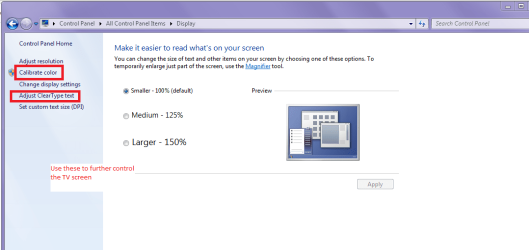
Once you have the TV set you can also use the Windows picture controls - gamma is very important too see pic.
 

Attachments

  • DISPLAY.PNG
    DISPLAY.PNG
    32.2 KB · Views: 1

My Computer My Computer

At a glance

Desk1 7 Home Prem / Desk2 10 Pro / Main lap A...Desk1 i5 3750K / Laptop i7 GTX 860M / Desk2 i...Desk1 8GB (1866) / Desk2 16GB (1333) / Laptop...Desk 1& 2NVidia GTX 650 & Laptops on board Intel
Computer type
PC/Desktop
Computer Manufacturer/Model Number
Own build (new) Desk1 / Asus ROG Win 7 / Desk2 1st build
OS
Desk1 7 Home Prem / Desk2 10 Pro / Main lap Asus ROG 10 Pro 2 laptop Toshiba 7 Pro Asus P2520 7 & 10
CPU
Desk1 i5 3750K / Laptop i7 GTX 860M / Desk2 i5 2500
Motherboard
Desk1 Asus P877-V / Desk2 Gigabyte H67 UD3H / Laptop ?
Memory
Desk1 8GB (1866) / Desk2 16GB (1333) / Laptop 8Gb DDR3
Graphics Card(s)
Desk 1& 2NVidia GTX 650 & Laptops on board Intel
Sound Card
Desk 1 & 2 -XONAR DG Realtek High Def audio Laptop
Monitor(s) Displays
Desk 1 Benq HD 2450 / Desk2 Philips 24" / Laptop 17.5"
Screen Resolution
1920x1080 D1 & D2 & Laptop 1
Hard Drives
Desk1 Samsung 120GB 830 SSD
Asus ROG 256GB 850 Pro SSD
Desk2 Samsung 840 256 SSD
Toshiba 120GB EVO
PSU
Desk 1 Corsair HX 1050/ Laptop ? / Desk 2 Corsair HX 650
Case
Desk 1 Cooler HAF XM ? Toshiba laptop / Desk2 Coolermaster
Cooling
Fans on all Desk1 -2 Desk2 - all Coolermasters 5 Laptop ?
Keyboard
Desk 1 MS Sidewinder X6 Desk 2 MS Sidewinder X 4
Mouse
Desk 1&2 - Gigabyte MS 900 gamer - laptop - Logitec wireless
Internet Speed
ADSL2+
Other Info
One other Desktop (tester) and spare Toshba laptop both with SSD's
Running Kaspersky 2016 ISS on all machines config'd identically
Logitec audio stereo systems on each machine (x3)
Canon MG5250MFC
Router/modem TP-Link running WPA2SK
Here's the site for manuals for the t240hd if you don't have one. Scroll down to manuals and D/Ls, if you click on Show more there are several English manuals of different sizes, just watch what language your picking to D/L, : http://Samsung T240HD | www.samsung.com

That covers the monitor settings, and using this tutorial: Display Color Calibration covers the windows operating system (OS) settings and should help you get rid of some of that yellow.

One more area to check for windows system (OS) settings is the ease of access center found in Control Panel\All Control Panel Items\Ease of Access Center there might be some settings in there like making the computer easier to see that might help.
 

My Computer My Computer

At a glance

Originally Win 7 Hm Prem x64 Ver 6.1.7600 Bui...Intel i3 530 2.93GHz, 2933MHz 2 Cores 4 Logic...6GB of 1,333MHz DDR3 SDRAM32MB Intel Graphics Media Accelerator HD IGChip
Computer type
PC/Desktop
Computer Manufacturer/Model Number
Gateway DX4831-01e (Mid-Tower Desktop)
OS
Originally Win 7 Hm Prem x64 Ver 6.1.7600 Build 7601-SP1 | Upgraded to Windows 10 December 14, 2019
CPU
Intel i3 530 2.93GHz, 2933MHz 2 Cores 4 Logical Processors
Motherboard
Gateway H57M01 133 megahertz
Memory
6GB of 1,333MHz DDR3 SDRAM
Graphics Card(s)
32MB Intel Graphics Media Accelerator HD IGChip
Sound Card
Realtek High Definition Audio
Monitor(s) Displays
Gateway HX2000 20inch TFT active matrix TN
Screen Resolution
1600 x 900 x 59 hertz
Hard Drives
WDC WD10EADS-00M2B0 [HDD] (1000.20 GB) -- drive 0,
HL-DT-ST DVDRAM GH41N [CD-ROM dr]
Four card readers, and Four USB 2.0
PSU
300watts.
Case
Mid-Tower Desktop
Cooling
Stock from Gateway
Keyboard
Natural Ergonomic Keyboard 4000, see Other Info
Mouse
Orig. Gateway wore out now using Insignia USB wired optical
Internet Speed
Vz FIOS 10ms png 57.64Mbps down 65.53Mbps up Speedtest.org
Antivirus
Zamana Anti-logger with Anti-malware, MSE, Windows Firewall,
Browser
IE11.0.9600.19399-Upd ver11.0.135, Firefox 68.0.1 x64
Other Info
System Specs by Belarc.

BIOS: American Megatrends Inc. P01-A0 11/17/2009

Replaced the MS 'Natural' Standard PS/2 Enhanced 101-102 Keyboard with a new Natural Ergonomic Keyboard 4000 on August 1st 2014.

Canon Pixma MG3222 Printer.

Updated to IE11 on 12102015 | Fios Quantum Router g1100

Additional AV: SpywareBlaster, manual Mbam, SAS
I lowered the brightness. That helped a bit. But issue is its sort of a bit too dark.


the contrast i did lower it. But i cannot low it too much otherwise it would be too dark.
 

My Computer My Computer

At a glance

Windows 10 Pro
Computer type
Laptop
OS
Windows 10 Pro
Does anyone know if there is a chance this monitor is a bit defective with this coloring? I believe he told me he used it for a bit over 2 years. This monitor is a much older model though. The coloring is just very hard on the eyes that i can barely look at the monitor long enough.
 

My Computer My Computer

At a glance

Windows 10 Pro
Computer type
Laptop
OS
Windows 10 Pro
Can someone also confirm here that this can be fixed somehow with the settings or calibration or anything like that? So i dont have to go back there and ask? I have a hard time using the monitor like it is and i would assume most people would similarly as well.
 

My Computer My Computer

At a glance

Windows 10 Pro
Computer type
Laptop
OS
Windows 10 Pro
The proof's in the pudding PJ, we can't confirm anything until you actually try the suggestions we've offered.

There may be a bit of hope, I went back to the manuals page for the monitor and D/L'd all the English manuals and in the one that is 6.94MB there are different settings and one of them is to allow the monitor to run with a PC/DVI.

You'll find the manual when you click on "see more" at Manuals & Downloads, it's second from the bottom (User Manual ver.1.0. (ENGLISH, 6.94MB)). Use the menu to go to "Adjusting the Picture" and it'll show you how to adjust it. the chapter starts on pg35 and goes to pg39, on pg38 it shows how to adjust the RGB red, green, and blue tones of the display, and I'll bet that's where you'll get rid of that yellowness.

It'll make it easier if you have the remote but there should still be a way to make the adjustments through the OSM - On Screen Menu. Check pg11 for menu button location.

We may be able to confirm after you go through these adjustments, and don't be afraid to experiment, there should be a reset to default in the menu.
 

My Computer My Computer

At a glance

Originally Win 7 Hm Prem x64 Ver 6.1.7600 Bui...Intel i3 530 2.93GHz, 2933MHz 2 Cores 4 Logic...6GB of 1,333MHz DDR3 SDRAM32MB Intel Graphics Media Accelerator HD IGChip
Computer type
PC/Desktop
Computer Manufacturer/Model Number
Gateway DX4831-01e (Mid-Tower Desktop)
OS
Originally Win 7 Hm Prem x64 Ver 6.1.7600 Build 7601-SP1 | Upgraded to Windows 10 December 14, 2019
CPU
Intel i3 530 2.93GHz, 2933MHz 2 Cores 4 Logical Processors
Motherboard
Gateway H57M01 133 megahertz
Memory
6GB of 1,333MHz DDR3 SDRAM
Graphics Card(s)
32MB Intel Graphics Media Accelerator HD IGChip
Sound Card
Realtek High Definition Audio
Monitor(s) Displays
Gateway HX2000 20inch TFT active matrix TN
Screen Resolution
1600 x 900 x 59 hertz
Hard Drives
WDC WD10EADS-00M2B0 [HDD] (1000.20 GB) -- drive 0,
HL-DT-ST DVDRAM GH41N [CD-ROM dr]
Four card readers, and Four USB 2.0
PSU
300watts.
Case
Mid-Tower Desktop
Cooling
Stock from Gateway
Keyboard
Natural Ergonomic Keyboard 4000, see Other Info
Mouse
Orig. Gateway wore out now using Insignia USB wired optical
Internet Speed
Vz FIOS 10ms png 57.64Mbps down 65.53Mbps up Speedtest.org
Antivirus
Zamana Anti-logger with Anti-malware, MSE, Windows Firewall,
Browser
IE11.0.9600.19399-Upd ver11.0.135, Firefox 68.0.1 x64
Other Info
System Specs by Belarc.

BIOS: American Megatrends Inc. P01-A0 11/17/2009

Replaced the MS 'Natural' Standard PS/2 Enhanced 101-102 Keyboard with a new Natural Ergonomic Keyboard 4000 on August 1st 2014.

Canon Pixma MG3222 Printer.

Updated to IE11 on 12102015 | Fios Quantum Router g1100

Additional AV: SpywareBlaster, manual Mbam, SAS
Someone recommended me to do calibration settings. I did this however... i cannot get all the dots to be removed in gamma. The tie and the white shirt, i made no changes becaues i could tell difference. I then applied these changes only to my samsung monitor.


I noticed that the screen was a bit darker which i liked. However when i viewed pictures, it was lot darker where there is no brightness on it which i did not like. So i went back to calibration and clicked okay on each one without making changes thus its back to default.


Is there a way to make my samsung monitor display settings exactly like my laptop? Laptop is dell xps 15 and the dsiplay is just very good. Is there a way to do this on my samsung monitor to copy the exact settings? Thus check contrast, brightness etc level on this dell and copy it on the samsung? Or a laptop screen you cannot check this since its not a monitor? When my asus monitor worked, it was very good. It was pretty much the same level as this laptop screen. It was bright enough, google site showed white and it wasn't like the picture where it displayed that yellow thing.
 

My Computer My Computer

At a glance

Windows 10 Pro
Computer type
Laptop
OS
Windows 10 Pro
I brought the monitor to the computer place. The guy looked it over and didn't notice the color at all. He had connected the monitor to his computer. I noticed that it looked okay. I then connected the monitor to my laptop. It looked okay but when i showed a chrome page on the laptop and one the monitor, there was a difference you notice but i didn't notice it as much at my place. I then showed pictures of how it looked if i take a picture of the google page on chrome with my iphone. I showed how its clear white on my iphone but on the monitor, you see that yellow thing. He noticed it as well. Then i went to take picture of the monitor and he noticed that there is the yellow. He then tells me he knows why and the reason is because this monitor is an old LCD monitor and LED. He said if you take a picture of it with your phone on any crt or lcd or plasma monitor of a webpage, it will display the yellow. I did not know this. Is anyone of you familiar with this? I had used crt , lcd monitors before but this was a while back. I never noticed this though... then again technology was slower back then.


But the yellow is something i noticed. He said yes everything with the monitor is fine. So does that mean i can just do the brightness/calibrate to try to get the best settings possible? Thus this monitor is like this because its LCD? Also this light isn't that bright compared to my laptop monitor. He said its because my laptop is LED screen and thats why its very bright.


I like to know is there a setting configuration out there for this samsung or any samsung lcd hdtv monitor where it can make the picture and display look the best? Such that what number to put for contrast, brightness and anything else etc.
 

My Computer My Computer

At a glance

Windows 10 Pro
Computer type
Laptop
OS
Windows 10 Pro
Sounds like you have a good local tech guy, don't lose him/her.

it would be true that the different light sources for the display would emit different light wave frequencies and trying to use a video display with drivers in your laptop not designed for it would produce unacceptable results.

For now I would try adjusting the configuration settings (brightness and calibrate) to get the best settings possible.

You could try installing the drivers for the 240 if you haven't already but its an 8year old monitor and may not work with win 7.

I remember when I was looking for reviews on a samsung plasma TV I ran across some forums that members would exchange settings like this from AVS Forums: Post #28 I didn't look through the whole thread.

I don't mean to worry you but I did see this while researching your thread: Samsung T240HD Monitor repair Kit (8 Capacitors)

You'e just going to have to experiment PJ.
 

My Computer My Computer

At a glance

Originally Win 7 Hm Prem x64 Ver 6.1.7600 Bui...Intel i3 530 2.93GHz, 2933MHz 2 Cores 4 Logic...6GB of 1,333MHz DDR3 SDRAM32MB Intel Graphics Media Accelerator HD IGChip
Computer type
PC/Desktop
Computer Manufacturer/Model Number
Gateway DX4831-01e (Mid-Tower Desktop)
OS
Originally Win 7 Hm Prem x64 Ver 6.1.7600 Build 7601-SP1 | Upgraded to Windows 10 December 14, 2019
CPU
Intel i3 530 2.93GHz, 2933MHz 2 Cores 4 Logical Processors
Motherboard
Gateway H57M01 133 megahertz
Memory
6GB of 1,333MHz DDR3 SDRAM
Graphics Card(s)
32MB Intel Graphics Media Accelerator HD IGChip
Sound Card
Realtek High Definition Audio
Monitor(s) Displays
Gateway HX2000 20inch TFT active matrix TN
Screen Resolution
1600 x 900 x 59 hertz
Hard Drives
WDC WD10EADS-00M2B0 [HDD] (1000.20 GB) -- drive 0,
HL-DT-ST DVDRAM GH41N [CD-ROM dr]
Four card readers, and Four USB 2.0
PSU
300watts.
Case
Mid-Tower Desktop
Cooling
Stock from Gateway
Keyboard
Natural Ergonomic Keyboard 4000, see Other Info
Mouse
Orig. Gateway wore out now using Insignia USB wired optical
Internet Speed
Vz FIOS 10ms png 57.64Mbps down 65.53Mbps up Speedtest.org
Antivirus
Zamana Anti-logger with Anti-malware, MSE, Windows Firewall,
Browser
IE11.0.9600.19399-Upd ver11.0.135, Firefox 68.0.1 x64
Other Info
System Specs by Belarc.

BIOS: American Megatrends Inc. P01-A0 11/17/2009

Replaced the MS 'Natural' Standard PS/2 Enhanced 101-102 Keyboard with a new Natural Ergonomic Keyboard 4000 on August 1st 2014.

Canon Pixma MG3222 Printer.

Updated to IE11 on 12102015 | Fios Quantum Router g1100

Additional AV: SpywareBlaster, manual Mbam, SAS
i cannot get all the dots to be removed in gamma.

Look the gamma is very hard to get exactly right it varies from machine to machine but as long a it is close to that dark grey spot in the centre it should be alright to go. Having it out of whack can mak a mess of the screen as you say difficult to even look at.
 

My Computer My Computer

At a glance

Desk1 7 Home Prem / Desk2 10 Pro / Main lap A...Desk1 i5 3750K / Laptop i7 GTX 860M / Desk2 i...Desk1 8GB (1866) / Desk2 16GB (1333) / Laptop...Desk 1& 2NVidia GTX 650 & Laptops on board Intel
Computer type
PC/Desktop
Computer Manufacturer/Model Number
Own build (new) Desk1 / Asus ROG Win 7 / Desk2 1st build
OS
Desk1 7 Home Prem / Desk2 10 Pro / Main lap Asus ROG 10 Pro 2 laptop Toshiba 7 Pro Asus P2520 7 & 10
CPU
Desk1 i5 3750K / Laptop i7 GTX 860M / Desk2 i5 2500
Motherboard
Desk1 Asus P877-V / Desk2 Gigabyte H67 UD3H / Laptop ?
Memory
Desk1 8GB (1866) / Desk2 16GB (1333) / Laptop 8Gb DDR3
Graphics Card(s)
Desk 1& 2NVidia GTX 650 & Laptops on board Intel
Sound Card
Desk 1 & 2 -XONAR DG Realtek High Def audio Laptop
Monitor(s) Displays
Desk 1 Benq HD 2450 / Desk2 Philips 24" / Laptop 17.5"
Screen Resolution
1920x1080 D1 & D2 & Laptop 1
Hard Drives
Desk1 Samsung 120GB 830 SSD
Asus ROG 256GB 850 Pro SSD
Desk2 Samsung 840 256 SSD
Toshiba 120GB EVO
PSU
Desk 1 Corsair HX 1050/ Laptop ? / Desk 2 Corsair HX 650
Case
Desk 1 Cooler HAF XM ? Toshiba laptop / Desk2 Coolermaster
Cooling
Fans on all Desk1 -2 Desk2 - all Coolermasters 5 Laptop ?
Keyboard
Desk 1 MS Sidewinder X6 Desk 2 MS Sidewinder X 4
Mouse
Desk 1&2 - Gigabyte MS 900 gamer - laptop - Logitec wireless
Internet Speed
ADSL2+
Other Info
One other Desktop (tester) and spare Toshba laptop both with SSD's
Running Kaspersky 2016 ISS on all machines config'd identically
Logitec audio stereo systems on each machine (x3)
Canon MG5250MFC
Router/modem TP-Link running WPA2SK
Back
Top