Hello
I have a samsung external hard drive that keeps on flashing when plugged in to any laptop or pc but eventually becoming stable.The pc picks up the drive as a connected device and after a while it shows up as drive 'H' in 'My computer'. However the drive cannot be accessed.Nothing seems to happen when i try a chkdsk from cmd. I tried uninstalling the drive from device manager,after reinstalling it still does not appear.Disk management freezes if the drive is connected.i have tried recovery tools but once again it freezes when scanning for the external drive.i have alot of important info and hope someone will be able to provide a solution.
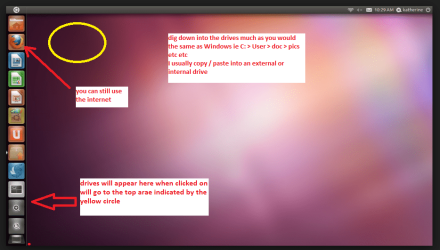
Set the BIOSto boot from the optical when the machine boots it will show you a screen with TRY or INSTALL >select TRY.You can of course remove the hard driveand any other drives when doing this as if the optical alone is the only driveleft in the machine then the BIOS willonly find it to boot from.
When it isfinished - it takes very little time you will get a screen like in the pic .
Open thedrive you want > User and dig down until you get to the data / settings you may be able to copy / paste the materialyou want to an external source or other installed drive doing this.
I am notsure if it will but I have recovered tons of data etc using this method both on"dead" or just plain drives that you cannot get data from using Windows.
Attachments
UBUTUX.PNG
128.9 KB
· Views: 1
My Computer
Computer type
PC/Desktop
Computer Manufacturer/Model Number
Own build (new) Desk1 / Asus ROG Win 7 / Desk2 1st build
OS
Desk1 7 Home Prem / Desk2 10 Pro / Main lap Asus ROG 10 Pro 2 laptop Toshiba 7 Pro Asus P2520 7 & 10
One other Desktop (tester) and spare Toshba laptop both with SSD's
Running Kaspersky 2016 ISS on all machines config'd identically
Logitec audio stereo systems on each machine (x3)
Canon MG5250MFC
Router/modem TP-Link running WPA2SK
Well seems like we have a real problem here I am really surprised the Ubuntu did ot pick it up mate.
That flashing is fairly normal in that it is showing some activity in the drive - ie the read write heads are actually moving and the disk must be spinning for it t do that - that is how it is eventually showing up in Computer.
Now the fact that it stops flashing tells me something is rather amiss in the internal mechanisms, and that I am suspecting the drive if not bad already is going bad. Can you send us the exact model of that drive as it could possibly be the driver for it is missing or has been corrupted.
One other thing you can try is a hard drive test this is the one we normally try first SeaTools for Windows | Seagate there are others but try this one for starters.
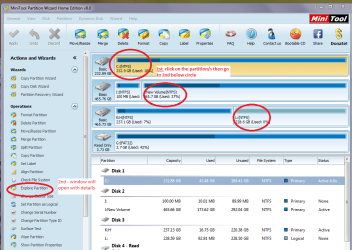
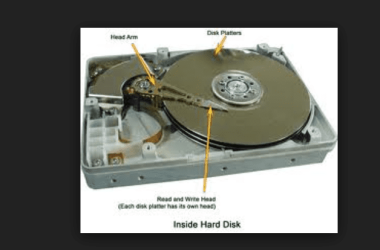
I have included a couple of pics that will show you the internals of a hard drive and what you will see in the Partition Wizard. In that pic I describe how to view what is on that partition /s
Attachments
MINI TOOL4.PNG
58.4 KB
· Views: 1
HARD DRIVE INTERNALS.PNG
50.1 KB
· Views: 8
My Computer
Computer type
PC/Desktop
Computer Manufacturer/Model Number
Own build (new) Desk1 / Asus ROG Win 7 / Desk2 1st build
OS
Desk1 7 Home Prem / Desk2 10 Pro / Main lap Asus ROG 10 Pro 2 laptop Toshiba 7 Pro Asus P2520 7 & 10
One other Desktop (tester) and spare Toshba laptop both with SSD's
Running Kaspersky 2016 ISS on all machines config'd identically
Logitec audio stereo systems on each machine (x3)
Canon MG5250MFC
Router/modem TP-Link running WPA2SK
Seatools for windows freezes and does not pick up the drive when plugged in..i opened up the drive to take a look,How is the head arm and read/write head suppose to be moving?This drives 1 doesnt look like its working properly
Sorry mate now you really have bricked that drive because for it to be repaired if indeed that was affordable it needs a completely dust free - absolutely particle free as one can get.
Also even putting back together requires extremely fine tolerances on for example the tightening of the lid retaining screws.
Anyway it is done but just for your info the platters spin at the drives rated speed (5400 or 7200 rpm) and the actuating arms move back and forth across that rotating disk/s and read or write information to the (usually) magnetic surface via the tiny heads at the very tip of those arms. Now the surfaces are very easily damaged by touching them or say for example dropping the drive as that in itself tends to "bend" the arms putting them out of alignment. It is not a job for anyone at home to repair these type of drives as it requires specialized technicians and equipment to do anything at all.
The arms are moved by passing small electrical currents through finely wound coils at the thick end of the arm which changes the polarity of the magnetic field in comparison to the one exerted by the very strong rare earth magnets in that fixed assembly hence moving the arm across the disk / platter.
Hope you backed up data before things started to go wrong because it is probably non recoverable - sorry if you had said what you were intending to do I would have warned you against doing it.
My Computer
Computer type
PC/Desktop
Computer Manufacturer/Model Number
Own build (new) Desk1 / Asus ROG Win 7 / Desk2 1st build
OS
Desk1 7 Home Prem / Desk2 10 Pro / Main lap Asus ROG 10 Pro 2 laptop Toshiba 7 Pro Asus P2520 7 & 10
One other Desktop (tester) and spare Toshba laptop both with SSD's
Running Kaspersky 2016 ISS on all machines config'd identically
Logitec audio stereo systems on each machine (x3)
Canon MG5250MFC
Router/modem TP-Link running WPA2SK