Solved External pick?

DrBejar

New member
Member
VIP
Local time
1:37 PM
Messages
188
Location
Bass Town
Hey everyone!
Today in class I asked my teacher a question about my external drive coming in the mail. I told him if i can backup and save other files like music. My teacher said you can only pick one.

Is that true?
I can only pick to back up and can't save music?
I'm new at this external hard drive think, can someone explain what I can really use it for?
Don't want 320G to go to waste.
 
Last edited:

My Computer

Computer Manufacturer/Model Number
ASUSTeK Computer INC
OS
Windows 7 Professional x64
CPU
AMD Athlon 64x2 Dual core Processor 5400+
Motherboard
ASUSTek Computer INC
Memory
5GB DDR2
Graphics Card(s)
ATi Radeon Hd 4650
Sound Card
Realtek High Definition Audio
Screen Resolution
1680x1024 AOC
Hard Drives
250GB
Internet Speed
28mbps
I'm pretty sure you can do both depending on the drive size
 

My Computer

Computer Manufacturer/Model Number
Vostro
OS
Windows 7 Ultimate (SP1)
CPU
AMD Sempron 3600+
Graphics Card(s)
ATI Radeon Xpress 1150
Screen Resolution
1200 x 800
Hard Drives
WD Scorpio Blue 500 GB
I'm pretty sure you can do both depending on the drive size


Well last time I was going to backup my hard drive and it is only 80G, that was about one week ago. I have tons of songs and movies to that i was to save on the external;the external drive I have is 320G.
 

My Computer

Computer Manufacturer/Model Number
ASUSTeK Computer INC
OS
Windows 7 Professional x64
CPU
AMD Athlon 64x2 Dual core Processor 5400+
Motherboard
ASUSTek Computer INC
Memory
5GB DDR2
Graphics Card(s)
ATi Radeon Hd 4650
Sound Card
Realtek High Definition Audio
Screen Resolution
1680x1024 AOC
Hard Drives
250GB
Internet Speed
28mbps
I think your "teacher" needs to go back to school ... you could back up quite a lot of data to a 320gb drive - regardless of what files they are :)
Give him the link to SevenForums maybe we can help him out a bit :D
 

My Computer

Computer type
PC/Desktop
Computer Manufacturer/Model Number
Self Built
OS
Windows 7 Ultimate 64bit
CPU
AMD Phenom Quad core 9950 black edition
Motherboard
Gigabyte
Memory
16Gb
Graphics Card(s)
2x XFX Radeon 5850
Sound Card
PCI Express X-Fi Titanium / Logitech G35
Monitor(s) Displays
2x HP 2410i
Screen Resolution
1920x1080
Hard Drives
2x 500Gb Seagate
1x 300Gb Seagate
1x 1Tb Seagate
2x 1Tb Hitatchi
PSU
Jean Tech Storm 700W
Case
Cooler Master COSMOS S
Cooling
Akasa Evo Blue Pro
Keyboard
Logitech G15
Mouse
Mad Catz M.M.O. 7
Internet Speed
12mb
Yeah i will tell him and tell him my friends from the forums told me to tell you to go back to school!ahaha.
I just had to ask windows 7 forums for more info because I know I can save whatever I want, that's why it's called and external drive right.:D
 

My Computer

Computer Manufacturer/Model Number
ASUSTeK Computer INC
OS
Windows 7 Professional x64
CPU
AMD Athlon 64x2 Dual core Processor 5400+
Motherboard
ASUSTek Computer INC
Memory
5GB DDR2
Graphics Card(s)
ATi Radeon Hd 4650
Sound Card
Realtek High Definition Audio
Screen Resolution
1680x1024 AOC
Hard Drives
250GB
Internet Speed
28mbps
Yeah i will tell him and tell him my friends from the forums told me to tell you to go back to school!ahaha.
I just had to ask windows 7 forums for more info because I know I can save whatever I want, that's why it's called and external drive right.:D

Yep you tell him pal ;)

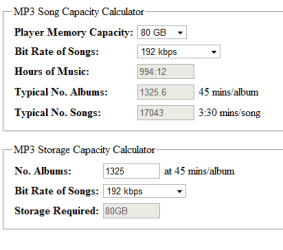
Here's a online calculator pic that shows you roughly what you can expect to get from only a 80Gb HDD

Here's the link free online song capacity calculator for mp3
 

Attachments

  • mp3 storage.PNG
    mp3 storage.PNG
    7.3 KB · Views: 3

My Computer

Computer type
PC/Desktop
Computer Manufacturer/Model Number
Self Built
OS
Windows 7 Ultimate 64bit
CPU
AMD Phenom Quad core 9950 black edition
Motherboard
Gigabyte
Memory
16Gb
Graphics Card(s)
2x XFX Radeon 5850
Sound Card
PCI Express X-Fi Titanium / Logitech G35
Monitor(s) Displays
2x HP 2410i
Screen Resolution
1920x1080
Hard Drives
2x 500Gb Seagate
1x 300Gb Seagate
1x 1Tb Seagate
2x 1Tb Hitatchi
PSU
Jean Tech Storm 700W
Case
Cooler Master COSMOS S
Cooling
Akasa Evo Blue Pro
Keyboard
Logitech G15
Mouse
Mad Catz M.M.O. 7
Internet Speed
12mb
An external hard drive is a hard drive just like any other. If you can put files on the original drive in your computer, you can also copy them over to the external drive. You can combine all types of files on it...just like you have done on your internal hard drive.
 

My Computer

Computer Manufacturer/Model Number
Self-Built in July 2009
OS
Windows 7 Ultimate x64
CPU
Intel Q9550 2.83Ghz OC'd to 3.40Ghz
Motherboard
Gigabyte GA-EP45-UD3R rev. 1.1, F12 BIOS
Memory
8GB G.Skill PI DDR2-800, 4-4-4-12 timings
Graphics Card(s)
EVGA 1280MB Nvidia GeForce GTX570
Sound Card
Realtek ALC899A 8 channel onboard audio
Monitor(s) Displays
23" Acer x233H
Screen Resolution
1920x1080
Hard Drives
Intel X25-M 80GB Gen 2 SSD
Western Digital 1TB Caviar Black, 32MB cache. WD1001FALS
PSU
Corsair 620HX modular
Case
Antec P182
Cooling
stock
Keyboard
ABS M1 Mechanical
Mouse
Logitech G9 Laser Mouse
Internet Speed
15/2 cable modem
Other Info
Windows and Linux enthusiast. Logitech G35 Headset.
PPARKS1, as I was reading this thread I was thinking exactly what you said. Anything that can be put on an internal drive can be put on an external. I hate to over simplify this discussion, but isn't that what a backup is? Taking what is on your internal and putting it on an external?
 

My Computers

System One System Two

  • Computer type
    PC/Desktop
    Computer Manufacturer/Model Number
    ALWAYS UNDER CONSTRUCTION
    OS
    Windows 11 Pro
    CPU
    Ryzen 9 5900X
    Motherboard
    Asus X570 Crosshair Viii Hero
    Memory
    32GB G Skill DDR4-3600
    Graphics Card(s)
    EVGA RTX 3080 FTW 3 Ultra
    Sound Card
    On Board/Sennheiser PC37X Headset
    Monitor(s) Displays
    3 X Asus 27"
    Screen Resolution
    2560x1440
    Hard Drives
    2 X 1 TB NVME drives
    PSU
    EVGA 850
    Case
    Phanteks Eclipse P400A
    Cooling
    EVGA 280 AIO
    Keyboard
    Logitech G510s/ Logitech G13
    Mouse
    Logitech G502
    Internet Speed
    24/1
    Antivirus
    ESET/MBAM Pro/SAS Pro
    Browser
    Chrome/ Firefox/ Edge
  • Computer type
    Laptop
    System Manufacturer/Model Number
    Dell 16 Plus
    OS
    Windows 11 Pro
    CPU
    Intel Ultra 9 288V
    Memory
    32 GB LPDDR5X 8533
    Monitor(s) Displays
    16" Mini-LED HDR600 Touch 90 Hz
    Screen Resolution
    2560X1600
    Hard Drives
    1 TB NVME
My teacher told me he has 1 hard drive and 3 externals..lol.
one is the main one(hard drive), one is for music, one is for backup, one is a 1T that jut backs up the other 2 drives from his music and backup.

I dont know why he has 4 drives :confused:
 

My Computer

Computer Manufacturer/Model Number
ASUSTeK Computer INC
OS
Windows 7 Professional x64
CPU
AMD Athlon 64x2 Dual core Processor 5400+
Motherboard
ASUSTek Computer INC
Memory
5GB DDR2
Graphics Card(s)
ATi Radeon Hd 4650
Sound Card
Realtek High Definition Audio
Screen Resolution
1680x1024 AOC
Hard Drives
250GB
Internet Speed
28mbps
This professor must be teaching political science. Sounds like most politicians to me. LOL
 

My Computer

Computer Manufacturer/Model Number
My Build
OS
win7 Ult 64
CPU
i7 3930K & 3960X
Motherboard
ASUS P9X79 Deluxe
Memory
16GB G-Skill 2133MHz
Graphics Card(s)
Sapphire HD 7970
Sound Card
On-board
Monitor(s) Displays
ASUS 27 inch
Screen Resolution
1920X1080
Hard Drives
Crucial M4 256GB, 1.5TB WD Black for Data/Images
PSU
Corsair AX1200
Case
NZXT 810
Cooling
Custom Loop, Swiftech HDBlock
Keyboard
Mionix
Mouse
Mionix
Internet Speed
Cable
Just make a series of folders on your new drive:

MP3

Video

Pictures

Or whatever you want. There's no reason to use a drive for just 1 type of file. That's what folders are for.

A 320 GB drive should be able to hold about 80,000 high quality mp3 songs of typical length, and twice that many of "average" quality. Video is what really eats up space.
 

My Computer

Computer type
PC/Desktop
Computer Manufacturer/Model Number
Ignatz Special; 4 speed manual gearbox; factory air conditioning; one of one
OS
Windows 7 Home Premium SP1, 64-bit
CPU
Intel Skylake i5-6600K, not overclocked
Motherboard
AsRock Z170M Extreme 4, micro ATX
Memory
8 GB HyperX DDR4-2666 (2 x 4 GB)
Graphics Card(s)
none; graphics are integrated on CPU
Sound Card
onboard: Realtek ALC1150; external: USB Behringer UF0-202
Monitor(s) Displays
Dell S2340M 23 inch IPS
Screen Resolution
1600 x 900
Hard Drives
System: Crucial MX100 series SSD, 128 GB;
Data: Samsung Spinpoint 103SJ, 1 TB;
Backup: WD Caviar Green WD30EZRX-00D8PB0, 3 TB
PSU
Rosewill SilentNight 500 watt fanless, semi-modular
Case
Antec Solo II
Cooling
Noctua NH-U12S; Noctua F12 intake, Noctua S12A exhaust
Keyboard
Microsoft 200 6JH-00001 USB
Mouse
Dell or Microsoft optical wired; USB
Antivirus
Microsoft Security Essentials and Malwarebytes Premium
Browser
Pale Moon
Other Info
All fans PWM; speeds at idle: CPU circa 500 rpm; intake circa 600 rpm; exhaust circa 600 rpm; CPU temps 27 idle and 47 C load in a warm room (27 C/81 F) when running Intel Extreme Tuning Utility stress test.
I break down my videos into 700-900MB :)
Do I have to make a folder for my backup on my external or will it make its self?
 

My Computer

Computer Manufacturer/Model Number
ASUSTeK Computer INC
OS
Windows 7 Professional x64
CPU
AMD Athlon 64x2 Dual core Processor 5400+
Motherboard
ASUSTek Computer INC
Memory
5GB DDR2
Graphics Card(s)
ATi Radeon Hd 4650
Sound Card
Realtek High Definition Audio
Screen Resolution
1680x1024 AOC
Hard Drives
250GB
Internet Speed
28mbps
This professor must be teaching political science. Sounds like most politicians to me. LOL


He's just my pre-cal teacher who likes computers, but has his facts wrong about my external hard drive. lol
 

My Computer

Computer Manufacturer/Model Number
ASUSTeK Computer INC
OS
Windows 7 Professional x64
CPU
AMD Athlon 64x2 Dual core Processor 5400+
Motherboard
ASUSTek Computer INC
Memory
5GB DDR2
Graphics Card(s)
ATi Radeon Hd 4650
Sound Card
Realtek High Definition Audio
Screen Resolution
1680x1024 AOC
Hard Drives
250GB
Internet Speed
28mbps
I break down my videos into 700-900MB :)
Do I have to make a folder for my backup on my external or will it make its self?


You would have to make folders manually--if you need them. You could use any name you wanted---"backup" or anything else. The only reason you would need a folder is to be better organized.

You might have to partition and format the external also? I'm not sure if external drives are formatted when you buy them. If it is formatted, it is ready to use.

Plug it in and then look in Windows Explorer and see if you see it. If you don't, you may have to go to Windows Disk Management and assign a drive letter to it.
 

My Computer

Computer type
PC/Desktop
Computer Manufacturer/Model Number
Ignatz Special; 4 speed manual gearbox; factory air conditioning; one of one
OS
Windows 7 Home Premium SP1, 64-bit
CPU
Intel Skylake i5-6600K, not overclocked
Motherboard
AsRock Z170M Extreme 4, micro ATX
Memory
8 GB HyperX DDR4-2666 (2 x 4 GB)
Graphics Card(s)
none; graphics are integrated on CPU
Sound Card
onboard: Realtek ALC1150; external: USB Behringer UF0-202
Monitor(s) Displays
Dell S2340M 23 inch IPS
Screen Resolution
1600 x 900
Hard Drives
System: Crucial MX100 series SSD, 128 GB;
Data: Samsung Spinpoint 103SJ, 1 TB;
Backup: WD Caviar Green WD30EZRX-00D8PB0, 3 TB
PSU
Rosewill SilentNight 500 watt fanless, semi-modular
Case
Antec Solo II
Cooling
Noctua NH-U12S; Noctua F12 intake, Noctua S12A exhaust
Keyboard
Microsoft 200 6JH-00001 USB
Mouse
Dell or Microsoft optical wired; USB
Antivirus
Microsoft Security Essentials and Malwarebytes Premium
Browser
Pale Moon
Other Info
All fans PWM; speeds at idle: CPU circa 500 rpm; intake circa 600 rpm; exhaust circa 600 rpm; CPU temps 27 idle and 47 C load in a warm room (27 C/81 F) when running Intel Extreme Tuning Utility stress test.
You would have to make folders manually--if you need them. You could use any name you wanted---"backup" or anything else. The only reason you would need a folder is to be better organized.

You might have to partition and format the external also? I'm not sure if external drives are formatted when you buy them. If it is formatted, it is ready to use.

Plug it in and then look in Windows Explorer and see if you see it. If you don't, you may have to go to Windows Disk Management and assign a drive letter to it.[/QUOTE]


It's a new drive so I'm sure it's already formated. it's coming in on tue.
Yeah, of course I'll have everything organized.

I check on backing up my hard drive and it said 100G, is there some other way to backup what is usefull?
 

My Computer

Computer Manufacturer/Model Number
ASUSTeK Computer INC
OS
Windows 7 Professional x64
CPU
AMD Athlon 64x2 Dual core Processor 5400+
Motherboard
ASUSTek Computer INC
Memory
5GB DDR2
Graphics Card(s)
ATi Radeon Hd 4650
Sound Card
Realtek High Definition Audio
Screen Resolution
1680x1024 AOC
Hard Drives
250GB
Internet Speed
28mbps
Hey everyone!
Today in class I asked my teacher a question about my external drive coming in the mail. I told him if i can backup and save other files like music. My teacher said you can only pick one.

Is that true?
I can only pick to back up and can't save music?
I'm new at this external hard drive think, can someone explain what I can really use it for?
Don't want 320G to go to waste.

And this happened in the United States ???? My god, what is the world coming too, If I were you I wouldn't go back to that "school" :rolleyes::rolleyes::rolleyes:
 

My Computer

Computer Manufacturer/Model Number
Alienware Aurora
OS
Win 7 Ultimate x64
CPU
Core I7 980X O.C. to 4.0 Ghz
Motherboard
Custom Intel mATX (Bios ver A10)
Memory
12GB 1600 mhz triple channel DDR3 - Kingston
Graphics Card(s)
ATI Radeon HD 5970 2GB Video Card
Sound Card
Creative Labs Titanium sound blaster
Monitor(s) Displays
30" Dell LCD
Screen Resolution
2560 x 1600
Hard Drives
240 GB OCZ Vertex 2 SSD
256 GB Samsung V2 SSD
2TB WD Black Caviar 7200 rpm SATA3
600GB WD Velociraptor 10,000 rpm SATA3
3TB WD MyBook Essential USB 3.0 7200 rpm External
PSU
850 Watt
Case
Alienware Aurora
Cooling
Water
Keyboard
Logitech G15 (original version)
Mouse
Logitech MX1000 Laser - Wireless
Internet Speed
Cable 22 Mb/sec download
Other Info
USB 3.0,
Blue Ray DVD Read/Writer
Bose Companion 3 Speakers
WRT54G Wireless Router
I check on backing up my hard drive and it said 100G, is there some other way to backup what is usefull?

I'm not sure I follow you.

If you mean that you currently have 100 G of stuff on your current drive, it's up to you to decide how much of that you want to back up.

You could back up just Windows itself (usually done by making an image).

Or you could back up just your own personal files (mp3s, email, videos, pictures, etc). This could be done by making an image, by just copying with the mouse, or by using a program designed to automate the procedure. I'd advise you not to use the image method to back up your personal files. Or at least not to rely on an image as a backup of your personal files.

Or you could back up both Windows and your personal files.
 

My Computer

Computer type
PC/Desktop
Computer Manufacturer/Model Number
Ignatz Special; 4 speed manual gearbox; factory air conditioning; one of one
OS
Windows 7 Home Premium SP1, 64-bit
CPU
Intel Skylake i5-6600K, not overclocked
Motherboard
AsRock Z170M Extreme 4, micro ATX
Memory
8 GB HyperX DDR4-2666 (2 x 4 GB)
Graphics Card(s)
none; graphics are integrated on CPU
Sound Card
onboard: Realtek ALC1150; external: USB Behringer UF0-202
Monitor(s) Displays
Dell S2340M 23 inch IPS
Screen Resolution
1600 x 900
Hard Drives
System: Crucial MX100 series SSD, 128 GB;
Data: Samsung Spinpoint 103SJ, 1 TB;
Backup: WD Caviar Green WD30EZRX-00D8PB0, 3 TB
PSU
Rosewill SilentNight 500 watt fanless, semi-modular
Case
Antec Solo II
Cooling
Noctua NH-U12S; Noctua F12 intake, Noctua S12A exhaust
Keyboard
Microsoft 200 6JH-00001 USB
Mouse
Dell or Microsoft optical wired; USB
Antivirus
Microsoft Security Essentials and Malwarebytes Premium
Browser
Pale Moon
Other Info
All fans PWM; speeds at idle: CPU circa 500 rpm; intake circa 600 rpm; exhaust circa 600 rpm; CPU temps 27 idle and 47 C load in a warm room (27 C/81 F) when running Intel Extreme Tuning Utility stress test.
how do I do this "image disk'? and how does it work in case of a super nasty virus hits me or something happens?
 

My Computer

Computer Manufacturer/Model Number
ASUSTeK Computer INC
OS
Windows 7 Professional x64
CPU
AMD Athlon 64x2 Dual core Processor 5400+
Motherboard
ASUSTek Computer INC
Memory
5GB DDR2
Graphics Card(s)
ATi Radeon Hd 4650
Sound Card
Realtek High Definition Audio
Screen Resolution
1680x1024 AOC
Hard Drives
250GB
Internet Speed
28mbps
Hey everyone!
Today in class I asked my teacher a question about my external drive coming in the mail. I told him if i can backup and save other files like music. My teacher said you can only pick one.

Is that true?
I can only pick to back up and can't save music?
I'm new at this external hard drive think, can someone explain what I can really use it for?
Don't want 320G to go to waste.

And this happened in the United States ???? My god, what is the world coming too, If I were you I wouldn't go back to that "school" :rolleyes::rolleyes::rolleyes:


Yeah this happened in the US:o
I saw him today, of course and I didn't tell him that he should go back to school and learn to get his facts right. lol:cry:
 

My Computer

Computer Manufacturer/Model Number
ASUSTeK Computer INC
OS
Windows 7 Professional x64
CPU
AMD Athlon 64x2 Dual core Processor 5400+
Motherboard
ASUSTek Computer INC
Memory
5GB DDR2
Graphics Card(s)
ATi Radeon Hd 4650
Sound Card
Realtek High Definition Audio
Screen Resolution
1680x1024 AOC
Hard Drives
250GB
Internet Speed
28mbps
Back
Top