External Seagate Back is recognized but cannot be opened!

Neikautuai

New member
Local time
4:33 AM
Messages
11
Location
Rome
Hi everyone,

I bought a 350 GB External Seagate Back-up and used for about 7 months. Now I cannot access it even though the computer recognize it. I check in the "command" and I was told that it is a RAW. I tried many recover softwares but none of them have fixed it. I tried to a IDE/SATA connection but failed too. Now what should I do? It almost 5 months without using it, please anyone can help?

Regards
 

My Computer

OS
Window 7 Home Premium 64 bit
Can you post a screenshot of Disk Management? Make sure to maximize the window and adjust the columns/rows to show as much relevant info as possible.
 

My Computer

OS
Windows 7 Ultimate x64
Hi sibbil!

Thank for your reply. Making a screenshot you mean before or after I attached the back-up?

Regards
 

My Computer

OS
Window 7 Home Premium 64 bit
With it attached.
 

My Computer

OS
Windows 7 Ultimate x64
Thanks once again Sibbil,

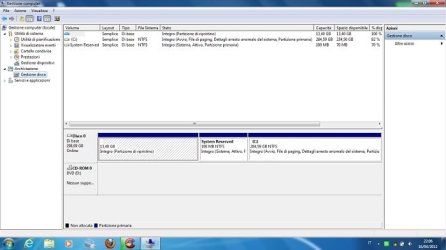
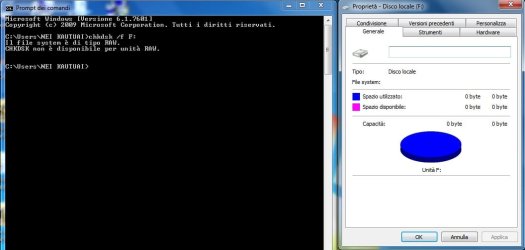
Apology for the delay. This is because I have tried many hours waiting to the Disc Management to display my back-up but nothing happened. These screenshots show shots of My Computer and the Disc Management. I'm so sorry for the language because I'm using an italian operating system but hope you can understand and find what you are looking for.

Regards

ScreenShot2.jpg

ScreenShot1.jpg
 

My Computer

OS
Window 7 Home Premium 64 bit
You're welcome. And welcome to the forum!

Yeah, nothing showing in disk management. I guess you're sure the drive was properly connected and powered on, correct?

In the Explorer window, is drive F: supposed to be the drive in question?

What command did you use where it told you the drive was "raw"?

And there is never a need to apologize for the language!! There are plenty of forum members here from all over the world who are willing to help.
 

My Computer

OS
Windows 7 Ultimate x64
Thanks once again Sibbil,

I was using a command in the accessories and typed: chkdsk .... After the completion of that, about 10 minutes later and a message of RAW appeared, saying that that scan disk cannot access because the hd is RAW!!!

Regards
 

My Computer

OS
Window 7 Home Premium 64 bit
Thanks once again Sibbil,

I was using a command in the accessories and typed: chkdsk .... After the completion of that, about 10 minutes later and a message of RAW appeared, saying that that scan disk cannot access because the hd is RAW!!!

Regards

Doesn't seem as though that chkdsk command would work at all if the drive wasn't even appearing in Disk Management.

I take it you've pulled the hard disk out of the external case once before as you said that "I tried to a IDE/SATA connection but failed too". Can you do that again, and see how it then appears in Disk Management?
 

My Computer

OS
Windows 7 Ultimate x64
Dear Sibbil,

Apology for the delay. I spent almost 5 hrs this afternoon, waited for the completion of the "chkdsk". I did this after school, that was I late to answer your latest reply. Anyway after the completion of the process attached the results.

Regards

ScreenShot6.jpg

ScreenShot5.jpg
 

My Computer

OS
Window 7 Home Premium 64 bit
If I can help out here.

Chkdsk won't run on a drive without a partition. Drive 2 is showing as RAW because it doesn't have a partition on it.

Right-click the drive and choose New Simple Volume, select Quick Format, allocate a drive letter, and then you should be able to use it.
 

My Computer

Computer Manufacturer/Model Number
HP Pavilion Elite 495UK
OS
Windows 7 Ultimate SP1 64-Bit
CPU
Intel Core i7 870 @ 2.93GHz
Motherboard
MSI 2A9C (CPU1)
Memory
8Gb Dual-Channel DDR3 @ 664MHz
Graphics Card(s)
nVidia GeForce GTX 460 1024MB dedicated RAM
Sound Card
Realtek HD Audio
Monitor(s) Displays
HP2310i
Screen Resolution
1920 x 1080
Hard Drives
1x1954GB Hitachi HDS22020ALA 330 (RAID), 1x1954GB Hitachi External for backup and storage
PSU
460W
Case
HP Elite
Cooling
Air cooled
Keyboard
Logitech K750 solar-powered keyboard
Mouse
Logitech Wireless M180 mouse
Internet Speed
2Mb
Other Info
Pure Avanti Flow Internet Radio with iPod Dock, 64Gb iPod, HP USB Speakers, Sony MDR-V500 Headphones, Sony Vaio F-Series Laptop
Hi Seavixen32,

I was attempted to do that, but I'm afraid to do so because I presume that once I make a partition everything that I saved in that back-up will be erased, won't they? If they will, any other option to enter in that back-up so that I can pull everything out from that.

Regards
 

My Computer

OS
Window 7 Home Premium 64 bit
Okay , now it shows up (your previous screenshots only showed an undetailed F: drive in Explorer). And it looks like one big partition, but it has lost it's fie system. The best tool I'm aware of for that is CGSecurity. It has no GUI, so take your time looking through it's options before committing writes to the disk. It should list any file system(s) it found and allow you to browse folders (directories) and files it found. If it gives you the option of copying data from it you might want to do that. When you're satisfied that it found your files/folders properly, then you can write the corrected file system to disk.
 

My Computer

OS
Windows 7 Ultimate x64
Greetings Sibbil,

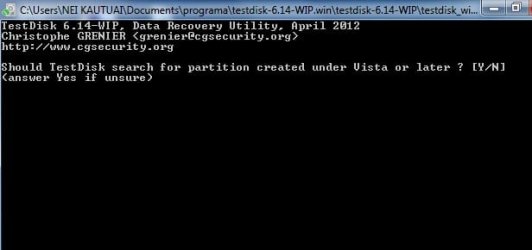
I tried the test-disk for the second time but still have the same problem. When I reached at the dialogue-box which needs to answer Y/N, I could not see my letters when I pressed Y or N. Attached the results.

Regards

TestDisk-result.jpg

TestDisk-result1.jpg
 

My Computer

OS
Window 7 Home Premium 64 bit
So pressing "Y" is not starting the deep search?
 

My Computer

OS
Windows 7 Ultimate x64
Greetings Sibbil,

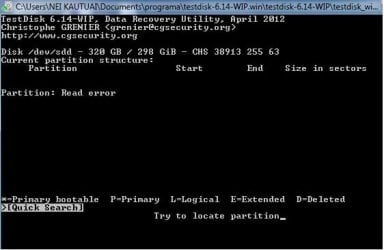
Apology for your late message when I did not reply it earlier. Well, I made a mistake when I posted my last post with the expectation that the letter Y/N must be displayed. I tried it again this evening and left it about an hour and ended up with the attached screenshot. Is it supposed to move on from this point or this is the end of the process?

I agree to what Seavixen32 has said that the back-up needs a partition. Is it right that once I make now a partition, everything will be deleted! But if everything is deleted, any other way to restore them while the hd has partitions on it?

Regards

no-partition.png
 

My Computer

OS
Window 7 Home Premium 64 bit
The screenshot shown indicates that testdisk could not find a partition with a quick check. So now that "Deeper Search" is highlighted, press enter.

Your last screenshot of Disk Management shows there is a partition on the drive {F:} but it is raw (unformatted -- no file system). Testdisk will try to find the remnants of the partition that was there while you had been using the drive normally. If it can find it, it will show you what it found, and it will give you the opportunity to browse through the folders/files it found. It'll also give you an opportunity to copy them to another location if you choose. Be cautious, go slow, as the menu at the bottom changes from step to step.

Check out the step-by-step guide here: TestDisk Step By Step - CGSecurity

Also check this out (regarding raw): http://www.cgsecurity.org/wiki/Data_Recovery_Examples
 
Last edited:

My Computer

OS
Windows 7 Ultimate x64
Hi Neikautuai

I just add some options if you wish to try it.

There is a time windows disk management getting a bit dumb in recognizing any storage attached to it no matter it is new or even been there for months. It would also happen sometimes when we reinstall windows.

There some tricks to manipulate it in order to avoid losing data.
Try using any free partition program (partition wizard, easeus, or else) or you can use any friend's PC who have the partition manager program. Try to check the drive from within the program and see if windows get to recognize its content. If it doesn't work try to manipulate the size by resizing the partition few MBs, and apply.

I do not guarantee it will always work. But that is the simplest way I always do several times, and it gives me good result. :)

Kevin
 

My Computers

System One System Two

  • Computer type
    PC/Desktop
    Computer Manufacturer/Model Number
    MSI
    OS
    Windows 11 Prerelease
    CPU
    CORE i5 10400
    Motherboard
    MSI H510M Pro
    Memory
    16GB
    Graphics Card(s)
    GTX 750Ti
    Sound Card
    Realtek HD Integrated
    Monitor(s) Displays
    Samsung Curved 24"; Samsung TV 50"
    Screen Resolution
    1920 x 1080
    Hard Drives
    Vi-Gen NVMe 256GB
    WD 3 TB
    Seagate 2 TB
    Seagate 4TB
    PSU
    Power Striker
    Case
    VBR
    Cooling
    Conventional
    Keyboard
    Logitech Wireless
    Mouse
    Logitech Wireless
    Internet Speed
    2MBPs
  • Computer type
    Laptop
    System Manufacturer/Model Number
    Apple MacBook
    OS
    BigSur
    CPU
    Core i5
    Memory
    8 GB
    Monitor(s) Displays
    13 "
    Screen Resolution
    1366 x 768
    Hard Drives
    SSD 256 GB
Greetings Sibbil and Kevin,

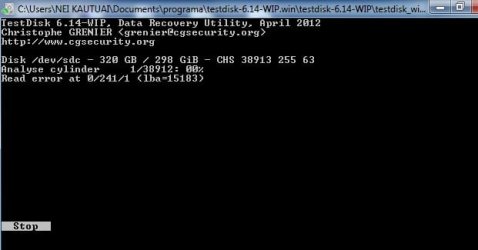
Apology for the late reply, due to other works for which are meant to be submitted this week. Anyway, I haven't tried all of your suggestions. Follow up what I posted last time, that is a "deep search" the attached screenshot displays the result. I will try one by one what you are suggesting here and see the result.

Regards

Stop.jpg
 

My Computer

OS
Window 7 Home Premium 64 bit
Normally you'll see testdisk fly through the cylinders, but when it hits a spot where it has a hard time reading, it'll try again a few times before it moves on to the next cylinder. That's what appears to have happened in your screenshot. You've just got to let it complete the scan.
 

My Computer

OS
Windows 7 Ultimate x64
Greetings Sibbil,

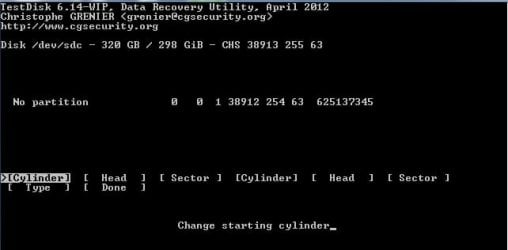
Sometimes it is good for me to be patient! You are right, the attached screenshot show where I am now, but the problem, as a beginner, I don't understand what should write for the Cylinder - Head - Sector - etc ... I tried to follow up the links you attached but confused! Please help.

Regards

Cylinder.jpg
 

My Computer

OS
Window 7 Home Premium 64 bit
Back
Top