
External to internal HDD

bbbwex

New member
Local time
12:11 AM
Messages
19
Location
Wexford
Greetings all,

Recently my 500GB external HDD stopped working. the power supply in the case stopped working.I took it out of the case and I've now got it hooked up via SATA as an internal HDD. Working fine but I keep getting SMART errors and warnings that the HDD is about to collapse.

At the moment of writing this I'm copying averything to another external HDD to save my data, so I can't give you the manufacturer name at the moment.
in properties I do get that it is an ST3500830AS ATA Device

Is there some BIOS setting I'm after forgetting, or maybe caused by going from USB external to SATA internal, or should I be really worried about this harddisk?

My pc info will give you any other HW info you may need, or else just ask!

Thanks for any help that can be provided.


Bob
 

My Computer

Computer Manufacturer/Model Number
self upgrade (used to be a p? running 800Mhz with 512kb from fujitsu siemens)
OS
win7
CPU
Intel 2.5Ghz DualCore
Motherboard
Asus p5s.....
Memory
2Gb
Graphics Card(s)
Geforce 8500
Sound Card
acl662 5.1 surround
Monitor(s) Displays
scaleo C772 (still to be upgraded to flat widescreen)
Screen Resolution
1280*1024
Hard Drives
250GB int
500 GB ext usb2.0 Mediafire
1.5Tb ext usb2.0 Verbatim
Case
midi tower oem
Keyboard
wireless qwerty full media
Mouse
To hell with mouses, use a TRACKBALL!!! Logitech trackman
Internet Speed
3Mbit
Other Info
better at hardware then software, former IT specialist in the good old days of i80x86 processors, MS-DOS, CGA -EGA graphics and memory still counted in KB and MB.

Now just keeping up some skill for the house and friends, but live life on the road on 18wheels!!!!!!!!!
In the mean time I've copied everything to another drive...

Hoping to get a suggestion soon, as i've got to travel again for a few weeks in 14 hrs.

I'll disconnect the drive then and continue this when back
 

My Computer

Computer Manufacturer/Model Number
self upgrade (used to be a p? running 800Mhz with 512kb from fujitsu siemens)
OS
win7
CPU
Intel 2.5Ghz DualCore
Motherboard
Asus p5s.....
Memory
2Gb
Graphics Card(s)
Geforce 8500
Sound Card
acl662 5.1 surround
Monitor(s) Displays
scaleo C772 (still to be upgraded to flat widescreen)
Screen Resolution
1280*1024
Hard Drives
250GB int
500 GB ext usb2.0 Mediafire
1.5Tb ext usb2.0 Verbatim
Case
midi tower oem
Keyboard
wireless qwerty full media
Mouse
To hell with mouses, use a TRACKBALL!!! Logitech trackman
Internet Speed
3Mbit
Other Info
better at hardware then software, former IT specialist in the good old days of i80x86 processors, MS-DOS, CGA -EGA graphics and memory still counted in KB and MB.

Now just keeping up some skill for the house and friends, but live life on the road on 18wheels!!!!!!!!!
Hi Bob,

Which SMART attributes are being flagged specifically? Can you install and run CrystalDiskInfo, and then paste a screen capture of the result here?

Once you have copied all your data out, you could try running a chkdsk /R to recover data from bad sectors, and flag them as bad for future writes.

Regards,
Golden
 

My Computer

Computer type
PC/Desktop
Computer Manufacturer/Model Number
Golden Mk. I.4
OS
Windows 10 Pro x64 ; Xubuntu x64
CPU
Intel i7 860 @ 2.80 GHz O/C'ed to 4.0GHz
Motherboard
Gigabyte P55A-UD3R Rev.1. Award BIOS F13
Memory
16GB Corsair Vengance DDR3 @ 661 MHz Dual Channel (9-9-9-24)
Graphics Card(s)
EVGA NVidia GTX 560 1024MB
Sound Card
Realtek Integrated
Monitor(s) Displays
Dual Samsung SyncMaster 2494HS
Screen Resolution
1920*1080 and 1920*1080
Hard Drives
1*Samsung 840 EVO 120GB SSD;
1*OCZ Vertex 2 60GB SSD;
2*Samsung F3 SpinPoint 1TB in RAID0;
1*Samsung F1 SpinPoint 1TB;
2*Western Digital 1TB External USB 3.0
1*Western Digital 500GB External USB 3.0
1*Seagate 500GB External USB 2.0
PSU
Thermaltake ToughPower QFan 750W
Case
Thermaltake Element S VK60001W2Z
Cooling
Corsair H60 Water Cooling, 2*230mm and 2*80mm case fans
Keyboard
Logitech G110
Mouse
Logitech MX518
files have been copied, disc reformatted and am running the chkdsk now overnight. I'll see what smart errors come up then in the morning and post them if needed. thanks
 

My Computer

Computer Manufacturer/Model Number
self upgrade (used to be a p? running 800Mhz with 512kb from fujitsu siemens)
OS
win7
CPU
Intel 2.5Ghz DualCore
Motherboard
Asus p5s.....
Memory
2Gb
Graphics Card(s)
Geforce 8500
Sound Card
acl662 5.1 surround
Monitor(s) Displays
scaleo C772 (still to be upgraded to flat widescreen)
Screen Resolution
1280*1024
Hard Drives
250GB int
500 GB ext usb2.0 Mediafire
1.5Tb ext usb2.0 Verbatim
Case
midi tower oem
Keyboard
wireless qwerty full media
Mouse
To hell with mouses, use a TRACKBALL!!! Logitech trackman
Internet Speed
3Mbit
Other Info
better at hardware then software, former IT specialist in the good old days of i80x86 processors, MS-DOS, CGA -EGA graphics and memory still counted in KB and MB.

Now just keeping up some skill for the house and friends, but live life on the road on 18wheels!!!!!!!!!
Since it is a Seagate HD, you might go to the Seagate website & download their SeaTools to run some checks on it also ;)
 

My Computer

Computer type
PC/Desktop
Computer Manufacturer/Model Number
Built them myself, Science Experiments !
OS
Win7 Enterprise, Win7 x86 (Ult 7600), Win7 x64 Ult 7600, TechNet RTM on AMD x64 (2.8Ghz)
CPU
AMD fx8350 4ghz, AMD-32 2400mhz, AMD-64 3200mhz, AMDx64 2.8G
Motherboard
SIS 755, ECS-K8M890M-M (Ult 7600), GigaByte & others
Memory
2gb, 4gb on the Ult 7600, 4gb on Technet RTM, 32gb on FX8350
Graphics Card(s)
Draw my own Graphics, several nVidia cards
Sound Card
on motherboard
Monitor(s) Displays
19" flat scr, 28" I-Inc widescr,22" Emprex Widescr, 23" Acer
Screen Resolution
1280 x 1024, 1440 x 900, 1920 x 1080
Hard Drives
6 pata Ide HD's & 2 Sata HD's
added 80gb external on Ult 7600 computer,
numerous extra 1tb, 2TB, 3Tb SATA HD's
A collection of ext HD Docks w/ HDs
PSU
430w, 550w, 600w, 700, 800, etc
Case
All Generic Full Towers
Cooling
Open Air & a few fans, some w/ colored LEDs
Keyboard
Compaq & Dell recycled from GoodWill
Mouse
Made in China Optical Wired Mouse
Internet Speed
Fast Cable InterNet
Antivirus
AVG Free on 24 different Desktops, NO Problems!
Browser
IE 8 is preferred, but use FireFox sometimes
Other Info
Linksys Routers, switches, & Hubs
Too Many USB Flash Drives to count, Biggest is 64GB !
Eight computers in my home network.
Sixteen computers at my business network.
Linked via TeamViewer !
Lots of old used spare computer parts everywhere!

Attachments

  • crystaldiskscreen.gif
    crystaldiskscreen.gif
    120.1 KB · Views: 20
Last edited:

My Computer

Computer Manufacturer/Model Number
self upgrade (used to be a p? running 800Mhz with 512kb from fujitsu siemens)
OS
win7
CPU
Intel 2.5Ghz DualCore
Motherboard
Asus p5s.....
Memory
2Gb
Graphics Card(s)
Geforce 8500
Sound Card
acl662 5.1 surround
Monitor(s) Displays
scaleo C772 (still to be upgraded to flat widescreen)
Screen Resolution
1280*1024
Hard Drives
250GB int
500 GB ext usb2.0 Mediafire
1.5Tb ext usb2.0 Verbatim
Case
midi tower oem
Keyboard
wireless qwerty full media
Mouse
To hell with mouses, use a TRACKBALL!!! Logitech trackman
Internet Speed
3Mbit
Other Info
better at hardware then software, former IT specialist in the good old days of i80x86 processors, MS-DOS, CGA -EGA graphics and memory still counted in KB and MB.

Now just keeping up some skill for the house and friends, but live life on the road on 18wheels!!!!!!!!!
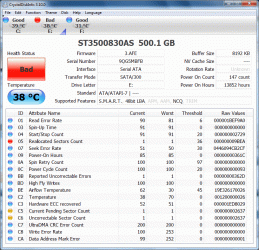
Mmm....that doesn't look too healthy. Have you tried the chkdsk /R yet? If not, please back all your data if you haven't done so already (I recall you said you were doing that?), and then run the chkdsk /R.

Post back here again when it is done.

Regards,
Golden

EDIT : sorry, I saw you already formatted and then did the chkdsk. Was that with the /R switch?
 

My Computer

Computer type
PC/Desktop
Computer Manufacturer/Model Number
Golden Mk. I.4
OS
Windows 10 Pro x64 ; Xubuntu x64
CPU
Intel i7 860 @ 2.80 GHz O/C'ed to 4.0GHz
Motherboard
Gigabyte P55A-UD3R Rev.1. Award BIOS F13
Memory
16GB Corsair Vengance DDR3 @ 661 MHz Dual Channel (9-9-9-24)
Graphics Card(s)
EVGA NVidia GTX 560 1024MB
Sound Card
Realtek Integrated
Monitor(s) Displays
Dual Samsung SyncMaster 2494HS
Screen Resolution
1920*1080 and 1920*1080
Hard Drives
1*Samsung 840 EVO 120GB SSD;
1*OCZ Vertex 2 60GB SSD;
2*Samsung F3 SpinPoint 1TB in RAID0;
1*Samsung F1 SpinPoint 1TB;
2*Western Digital 1TB External USB 3.0
1*Western Digital 500GB External USB 3.0
1*Seagate 500GB External USB 2.0
PSU
Thermaltake ToughPower QFan 750W
Case
Thermaltake Element S VK60001W2Z
Cooling
Corsair H60 Water Cooling, 2*230mm and 2*80mm case fans
Keyboard
Logitech G110
Mouse
Logitech MX518
re chkdsk /r. Didn't use the command line, but win chkdsk from the tools tab in properties, and checkedmarked the recovery. the post above is from after it ran through the chkdsk.

To me it looks like I may have to replace it..

as its not crashed yet can use it as an emergency spare...

If anyone has any other suggestions, post them but it will be a while before I can try it. HD is now disconnected and the data moved to my 1.5Tb.

I'm off to travel for a few weeks again.

thanks for all suggestions so far and future posts, I will check regularly while on the road.

Bob
 

My Computer

Computer Manufacturer/Model Number
self upgrade (used to be a p? running 800Mhz with 512kb from fujitsu siemens)
OS
win7
CPU
Intel 2.5Ghz DualCore
Motherboard
Asus p5s.....
Memory
2Gb
Graphics Card(s)
Geforce 8500
Sound Card
acl662 5.1 surround
Monitor(s) Displays
scaleo C772 (still to be upgraded to flat widescreen)
Screen Resolution
1280*1024
Hard Drives
250GB int
500 GB ext usb2.0 Mediafire
1.5Tb ext usb2.0 Verbatim
Case
midi tower oem
Keyboard
wireless qwerty full media
Mouse
To hell with mouses, use a TRACKBALL!!! Logitech trackman
Internet Speed
3Mbit
Other Info
better at hardware then software, former IT specialist in the good old days of i80x86 processors, MS-DOS, CGA -EGA graphics and memory still counted in KB and MB.

Now just keeping up some skill for the house and friends, but live life on the road on 18wheels!!!!!!!!!
Hi Bob,

I agree. If it still look bad after the chkdsk, then its worth replacing. Let us know how you get on with that, and safe travels.

Regards,
Golden
 

My Computer

Computer type
PC/Desktop
Computer Manufacturer/Model Number
Golden Mk. I.4
OS
Windows 10 Pro x64 ; Xubuntu x64
CPU
Intel i7 860 @ 2.80 GHz O/C'ed to 4.0GHz
Motherboard
Gigabyte P55A-UD3R Rev.1. Award BIOS F13
Memory
16GB Corsair Vengance DDR3 @ 661 MHz Dual Channel (9-9-9-24)
Graphics Card(s)
EVGA NVidia GTX 560 1024MB
Sound Card
Realtek Integrated
Monitor(s) Displays
Dual Samsung SyncMaster 2494HS
Screen Resolution
1920*1080 and 1920*1080
Hard Drives
1*Samsung 840 EVO 120GB SSD;
1*OCZ Vertex 2 60GB SSD;
2*Samsung F3 SpinPoint 1TB in RAID0;
1*Samsung F1 SpinPoint 1TB;
2*Western Digital 1TB External USB 3.0
1*Western Digital 500GB External USB 3.0
1*Seagate 500GB External USB 2.0
PSU
Thermaltake ToughPower QFan 750W
Case
Thermaltake Element S VK60001W2Z
Cooling
Corsair H60 Water Cooling, 2*230mm and 2*80mm case fans
Keyboard
Logitech G110
Mouse
Logitech MX518
Back
Top