
External USB HD cannot be safely removed

bawldiggle

GrayGhost2 ret.
Pro User
VIP
Local time
7:04 AM
Messages
895
Location
Australia
Cannot safely remove ext-HD
Toshiba laptop, Win7 x32, Home Premium
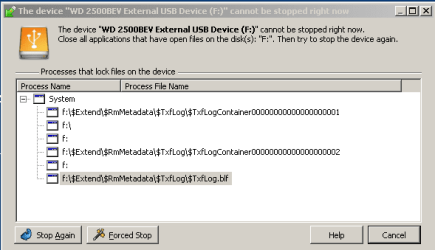
Mains powered hub > Ext-USB powered HD. (Western Digital)

I am using a third party "USB Safely Remove" app because it gives me more feedback than the Windows default "Safely Remove"
external HDD.PNG

USB Safely Remove advise this is a Windows problem

No amount of "Stop Again" or "Forced Stop" releases the USB HD.

I have searched the web for several hours without finding any recent "fixes"
Have googled = :\$Extend\$RmMetadata\$TxfLog\$TxfLog.blf ... and found Cannot eject removable usb drive dated 2009

But I am none the wiser. Way out of my depth.

Ext-HD is my data drive on the Toshiba laptop.
NTFS format (reformatted about 3 months ago to clear the HD for use as my laptop data drive)
Would reformatting cleared some hidden files on the USB device ?

Each night I disconnect the USB-HD from the laptop. But occasionally I forget, so cold boot the lappy > safely remove the USB HD > shutdown lappy again.
Could this process antagonize windows ?

Would appreciate any help, thank you :)
 

My Computer

Computer type
PC/Desktop
Computer Manufacturer/Model Number
Toshiba, Lenovo (laptops) + 4 rigs
OS
XP Pro (x86) | 7 HP (x86) & (x64) | 7 Pro (x64)
Normally, when you shut down Windows the operating system will stop all writing and "safely remove" any connected drive. You can disconnect the drive from the PC while it is off without any problems.

Sometimes you can 'reset' the handles (identifiers) for an external drive just by restarting Windows while the drive is attached.

Other times there can be a process or program that has been connected to the drive that will not release it. See this post for a method to clear any such problem:
http://www.sevenforums.com/hardware...remove-my-usb-external-drive.html#post1494590
 

My Computer

Computer type
PC/Desktop
Computer Manufacturer/Model Number
Home Built - Jan 2013
OS
Windows 7 64 Bit Home Premium SP1
CPU
i7-3820
Motherboard
Asus P9X79-PRO - Bios 4608
Memory
GSkill F3-14900CL9Q - 16GB
Graphics Card(s)
EVGA GeForce GTX660 - Driver 352.86
Sound Card
On board Realtek ALC898
Monitor(s) Displays
Acer S271HL
Screen Resolution
1920 x 1080
Hard Drives
#1- Samsung 840 Pro Series
#2- Western Digital WD1002FAEX Sata3 Black
#3- Western Digital WD1002FAEX Sata3 Black
PSU
Corsair CMPSU-850TX-V2 - 850 watt (by Seasonic)
Case
Corsair Obsidian 550D
Cooling
Standard 3 120mm case fans, Cooler Master Hyper 212 EVO
Keyboard
MS KC-0405
Mouse
Intellimouse 5-button
Internet Speed
56 Mbits/Sec (on a good day)
Antivirus
Avast & Malwarebytes
Browser
Firefox
Other Info
Asus DVD - DRW-24B1ST 24X
Especially if there is a disk activity LED so it's obvious when the external has stopped writing, you can use sync.exe from SysInternals, a free program that simply flushes disk buffers. I had the same experience running docking stations and external drive. That program and the Windows built in, almost never released the drives since I had write caching enabled. If you flush the buffers of all drives on the external after activity has ceased, you should be able to unplug the drive with no issues. sync.exe simply locks the volume using a Windows API call. This causes all cachd disk data to be flushed to disk.

edit: http://forum.sysinternals.com/syncexe-how-to-use_topic25219.html

edit2: download link
 

My Computer

Computer Manufacturer/Model Number
HP Media Center
OS
Windows 7 32 bit
CPU
AMD 5200+ dual core
Memory
2 GB
Graphics Card(s)
NVidia GeForce 6150SE 128 MB
Monitor(s) Displays
CRT
Screen Resolution
1280x1024
Hard Drives
500 GB Sata internal :

SIIG USB 3.0 docking stations w/WD Caviar Black 6 Gb/s drives
Keyboard
PS/2
Mouse
PS/2 Wheel Mouse
Other Info
SIIG USB 3.0 PCIexpress card.
Windows 7 activator doesnt work

Hey guys,

I am using Windows 7 loader to activate my windows 7 ultimate 32bits installed in my acer laptop but win7 loader gives install option disabled using this one from other computer it works , I think something wrong is going on. please help
 

My Computer

Computer type
Laptop
Computer Manufacturer/Model Number
Acer
OS
Windows 7 ultimate x32bits
CPU
Intel pentium
Antivirus
Microsoft security essencial
Browser
Mozila firefox 4
Thank you MilesAhead for your response, :)

I have downloaded + extracted "sysinternals" and run "sync.exe" assuming it is an install.
Just a flash of (I assume) a command window.
Have tried "Run" sync.exe -r f ... I want to remove the device in F: drive
- result alert: "Windows cannot find sync.exe"
- also tried sync -r f ... with the same resulting alert
- so I assume sync.exe is not installed
Should I run synce.exe as a command or "Run" ?

If a command ...
I imagine I will need the full-name to sync.exe [param -r or -e] [param drive letter]
eg, C:\MyPath\sync.exe -r f
I know parameters can be very fickle if the string is not strictly correct
Are parameters separated by a space or commas ?
Is my drive letter complete, ie "f", "f:" or "f:\" ... ?

Also one of your links mentions "must be run as administrator"
Would I have to login as admin OR can I ... Search=cmd > cmd.exe > RClick > Run as admin ... etc

Thank you :)
 

My Computer

Computer type
PC/Desktop
Computer Manufacturer/Model Number
Toshiba, Lenovo (laptops) + 4 rigs
OS
XP Pro (x86) | 7 HP (x86) & (x64) | 7 Pro (x64)
I would not go thru all this trouble. A simple shutdown or reboot should fix the problem. Maybe you missed that suggestion by TVeblen.
 

My Computer

Computer Manufacturer/Model Number
HP, Dell, Gateway, Toshiba - 4 laptops and 2 desktops
OS
Vista, Windows7, Mint Mate, Zorin, Windows 8
CPU
from 1.6GHz Duo to i7
Monitor(s) Displays
2x HP w2207
Hard Drives
5x HDD, 7x SSD, 12x Externals
Keyboard
with trackball - no mices
Mouse
Trackball mice
Internet Speed
DSL 6000
Hey guys,

I am using Windows 7 loader to activate my windows 7 ultimate 32bits installed in my acer laptop but win7 loader gives install option disabled using this one from other computer it works , I think something wrong is going on. please help


If you are running a cracked copy of windows this site will not help you.
 

My Computer

Computer type
PC/Desktop
Computer Manufacturer/Model Number
Home Build
OS
Windows 8.1 Pro
CPU
i5 3550 Ivy Bridge
Motherboard
Gigabyte Z77MX-D3H
Memory
8gb 1600 GSkill 9-9-9-24 xmp
Graphics Card(s)
Gigabyte GTX 760 OC
Sound Card
VIA VT2021 onboard
Monitor(s) Displays
BenQ GL2760H 27inch hdmi; LG Flatron E2351 23inch dvi
Screen Resolution
1920x1080
Hard Drives
1x Samsung 850 Evo 120GB
1x 4TB WD Green HDD
1x 3TB WD Green HDD
2x 2TB Seagate HDD
1x 1TB Seagate External HDD
PSU
Cooler Master V750
Case
Coolermaster HAF 912 Advanced
Cooling
Standard
Keyboard
Logitech K120 USB
Mouse
Razor Abyssus USB
Internet Speed
Broadband
Antivirus
MSE + Malwarebytes
Browser
Palemoon
Other Info
It's been the worst day since yesterday (thanks Flogging Molly) so apt!
Back
Top