
spastik0827
New member
- Local time
- 11:43 AM
- Messages
- 1
I have this WD 1TB external drive that stopped working a while ago. I am trying to initialize it in order to perhaps try to recover data from it using a Data Recovery Wizard.
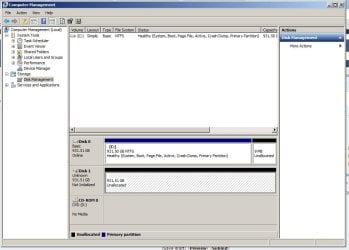
When connecting the drive via USB, it only sometimes shows up in 'Devices and Printers' as connected through USB (ie, it allows me to click 'Eject My Book' in the task bar). When it shows up there, I can also see it in Disk Management as 'Disk 2, Unknown, 931.51 GB, Not Initialized' with a little red downward facing arrow icon.
When I right click the icon (with the red arrow) and choose Initialize, it hangs a bit and then shows an error saying "The request could not be performed because of an I/O device error"
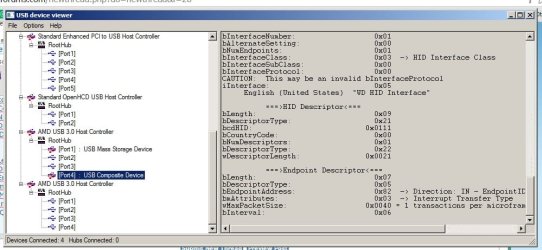
When I run 'USB device viewer' (UVCView) this is what shows up next to that device :
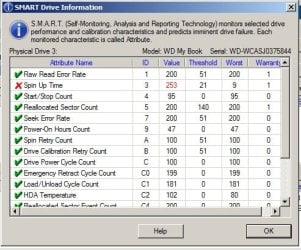
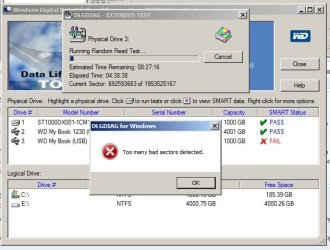
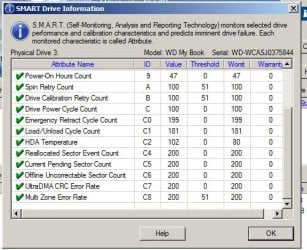
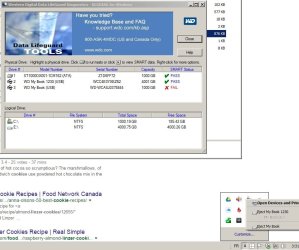
When I run WD Data LifeGuard Diagnostics, the drive seems normal other than the fact that a spin up time is 'wrong' (see attached screenshots).
Any idea what I should try next? I would definitely love to be able to recover data from this drive without spending a fortune through data recovery businesses.
Thank you for your help!
When connecting the drive via USB, it only sometimes shows up in 'Devices and Printers' as connected through USB (ie, it allows me to click 'Eject My Book' in the task bar). When it shows up there, I can also see it in Disk Management as 'Disk 2, Unknown, 931.51 GB, Not Initialized' with a little red downward facing arrow icon.
When I right click the icon (with the red arrow) and choose Initialize, it hangs a bit and then shows an error saying "The request could not be performed because of an I/O device error"
When I run 'USB device viewer' (UVCView) this is what shows up next to that device :
---===>Device Information<===---
English product name: "My Book"
ConnectionStatus:
Current Config Value: 0x01 -> Device Bus Speed: High
Device Address: 0x02
Open Pipes: 3
===>Endpoint Descriptor<===
bLength: 0x07
bDescriptorType: 0x05
bEndpointAddress: 0x01 -> Direction: OUT - EndpointID: 1
bmAttributes: 0x02 -> Bulk Transfer Type
wMaxPacketSize: 0x0200 = 0x200 max bytes
bInterval: 0x00
===>Endpoint Descriptor<===
bLength: 0x07
bDescriptorType: 0x05
bEndpointAddress: 0x81 -> Direction: IN - EndpointID: 1
bmAttributes: 0x02 -> Bulk Transfer Type
wMaxPacketSize: 0x0200 = 0x200 max bytes
bInterval: 0x00
===>Endpoint Descriptor<===
bLength: 0x07
bDescriptorType: 0x05
bEndpointAddress: 0x82 -> Direction: IN - EndpointID: 2
bmAttributes: 0x03 -> Interrupt Transfer Type
wMaxPacketSize: 0x0040 = 1 transactions per microframe, 0x40 max bytes
bInterval: 0x06
===>Device Descriptor<===
bLength: 0x12
bDescriptorType: 0x01
bcdUSB: 0x0200
bDeviceClass: 0x00 -> This is an Interface Class Defined Device
bDeviceSubClass: 0x00
bDeviceProtocol: 0x00
bMaxPacketSize0: 0x40 = (64) Bytes
idVendor: 0x1058 = Western Digital Technologies, Inc.
idProduct: 0x1102
bcdDevice: 0x1025
iManufacturer: 0x01
English (United States) "Western Digital"
iProduct: 0x02
English (United States) "My Book"
iSerialNumber: 0x03
English (United States) "57442D574341534A30333735383434"
bNumConfigurations: 0x01
===>Configuration Descriptor<===
bLength: 0x09
bDescriptorType: 0x02
wTotalLength: 0x0039 -> Validated
bNumInterfaces: 0x02
bConfigurationValue: 0x01
iConfiguration: 0x06
English (United States) "Configuration0"
bmAttributes: 0xC0 -> Bus Powered
MaxPower: 0x00 = 0 mA
===>Interface Descriptor<===
bLength: 0x09
bDescriptorType: 0x04
bInterfaceNumber: 0x00
bAlternateSetting: 0x00
bNumEndpoints: 0x02
bInterfaceClass: 0x08 -> This is a Mass Storage USB Device Interface Class
bInterfaceSubClass: 0x06
bInterfaceProtocol: 0x50
iInterface: 0x04
English (United States) "WD Mass Storage Interface"
===>Endpoint Descriptor<===
bLength: 0x07
bDescriptorType: 0x05
bEndpointAddress: 0x01 -> Direction: OUT - EndpointID: 1
bmAttributes: 0x02 -> Bulk Transfer Type
wMaxPacketSize: 0x0200 = 0x200 max bytes
bInterval: 0x00
===>Endpoint Descriptor<===
bLength: 0x07
bDescriptorType: 0x05
bEndpointAddress: 0x81 -> Direction: IN - EndpointID: 1
bmAttributes: 0x02 -> Bulk Transfer Type
wMaxPacketSize: 0x0200 = 0x200 max bytes
bInterval: 0x00
===>Interface Descriptor<===
bLength: 0x09
bDescriptorType: 0x04
bInterfaceNumber: 0x01
bAlternateSetting: 0x00
bNumEndpoints: 0x01
bInterfaceClass: 0x03 -> HID Interface Class
bInterfaceSubClass: 0x00
bInterfaceProtocol: 0x00
CAUTION: This may be an invalid bInterfaceProtocol
iInterface: 0x05
English (United States) "WD HID Interface"
===>HID Descriptor<===
bLength: 0x09
bDescriptorType: 0x21
bcdHID: 0x0111
bCountryCode: 0x00
bNumDescriptors: 0x01
bDescriptorType: 0x22
wDescriptorLength: 0x0021
===>Endpoint Descriptor<===
bLength: 0x07
bDescriptorType: 0x05
bEndpointAddress: 0x82 -> Direction: IN - EndpointID: 2
bmAttributes: 0x03 -> Interrupt Transfer Type
wMaxPacketSize: 0x0040 = 1 transactions per microframe, 0x40 max bytes
bInterval: 0x06
When I run WD Data LifeGuard Diagnostics, the drive seems normal other than the fact that a spin up time is 'wrong' (see attached screenshots).
Any idea what I should try next? I would definitely love to be able to recover data from this drive without spending a fortune through data recovery businesses.
Thank you for your help!
Attachments
-
 Disk Management.jpg69.2 KB · Views: 0
 -
 Disk Management 2.jpg89 KB · Views: 0
 -
 Disk Management 3.jpg75.4 KB · Views: 0
 -
 WD Data Lifeguard Tools SMART 1.jpg44.7 KB · Views: 10
 -
 UVCView.jpg66.3 KB · Views: 0
 -
 WD Data Lifeguard Tools 3.jpg44.4 KB · Views: 10
 -
 WD Data Lifeguard Tools SMART 2.jpg46.4 KB · Views: 10
 -
 WD Data Lifeguard Tools 2.jpg78.9 KB · Views: 0
 -
 WD Data Lifeguard Tools.jpg72.1 KB · Views: 0
My Computer
At a glance
Windows XP Ultimate x64AMD A10-6700 APU (3.70GHz)8GBAMD Radeon HD 8670D
- Computer type
- PC/Desktop
- Computer Manufacturer/Model Number
- Custom build
- OS
- Windows XP Ultimate x64
- CPU
- AMD A10-6700 APU (3.70GHz)
- Memory
- 8GB
- Graphics Card(s)
- AMD Radeon HD 8670D
- Hard Drives
- Seagate Desktop SSHD 1TB ST1000DX001
WD My Book External 4GB (USB3.0)
WD My Book External 1TB (
- Browser
- Google Chrome


