
Solved Extra drivers causing startup problems

Slammer

Destroyer of Tyranny
Power User
Local time
11:53 PM
Messages
118
Location
New Mexico, USA!
Let me preface this by saying that my actions over the last couple days haven't been the smartest, and were done mostly out of stupid curiosity. Also, sorry for the lengthy post, but I want to get as much info out there as possible.

This all started when I started having issues with my laptop screen a few weeks ago. Something's wrong with it and the back light refuses to stay on for more than a few minutes (if I'm lucky). Long story short, I got fed up with the issue while waiting for a replacement part to get in, and had this brilliant thought: "Why don't I just stick my hard drive in a different computer and boot to it there?" I figured I could just plug it in, boot it up, and install all the drivers for the hardware that's part of the computer I stick it in. But that's not all! I also figured that it would be cool to just put MY computer into Sleep mode before taking out the HD, so that when I was done using it in the other computer a couple hours later, I could just plug the HD back in to mine and have it resume to where it was when I hit sleep. It must have been late because now I have no idea why I thought that was a good idea.

Surprisingly, this idea seemed to work great. After testing my sleep mode theory by just unplugging and re-plugging the HD into my laptop while in sleep mode. Everything resumed normally like nothing had happened, so I put it to sleep again, took out the HD, and hooked it up to a different computer. It booted up just fine, and Windows was able to install most of the drivers it needed right off the bat. The main ones that were missing were the network drivers, and the PCI controller drivers (or something similar to that).

So I hopped onto a separate computer, pulled up the driver support page for the Acer Aspire 7750Z laptop I now had my HD plugged into, and downloaded the Ethernet and chipset drivers onto a flashdrive. I copied these onto the Acer laptop (after it had already installed the other drivers it could find and restarted without a problem) and ran the setup for the chipset drivers. I don't remember if I also ran the Ethernet driver setup, but I think I did.

At this point the family member that owns the Acer laptop I had been doing all this on said they needed it so I shut everything down properly and plugged the HD back into my laptop. I hit the power button to resume windows like before, and it did so without a hitch, just like before.

But this afternoon, I tried to turn my computer on (I shut it down last night without having any signs of any issue) and discovered a problem: it will boot through the Windows logo/animation, but at the point where it should load the login screen, I get an extremely brief flash of a BSOD and the computer restarts. The BSOD is gone too fast for me to see what it says at all, but I can tell that it's very short (the white text only goes about halfway down the screen).

I've let it run chkdsk at startup like it asked, but to no avail. I've also booted to the installation disk and let it run startup repair a couple times. When I try to do a system restore, it tells me I have no restore points (even though I could have sworn I did). I opened the command prompt and ran bootrec /fixboot and /rebuildbcd with no effects. (I don't really know what these do, but after a google search they seemed like my best bet) When I try to boot into safe mode, it gets up to the loading of driver "CI.dll" and then flashes that fleeting BSOD screen for an instant before restarting again.

Just to be sure it wasn't a sudden problem with my laptop, I plugged the HD back into the Acer again and got the exact same behavior.

My best guess is that installing those chipset drivers onto an OS that already had other chipset drivers is causing this mess, but I'm certainly not very expert in this subject. If someone could tell me how to wipe all the drivers (and make the OS reload them all just like it has to do when the OS is first installed) I think that should fix this problem. Any other suggestions are also appreciated.

I REALLY DON'T want to have to reinstall my OS because I have roughly half a terabyte of programs installed and configured just how I want them, and reinstalling and reconfiguring them all would be a HUGE pain. So that's an absolute last resort.
 

My Computer

Computer Manufacturer/Model Number
Dell Inspiron 1545
OS
MS Windows 7 Ultimate 64-bit SP1
CPU
Intel Mobile Core 2 Duo T6400 @ 2.00GHz, Penryn 45nm
Motherboard
Dell Inc. 0G848F (Microprocessor)
Memory
4.00 GB Dual-Channel DDR2 @ 399MHz (6-6-6-18)
Graphics Card(s)
Mobile Intel(R) 4 Series Express Chipset Family (Integrated)
Sound Card
IDT High Definition Audio CODEC
Monitor(s) Displays
Generic PnP Monitor (DPMS) (1366x768@60Hz)
Screen Resolution
1366x768 (16:9)
Hard Drives
2TB External, with ~1TB partition booting OS
PSU
Laptop
Case
Laptop
Cooling
Laptop vent
Keyboard
Laptop
Mouse
Touchpad, and Logitech wireless USB mouse.
Internet Speed
~150 kb/s
Other Info
I'm running Windows COMPLETELY off a 2TB portable hard drive (since my 300GB internal drive just isn't big enough). It works exactly the same as it would normally, only it has to be constantly connected to my USB port. Obviously. I'll show you how to do it, if you ask! It's pretty cool.

Specs via Speccy
Also: after a little searching it looks like I should be able to run some variation of the "sysprep" command, something like "sysprep /oobe /generalize" to remove all the drivers and let them be reinstalled. But I figured I should check with people who know about this kind of thing before running a command that I don't know anything about.
 

My Computer

Computer Manufacturer/Model Number
Dell Inspiron 1545
OS
MS Windows 7 Ultimate 64-bit SP1
CPU
Intel Mobile Core 2 Duo T6400 @ 2.00GHz, Penryn 45nm
Motherboard
Dell Inc. 0G848F (Microprocessor)
Memory
4.00 GB Dual-Channel DDR2 @ 399MHz (6-6-6-18)
Graphics Card(s)
Mobile Intel(R) 4 Series Express Chipset Family (Integrated)
Sound Card
IDT High Definition Audio CODEC
Monitor(s) Displays
Generic PnP Monitor (DPMS) (1366x768@60Hz)
Screen Resolution
1366x768 (16:9)
Hard Drives
2TB External, with ~1TB partition booting OS
PSU
Laptop
Case
Laptop
Cooling
Laptop vent
Keyboard
Laptop
Mouse
Touchpad, and Logitech wireless USB mouse.
Internet Speed
~150 kb/s
Other Info
I'm running Windows COMPLETELY off a 2TB portable hard drive (since my 300GB internal drive just isn't big enough). It works exactly the same as it would normally, only it has to be constantly connected to my USB port. Obviously. I'll show you how to do it, if you ask! It's pretty cool.

Specs via Speccy
Anyone?
 

My Computer

Computer Manufacturer/Model Number
Dell Inspiron 1545
OS
MS Windows 7 Ultimate 64-bit SP1
CPU
Intel Mobile Core 2 Duo T6400 @ 2.00GHz, Penryn 45nm
Motherboard
Dell Inc. 0G848F (Microprocessor)
Memory
4.00 GB Dual-Channel DDR2 @ 399MHz (6-6-6-18)
Graphics Card(s)
Mobile Intel(R) 4 Series Express Chipset Family (Integrated)
Sound Card
IDT High Definition Audio CODEC
Monitor(s) Displays
Generic PnP Monitor (DPMS) (1366x768@60Hz)
Screen Resolution
1366x768 (16:9)
Hard Drives
2TB External, with ~1TB partition booting OS
PSU
Laptop
Case
Laptop
Cooling
Laptop vent
Keyboard
Laptop
Mouse
Touchpad, and Logitech wireless USB mouse.
Internet Speed
~150 kb/s
Other Info
I'm running Windows COMPLETELY off a 2TB portable hard drive (since my 300GB internal drive just isn't big enough). It works exactly the same as it would normally, only it has to be constantly connected to my USB port. Obviously. I'll show you how to do it, if you ask! It's pretty cool.

Specs via Speccy
I am not sure I can help you here. But for sysprep I would ask Gregrocker. He knows these things. Send him a PM.

And next time you make experiments like that, do yourself a favor and make an image beforehand.

Your theory regarding the drivers sounds plausible but it could also be some corrupted .dll which happens frequently.
 

My Computer

Computer Manufacturer/Model Number
HP, Dell, Gateway, Toshiba - 4 laptops and 2 desktops
OS
Vista, Windows7, Mint Mate, Zorin, Windows 8
CPU
from 1.6GHz Duo to i7
Monitor(s) Displays
2x HP w2207
Hard Drives
5x HDD, 7x SSD, 12x Externals
Keyboard
with trackball - no mices
Mouse
Trackball mice
Internet Speed
DSL 6000
Thanks for the info, I'll send him a message. And unfortunately I don't have a big enough storage medium to create a backup image on for this hard drive. I thought I was covered with system restore points, but apparently not.
 

My Computer

Computer Manufacturer/Model Number
Dell Inspiron 1545
OS
MS Windows 7 Ultimate 64-bit SP1
CPU
Intel Mobile Core 2 Duo T6400 @ 2.00GHz, Penryn 45nm
Motherboard
Dell Inc. 0G848F (Microprocessor)
Memory
4.00 GB Dual-Channel DDR2 @ 399MHz (6-6-6-18)
Graphics Card(s)
Mobile Intel(R) 4 Series Express Chipset Family (Integrated)
Sound Card
IDT High Definition Audio CODEC
Monitor(s) Displays
Generic PnP Monitor (DPMS) (1366x768@60Hz)
Screen Resolution
1366x768 (16:9)
Hard Drives
2TB External, with ~1TB partition booting OS
PSU
Laptop
Case
Laptop
Cooling
Laptop vent
Keyboard
Laptop
Mouse
Touchpad, and Logitech wireless USB mouse.
Internet Speed
~150 kb/s
Other Info
I'm running Windows COMPLETELY off a 2TB portable hard drive (since my 300GB internal drive just isn't big enough). It works exactly the same as it would normally, only it has to be constantly connected to my USB port. Obviously. I'll show you how to do it, if you ask! It's pretty cool.

Specs via Speccy
Restore points are very unreliable. As for an image, figure 60% of the amount of your data on C: will be the size of the image - at least if you use free Macrium which I can highly recommend. DO NOT use Windows imaging. It is just as unreliable as restore points.
 

My Computer

Computer Manufacturer/Model Number
HP, Dell, Gateway, Toshiba - 4 laptops and 2 desktops
OS
Vista, Windows7, Mint Mate, Zorin, Windows 8
CPU
from 1.6GHz Duo to i7
Monitor(s) Displays
2x HP w2207
Hard Drives
5x HDD, 7x SSD, 12x Externals
Keyboard
with trackball - no mices
Mouse
Trackball mice
Internet Speed
DSL 6000
May be my suggestion is coming after the horse has bolted from the stable, but it may be of use in the future. If the 500 or so gigabytes of programs are likely to disappear on re-installation then in future you ought to partition the disk and then change the location of the Program Files Folder to another drive. By doing so your System Volume Drive size would get substantially reduced and then you can image it, as whs has suggested. This image, you can store elsewhere and may be on the same drive in which you relocate the Program Files.

In case it becomes necessary to restore this image, it shall upon restoration pick up the path to the programs in the Program Files Folder on the other drive and you shall be back in business without any problem.
 

My Computer

Computer Manufacturer/Model Number
Custom Built
OS
Windows 7 Pro with SP1 32bit
Motherboard
Intel D845GVS1 X86-based PC
Memory
2 gigs of RAM
Graphics Card(s)
Intel(R) 82845G/GL/GE/PE/GV Graphics Controller
Sound Card
Realtek AC'97 Audio
Monitor(s) Displays
Samsung SyncMaster 931BF Black 19" LCD Monitor
Screen Resolution
1280X960
Hard Drives
1. SAMSUNG SP0822N ATA Device ~ 80 GigaBytes

2. Seagate FreeAgent Go USB Device ~ 500 GigaBytes
Keyboard
COMPAQ Standard PS/2 Keyboard
Mouse
iBall Laser Precise Speedster
Internet Speed
4 mb/sec
You cannot expect Win7 to start on new hardware without adjusting it using SysPrep, Paragon Adaptive Restore, or during reimaging using Acronis with Universal Restore. It requires more than just removing the drivers since the SID and HID changes required can be sensitive. That you got it to start was unusual - asking it to start again on the old hardware is a bridge too far.

It's likely too late to SysPrep now so I would try to get my hands on the PAR disk which was freely available up to a year or so ago. Boot it and point at Win7 on the native computer to see if it will make the necessary P2P adjustments.

You can copy out your files using the WIn7 DVD or Repair CD with this method: Copy & Paste - in Windows Recovery Console or using Paragon rescue disk to recover data. There is 25gb free storage available on Skydrive with each Windows Live ID right now with a free promotional upgrade from the normal 7gb.

If necessary follow these steps to Clean Reinstall - Factory OEM Windows 7 which are the same as for retail.

I would not unplug a HD from a laptop which is only sleeping and still has power to it's RAM as it is risky behavior. You want all power drained by removing battery and power cord, holding power button down to discharge residual power.
 
@whs- Oh, that's impressive. I didn't know they would compress so efficiently. I might be able to do that in the future then, and I'll be sure to use Macrium. I've heard lots of good things about it.

@wanchoo- I was actually going to do that when I set this hard drive up, but I got excited using Windows 7 for the first time, forgot about that, and already most of my core programs installed by the time I remembered that I wanted to change it to that kind of setup. But from now on, any time I set up my own OS, I think that's what I'm going to do.

@gregrocker- Yeah, I guess it would have been better if it had just refused to work at all on the other computer. Would have saved me a lot of trouble. I'll find that PAR disc you're talking about and see what it can do for me. As for data backup, I have some adapters I can use to hook it up as an external HD and copy them wherever I need using other computers, if I end up needing to. I also have some Linux recovery CDs I can use for that purpose. Although the method using the recovery console is pretty neat, I'll have to remember it.

@Everyone- I talked to a tech teacher I have at school about this. She guessed that since the safe mode boot hangs on loading that "CI.dll", that dll (and possibly more) are probably corrupt in some way. So first I'm going to see if I can run the sfc /scannow command on the hard drive from the recovery console or something and see if that can repair it.

I've also heard that there's some way you can rip the main Windows resources (such as these required .dll's) directly off the Windows installation disc somehow. If the sfc command fails, I'd like to try that and see if I can manually replace any corrupt .dll's. If neither of those get me anywhere, I'll give all the other helpful suggestions a try. But has anyone else heard of this method of ripping resources, or can point me to a tutorial for doing it or something?

Thanks again everyone, I appreciate all of your input. I'm prepared to do a complete OS reinstall, but only as a last resort. Reinstalling all my programs won't be that hard, I'm just dreading the process of reconfiguring them all to how they are set up now. I like to customize EVERYTHING...
 

My Computer

Computer Manufacturer/Model Number
Dell Inspiron 1545
OS
MS Windows 7 Ultimate 64-bit SP1
CPU
Intel Mobile Core 2 Duo T6400 @ 2.00GHz, Penryn 45nm
Motherboard
Dell Inc. 0G848F (Microprocessor)
Memory
4.00 GB Dual-Channel DDR2 @ 399MHz (6-6-6-18)
Graphics Card(s)
Mobile Intel(R) 4 Series Express Chipset Family (Integrated)
Sound Card
IDT High Definition Audio CODEC
Monitor(s) Displays
Generic PnP Monitor (DPMS) (1366x768@60Hz)
Screen Resolution
1366x768 (16:9)
Hard Drives
2TB External, with ~1TB partition booting OS
PSU
Laptop
Case
Laptop
Cooling
Laptop vent
Keyboard
Laptop
Mouse
Touchpad, and Logitech wireless USB mouse.
Internet Speed
~150 kb/s
Other Info
I'm running Windows COMPLETELY off a 2TB portable hard drive (since my 300GB internal drive just isn't big enough). It works exactly the same as it would normally, only it has to be constantly connected to my USB port. Obviously. I'll show you how to do it, if you ask! It's pretty cool.

Specs via Speccy
Ok sfc didn't help. But I was able to rip the CI.dll from my install disc (that's the dll it hangs on when booting into safe mode) and want to try replacing the ci.dll file on the HD that isn't booting. However, when I plugged the HD into another computer running Vista x64, it gave me an access denied message when I tried to rename the old one to keep it as a backup. (both when using Explorer and command prompt). How can I make it let me rename that file?
 

My Computer

Computer Manufacturer/Model Number
Dell Inspiron 1545
OS
MS Windows 7 Ultimate 64-bit SP1
CPU
Intel Mobile Core 2 Duo T6400 @ 2.00GHz, Penryn 45nm
Motherboard
Dell Inc. 0G848F (Microprocessor)
Memory
4.00 GB Dual-Channel DDR2 @ 399MHz (6-6-6-18)
Graphics Card(s)
Mobile Intel(R) 4 Series Express Chipset Family (Integrated)
Sound Card
IDT High Definition Audio CODEC
Monitor(s) Displays
Generic PnP Monitor (DPMS) (1366x768@60Hz)
Screen Resolution
1366x768 (16:9)
Hard Drives
2TB External, with ~1TB partition booting OS
PSU
Laptop
Case
Laptop
Cooling
Laptop vent
Keyboard
Laptop
Mouse
Touchpad, and Logitech wireless USB mouse.
Internet Speed
~150 kb/s
Other Info
I'm running Windows COMPLETELY off a 2TB portable hard drive (since my 300GB internal drive just isn't big enough). It works exactly the same as it would normally, only it has to be constantly connected to my USB port. Obviously. I'll show you how to do it, if you ask! It's pretty cool.

Specs via Speccy
Thanks, that was pretty easy. Sadly, replacing the ci.dll didn't help any.

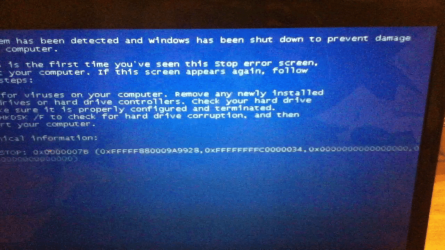
Ok, I decided that the BSOD that is flickering when my computer restarts during startup each time was probably pretty important. I was able to record my screen while it occurred and then pulled a screenshot of the BSOD out of the video. Here's the best quality picture I could get.

3rd snapshot.png

I did a quick google search for the 0x0000007b part of the error and the first link said that it's pretty indicative of a driver issue, which makes sense since the last thing I did before having all these issues was install some additional network and chipset drivers 9as explained in the original post). But I really don't know what else to do with this information. Is there someone who can look at this and maybe tell me exactly what these errors mean? Or at least the ones that be made out.
 

My Computer

Computer Manufacturer/Model Number
Dell Inspiron 1545
OS
MS Windows 7 Ultimate 64-bit SP1
CPU
Intel Mobile Core 2 Duo T6400 @ 2.00GHz, Penryn 45nm
Motherboard
Dell Inc. 0G848F (Microprocessor)
Memory
4.00 GB Dual-Channel DDR2 @ 399MHz (6-6-6-18)
Graphics Card(s)
Mobile Intel(R) 4 Series Express Chipset Family (Integrated)
Sound Card
IDT High Definition Audio CODEC
Monitor(s) Displays
Generic PnP Monitor (DPMS) (1366x768@60Hz)
Screen Resolution
1366x768 (16:9)
Hard Drives
2TB External, with ~1TB partition booting OS
PSU
Laptop
Case
Laptop
Cooling
Laptop vent
Keyboard
Laptop
Mouse
Touchpad, and Logitech wireless USB mouse.
Internet Speed
~150 kb/s
Other Info
I'm running Windows COMPLETELY off a 2TB portable hard drive (since my 300GB internal drive just isn't big enough). It works exactly the same as it would normally, only it has to be constantly connected to my USB port. Obviously. I'll show you how to do it, if you ask! It's pretty cool.

Specs via Speccy
Try System Restore again from System Recovery Options.

Test your RAM: RAM - Test with Memtest86+. Remove the RAM sticks and check that their slots are clean of debris, try starting with one stick, then the other, swap sticks.

Test your HD with maker's HD Diagnostic extended CD scan, followed by another Disk Check from Recovery Options Command line.

Reset the CMOS: Clear CMOS - 3 Ways to Clear the CMOS - Reset BIOS . Check the SATA controller setting in BIOS. Set SATA controller to AHCI to try starting and then reinstall after copying out your files using methods given. Clean Reinstall - Factory OEM Windows 7
 
System restore didn't work. Also, I think I forgot to mention that I have a very old Vista installation also on this HD that boots up fine. That's the OS that I'm mostly using until I can get the 7 one back up and running. So I'm pretty sure my RAM is working fine. Hard drive tests came up clean.

Is a reinstall my only option at this point? I think it might boot normally if I could just uninstall the extra chipset and Ethernet drivers I installed for the other computer. But I have no idea how to do that without booting up the OS they're installed on.
 

My Computer

Computer Manufacturer/Model Number
Dell Inspiron 1545
OS
MS Windows 7 Ultimate 64-bit SP1
CPU
Intel Mobile Core 2 Duo T6400 @ 2.00GHz, Penryn 45nm
Motherboard
Dell Inc. 0G848F (Microprocessor)
Memory
4.00 GB Dual-Channel DDR2 @ 399MHz (6-6-6-18)
Graphics Card(s)
Mobile Intel(R) 4 Series Express Chipset Family (Integrated)
Sound Card
IDT High Definition Audio CODEC
Monitor(s) Displays
Generic PnP Monitor (DPMS) (1366x768@60Hz)
Screen Resolution
1366x768 (16:9)
Hard Drives
2TB External, with ~1TB partition booting OS
PSU
Laptop
Case
Laptop
Cooling
Laptop vent
Keyboard
Laptop
Mouse
Touchpad, and Logitech wireless USB mouse.
Internet Speed
~150 kb/s
Other Info
I'm running Windows COMPLETELY off a 2TB portable hard drive (since my 300GB internal drive just isn't big enough). It works exactly the same as it would normally, only it has to be constantly connected to my USB port. Obviously. I'll show you how to do it, if you ask! It's pretty cool.

Specs via Speccy
I told you in the beginning that Win7 would have to be readjusted to boot it after changing the hardware. It was only luck that you got it to boot on the new hardware, and now it must be adjusted again for it to have any chance to boot on the original hardware.

What were the results of running Paragon Adaptive Restore CD on the Win7 installation? This is how you adjust the drivers, HID, SID and activation to move to another computer - it's a combination of these which most often will stop it from starting on changed hardware.
 
Windows may fail to start for a variety of reasons::

  • Hardware failure
  • Bad driver
  • Corrupt file or volume
  • System misconfiguration
  • Virus infection

Just try troubleshooting above mentioned causes, something will work.
 

My Computer

OS
Windows 7 Ultimate x64
Hey guys, sorry for the delay. I have school finals and projects and stuff upon me and haven't had time to do much with this since I last posted. But I haven't given up, and I'll be back on top of it in a couple weeks!

Thanks to everyone who's given their input thus far, I really appreciate it all.
 

My Computer

Computer Manufacturer/Model Number
Dell Inspiron 1545
OS
MS Windows 7 Ultimate 64-bit SP1
CPU
Intel Mobile Core 2 Duo T6400 @ 2.00GHz, Penryn 45nm
Motherboard
Dell Inc. 0G848F (Microprocessor)
Memory
4.00 GB Dual-Channel DDR2 @ 399MHz (6-6-6-18)
Graphics Card(s)
Mobile Intel(R) 4 Series Express Chipset Family (Integrated)
Sound Card
IDT High Definition Audio CODEC
Monitor(s) Displays
Generic PnP Monitor (DPMS) (1366x768@60Hz)
Screen Resolution
1366x768 (16:9)
Hard Drives
2TB External, with ~1TB partition booting OS
PSU
Laptop
Case
Laptop
Cooling
Laptop vent
Keyboard
Laptop
Mouse
Touchpad, and Logitech wireless USB mouse.
Internet Speed
~150 kb/s
Other Info
I'm running Windows COMPLETELY off a 2TB portable hard drive (since my 300GB internal drive just isn't big enough). It works exactly the same as it would normally, only it has to be constantly connected to my USB port. Obviously. I'll show you how to do it, if you ask! It's pretty cool.

Specs via Speccy
Ok I finally gave up on this and just reinstalled the OS. I couldn't get Macrium Reflect to power through the errors it was giving me when it tried to back up my partition, so I just used TeraCopy to manually copy my entire file structure onto a separate drive. I reinstalled the OS, and now I'm in the process of putting all my stuff back on.

I greatly appreciate all the help everyone gave me here. Sadly, it looks like it's been too long since everyone posted for me to rep them, which I had no idea about. Sorry about that. But thanks a million to everyone anyway!
 

My Computer

Computer Manufacturer/Model Number
Dell Inspiron 1545
OS
MS Windows 7 Ultimate 64-bit SP1
CPU
Intel Mobile Core 2 Duo T6400 @ 2.00GHz, Penryn 45nm
Motherboard
Dell Inc. 0G848F (Microprocessor)
Memory
4.00 GB Dual-Channel DDR2 @ 399MHz (6-6-6-18)
Graphics Card(s)
Mobile Intel(R) 4 Series Express Chipset Family (Integrated)
Sound Card
IDT High Definition Audio CODEC
Monitor(s) Displays
Generic PnP Monitor (DPMS) (1366x768@60Hz)
Screen Resolution
1366x768 (16:9)
Hard Drives
2TB External, with ~1TB partition booting OS
PSU
Laptop
Case
Laptop
Cooling
Laptop vent
Keyboard
Laptop
Mouse
Touchpad, and Logitech wireless USB mouse.
Internet Speed
~150 kb/s
Other Info
I'm running Windows COMPLETELY off a 2TB portable hard drive (since my 300GB internal drive just isn't big enough). It works exactly the same as it would normally, only it has to be constantly connected to my USB port. Obviously. I'll show you how to do it, if you ask! It's pretty cool.

Specs via Speccy
Back
Top