Extra Partition (Disk Management)

Skulblaka

Are you Alive?
Guru
VIP
Local time
10:49 AM
Messages
1,105
Location
Minnesota
Hello everyone, unfortunately I encountered a problem. :sarc:

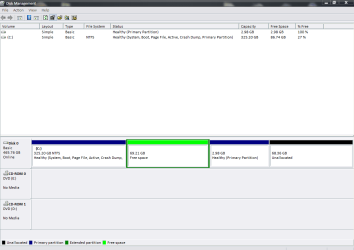
I partitioned my hard-drive for some backup, now I noticed that was a waste since I'll get myself a 2TB external hard-drive. Right now I formatted and pretty much deleted the partition, it's left as unallocated space. Now I'm trying to "extend" my primary partition with the 60GB's of unallocated space. But I'm unable to, the option to "extend" is grayed out. :eek:

Must I get new software to do this? :devil:
 

My Computer

Computer Manufacturer/Model Number
Custom
OS
Windows 8 Professional 64-bit
CPU
Intel Core i3-2100
Motherboard
ASRock Intel Z68M/USB3
Memory
4GB
Graphics Card(s)
GeForece GTX 550 Ti
Screen Resolution
1680 x 1050
PSU
750w

My Computer

Computer Manufacturer/Model Number
Custom
OS
Windows 7 Professional x64
CPU
Intel i7 2600K OC'd @ 4620 MHz
Motherboard
Asus P8Z68-V Pro
Memory
16GB GSkill Sniper 2133 Mhz (4x4GB)
Graphics Card(s)
EVGA GeForce GTX 480 SuperClocked+
Sound Card
Realtek High Definition Audio
Monitor(s) Displays
2x Acer S273HLbmii 27"
Screen Resolution
2 x 1920x1080
Hard Drives
64GB Crucial M4 SSD

Storage: Hitachi 1TB 5400RPM, Samsung 1.5TB 5400RPM
PSU
Corsair HW Series 750w (modular)
Case
Cooler Master HAF 932 Advanced Blue Edition
Cooling
CM Hyper 212+ CPU cooler, 3x 230mm + 1x 140mm case fans
Keyboard
Logitech MK320 (wireless)
Mouse
Logitech MK320 (wireless)
Internet Speed
30 Mb/s : 2 Mb/s
Here you go, thank you for the quick reply.
 

Attachments

  • Capture.PNG
    Capture.PNG
    16.5 KB · Views: 52

My Computer

Computer Manufacturer/Model Number
Custom
OS
Windows 8 Professional 64-bit
CPU
Intel Core i3-2100
Motherboard
ASRock Intel Z68M/USB3
Memory
4GB
Graphics Card(s)
GeForece GTX 550 Ti
Screen Resolution
1680 x 1050
PSU
750w
Probably.

I can't see your disk layout in Disk Management, but from your description, I would guess you have a partition of some kind to the right of the unallocated space as seen in Disk Management. If that is the case, you need a third party app---but it isn't difficult, knock on wood.
 

My Computer

Computer type
PC/Desktop
Computer Manufacturer/Model Number
Ignatz Special; 4 speed manual gearbox; factory air conditioning; one of one
OS
Windows 7 Home Premium SP1, 64-bit
CPU
Intel Skylake i5-6600K, not overclocked
Motherboard
AsRock Z170M Extreme 4, micro ATX
Memory
8 GB HyperX DDR4-2666 (2 x 4 GB)
Graphics Card(s)
none; graphics are integrated on CPU
Sound Card
onboard: Realtek ALC1150; external: USB Behringer UF0-202
Monitor(s) Displays
Dell S2340M 23 inch IPS
Screen Resolution
1600 x 900
Hard Drives
System: Crucial MX100 series SSD, 128 GB;
Data: Samsung Spinpoint 103SJ, 1 TB;
Backup: WD Caviar Green WD30EZRX-00D8PB0, 3 TB
PSU
Rosewill SilentNight 500 watt fanless, semi-modular
Case
Antec Solo II
Cooling
Noctua NH-U12S; Noctua F12 intake, Noctua S12A exhaust
Keyboard
Microsoft 200 6JH-00001 USB
Mouse
Dell or Microsoft optical wired; USB
Antivirus
Microsoft Security Essentials and Malwarebytes Premium
Browser
Pale Moon
Other Info
All fans PWM; speeds at idle: CPU circa 500 rpm; intake circa 600 rpm; exhaust circa 600 rpm; CPU temps 27 idle and 47 C load in a warm room (27 C/81 F) when running Intel Extreme Tuning Utility stress test.

My Computer

Computer Manufacturer/Model Number
Custom
OS
Windows 7 Professional x64
CPU
Intel i7 2600K OC'd @ 4620 MHz
Motherboard
Asus P8Z68-V Pro
Memory
16GB GSkill Sniper 2133 Mhz (4x4GB)
Graphics Card(s)
EVGA GeForce GTX 480 SuperClocked+
Sound Card
Realtek High Definition Audio
Monitor(s) Displays
2x Acer S273HLbmii 27"
Screen Resolution
2 x 1920x1080
Hard Drives
64GB Crucial M4 SSD

Storage: Hitachi 1TB 5400RPM, Samsung 1.5TB 5400RPM
PSU
Corsair HW Series 750w (modular)
Case
Cooler Master HAF 932 Advanced Blue Edition
Cooling
CM Hyper 212+ CPU cooler, 3x 230mm + 1x 140mm case fans
Keyboard
Logitech MK320 (wireless)
Mouse
Logitech MK320 (wireless)
Internet Speed
30 Mb/s : 2 Mb/s
I'll try out the Partition Wizard, I'll post feedback on my progress.
 

My Computer

Computer Manufacturer/Model Number
Custom
OS
Windows 8 Professional 64-bit
CPU
Intel Core i3-2100
Motherboard
ASRock Intel Z68M/USB3
Memory
4GB
Graphics Card(s)
GeForece GTX 550 Ti
Screen Resolution
1680 x 1050
PSU
750w
I didn't see this coming, I ran into a "little" snag. The Partition Wizard needed to restart my system. I did and, well, is said the it was unable to find the file-system. This has to be related to interference from my Linux on the same partition as my main. I deleted it and will attempt to restart and resume the process. Right now I booted off an Ubuntu CD.

This thing is awesome...
 

My Computer

Computer Manufacturer/Model Number
Custom
OS
Windows 8 Professional 64-bit
CPU
Intel Core i3-2100
Motherboard
ASRock Intel Z68M/USB3
Memory
4GB
Graphics Card(s)
GeForece GTX 550 Ti
Screen Resolution
1680 x 1050
PSU
750w
Keep us posted!

Remember, your problem is that you have an extended partition on there. It needs to be deleted before you can extend the C drive.
 

My Computer

Computer Manufacturer/Model Number
Custom
OS
Windows 7 Professional x64
CPU
Intel i7 2600K OC'd @ 4620 MHz
Motherboard
Asus P8Z68-V Pro
Memory
16GB GSkill Sniper 2133 Mhz (4x4GB)
Graphics Card(s)
EVGA GeForce GTX 480 SuperClocked+
Sound Card
Realtek High Definition Audio
Monitor(s) Displays
2x Acer S273HLbmii 27"
Screen Resolution
2 x 1920x1080
Hard Drives
64GB Crucial M4 SSD

Storage: Hitachi 1TB 5400RPM, Samsung 1.5TB 5400RPM
PSU
Corsair HW Series 750w (modular)
Case
Cooler Master HAF 932 Advanced Blue Edition
Cooling
CM Hyper 212+ CPU cooler, 3x 230mm + 1x 140mm case fans
Keyboard
Logitech MK320 (wireless)
Mouse
Logitech MK320 (wireless)
Internet Speed
30 Mb/s : 2 Mb/s
Howdy.


You could also use the bootable Partition Wizard CD to make those changes to the system, especially if it won't boot; have a look at the tutorial at the link below.


Partition Wizard : Use the Bootable CD
 

My Computer

Computer Manufacturer/Model Number
* BFK Customs *
OS
W 7 64-bit Ultimate
CPU
Intel Q9550 Yorkfield
Motherboard
ASUS P5Q Pro
Memory
8GB Dominator 8500C5D
Graphics Card(s)
ATI : XFX 5870
Sound Card
Realtek HD Audio 7-1
Monitor(s) Displays
1x 47" LCD HDMI & 3x 26" LCD HDMI
Screen Resolution
1920x1080P & 1920x1200
Hard Drives
1x 80GB Intel X25-M G2 SSD : 1x 500GB & 1x 640GB WD Caviar Black(s)
PSU
Corsair 620HX
Case
Cooler Master RC-690
Cooling
Tuniq Tower 120, 2x 140mm and 3x 120mm case fans
Keyboard
Microsoft 500
Mouse
Razer Diamondback 3G
Internet Speed
14 Mb/s
Other Info
1x Koutech 3Gb/s SATA HDD Hot Swap Rack
No luck...

This is word for word what I see when having restarted;

Verifying DMI Pool Data....
Boot from CD:

error : unknown filesystem.
grub rescue>_

I cannot boot into Windows 7, nor can I start safe mode since this is pretty much in a high priority to boot than pressing keys for Safe mode, recovery manager etc. I tried the recovery CD but the startup repair is unable to find the problem. What did I get myself into... This just show I must be more cautious.
 

My Computer

Computer Manufacturer/Model Number
Custom
OS
Windows 8 Professional 64-bit
CPU
Intel Core i3-2100
Motherboard
ASRock Intel Z68M/USB3
Memory
4GB
Graphics Card(s)
GeForece GTX 550 Ti
Screen Resolution
1680 x 1050
PSU
750w

My Computer

Computer Manufacturer/Model Number
Custom
OS
Windows 7 Professional x64
CPU
Intel i7 2600K OC'd @ 4620 MHz
Motherboard
Asus P8Z68-V Pro
Memory
16GB GSkill Sniper 2133 Mhz (4x4GB)
Graphics Card(s)
EVGA GeForce GTX 480 SuperClocked+
Sound Card
Realtek High Definition Audio
Monitor(s) Displays
2x Acer S273HLbmii 27"
Screen Resolution
2 x 1920x1080
Hard Drives
64GB Crucial M4 SSD

Storage: Hitachi 1TB 5400RPM, Samsung 1.5TB 5400RPM
PSU
Corsair HW Series 750w (modular)
Case
Cooler Master HAF 932 Advanced Blue Edition
Cooling
CM Hyper 212+ CPU cooler, 3x 230mm + 1x 140mm case fans
Keyboard
Logitech MK320 (wireless)
Mouse
Logitech MK320 (wireless)
Internet Speed
30 Mb/s : 2 Mb/s

My Computer

Computer Manufacturer/Model Number
Custom
OS
Windows 8 Professional 64-bit
CPU
Intel Core i3-2100
Motherboard
ASRock Intel Z68M/USB3
Memory
4GB
Graphics Card(s)
GeForece GTX 550 Ti
Screen Resolution
1680 x 1050
PSU
750w

My Computer

Computer Manufacturer/Model Number
Custom
OS
Windows 8 Professional 64-bit
CPU
Intel Core i3-2100
Motherboard
ASRock Intel Z68M/USB3
Memory
4GB
Graphics Card(s)
GeForece GTX 550 Ti
Screen Resolution
1680 x 1050
PSU
750w
Whichever one, I hope you get it sorted. ;)
 

My Computer

Computer Manufacturer/Model Number
* BFK Customs *
OS
W 7 64-bit Ultimate
CPU
Intel Q9550 Yorkfield
Motherboard
ASUS P5Q Pro
Memory
8GB Dominator 8500C5D
Graphics Card(s)
ATI : XFX 5870
Sound Card
Realtek HD Audio 7-1
Monitor(s) Displays
1x 47" LCD HDMI & 3x 26" LCD HDMI
Screen Resolution
1920x1080P & 1920x1200
Hard Drives
1x 80GB Intel X25-M G2 SSD : 1x 500GB & 1x 640GB WD Caviar Black(s)
PSU
Corsair 620HX
Case
Cooler Master RC-690
Cooling
Tuniq Tower 120, 2x 140mm and 3x 120mm case fans
Keyboard
Microsoft 500
Mouse
Razer Diamondback 3G
Internet Speed
14 Mb/s
Other Info
1x Koutech 3Gb/s SATA HDD Hot Swap Rack

My Computer

Computer Manufacturer/Model Number
Custom
OS
Windows 8 Professional 64-bit
CPU
Intel Core i3-2100
Motherboard
ASRock Intel Z68M/USB3
Memory
4GB
Graphics Card(s)
GeForece GTX 550 Ti
Screen Resolution
1680 x 1050
PSU
750w

My Computer

Computer Manufacturer/Model Number
Custom
OS
Windows 8 Professional 64-bit
CPU
Intel Core i3-2100
Motherboard
ASRock Intel Z68M/USB3
Memory
4GB
Graphics Card(s)
GeForece GTX 550 Ti
Screen Resolution
1680 x 1050
PSU
750w
Did you remove Grub?
 

My Computer

Computer Manufacturer/Model Number
* BFK Customs *
OS
W 7 64-bit Ultimate
CPU
Intel Q9550 Yorkfield
Motherboard
ASUS P5Q Pro
Memory
8GB Dominator 8500C5D
Graphics Card(s)
ATI : XFX 5870
Sound Card
Realtek HD Audio 7-1
Monitor(s) Displays
1x 47" LCD HDMI & 3x 26" LCD HDMI
Screen Resolution
1920x1080P & 1920x1200
Hard Drives
1x 80GB Intel X25-M G2 SSD : 1x 500GB & 1x 640GB WD Caviar Black(s)
PSU
Corsair 620HX
Case
Cooler Master RC-690
Cooling
Tuniq Tower 120, 2x 140mm and 3x 120mm case fans
Keyboard
Microsoft 500
Mouse
Razer Diamondback 3G
Internet Speed
14 Mb/s
Other Info
1x Koutech 3Gb/s SATA HDD Hot Swap Rack
Did you remove Grub?
What do you mean? Remove Grub? I've no idea what it is...

Well, I've made a little progress, Linux is gone, and the extra partition is now within my Primary C:\ drive. I'm still getting the error, but this time it states "no such partition'.

It's because the unallocated space has been merged with the primary partition. I need to override the Partition Wizard's boot command to merge the unallocated space with C:\, which is gone now.
 

My Computer

Computer Manufacturer/Model Number
Custom
OS
Windows 8 Professional 64-bit
CPU
Intel Core i3-2100
Motherboard
ASRock Intel Z68M/USB3
Memory
4GB
Graphics Card(s)
GeForece GTX 550 Ti
Screen Resolution
1680 x 1050
PSU
750w
No luck...

This is word for word what I see when having restarted;

Verifying DMI Pool Data....
Boot from CD:

error : unknown filesystem.
grub rescue>_

I cannot boot into Windows 7, nor can I start safe mode since this is pretty much in a high priority to boot than pressing keys for Safe mode, recovery manager etc. I tried the recovery CD but the startup repair is unable to find the problem. What did I get myself into... This just show I must be more cautious.


Grub is the Linux boot loader. ;)
 

My Computer

Computer Manufacturer/Model Number
* BFK Customs *
OS
W 7 64-bit Ultimate
CPU
Intel Q9550 Yorkfield
Motherboard
ASUS P5Q Pro
Memory
8GB Dominator 8500C5D
Graphics Card(s)
ATI : XFX 5870
Sound Card
Realtek HD Audio 7-1
Monitor(s) Displays
1x 47" LCD HDMI & 3x 26" LCD HDMI
Screen Resolution
1920x1080P & 1920x1200
Hard Drives
1x 80GB Intel X25-M G2 SSD : 1x 500GB & 1x 640GB WD Caviar Black(s)
PSU
Corsair 620HX
Case
Cooler Master RC-690
Cooling
Tuniq Tower 120, 2x 140mm and 3x 120mm case fans
Keyboard
Microsoft 500
Mouse
Razer Diamondback 3G
Internet Speed
14 Mb/s
Other Info
1x Koutech 3Gb/s SATA HDD Hot Swap Rack
No luck...

This is word for word what I see when having restarted;

Verifying DMI Pool Data....
Boot from CD:

error : unknown filesystem.
grub rescue>_

I cannot boot into Windows 7, nor can I start safe mode since this is pretty much in a high priority to boot than pressing keys for Safe mode, recovery manager etc. I tried the recovery CD but the startup repair is unable to find the problem. What did I get myself into... This just show I must be more cautious.


Grub is the Linux boot loader. ;)
Hm, that could be the problem, could you tell me how to remove it? I thought I deleted the entire Linux partition. Also, from this Linux boot CD, I can access my Windows 7 files, maybe that could be of some use...:geek:
 

My Computer

Computer Manufacturer/Model Number
Custom
OS
Windows 8 Professional 64-bit
CPU
Intel Core i3-2100
Motherboard
ASRock Intel Z68M/USB3
Memory
4GB
Graphics Card(s)
GeForece GTX 550 Ti
Screen Resolution
1680 x 1050
PSU
750w
Back
Top