Extract Files from Windows 7 Installation DVD

How to Extract Files from the Windows 7 Installation DVD

   Information
This will show you how to extract original files from the retail Windows 7 installation DVD. You can then use these extracted files to replace missing or corrupted system files in your current Windows 7 installation.
   Note
Normally you will find out that you have corrupted system files that cannot be repaired after your run a sfc /scannow command and look at it's log report.
   Tip
If you do not have a Windows 7 with SP1 installation disc, then you can download the latest official Windows 7 with SP1 ISO file at the link below, then create an installation DVD or USB with it.

Microsoft: Windows 7 Direct Download Links


Here's How:
1. Download and install the same free 32-bit or 64-bit 7-Zip program version as your 32-bit or 64-bit Windows 7.

2. Use Compatibiliy Mode on the 7-Zip shortcut and check the Run this program as an administrator box.

3. Run 7-Zip, then click on Tools and Options on the menu bar. Next, select (highlight) .wim, and click on the plus button for All users, and click on OK. (See screenshots below)
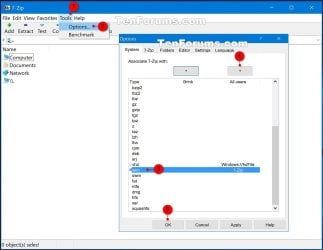
7-Zip.jpg
4. Insert your retail Windows 7 installation disc into the DVD drive and wait for it to be recognized.

5. In 7-Zip, navigate to your DVD drive letter (ex: E: ) that has the Windows 7 installation disc in it, and double click on the Sources folder. (See screenshot below)
Step2.jpg
6. Scroll down and double click on the install.wim file. (See screenshot below)
Step3.jpg
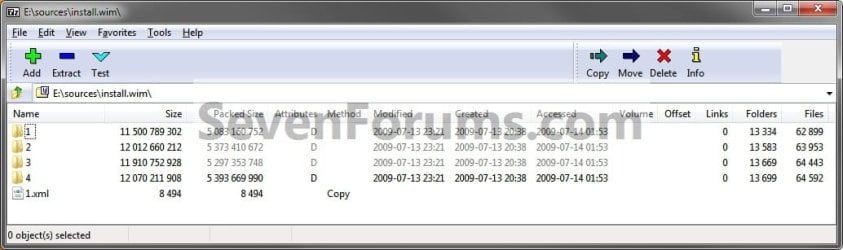
7. You will now see this for a few seconds as it opens. (See screenshot below)
Step4.jpg
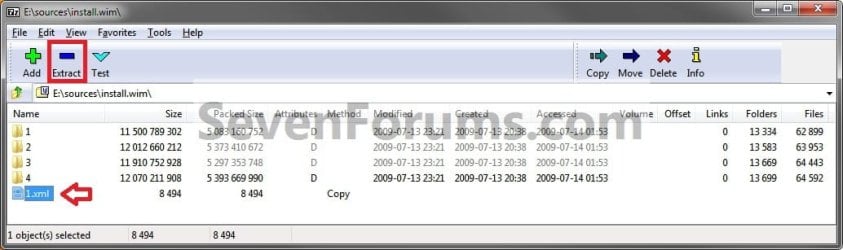
8. Each numbered folder is a different edition of Windows 7. They will vary depending on what type of Windows 7 installation DVD you have. To see what edition is for each numbered folder, select the 1.xml file and click on the Extract button on the toolbar. (See screenshots below)
Step5.jpg

Step6.jpg

9. Copy the 1.xml file to your desktop. (See screenshot below)
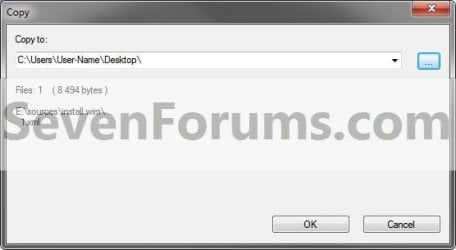
Step7.jpg
10. Open the 1.xml file on the desktop. Look for the <IMAGE INDEX="#"> entry and the <NAME>edition</NAME> entry a bit under it in the code (highlighted in red below) to see what Windows 7 edition is for each numbered folder in step 8. (See code box below with an example 1.xml file)
NOTE: This file will open in Internet Explorer by default.
Code:
[URL="file:///C:/Users/User-Name/Desktop/1.xml#"]-[/URL] <WIM>
  <TOTALBYTES>2860826557</TOTALBYTES> 
[URL="file:///C:/Users/User-Name/Desktop/1.xml#"][B][COLOR=red]-[/COLOR][/B][/URL][B][COLOR=red] <IMAGE INDEX="1">[/COLOR][/B]
  <DIRCOUNT>13290</DIRCOUNT> 
  <FILECOUNT>62943</FILECOUNT> 
  <TOTALBYTES>11500789302</TOTALBYTES> 
[URL="file:///C:/Users/User-Name/Desktop/1.xml#"]-[/URL] <CREATIONTIME>
  <HIGHPART>0x01CA0446</HIGHPART> 
  <LOWPART>0xE89FF88A</LOWPART> 
  </CREATIONTIME>
[URL="file:///C:/Users/User-Name/Desktop/1.xml#"]-[/URL] <LASTMODIFICATIONTIME>
  <HIGHPART>0x01CA045F</HIGHPART> 
  <LOWPART>0x3C8C7A24</LOWPART> 
  </LASTMODIFICATIONTIME>
[URL="file:///C:/Users/User-Name/Desktop/1.xml#"]-[/URL] <WINDOWS>
  <ARCH>9</ARCH> 
  <PRODUCTNAME>Microsoft® Windows® Operating System</PRODUCTNAME> 
  <EDITIONID>HomeBasic</EDITIONID> 
  <INSTALLATIONTYPE>Client</INSTALLATIONTYPE> 
  <HAL>acpiapic</HAL> 
  <PRODUCTTYPE>WinNT</PRODUCTTYPE> 
  <PRODUCTSUITE>Terminal Server</PRODUCTSUITE> 
[URL="file:///C:/Users/User-Name/Desktop/1.xml#"]-[/URL] <LANGUAGES>
  <LANGUAGE>en-US</LANGUAGE> 
  <DEFAULT>en-US</DEFAULT> 
  </LANGUAGES>
[URL="file:///C:/Users/User-Name/Desktop/1.xml#"]-[/URL] <VERSION>
  <MAJOR>6</MAJOR> 
  <MINOR>1</MINOR> 
  <BUILD>7600</BUILD> 
  <SPBUILD>16385</SPBUILD> 
  <SPLEVEL>0</SPLEVEL> 
  </VERSION>
  <SYSTEMROOT>WINDOWS</SYSTEMROOT> 
  </WINDOWS>
[B][COLOR=red]<NAME>Windows 7 HOMEBASIC</NAME>[/COLOR][/B] 
  <DESCRIPTION>Windows 7 HOMEBASIC</DESCRIPTION> 
  <FLAGS>HomeBasic</FLAGS> 
  <HARDLINKBYTES>4516930990</HARDLINKBYTES> 
  <DISPLAYNAME>Windows 7 Home Basic</DISPLAYNAME> 
  <DISPLAYDESCRIPTION>Windows 7 Home Basic</DISPLAYDESCRIPTION> 
  </IMAGE>
[URL="file:///C:/Users/User-Name/Desktop/1.xml#"][B][COLOR=red]-[/COLOR][/B][/URL][B][COLOR=red] <IMAGE INDEX="2">[/COLOR][/B]
  <DIRCOUNT>13539</DIRCOUNT> 
  <FILECOUNT>63997</FILECOUNT> 
  <TOTALBYTES>12012660212</TOTALBYTES> 
[URL="file:///C:/Users/User-Name/Desktop/1.xml#"]-[/URL] <CREATIONTIME>
  <HIGHPART>0x01CA0446</HIGHPART> 
  <LOWPART>0xE89FF88A</LOWPART> 
  </CREATIONTIME>
[URL="file:///C:/Users/User-Name/Desktop/1.xml#"]-[/URL] <LASTMODIFICATIONTIME>
  <HIGHPART>0x01CA045F</HIGHPART> 
  <LOWPART>0x5C029E16</LOWPART> 
  </LASTMODIFICATIONTIME>
[URL="file:///C:/Users/User-Name/Desktop/1.xml#"]-[/URL] <WINDOWS>
  <ARCH>9</ARCH> 
  <PRODUCTNAME>Microsoft® Windows® Operating System</PRODUCTNAME> 
  <EDITIONID>HomePremium</EDITIONID> 
  <INSTALLATIONTYPE>Client</INSTALLATIONTYPE> 
  <HAL>acpiapic</HAL> 
  <PRODUCTTYPE>WinNT</PRODUCTTYPE> 
  <PRODUCTSUITE>Terminal Server</PRODUCTSUITE> 
[URL="file:///C:/Users/User-Name/Desktop/1.xml#"]-[/URL] <LANGUAGES>
  <LANGUAGE>en-US</LANGUAGE> 
  <DEFAULT>en-US</DEFAULT> 
  </LANGUAGES>
[URL="file:///C:/Users/User-Name/Desktop/1.xml#"]-[/URL] <VERSION>
  <MAJOR>6</MAJOR> 
  <MINOR>1</MINOR> 
  <BUILD>7600</BUILD> 
  <SPBUILD>16385</SPBUILD> 
  <SPLEVEL>0</SPLEVEL> 
  </VERSION>
  <SYSTEMROOT>WINDOWS</SYSTEMROOT> 
  </WINDOWS>
  [B][COLOR=red]<NAME>Windows 7 HOMEPREMIUM</NAME>[/COLOR][/B] 
  <DESCRIPTION>Windows 7 HOMEPREMIUM</DESCRIPTION> 
  <FLAGS>HomePremium</FLAGS> 
  <HARDLINKBYTES>4931998179</HARDLINKBYTES> 
  <DISPLAYNAME>Windows 7 Home Premium</DISPLAYNAME> 
  <DISPLAYDESCRIPTION>Windows 7 Home Premium</DISPLAYDESCRIPTION> 
  </IMAGE>
[URL="file:///C:/Users/User-Name/Desktop/1.xml#"][B][COLOR=red]-[/COLOR][/B][/URL][B][COLOR=red] <IMAGE INDEX="3">[/COLOR][/B]
  <DIRCOUNT>13625</DIRCOUNT> 
  <FILECOUNT>64487</FILECOUNT> 
  <TOTALBYTES>11910752928</TOTALBYTES> 
[URL="file:///C:/Users/User-Name/Desktop/1.xml#"]-[/URL] <CREATIONTIME>
  <HIGHPART>0x01CA0446</HIGHPART> 
  <LOWPART>0xE89FF88A</LOWPART> 
  </CREATIONTIME>
[URL="file:///C:/Users/User-Name/Desktop/1.xml#"]-[/URL] <LASTMODIFICATIONTIME>
  <HIGHPART>0x01CA045F</HIGHPART> 
  <LOWPART>0x79D2BCF7</LOWPART> 
  </LASTMODIFICATIONTIME>
[URL="file:///C:/Users/User-Name/Desktop/1.xml#"]-[/URL] <WINDOWS>
  <ARCH>9</ARCH> 
  <PRODUCTNAME>Microsoft® Windows® Operating System</PRODUCTNAME> 
  <EDITIONID>Professional</EDITIONID> 
  <INSTALLATIONTYPE>Client</INSTALLATIONTYPE> 
  <HAL>acpiapic</HAL> 
  <PRODUCTTYPE>WinNT</PRODUCTTYPE> 
  <PRODUCTSUITE>Terminal Server</PRODUCTSUITE> 
[URL="file:///C:/Users/User-Name/Desktop/1.xml#"]-[/URL] <LANGUAGES>
  <LANGUAGE>en-US</LANGUAGE> 
  <DEFAULT>en-US</DEFAULT> 
  </LANGUAGES>
[URL="file:///C:/Users/User-Name/Desktop/1.xml#"]-[/URL] <VERSION>
  <MAJOR>6</MAJOR> 
  <MINOR>1</MINOR> 
  <BUILD>7600</BUILD> 
  <SPBUILD>16385</SPBUILD> 
  <SPLEVEL>0</SPLEVEL> 
  </VERSION>
  <SYSTEMROOT>WINDOWS</SYSTEMROOT> 
  </WINDOWS>
  [B][COLOR=red]<NAME>Windows 7 PROFESSIONAL</NAME>[/COLOR][/B] 
  <DESCRIPTION>Windows 7 PROFESSIONAL</DESCRIPTION> 
  <FLAGS>Professional</FLAGS> 
  <HARDLINKBYTES>4804037542</HARDLINKBYTES> 
  <DISPLAYNAME>Windows 7 Professional</DISPLAYNAME> 
  <DISPLAYDESCRIPTION>Windows 7 Professional</DISPLAYDESCRIPTION> 
  </IMAGE>
[URL="file:///C:/Users/User-Name/Desktop/1.xml#"][B][COLOR=red]-[/COLOR][/B][/URL][B][COLOR=red] <IMAGE INDEX="4">[/COLOR][/B]
  <DIRCOUNT>13655</DIRCOUNT> 
  <FILECOUNT>64636</FILECOUNT> 
  <TOTALBYTES>12070211908</TOTALBYTES> 
[URL="file:///C:/Users/User-Name/Desktop/1.xml#"]-[/URL] <CREATIONTIME>
  <HIGHPART>0x01CA0446</HIGHPART> 
  <LOWPART>0xE89FF88A</LOWPART> 
  </CREATIONTIME>
[URL="file:///C:/Users/User-Name/Desktop/1.xml#"]-[/URL] <LASTMODIFICATIONTIME>
  <HIGHPART>0x01CA045F</HIGHPART> 
   <LOWPART>0x97ECC597</LOWPART> 
  </LASTMODIFICATIONTIME>
[URL="file:///C:/Users/User-Name/Desktop/1.xml#"]-[/URL] <WINDOWS>
  <ARCH>9</ARCH> 
  <PRODUCTNAME>Microsoft® Windows® Operating System</PRODUCTNAME> 
  <EDITIONID>Ultimate</EDITIONID> 
  <INSTALLATIONTYPE>Client</INSTALLATIONTYPE> 
  <HAL>acpiapic</HAL> 
  <PRODUCTTYPE>WinNT</PRODUCTTYPE> 
  <PRODUCTSUITE>Terminal Server</PRODUCTSUITE> 
[URL="file:///C:/Users/User-Name/Desktop/1.xml#"]-[/URL] <LANGUAGES>
  <LANGUAGE>en-US</LANGUAGE> 
  <DEFAULT>en-US</DEFAULT> 
  </LANGUAGES>
[URL="file:///C:/Users/User-Name/Desktop/1.xml#"]-[/URL] <VERSION>
  <MAJOR>6</MAJOR> 
  <MINOR>1</MINOR> 
  <BUILD>7600</BUILD> 
  <SPBUILD>16385</SPBUILD> 
  <SPLEVEL>0</SPLEVEL> 
  </VERSION>
  <SYSTEMROOT>WINDOWS</SYSTEMROOT> 
  </WINDOWS>
  [B][COLOR=red]<NAME>Windows 7 ULTIMATE</NAME>[/COLOR][/B] 
  <DESCRIPTION>Windows 7 ULTIMATE</DESCRIPTION> 
  <FLAGS>Ultimate</FLAGS> 
  <HARDLINKBYTES>4963044302</HARDLINKBYTES> 
  <DISPLAYNAME>Windows 7 Ultimate</DISPLAYNAME> 
  <DISPLAYDESCRIPTION>Windows 7 Ultimate</DISPLAYDESCRIPTION> 
  </IMAGE>
  </WIM>
11. Now open the numbered folder (step 8) that is the same edition as your currently installed Windows 7 edition, and navigate to the Windows\System32 folder. You can now select and extract the system files that you need to your desktop. (See screenshot below)
Step8.jpg
12. Verify that each extracted file is unblocked. You can now use the extracted files to copy and replace your missing or corrupted system files in your currently installed Windows 7.

   Tip
You will need to take ownership and set permissions to "Allow" your account "Full Control" of the original file in your current installation before you will be allowed to replace it with the extracted copy.

If the system file is in use and you are unable to replace it with the extracted copy, then:
  • Open a Command Prompt at boot.
  • Do steps 4B to 4D in this tutorial first to verify the drive letter of your Windows 7 drive. It's not always C: at boot.
  • Type in the command below to copy and replace the original file with the extracted replacement file.
Copy /Y "full path of extracted replacement file" "full path of original Windows 7 system file"

For example:
If the extracted replacement uDWM.DLL is on my desktop, then I would use type this in the command prompt at boot and press enter.

Copy /Y "C:\Users\User-name\Desktop\uDWM.dll" "C:\Windows\System32\uDWM.dll"


That's it,
Shawn


Last edited:
Hello jraju, :)

Manually replacing the file will most likely not work in this situation. You might see if doing a system restore using a restore point dated before this started may be able to sort this for you.
 

My Computer My Computer

Computer type
PC/Desktop
Computer Manufacturer/Model Number
Self built custom
OS
64-bit Windows 11 Pro for Workstations
CPU
Intel i7-8700K OC'd to 5 GHz
Motherboard
ASUS ROG Maximus XI Formula Z390
Memory
64 GB (4x16GB) G.SKILL TridentZ RGB DDR4 3600 MHz
Graphics Card(s)
ASUS ROG-STRIX-GTX1080TI-O11G-GAMING
Sound Card
Integrated
Monitor(s) Displays
2 x Samsung Odyssey G7 27"
Screen Resolution
2560x1440
Hard Drives
1TB Samsung 990 PRO M.2,
4TB Samsung 990 PRO PRO M.2,
TerraMaster F8 SSD Plus NAS
PSU
Seasonic Prime Titanium 850W
Case
Thermaltake Core P3
Cooling
Corsair Hydro H115i
Keyboard
Logitech wireless K800
Mouse
Logitech MX Master 4
Internet Speed
2 Gb/s Download and 100 Mb/s Upload
Antivirus
Malwarebyte Anti-Malware Premium
Browser
Google Chrome
Other Info
Logitech Z625 speaker system,
Logitech BRIO 4K Pro webcam,
HP Color LaserJet Pro MFP M477fdn,
APC SMART-UPS RT 1000 XL - SURT1000XLI,
Galaxy S23 Plus phone
Hi, Brink,
Really one of the bestest , (the besst)tutorial. Please inform me whether i have to rename the original file present file that need to be replaced before install of any dll or any other file? Naturally, what explore.exe , or exploreframedll contents
 

My Computer My Computer

Computer type
PC/Desktop
Computer Manufacturer/Model Number
custom build
OS
Microsoft Windows 7 Ultimate 64-bit 7601 Multiprocessor Free Service Pack 1
CPU
Intel(R) Core(TM)2 Duo CPU E7200 @ 2.53GHz
Motherboard
To be filled by O.E.M. To be filled by O.E.M.
Memory
4.00 GB
Graphics Card(s)
NVIDIA GeForce 210
Sound Card
(1) NVIDIA High Definition Audio (2) Realtek High Definiti
Screen Resolution
1920 x 1080 x 32 bits (4294967296 colors) @ 60 Hz
Hard Drives
ST3500312CS ATA Device
Did you try doing a system restore using a restore point dated before this started?
 

My Computer My Computer

Computer type
PC/Desktop
Computer Manufacturer/Model Number
Self built custom
OS
64-bit Windows 11 Pro for Workstations
CPU
Intel i7-8700K OC'd to 5 GHz
Motherboard
ASUS ROG Maximus XI Formula Z390
Memory
64 GB (4x16GB) G.SKILL TridentZ RGB DDR4 3600 MHz
Graphics Card(s)
ASUS ROG-STRIX-GTX1080TI-O11G-GAMING
Sound Card
Integrated
Monitor(s) Displays
2 x Samsung Odyssey G7 27"
Screen Resolution
2560x1440
Hard Drives
1TB Samsung 990 PRO M.2,
4TB Samsung 990 PRO PRO M.2,
TerraMaster F8 SSD Plus NAS
PSU
Seasonic Prime Titanium 850W
Case
Thermaltake Core P3
Cooling
Corsair Hydro H115i
Keyboard
Logitech wireless K800
Mouse
Logitech MX Master 4
Internet Speed
2 Gb/s Download and 100 Mb/s Upload
Antivirus
Malwarebyte Anti-Malware Premium
Browser
Google Chrome
Other Info
Logitech Z625 speaker system,
Logitech BRIO 4K Pro webcam,
HP Color LaserJet Pro MFP M477fdn,
APC SMART-UPS RT 1000 XL - SURT1000XLI,
Galaxy S23 Plus phone
Hi, I did it, but still i get the error module not loaded.
 

My Computer My Computer

Computer type
PC/Desktop
Computer Manufacturer/Model Number
custom build
OS
Microsoft Windows 7 Ultimate 64-bit 7601 Multiprocessor Free Service Pack 1
CPU
Intel(R) Core(TM)2 Duo CPU E7200 @ 2.53GHz
Motherboard
To be filled by O.E.M. To be filled by O.E.M.
Memory
4.00 GB
Graphics Card(s)
NVIDIA GeForce 210
Sound Card
(1) NVIDIA High Definition Audio (2) Realtek High Definiti
Screen Resolution
1920 x 1080 x 32 bits (4294967296 colors) @ 60 Hz
Hard Drives
ST3500312CS ATA Device
In that case, it may be best to do a clean install when able. :(
 

My Computer My Computer

Computer type
PC/Desktop
Computer Manufacturer/Model Number
Self built custom
OS
64-bit Windows 11 Pro for Workstations
CPU
Intel i7-8700K OC'd to 5 GHz
Motherboard
ASUS ROG Maximus XI Formula Z390
Memory
64 GB (4x16GB) G.SKILL TridentZ RGB DDR4 3600 MHz
Graphics Card(s)
ASUS ROG-STRIX-GTX1080TI-O11G-GAMING
Sound Card
Integrated
Monitor(s) Displays
2 x Samsung Odyssey G7 27"
Screen Resolution
2560x1440
Hard Drives
1TB Samsung 990 PRO M.2,
4TB Samsung 990 PRO PRO M.2,
TerraMaster F8 SSD Plus NAS
PSU
Seasonic Prime Titanium 850W
Case
Thermaltake Core P3
Cooling
Corsair Hydro H115i
Keyboard
Logitech wireless K800
Mouse
Logitech MX Master 4
Internet Speed
2 Gb/s Download and 100 Mb/s Upload
Antivirus
Malwarebyte Anti-Malware Premium
Browser
Google Chrome
Other Info
Logitech Z625 speaker system,
Logitech BRIO 4K Pro webcam,
HP Color LaserJet Pro MFP M477fdn,
APC SMART-UPS RT 1000 XL - SURT1000XLI,
Galaxy S23 Plus phone
Hi, brink , can i view the files copied as service pack 1 in the installation dvd.
i mean, normally updates files are stored in software distribution folder.
i also read from tutorials, that all the files are located in the same folder as in the installation disk.
what i want to know is if i integrated the service pack, then could i know, if it has been incorporated in the installlation media by looking at the file concerned
 

My Computer My Computer

Computer type
PC/Desktop
Computer Manufacturer/Model Number
custom build
OS
Microsoft Windows 7 Ultimate 64-bit 7601 Multiprocessor Free Service Pack 1
CPU
Intel(R) Core(TM)2 Duo CPU E7200 @ 2.53GHz
Motherboard
To be filled by O.E.M. To be filled by O.E.M.
Memory
4.00 GB
Graphics Card(s)
NVIDIA GeForce 210
Sound Card
(1) NVIDIA High Definition Audio (2) Realtek High Definiti
Screen Resolution
1920 x 1080 x 32 bits (4294967296 colors) @ 60 Hz
Hard Drives
ST3500312CS ATA Device
Hi, brink , can i view the files copied as service pack 1 in the installation dvd.
i mean, normally updates files are stored in software distribution folder.
i also read from tutorials, that all the files are located in the same folder as in the installation disk.
what i want to know is if i integrated the service pack, then could i know, if it has been incorporated in the installlation media by looking at the file concerned

Usually the installation media (ex: ISO) will have SP1 in the name to help indicate it includes the service pack.

You can use the same method below to look at the details of the Windows 7 ISO or USB to see if it includes the service pack.

See Full Details about a Windows 10 ISO file or USB | Tutorials
 

My Computer My Computer

Computer type
PC/Desktop
Computer Manufacturer/Model Number
Self built custom
OS
64-bit Windows 11 Pro for Workstations
CPU
Intel i7-8700K OC'd to 5 GHz
Motherboard
ASUS ROG Maximus XI Formula Z390
Memory
64 GB (4x16GB) G.SKILL TridentZ RGB DDR4 3600 MHz
Graphics Card(s)
ASUS ROG-STRIX-GTX1080TI-O11G-GAMING
Sound Card
Integrated
Monitor(s) Displays
2 x Samsung Odyssey G7 27"
Screen Resolution
2560x1440
Hard Drives
1TB Samsung 990 PRO M.2,
4TB Samsung 990 PRO PRO M.2,
TerraMaster F8 SSD Plus NAS
PSU
Seasonic Prime Titanium 850W
Case
Thermaltake Core P3
Cooling
Corsair Hydro H115i
Keyboard
Logitech wireless K800
Mouse
Logitech MX Master 4
Internet Speed
2 Gb/s Download and 100 Mb/s Upload
Antivirus
Malwarebyte Anti-Malware Premium
Browser
Google Chrome
Other Info
Logitech Z625 speaker system,
Logitech BRIO 4K Pro webcam,
HP Color LaserJet Pro MFP M477fdn,
APC SMART-UPS RT 1000 XL - SURT1000XLI,
Galaxy S23 Plus phone
Hi, Sorry for the late reply. I like the way you answer to the point. awesome answers at that . The link would be very useful not only to me, but to other users as well
A small query,
If i had integrated the updates, could i just totally install in a virtual drive and then unmount the virtual drive totally during the windows session
If that could be done, i will be knowing if the instllation dvd or usb is booting.
i checked once that it is booting, but failed when expanding...files stae, after copying files stage. It ended with the installation was not successful
mere booting from usb, would not mean that it is installing to the last process
please give your ideas
Ok, those dism commands only list the version and architecture
what i want to know, is if the service pack and updates as shown as integrated have been in the installation media
Are there any clue to find those.
Normally install.wim is the folder where all integration takes place , and could i view the files like service pack and otaher updates, so that i could be confident of my installation media
 

My Computer My Computer

Computer type
PC/Desktop
Computer Manufacturer/Model Number
custom build
OS
Microsoft Windows 7 Ultimate 64-bit 7601 Multiprocessor Free Service Pack 1
CPU
Intel(R) Core(TM)2 Duo CPU E7200 @ 2.53GHz
Motherboard
To be filled by O.E.M. To be filled by O.E.M.
Memory
4.00 GB
Graphics Card(s)
NVIDIA GeForce 210
Sound Card
(1) NVIDIA High Definition Audio (2) Realtek High Definiti
Screen Resolution
1920 x 1080 x 32 bits (4294967296 colors) @ 60 Hz
Hard Drives
ST3500312CS ATA Device
Hi, Brink, When I tried to copy a file from winsxs folder, I get permission errors.
The file is reported to be corrupt in install disc. I copied from a friends system and tried to copy the same to the installation usb.
I get permission errors as its permission is set to TrustedInstaller.
Is there anything i do to copy the files.
I just used the gimagex to mount the wim file and using 7 zip to go the winsxs folder of my id and then try to copy the clean file. But it asks for admin permission to do this task.
As I have deleted the folder in the winsxs folder, I could not just restore the file from recycle bin also.
Brink, expecting your reply
 

My Computer My Computer

Computer type
PC/Desktop
Computer Manufacturer/Model Number
custom build
OS
Microsoft Windows 7 Ultimate 64-bit 7601 Multiprocessor Free Service Pack 1
CPU
Intel(R) Core(TM)2 Duo CPU E7200 @ 2.53GHz
Motherboard
To be filled by O.E.M. To be filled by O.E.M.
Memory
4.00 GB
Graphics Card(s)
NVIDIA GeForce 210
Sound Card
(1) NVIDIA High Definition Audio (2) Realtek High Definiti
Screen Resolution
1920 x 1080 x 32 bits (4294967296 colors) @ 60 Hz
Hard Drives
ST3500312CS ATA Device
Hi, Brink, When I tried to copy a file from winsxs folder, I get permission errors.
The file is reported to be corrupt in install disc. I copied from a friends system and tried to copy the same to the installation usb.
I get permission errors as its permission is set to TrustedInstaller.
Is there anything i do to copy the files.
I just used the gimagex to mount the wim file and using 7 zip to go the winsxs folder of my id and then try to copy the clean file. But it asks for admin permission to do this task.
As I have deleted the folder in the winsxs folder, I could not just restore the file from recycle bin also.
Brink, expecting your reply

Hello mate, :-)

Just to confirm, but did you take ownership and set permissions like in the yellow tip box at the bottom of the tutorial to see if that may help?
 

My Computer My Computer

Computer type
PC/Desktop
Computer Manufacturer/Model Number
Self built custom
OS
64-bit Windows 11 Pro for Workstations
CPU
Intel i7-8700K OC'd to 5 GHz
Motherboard
ASUS ROG Maximus XI Formula Z390
Memory
64 GB (4x16GB) G.SKILL TridentZ RGB DDR4 3600 MHz
Graphics Card(s)
ASUS ROG-STRIX-GTX1080TI-O11G-GAMING
Sound Card
Integrated
Monitor(s) Displays
2 x Samsung Odyssey G7 27"
Screen Resolution
2560x1440
Hard Drives
1TB Samsung 990 PRO M.2,
4TB Samsung 990 PRO PRO M.2,
TerraMaster F8 SSD Plus NAS
PSU
Seasonic Prime Titanium 850W
Case
Thermaltake Core P3
Cooling
Corsair Hydro H115i
Keyboard
Logitech wireless K800
Mouse
Logitech MX Master 4
Internet Speed
2 Gb/s Download and 100 Mb/s Upload
Antivirus
Malwarebyte Anti-Malware Premium
Browser
Google Chrome
Other Info
Logitech Z625 speaker system,
Logitech BRIO 4K Pro webcam,
HP Color LaserJet Pro MFP M477fdn,
APC SMART-UPS RT 1000 XL - SURT1000XLI,
Galaxy S23 Plus phone
The file is reported to be corrupt in install disc.
the obvious answer is to get new installation media

what edition, bit version and language are you using?
 

My Computers My Computers

System One System Two

  • Computer type
    PC/Desktop
    OS
    7 X64
    CPU
    i5 8400
    Motherboard
    gigabyte b365m ds3h
    Memory
    2x8gb 3200mhz
    Hard Drives
    various
    PSU
    pure power 11 400w cm
    Case
    Coolermaster
    Cooling
    cryorig m9i
  • Computer type
    PC/Desktop
    OS
    7x64
    CPU
    g5400
    Motherboard
    ga b365m ds3h
    Memory
    8gb ddr4 2400
    PSU
    xfx pro 450w
I did not get the add button show on advanced option.
So, I just used this command in the link to take the permission of winsxs folder.
When I finished the command to take ownership, there was some activity screen on cmd to give all the subfoders in it , to get success of permissions.
But, the next command Icalc in the page, link, has come with error
No mapping between accounts and secruity ids was done error
Should I do icalc for copying a system file on a mounted wim folder
Is this command necessary to copy a file
i used this cmd to perform take ownership

Takeown /f <folder name> /r /d /y
and then used icacls which alerts error
icacls <folder name> grant administrators: F /T
the link:
Take Ownership of a File or Folder Using Command-Line in Windows >> Winhelponline

- - - Updated - - -

Hi, Brink,
If you copied the correct file to a installation disc on the correct folder, say , winsxs folder, will there be any problem in booting in extracting windows files stage.
Why I ask is , we are directly copying to the mounted image on the same folder and then unmounting after committing changes
Thanks and expecting reply
 
Last edited:

My Computer My Computer

Computer type
PC/Desktop
Computer Manufacturer/Model Number
custom build
OS
Microsoft Windows 7 Ultimate 64-bit 7601 Multiprocessor Free Service Pack 1
CPU
Intel(R) Core(TM)2 Duo CPU E7200 @ 2.53GHz
Motherboard
To be filled by O.E.M. To be filled by O.E.M.
Memory
4.00 GB
Graphics Card(s)
NVIDIA GeForce 210
Sound Card
(1) NVIDIA High Definition Audio (2) Realtek High Definiti
Screen Resolution
1920 x 1080 x 32 bits (4294967296 colors) @ 60 Hz
Hard Drives
ST3500312CS ATA Device
A question, I saw an iso file with win 7 made by another guy, with all supported usb 3.x and nvme drivers integrated in that iso file.

Im tryng to create my own win 7 iso file (version 2015) and Im planning to use these drivers from that image iso file made by a third people and integrate in my own. How can I extract these drivers from that iso?

The idea is integrate them in the win 7 iso image version 2015 by using whatever tool to integrate updates and drivers.
 

My Computer My Computer

Computer type
PC/Desktop
Computer Manufacturer/Model Number
unknow
OS
win 7 x64 ultimate
CPU
amd fx3850
Motherboard
asrock extreme4
Memory
16 gskill cl9
Graphics Card(s)
gtx 780 evga 3 gb
Hard Drives
2 ssd kingstons and 1 tb hdd
Antivirus
none
Browser
chrome, firefox and opera

My Computer My Computer

Computer type
PC/Desktop
Computer Manufacturer/Model Number
unknow
OS
win 7 x64 ultimate
CPU
amd fx3850
Motherboard
asrock extreme4
Memory
16 gskill cl9
Graphics Card(s)
gtx 780 evga 3 gb
Hard Drives
2 ssd kingstons and 1 tb hdd
Antivirus
none
Browser
chrome, firefox and opera
you might have to integrate the driver framework update as well. windows6.1-kb2864202-x64.msu

it is in the USB3 attachment at the bottom of all my posts.

some drivers ( for example the recent realtek net drivers ) are sha2 signed which means also integrating the sha2 update into the installation media. windows6.1-kb4474419-v3-x64.msu
 

My Computers My Computers

System One System Two

  • Computer type
    PC/Desktop
    OS
    7 X64
    CPU
    i5 8400
    Motherboard
    gigabyte b365m ds3h
    Memory
    2x8gb 3200mhz
    Hard Drives
    various
    PSU
    pure power 11 400w cm
    Case
    Coolermaster
    Cooling
    cryorig m9i
  • Computer type
    PC/Desktop
    OS
    7x64
    CPU
    g5400
    Motherboard
    ga b365m ds3h
    Memory
    8gb ddr4 2400
    PSU
    xfx pro 450w
Back
Top