Extract Office 2007 key from VHD: looking for a challenge?

ikjadoon

New member
Power User
VIP
Local time
9:23 PM
Messages
94
Yup. Long story short: I reformatted and lost my Office 2007 key. I thought I had the right disc/key ready, but I picked up the wrong Office 2007 (there are a few copies floating about the house/office).

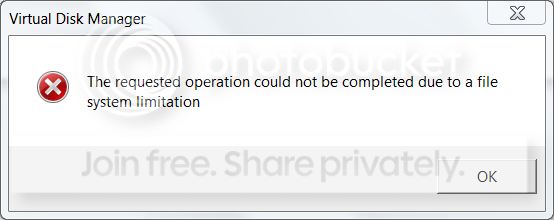
So, yes. I have this ancient VHD backup that definitely has the correct Office 2007 installed. I tried attaching the 49GB VHD file on my 256GB hard drive (which has 136GB free) via Disk Management, but I got an error about a file system limitation:
VHDerror.png


I think it may be do to space (I will remove the 90GB of pictures and see if it helps).

Question 1) What is up with the error above? I haven't had time to Google, so don't waste time searching as I will later. If you know the answer off the top of your head, however, do post! :)

Question 2) Is it possible to extract Office 2007 keys from "folders"? Like not a working installation? If I have C:\ extracted, can you get the Office 2007 keys for free? I found some shareware (Backup Key Extractor), but I'd rather not pay.

Question 3) If the answer is "no" to question 2, is there a safe way to boot from the VHD and I can run a key scanner there? I really don't want to mess up my current installation of Windows; it's taken me forever to get it back to where it needs to be. :(

Thanks in advance,

~Ibrahim~
 

My Computer My Computer

At a glance

Windows 7 Ultimate 64-biti7-720QM6GB DDR3-1.333GHzATI 4670 1GB
Computer Manufacturer/Model Number
Dell SXPS 1645
OS
Windows 7 Ultimate 64-bit
CPU
i7-720QM
Memory
6GB DDR3-1.333GHz
Graphics Card(s)
ATI 4670 1GB
Sound Card
IDT Integ.
Monitor(s) Displays
RGBLED
Screen Resolution
1920x1080
Hard Drives
Samsung PM800 256GB SSD
PSU
Dell 90W w/ 9-cell
For #1: If the number of allocated regions in a sparse or compressed file exceeds a threshold, the OS refuses to allocate additional regions. If the operations that will fail with ERROR_FILE_SYSTEM_LIMITATION were submitted with file buffering on (thus postponing this error until they are flushed) this can cause major issues including completely preventing the OS from writing to disk in any buffered file. (source: The requested operation could not be completed due to a file system limitation)

Try defragmenting.

For #2: No. The key is in the registry.

For #3: You can mount the VHD in Virtual PC and boot it up from there. Try this list of key finders from About.com Key Finder Programs - Top 13 Free Product Key Finder Programs - Keyfinder Software.
 

My Computer My Computer

At a glance

Windows 7 Ultimate 64-bitAMD Phenom II X6 1090T 3.2GHZG.SKILL RipJaw 3x2GB DDR3-10662x HIS Radeon HD 6850 1 GB
OS
Windows 7 Ultimate 64-bit
CPU
AMD Phenom II X6 1090T 3.2GHZ
Motherboard
MSI 890FXA-GD70
Memory
G.SKILL RipJaw 3x2GB DDR3-1066
Graphics Card(s)
2x HIS Radeon HD 6850 1 GB
Sound Card
VIA 8-channel
Monitor(s) Displays
2x 20 inch Acer LCDs, 1x 32" Sony LCD TV
Screen Resolution
4480x900
Hard Drives
1x Crucial 64GB SSD
3x 1TB HDDs (WD, Seagate, Hitatchi)
1x 500GB Seagate External
PSU
Kingwin 1000W Modular
Case
Coolermaster HAF 932
Cooling
1x 120mm, 3x 200mm, CoolerMaster Hyper 212+
Keyboard
Microsoft Wireless Keyboard 1000
Mouse
Microsoft Wiresless Mouse 5000
Internet Speed
20mbps
Other Info
Samsung BD-ROM/DVD-RW
For #1: If the number of allocated regions in a sparse or compressed file exceeds a threshold, the OS refuses to allocate additional regions. If the operations that will fail with ERROR_FILE_SYSTEM_LIMITATION were submitted with file buffering on (thus postponing this error until they are flushed) this can cause major issues including completely preventing the OS from writing to disk in any buffered file. (source: The requested operation could not be completed due to a file system limitation)

Try defragmenting.

For #2: No. The key is in the registry.

For #3: You can mount the VHD in Virtual PC and boot it up from there. Try this list of key finders from About.com Key Finder Programs - Top 13 Free Product Key Finder Programs - Keyfinder Software.

1) All right...well, it's an SSD. I'm unsure if defragmentation would help, but I will try it. Is it because it's on a 50GB BD-RE? It takes up 49GB on it. Let me copy it to my external 320GB drive.

2) Gotcha.

3) I'm installing VirtualPC now. :) Maybe VirtualPC will be able to attach the VHD without the error. Thanks for the linkage; I've used Magic Jelly Bean before with good success. :)

Thanks for the help; I really appreciate it! :D

///EDIT\\\

All right; I downloaded/installed Virtual PC and then restarted my PC. I also went ahead and moved the VHD from the BD-RE (which has a max read/write speed of 9MB/s) to my eSATA HDD which should get around 50-70MB/s.

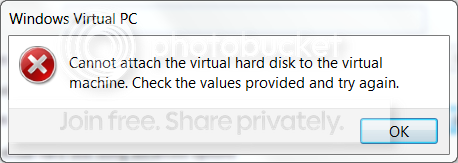
I tried to attach the VHD, but then I got this error:
VHDerror2.png


Ugh! Apparently, Virtual PC cannot open VHD images created from hard drives with over 127.5GB used. It doesn't matter what size the VHD is; it depends on how much of the the initial hard drive was being used: greater than 127.5GB and no go. I can't remember how big my hard drive was, but it was definitely over 100GB. It's apparently some sort of ATA limitation?

You can shrink it if you imaged extra partitions (by deleting those), but I definitely only had one partition.

I'm looking into VirtualBox which some have stated can open VHD files created from hard drives larger than 127.5GB, but I don't know how it's going to get around at ATA limitation....

@Microsoft

Seriously? Your own tool can't open images of hard drives with hard drives greater than 127.5GB used? Come on... EDIT: Well, Hyper-V (the server implementation, I think) can open them, but the "consumer" Virtual PC can't. Poop on you, Microsoft.

///EDIT2\\\

Well, there are bigger problems. Virtual PC can't support guest 64-bit OSes. So, VPC definitely won't work: 1) hard drive initial size possibly greater than 127GB and 2) guest OS is 64-bit. :( #MicrosoftFail

I also moved my pictures to the external HDD; now the host OS has around 186GB free, so this VHD should definitely fit...

VirtualBox won't open the VHD (some error). It won't open it on from my BD-RE nor my external HDD. Off to more Googling...

~Ibrahim~
 
Last edited:

My Computer My Computer

At a glance

Windows 7 Ultimate 64-biti7-720QM6GB DDR3-1.333GHzATI 4670 1GB
Computer Manufacturer/Model Number
Dell SXPS 1645
OS
Windows 7 Ultimate 64-bit
CPU
i7-720QM
Memory
6GB DDR3-1.333GHz
Graphics Card(s)
ATI 4670 1GB
Sound Card
IDT Integ.
Monitor(s) Displays
RGBLED
Screen Resolution
1920x1080
Hard Drives
Samsung PM800 256GB SSD
PSU
Dell 90W w/ 9-cell
The file system error is because you can't open VHDs on UDF (what the BD-RE disc is). I copied it to my NTFS external HDD, but it told me the VHD was corrupted.

I tried legit for five hours last night with different tools, different virtualization programs: nothing can open it. It's a dud VHD. :(

Alas....

Thanks for your help, however! I appreciated it.

~Ibrahim~
 

My Computer My Computer

At a glance

Windows 7 Ultimate 64-biti7-720QM6GB DDR3-1.333GHzATI 4670 1GB
Computer Manufacturer/Model Number
Dell SXPS 1645
OS
Windows 7 Ultimate 64-bit
CPU
i7-720QM
Memory
6GB DDR3-1.333GHz
Graphics Card(s)
ATI 4670 1GB
Sound Card
IDT Integ.
Monitor(s) Displays
RGBLED
Screen Resolution
1920x1080
Hard Drives
Samsung PM800 256GB SSD
PSU
Dell 90W w/ 9-cell

My Computer My Computer

At a glance

Windows 7 Ultimate 64-bitAMD Phenom II X6 1090T 3.2GHZG.SKILL RipJaw 3x2GB DDR3-10662x HIS Radeon HD 6850 1 GB
OS
Windows 7 Ultimate 64-bit
CPU
AMD Phenom II X6 1090T 3.2GHZ
Motherboard
MSI 890FXA-GD70
Memory
G.SKILL RipJaw 3x2GB DDR3-1066
Graphics Card(s)
2x HIS Radeon HD 6850 1 GB
Sound Card
VIA 8-channel
Monitor(s) Displays
2x 20 inch Acer LCDs, 1x 32" Sony LCD TV
Screen Resolution
4480x900
Hard Drives
1x Crucial 64GB SSD
3x 1TB HDDs (WD, Seagate, Hitatchi)
1x 500GB Seagate External
PSU
Kingwin 1000W Modular
Case
Coolermaster HAF 932
Cooling
1x 120mm, 3x 200mm, CoolerMaster Hyper 212+
Keyboard
Microsoft Wireless Keyboard 1000
Mouse
Microsoft Wiresless Mouse 5000
Internet Speed
20mbps
Other Info
Samsung BD-ROM/DVD-RW

I think the VHD has to be mounted/attached before it can be booted from, right? I have gotten conflicting reports on this: some say possible, others say you can native-boot without an OS already installed (thus meaning it isn't mounted/attached).

I tried similar steps (not those exactly, but very close) to boot it. I kept getting some error when I selected the VHD.

I will try again, though, with these steps when I get my laptop back (it's in the Dell repair to fix some random shut-downs).

Thanks for the linkage! :)

~Ibrahim~
 

My Computer My Computer

At a glance

Windows 7 Ultimate 64-biti7-720QM6GB DDR3-1.333GHzATI 4670 1GB
Computer Manufacturer/Model Number
Dell SXPS 1645
OS
Windows 7 Ultimate 64-bit
CPU
i7-720QM
Memory
6GB DDR3-1.333GHz
Graphics Card(s)
ATI 4670 1GB
Sound Card
IDT Integ.
Monitor(s) Displays
RGBLED
Screen Resolution
1920x1080
Hard Drives
Samsung PM800 256GB SSD
PSU
Dell 90W w/ 9-cell
Back
Top