Extract Old Icons

RP McIntosh

New member
Member
VIP
Local time
3:24 AM
Messages
135
This is admittedly a relatively trivial issue. But just based on the possibility that someone else has solved this, I'm going to ask anyway.

I have several "libraries" of icons that were accumulated over the years, going back to Windows XP, Windows 98, Windows 95, and maybe even Windows 3.1. They are mostly in .EXE files. The CHANGE ICON button in Windows 7 doesn't recognize that these files have any icons in them. I've since learned that the ability to detect 16 bit icons (which I assume many, if not all of these are) was removed from Windows at some point in the past, presumably after Windows XP, since I could access the icons in these files with XP.

Now, truth is, I'm not sure if the limitation is in displaying the icons at all, or merely detecting their presence within an EXE file. So, what I'm looking for is a (preferably free) utility that will run on Windows 7 64 bit, access and extract (converting if necessary) these old icons so that I can use them with Windows 7.

Does anyone know if such a program exists?
 

My Computer

Computer Manufacturer/Model Number
Dell
OS
Windows 7 Ultimate 64
CPU
Intel i7-975
Memory
12 GB
Graphics Card(s)
ATI Radeon HD 5870
Sound Card
Sound Blaster X-Fi Titanium
Monitor(s) Displays
Dell U2410
Hard Drives
3, SATA 1.5 TB each
Hello RP,

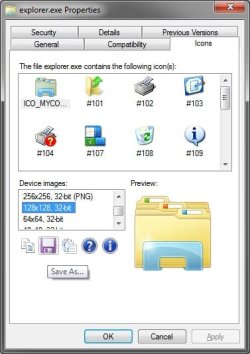
You could download and install the free program Icon Viewer to have a Icons tab added to these files (ex: exe or dll files with icons in them) properties pages. You can then be able to extract and save the icons from them as .ico or .png files.

Properties.jpg

Hope this helps,
Shawn
 

My Computer

Computer type
PC/Desktop
Computer Manufacturer/Model Number
Self built custom
OS
64-bit Windows 11 Pro for Workstations
CPU
Intel i7-8700K OC'd to 5 GHz
Motherboard
ASUS ROG Maximus XI Formula Z390
Memory
64 GB (4x16GB) G.SKILL TridentZ RGB DDR4 3600 MHz
Graphics Card(s)
ASUS ROG-STRIX-GTX1080TI-O11G-GAMING
Sound Card
Integrated
Monitor(s) Displays
2 x Samsung Odyssey G7 27"
Screen Resolution
2560x1440
Hard Drives
1TB Samsung 990 PRO M.2,
4TB Samsung 990 PRO PRO M.2,
TerraMaster F8 SSD Plus NAS
PSU
Seasonic Prime Titanium 850W
Case
Thermaltake Core P3
Cooling
Corsair Hydro H115i
Keyboard
Logitech wireless K800
Mouse
Logitech MX Master 4
Internet Speed
2 Gb/s Download and 100 Mb/s Upload
Antivirus
Malwarebyte Anti-Malware Premium
Browser
Google Chrome
Other Info
Logitech Z625 speaker system,
Logitech BRIO 4K Pro webcam,
HP Color LaserJet Pro MFP M477fdn,
APC SMART-UPS RT 1000 XL - SURT1000XLI,
Galaxy S23 Plus phone
Hello RP,

You could download and install the free program Icon Viewer to have a Icons tab added to these files (ex: exe or dll files with icons in them) properties pages. You can then be able to extract and save the icons from them as .ico or .png files.

View attachment 109614

Hope this helps,
Shawn

Shawn--

Well, it looked promising. And though it sees icons in many EXE files, it does NOT see them in any of my EXE or NIL icon library files. Most of these files were created in the 1990-1995 time frame, so I'm assuming that they date back to the old Windows 3.1 days.

Heaven knows that there are thousands of icons available, and I can build new libraries. Just was hoping that there might be a utility that could access the hundreds that I already have.

Thanks very much for the effort. Though it won't do what I was looking for, it's still a handy utility.
 

My Computer

Computer Manufacturer/Model Number
Dell
OS
Windows 7 Ultimate 64
CPU
Intel i7-975
Memory
12 GB
Graphics Card(s)
ATI Radeon HD 5870
Sound Card
Sound Blaster X-Fi Titanium
Monitor(s) Displays
Dell U2410
Hard Drives
3, SATA 1.5 TB each
you need ICOfx a software that will turn most images into an icon file it even converts mac icons to windows icons grab it here ,drag an icon into the window and click the windows symbol and away you go.

PS.its free
 

My Computer

Computer Manufacturer/Model Number
Hewlett packard/p6512uk
OS
Microsoft Windows 7 Home Premium 64-bit 7600
CPU
IIx4 amd athelon 635 processor
Motherboard
FOXCONN 2AA9
Memory
2x2gb
Graphics Card(s)
ati radeon HD 5450
Sound Card
(1) Realtek High Definition Audio (2) AMD High Definition
Monitor(s) Displays
samsung lcd tv 32"
Screen Resolution
1360x 768
Hard Drives
(1) WDC WD10 01FAES-60Z2A0 SATA Disk Device (2) Maxtor OneTouch USB Device (3) ST310003 33AS USB Device (4) WD My Book 1111 USB Device
PSU
?
Cooling
air!
Keyboard
wireless hp
Mouse
wireless Hp,optical
Internet Speed
1.10mb/s
Antivirus
MSE
Browser
Firefox
you need ICOfx a software that will turn most images into an icon file it even converts mac icons to windows icons grab it here ,drag an icon into the window and click the windows symbol and away you go.

PS.its free


Boobah--

Thanks for the suggestion. But I already tried the IcoFx program. And it won't recognize that my icon library files have any icons. My problem isn't that I need to turn image files into icons. It is that I have all these hundreds of old icons in library files, (EXE and NIL files), but neither Windows (using its Change Icon feature) nor either of the two utilities I have tried recognize that these files contain icons.

Interestingly, I have the IcoFX program on my old Windows XP machine, and when run there, it DOES recognize that the EXE library files contain icons. So an awkward, but workable approach is to take the icon library file to my XP machine, use the IcoFx program to extract the icon I want from the file, save it individually, then bring the individual ICO file back to my Windows 7 machine to use it.

Since so far, nothing seems to work on the Windows 7 system, what I may do (on a cold winter day, when I have nothing else to do), is extract ALL of the icons (one by one) using the XP machine, organize them into folders, then move them to the Windows 7 machine. However, if anyone knows of a program that will extract these old icons from library files in a 64 bit Windows 7 environment, I'd be most interested.
 

My Computer

Computer Manufacturer/Model Number
Dell
OS
Windows 7 Ultimate 64
CPU
Intel i7-975
Memory
12 GB
Graphics Card(s)
ATI Radeon HD 5870
Sound Card
Sound Blaster X-Fi Titanium
Monitor(s) Displays
Dell U2410
Hard Drives
3, SATA 1.5 TB each
OK, sorry that doesn't work for you. bed time for me . hope you find a fix good luck! :)
 

My Computer

Computer Manufacturer/Model Number
Hewlett packard/p6512uk
OS
Microsoft Windows 7 Home Premium 64-bit 7600
CPU
IIx4 amd athelon 635 processor
Motherboard
FOXCONN 2AA9
Memory
2x2gb
Graphics Card(s)
ati radeon HD 5450
Sound Card
(1) Realtek High Definition Audio (2) AMD High Definition
Monitor(s) Displays
samsung lcd tv 32"
Screen Resolution
1360x 768
Hard Drives
(1) WDC WD10 01FAES-60Z2A0 SATA Disk Device (2) Maxtor OneTouch USB Device (3) ST310003 33AS USB Device (4) WD My Book 1111 USB Device
PSU
?
Cooling
air!
Keyboard
wireless hp
Mouse
wireless Hp,optical
Internet Speed
1.10mb/s
Antivirus
MSE
Browser
Firefox
Use irfanview, IrfanView - Official Homepage - one of the most popular viewers worldwide, one of the more useful things on the Web.

Install it, run it, and drag the .exe onto it.

The icon will show up in the screen. If there are multiple icons, you can page thru them by clicking the DOWN arrow on the menu bar at the top of the screen.

You can export all of them using OPTIONS -> EXTRACT_ALL_FRAMES. Try different file types for best resolutions. .ICO type is a good place to start.

I just extracted about 50 icons from a windows 3.1 executable in about 1 second.

- john
 

My Computer

Computer type
PC/Desktop
OS
7_64
You can attempt to open the EXE in Resource Hacker. Download it here >> Resource Hacker
step1.png


Snap_Crab_Resource_Hacker_firefoxexe_2016_4_7_2.png
Snap_Crab_No_Name_2016_4_7_21_23_4_No_00.png
 

My Computer

Computer type
PC/Desktop
Computer Manufacturer/Model Number
custom build
OS
Windows 7 Enterprise x64
Back
Top