Extremely long shutdown

Thanks for the input.. But that's not it. This is a stock Dell XPS 8300 and my largest disk is 1TB and that is an external disk which is usually off.
 

My Computer

Computer Manufacturer/Model Number
HP, Dell, Gateway, Toshiba - 4 laptops and 2 desktops
OS
Vista, Windows7, Mint Mate, Zorin, Windows 8
CPU
from 1.6GHz Duo to i7
Monitor(s) Displays
2x HP w2207
Hard Drives
5x HDD, 7x SSD, 12x Externals
Keyboard
with trackball - no mices
Mouse
Trackball mice
Internet Speed
DSL 6000
Slow shutdown

Thoughts:

You could try the tutorial here as a temporary fix including items listed in Option Two Step 5.

The other suggestion that seems to crop up is after initiating a shutdown - wait a bit then try to bring up task manager and see if it still lists running apps or processes that could be the problem.

Other than that it could be a software needs patching / driver needs updating issue but I'm not sure how to track that down.

Edit: Tutorial link that I forgot to include:

http://www.sevenforums.com/tutorials/717-shut-down-speed-up.html
 
Last edited:

My Computer

Computer type
Laptop
Computer Manufacturer/Model Number
ASUS
OS
Microsoft Windows 7 Home Premium 64-bit 7601 Multiprocessor Free Service Pack 1
CPU
AMD C-60 APU with Radeon(tm) HD Graphics
Motherboard
ASUSTeK COMPUTER INC. X501U
Memory
4.00 GB
Graphics Card(s)
AMD Radeon HD 6290 Graphics
Sound Card
(1) AMD High Definition Audio Device (2) Realtek High Defi
Screen Resolution
1366 x 768 x 32 bits (4294967296 colors) @ 60 Hz
Hard Drives
Hitachi HTS545050A7E380 SATA Disk Device
Antivirus
Comodo CIS & FW, SecureAplus App Whitelisting, Threatfire
Browser
Cyberfox 64bit, Opera 64bit, Airfox
Other Info
Spy-The-Spy, HitmanPro.Alert, Norton Connect Safe, MJRegWatcher, BitDefender TrafficLight, Voodoo Shield, Zemana AntiMalware
Nah, that won't work. When I click 'shutdown' the system disappeares and the "Shutting down" screen appears.
 

My Computer

Computer Manufacturer/Model Number
HP, Dell, Gateway, Toshiba - 4 laptops and 2 desktops
OS
Vista, Windows7, Mint Mate, Zorin, Windows 8
CPU
from 1.6GHz Duo to i7
Monitor(s) Displays
2x HP w2207
Hard Drives
5x HDD, 7x SSD, 12x Externals
Keyboard
with trackball - no mices
Mouse
Trackball mice
Internet Speed
DSL 6000
Just for S&G time a shut down from Safe Mode.
 

My Computer

Computer type
PC/Desktop
Computer Manufacturer/Model Number
Home made Desktop
OS
Windows 10 Pro. 64/ version 1709 Windows 7 Pro/64
CPU
Intel i7-6800K @ 4.3
Motherboard
ASUS X-99 Deluxe II
Memory
Corsair Platinum 16 gig @2400
Graphics Card(s)
EVGA GTX 1070 OC
Monitor(s) Displays
Asus 27" LED LCD/VE278Q
Screen Resolution
1920-1080 or 1280-720 HDMI
Hard Drives
INTEL SSD 730-240 Gb Sata 3.0/
PSU
EVGA Platium 1200W
Case
Phanteks Luxe Tempered Glass 8 fans/ one radiator
Cooling
XSPC/ Water Cooled CPU
Keyboard
Das 4 Professional
Mouse
Logitech M705/MX Anywhere 2-S
Internet Speed
100 mbits
Antivirus
Microsoft Security Essentials/ Malwarebytes Premium 3.0/ SAS
Browser
I.E. 11 default/Firefox/ ISP Time Warner Cable/Spectrum
Other Info
LG BluRay Burner/
Sound system-KLipsch-THX/
Icy Dock ssd Hot Swap bays.
Get a list of processes?

Well here's some more thoughts. What about getting a list of running non critical processes then killing them before shutting down just to see if it results in a faster shutdown just for test purposes?

You could do that using UVK. I've tried it on my own machine.

Here's the idea:

Right click UVK desktop icon and choose "Run as administrator" then use the Process Manager. Select "Hide critical processes" and select "Kill all with same path" and then highlight the first process in the list and hold down "Ctrl+A" and a filter opens up.

Then choose "Kill all non critical processes"
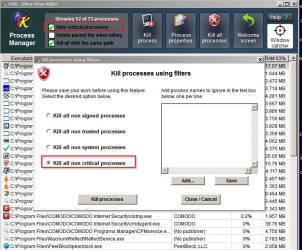
Processes.jpg

It will kill everything in the list and you'll most likely get an "Explorer has stopped responding" message. Ignore the option to restart Explorer and just shut down. Does it shut down any faster?

If so it does point to a software issue.

Then consider using the "Scan and create log" option.

Scan and create log.jpg

If you inspect the log take a look at Global Context Menus (Folder, File) and check for updates for any software that has installed a right click context menu entry (shell extension that integrates with explorer) and also check for any entries that can be removed.

In the same log check services for any additional service that doesn't need to be running. Same goes for drivers.

It's possible that you will spot enrties in the log for software that you have uninstalled. It's possible to write a script to delete those if needed.

UVK - Ultra Virus Killer - Beta version not recommended.

 
Last edited:

My Computer

Computer type
Laptop
Computer Manufacturer/Model Number
ASUS
OS
Microsoft Windows 7 Home Premium 64-bit 7601 Multiprocessor Free Service Pack 1
CPU
AMD C-60 APU with Radeon(tm) HD Graphics
Motherboard
ASUSTeK COMPUTER INC. X501U
Memory
4.00 GB
Graphics Card(s)
AMD Radeon HD 6290 Graphics
Sound Card
(1) AMD High Definition Audio Device (2) Realtek High Defi
Screen Resolution
1366 x 768 x 32 bits (4294967296 colors) @ 60 Hz
Hard Drives
Hitachi HTS545050A7E380 SATA Disk Device
Antivirus
Comodo CIS & FW, SecureAplus App Whitelisting, Threatfire
Browser
Cyberfox 64bit, Opera 64bit, Airfox
Other Info
Spy-The-Spy, HitmanPro.Alert, Norton Connect Safe, MJRegWatcher, BitDefender TrafficLight, Voodoo Shield, Zemana AntiMalware
Back
Top