Extremely slow file transfers and network access...

After fighting this for a couple of hours, I finally found the magic solution for me. Since I hadn't seen it here, thought I'd share.

First, a bit about my configuration. I have 2 client machines and a Windows Home Server. One client machine was a new HP that has Win7 Professional, 64bit. The other client machine is a Dell with 32bit Vista on it. The Dell was working just fine. For some odd reason, file copies FROM the HP to any other machine on my network were PAINFULLY SLOW. Even odder, copies TO the HP machine were blazing fast. I first noticed this problem when I tried the initial backup of the HP machine to the Home Server. It was taking FOREVER and I didn't know why. Then, I tried a simple file copy from and that too was very slow.

SOLUTION: In the Advanced tab for my network adapter, I changed IPv4 Checksum Offload to Disabled.

Sigh. This was probably the 10th setting that I had tried (changing each back to its original value when there was no difference).

YMMV.

Greg
 

My Computer My Computer

OS
Windows 7 Professional 64bit
After fighting this for a couple of hours, I finally found the magic solution for me. Since I hadn't seen it here, thought I'd share.

First, a bit about my configuration. I have 2 client machines and a Windows Home Server. One client machine was a new HP that has Win7 Professional, 64bit. The other client machine is a Dell with 32bit Vista on it. The Dell was working just fine. For some odd reason, file copies FROM the HP to any other machine on my network were PAINFULLY SLOW. Even odder, copies TO the HP machine were blazing fast. I first noticed this problem when I tried the initial backup of the HP machine to the Home Server. It was taking FOREVER and I didn't know why. Then, I tried a simple file copy from and that too was very slow.

SOLUTION: In the Advanced tab for my network adapter, I changed IPv4 Checksum Offload to Disabled.

Sigh. This was probably the 10th setting that I had tried (changing each back to its original value when there was no difference).

YMMV.

Greg


I registered just to say thanks after trying everything else I could dig up on the internet about this specific issue, this is the only thing that worked for me from 250KB to 16Mb which I can live with ... man what a relief I've spent the better part of the day trying to figure this crap out....

Thanks again
 

My Computer My Computer

OS
Windows 7 Premium x64
After fighting this for a couple of hours, I finally found the magic solution for me. Since I hadn't seen it here, thought I'd share.

First, a bit about my configuration. I have 2 client machines and a Windows Home Server. One client machine was a new HP that has Win7 Professional, 64bit. The other client machine is a Dell with 32bit Vista on it. The Dell was working just fine. For some odd reason, file copies FROM the HP to any other machine on my network were PAINFULLY SLOW. Even odder, copies TO the HP machine were blazing fast. I first noticed this problem when I tried the initial backup of the HP machine to the Home Server. It was taking FOREVER and I didn't know why. Then, I tried a simple file copy from and that too was very slow.

SOLUTION: In the Advanced tab for my network adapter, I changed IPv4 Checksum Offload to Disabled.

Sigh. This was probably the 10th setting that I had tried (changing each back to its original value when there was no difference).

YMMV.

Greg

I also just registered to say that this was the only thing that helped me, too.
Specifically I have a Realtek PCIe Gigabit adapter that had TCP Checksum Offload IPv4 set to "Rx and Tx Enabled". Tried both Rx Enabled and Tx Enabled independently and disabling both is the only thing that worked.

Thanks!
 

My Computer My Computer

OS
Windows 7 Enterprise x64
More detailed answer for Nvidia boards and W7 x64

Thanks!

This worked for me but it wasn't the whole solution.

I had an Nvidia board and needed the latest driver. The built in Windows 7 driver was not good enough. Next, I had to disable all the silly Microsoft "improvements:
C:\Windows\System32>netsh int tcp show global
Querying active state...

TCP Global Parameters
----------------------------------------------
Receive-Side Scaling State : disabled
Chimney Offload State : disabled
NetDMA State : disabled
Direct Cache Acess (DCA) : disabled
Receive Window Auto-Tuning Level : disabled
Add-On Congestion Control Provider : none
ECN Capability : disabled
RFC 1323 Timestamps : disabled
** The above autotuninglevel setting is the result of Windows Scaling heuristics
overriding any local/policy configuration on at least one profile.

Then, once that was done, I had to make sure that Flow Control was Receive Enabled.

Then once that was done, I could change your setting regarding IPv4 Checksum Offloading Enabled to DISABLED.

Oh, and I'm not sure it matters but I've got IPv6 disabled across the board
.

What a PITA! But thanks for the last piece to the puzzle! :cool:

After fighting this for a couple of hours, I finally found the magic solution for me. Since I hadn't seen it here, thought I'd share.
...................

SOLUTION: In the Advanced tab for my network adapter, I changed IPv4 Checksum Offload to Disabled.

Sigh. This was probably the 10th setting that I had tried (changing each back to its original value when there was no difference).

YMMV.

Greg
 

My Computer My Computer

OS
Windows 7 x64
Thankyouthankyou

After fighting this for a couple of hours, I finally found the magic solution for me. Since I hadn't seen it here, thought I'd share.

First, a bit about my configuration. I have 2 client machines and a Windows Home Server. One client machine was a new HP that has Win7 Professional, 64bit. The other client machine is a Dell with 32bit Vista on it. The Dell was working just fine. For some odd reason, file copies FROM the HP to any other machine on my network were PAINFULLY SLOW. Even odder, copies TO the HP machine were blazing fast. I first noticed this problem when I tried the initial backup of the HP machine to the Home Server. It was taking FOREVER and I didn't know why. Then, I tried a simple file copy from and that too was very slow.

SOLUTION: In the Advanced tab for my network adapter, I changed IPv4 Checksum Offload to Disabled.

Sigh. This was probably the 10th setting that I had tried (changing each back to its original value when there was no difference).

YMMV.

Greg

I know this is an old thread, but I thought it was worth registering to say thanks.

This worked a dream for me!!!
I just upgraded a machine from Ubuntu to Windows 7 as I only use the machine to stream films/TV to another PC in the house using XBMC (and occasionally use it as an ftp server).

Having spent all the time installing and transferring 1TB of stuff onto the new set up with Windows 7 I could have cried when I saw the word "Buffering" only 30 seconds into a new film; esspecially as samba streaming from my Ubuntu set up ran without a hitch.

So Thanks! and hopefully I've just added a few keywords for anyone else googling the same issue.
 

My Computer My Computer

OS
Windows 7 Ultimate x64
Hello.

I will test the above solution as soon as I get my hands on my laptop.

The only question I have is on which machine should I change this setting of the network adaptor? On the one having Windows 7 or the other that is trying to copy from Windows 7?

Regards.
 

My Computer My Computer

Computer type
PC/Desktop
OS
Windows 7 Ultimate 64-Bit
CPU
Intel Core i7-860
Motherboard
ASUS P7P55D Deluxe
Memory
KINGSTON KVR1333D3N9K4/16G
Graphics Card(s)
2xGigabyte ATI Radeon HD5870
Sound Card
OnBoard
Monitor(s) Displays
LG W2361V 23'
Screen Resolution
1920x1080
Hard Drives
OCZ 256GB Vertex IV
Western Digital Caviar Green WD15EARX
PSU
Cooler Master Silent Pro Hybrid 1050W
Case
Cosmos Pure Black
Cooling
Prolimatech Mega Shadow

My Computer My Computer

Computer type
PC/Desktop
OS
Windows 7 Ultimate 64-Bit
CPU
Intel Core i7-860
Motherboard
ASUS P7P55D Deluxe
Memory
KINGSTON KVR1333D3N9K4/16G
Graphics Card(s)
2xGigabyte ATI Radeon HD5870
Sound Card
OnBoard
Monitor(s) Displays
LG W2361V 23'
Screen Resolution
1920x1080
Hard Drives
OCZ 256GB Vertex IV
Western Digital Caviar Green WD15EARX
PSU
Cooler Master Silent Pro Hybrid 1050W
Case
Cosmos Pure Black
Cooling
Prolimatech Mega Shadow
To all those that thanked me...

You are welcome! I originally spent so much time trying to root cause this problem that I subscribed to this thread to see how many other people ran into the same issue. It's been nice over the months to see the "Thank you" replies trickle in.
 

My Computer My Computer

OS
Windows 7 Professional 64bit
I give up. I just cannot believe that there are so many steps just to get this stupid stuff to work. I read query after query, with increasingly complex and hacky replies, just to (a) get the stupid network working (I can't BELIEVE how many different ways you have to get to do things that should be under one banner) (b) then try to make it work remotely properly.

Sorry. I came here looking for ideas and it's just left me feeling I am happier to simply use a usb drive and walk.

This seems to be utter nonsense and I feel M$oft should be ashamed of themselves.
 

My Computer My Computer

Computer Manufacturer/Model Number
HP Compaq 620
OS
Windows 7 Home Premium 32bit
CPU
Intel
Motherboard
Don't know
Memory
2GB
Graphics Card(s)
onboard
Sound Card
onboard
Monitor(s) Displays
inbuilt
Hard Drives
250GB WD 7200
PSU
inbuilt
Case
laptop
Cooling
???
I am still suffering with terribly slow netorks speeds, to the point where I really cannot transfer anything other than one file at a time. Hopelessly slow.

I have tried may many 'suggestions' on the know Windows 7 issue - nothing works.

Was very execited to read of " changed IPv4 Checksum Offload to Disabled. "... but could not find that option anywhere. Is it only applicable to certain network cards???
 

My Computer My Computer

Computer type
PC/Desktop
Computer Manufacturer/Model Number
DELL XPS 8500 // DELL XPS Studio 9100 // DELL Dim 9200
OS
DELL Win 7 Home Premium 64 Bit
CPU
Intel Core i7-930 (8MB L2, 2.8GHz) // ntel Core 2 Quad Q6600
Motherboard
?? // Dell A02 BIOS // ??
Memory
16GB // 18GB DDR3 SDRAM 1333Mhhz 6 DIMMS (3x2, 3x4) //4 GB
Graphics Card(s)
AMD HD7570 // AMD Radeon HD6750 // ATI Radeon HD5670 1 GB GD
Sound Card
?? // THX TruStudio PC //?
Monitor(s) Displays
Dual Dell 2405 WFP-HC24 //SAmsung 27" // Triple 19" LCD
Screen Resolution
1900 x 1200
Hard Drives
Main :WD Caviar Black 1 TB SATA WD1002FAEX
Backup :WD Caviar Black 1 TB SATA WD1002FAEX
PSU
?? // Ultra 900W // ??
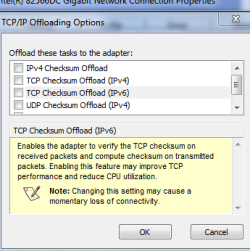
On my Asus P8P67 Pro Rev 3, with an Intel 82579V network card, the "IPv4 Checksum Offload" is actually a "sub-option" of the setting titled "TCP/IP Offloading Options", so when "TCP/IP ..." is highlighted a "Properties" button is available, and the IPv4 Checksum Offload is one of several "tasks" that can be enabled or disabled.
 

My Computer My Computer

OS
Win7 Ultimate x64
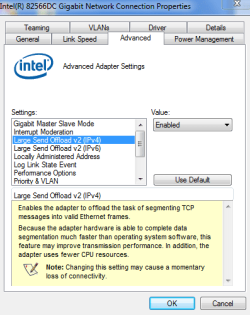
Windows told me my Intel NIC 82566DC drivers were up to date, but I went to the intel site, and sure enough, updated drivers exist.

With the new drivers

  • My Win 7 pc to XP pc transfer speed improved from a unusable 175kb/s to a still very slow but better at 1.5 MB /s
  • My Win 7 pc to other Win 7 pc transfer speed improved from a dismal 175kb/s to more respectable 30 MB /s. I updated the drivers on that machiens as well and now is up to 60 MB/sec -excellent
With the new drivers, I now have more "offload" options... do I have these, and others, set correctly re addressing this isssue??
 

Attachments

  • nic_auto.PNG
    nic_auto.PNG
    14.9 KB · Views: 81
  • nic_large_send.PNG
    nic_large_send.PNG
    15.4 KB · Views: 99
  • nic_offload.PNG
    nic_offload.PNG
    11.5 KB · Views: 69
Last edited:

My Computer My Computer

Computer type
PC/Desktop
Computer Manufacturer/Model Number
DELL XPS 8500 // DELL XPS Studio 9100 // DELL Dim 9200
OS
DELL Win 7 Home Premium 64 Bit
CPU
Intel Core i7-930 (8MB L2, 2.8GHz) // ntel Core 2 Quad Q6600
Motherboard
?? // Dell A02 BIOS // ??
Memory
16GB // 18GB DDR3 SDRAM 1333Mhhz 6 DIMMS (3x2, 3x4) //4 GB
Graphics Card(s)
AMD HD7570 // AMD Radeon HD6750 // ATI Radeon HD5670 1 GB GD
Sound Card
?? // THX TruStudio PC //?
Monitor(s) Displays
Dual Dell 2405 WFP-HC24 //SAmsung 27" // Triple 19" LCD
Screen Resolution
1900 x 1200
Hard Drives
Main :WD Caviar Black 1 TB SATA WD1002FAEX
Backup :WD Caviar Black 1 TB SATA WD1002FAEX
PSU
?? // Ultra 900W // ??
what can my problem be?
I have a stationary computer with a 1Gbps network card + a dlink dir-655 with the support of 1Gbps
I also have a laptop with 1gbps ethernaet card. Both computer is connected with cable to the dlink router.
Here´s the problem when i send files to my stationary computer it can send files between 8-16MB/sec.
But when I wanna send files from my stationary to my laptop it can only send at the speed og 180kb/se-400kb/sec WHYYY?? getting really frustrated here...
Please help....
 

My Computer My Computer

Computer Manufacturer/Model Number
Asus m2nc61s barebone
OS
Win7
CPU
amd dual-core 4200 2,2ghz
Motherboard
NVIDIA GeForce 6100 / nForce 405
Memory
2048MD ram
Graphics Card(s)
Nvidia 9600gt
Sound Card
Built in
Screen Resolution
1920*1080
Hard Drives
samsung 400gb
This worked for me...

I had the same problem with a slow network connection (15 Kb/s) and even losing the connection to network drives while copying etc. After trying several of the suggested solutions this one worked for me on my Asus u36sd with Atheros AR8151 ethernet card (with up-to-date drivers):

1. From the Run command: ncpa.cpl (or go via Control panel to Network connections)
2. Right click on 'local area connection' > properties
3. Click 'configure' to open new dialog box
4. In 'Advanced' tab: select TCP checksum Offload (IPv6) & select 'Disabled' from drop-down menu.

Thanks for the tips & good luck :)

Philip
 

My Computer My Computer

Computer Manufacturer/Model Number
Asus
OS
Windows 7 Professional 64 bit
CPU
2.3 GHz
:)

Thankyou
philipomonas
I wanted to take a moment to thank you for your support For This Solution when we were experiencing difficulties with our PC system. Your help was critical in troubleshooting resolving the issues. I understand that you bent over backwards for us, spending a significant amount of time in conference calls and research on our behalf. Your commitment to delivering excellent service made a huge impact on our company's ability to connect with our customers at a critical time during our busiest season.

:)
:):):):):):):):):):):):):):):):):):):):):):):):):):):):):):)
Problem Solved !!!
 

My Computer My Computer

Computer Manufacturer/Model Number
Assembled
OS
Windods 7 Ultimate x64, 8GB DDR3, 1TB
CPU
Intel Dual Core
Motherboard
GA-G41MTS2P
Memory
Trenscend 8GB DDR3
Graphics Card(s)
Onboard 256 MB
Sound Card
Realtek High Definition Audio
Monitor(s) Displays
Samsung SyncMaster B2230
Hard Drives
Western Digital 500 GB x 2
PSU
iBall SMPS 450W
Case
iBall ATX
Cooling
Intel Orignal Heatsink
You must have the right switch for Fast transfers

Requirement for full speed ethernet transfers (75% of 1000 every transfer +) is a Non-blocking, wire-speed transmission switch!

Switches:
•ZyXEL's GS1100-16 16 Port Desktop GbE Switch is a 16-port 10/100/1000 switch (I'm getting 700-800Mbit or 80Mbyte transfers)
•ZyXEL's GS1100-24 The GS1100-24 is a 24-port 10/100/1000 switch
•ZyXEL's GS-108B 10/100/1000Mbps Port Desktop GbE Switch is a 8-port 10/100/1000 switch
•Cisco SR2024 24-port 10/100/1000 Gigabit Switch
•SMC Networks - SMC8508T - EZ Switch 10/100/1000 - 8-Port 10/100/1000 Gigabit Unmanaged Switch
•Linksys SR2016 The 16-Port 10/100/1000 Gigabit

Please try the examples given but if you don't have the right switch then it won't matter what you do at the OS

Regards,

Jason
 

My Computer My Computer

OS
Windows 7 64bit
Registered just to say I was having the same problem and turning off tcp ip4 checksum solved it (still don't understand why my laptop is fine - old dell laptop - and the checksum is enabled)

What does this check actually do? Also no idea why this started happening... everything was fine until a few days ago

Thanks
 

My Computer My Computer

OS
Windows 7 Ultimate 64bit
One problem solved One to go! Windows 7 file xfer speed

Like SO many others across the planet, I too have experience the two seemingly common Win 7 issues that is BEYOND frustrating!!!

I have a Windows 2003 server. It has a RAID Volume and a 2 Terabyte SATA drive. We have 1 Gig unmanaged switches and wiring throughout.

All our PCs are HP XW6400 workstations with at least 4 Gig RAM, they all run on onboard Broadcom NetXtreme Gigabit Ethernet.

All our PCs were XP Pro and ran PERFECTLY and FAST until recently where we needed to update to Win 7 64 for our video editing.

That is when this mess began, and me pulling my hair. All the Windows 7 PCs have the same issue, PAINFULLY SLOW file transfers in the kb/sec range and drilling down on the MAPPED folders is like watching paint dry!!!

Today I decided I was going to get to the bottom of this no matter how long it took.

I have spent over 4 hours now trying all the "solutions".

Issue 1: Drilling down folders :cry:

After trying nearly everything out there, nothing seemed to work for me....changing the properties from Video to General to Pictures etc. never did a thing for me.

Even though Windows 7 said I had the latest driver for the broadcom card, and HP website did not show any further updates than what I had.....I went to the BROADCOM support site and was surprised to find a whole array of NetXtreme drivers for every OS including one specifically for Win 7 64bit

I download and installed the software and WOW!!!! Instantly without even restarting I could drill down Folders as FAST AS I COULD CLICK!!! Didn't matter if I had a 1000 pics, videos, files it opened and displayed the contents as fast as I could click

SO DRILL DOWN FIXED!!!

Please note: I dont know if this fixed it ALONE. Just in case, I want you to know that prior to this I also implemented a number of suggestions that MAY also be needed.

You can find that list here: Windows 7 Network Slow - 6 Easy Ways to Make it Fast

Later I am going to reverse all this and see if it has any effect


Issue 2 FILE TRANSFERS :mad:

Since updating the Broadcom driver I am getting faster speeds. I have gone from speeds in the Kilobits, then with some changes people have suggested such as unchecking IPV6 I got it faster but the real improvement was the driver which has now got me to 11 MB/second, but still far slower than my XP computers.

Curious thing....this is supposed to be a gig chipset, but when I go to my NIC settings the highest speed stated is 100MB and this is after the update of the driver from Broadcom....so I am puzzled as to why I cannot see 1000MB, and that might explain why I am only getting 11MB/sec

So in summary, I am now working at least to the point of being functional, but having to wait several hours for a 112Gig transfer of 25 files is still FAR TOO LONG!

If anyone else has any ideas on how to fix the 1000MB issue or to increase overall performance please let me know.

I hope this post will help other equally frustrated people....because Microsoft sure isn't doing anything to fix this.
 

My Computer My Computer

OS
Windows 7 Pro
My hardwired internet connection was 75mb/s download, 0.12mb/s upload, and it ran like that for almost a year. If I ran the desktop wirelessly, I had a 35mb/s download and a normal 10mb/s upload. I hardwired a different desktop running ubuntu and the speed was 75mb/s download with 15mb/s upload so the problem was definitely with windows 7. After messing with the settings listed on this thread, the upload speed improved but was still only a barely tolerable 1.5 mb/s.

Infuriated with windows 7, upgraded to windows 8- straight away the connection speed was 75mb/s with 15mb/d upload, just like the ubuntu machine.
 

My Computer My Computer

OS
win 7 home premium 64bit
We had extremely slow file transfers to/from network drives for a completely different reason. With a Windows 7 client and a Windows 2008 server or a NETAPP NAS, or an EMC NAS the results were all similar.....awful performance. The Windows 7 client had McAfee removable media encryption which includes a feature for network file and folder encryption that we were not using but had not disabled. As a result, the non-encrypted network transfers started out looking for a .cekey file which would have been used for the encryption, but it didn't exist and there was a bit of a delay waiting for the timeout looking for it. But that isn't the real performance issue. Until you DISABLE the file and folder encryption there is a ton of overhead on the file transfer, even if the files are real small.

For version 3.x.x there is a single registry key to make (there are 2 for version 4.x)

3.x.x
[FONT=&quot]https://kc.mcafee.com/corporate/index?page=content&id=KB69533[/FONT]

  1. Click Start, Run, type regedit, then click OK.
  2. Navigate to: [HKLM\System\CurrentControlSet\Services\Service\SbCe].
  3. Right-click SbCe and select New, DWORD.
  4. Create a value called ExemptNonRemovable.
  5. Double-click ExemptNonRemovable and in the Value data field type 1, then click OK.
  6. Close the registry editor.


4.x
[FONT=&quot]https://kc.mcafee.com/corporate/index?page=content&id=KB72985[/FONT]

After disabling the file and folder encryption that we weren't using the file transfer performance was about 2-3 times faster. We also found that some of our EMC NAS devices has bad OP LOCK (opportunistic file locking) configurations. Getting that straightened out made our NETAPP and EMC systems perform similarly....both bad instead of one bad and one really bad... until the client was fixed up and then all servers systems performed quite nicely.

Because Windows 7 prefers to talk using SMB2 instead of SMB like Windows XP, somehow the smarts in SMB2 was trying to create the network files with requested permissions that were denied when the server permissions were MODIFY instead of FULL CONTROL. Windows XP didn't try for these different permissions so that difference was a distractor that stopped us from focusing correctly on the McAfee product until the attempt to find a .cekey file tipped us off that McAfee was part of the configuration problem.

For us, TCP/IP v6 versus v4 was also a distractor. Some of our network doesn't route v6 yet so it COULD have been part of the problem if we were actually negotiating down to v4 and taking time to do so....but we weren't. We even forced Windows 7 to operate as SMB for a test. You can really see that SMB2 is more efficient when it isn't messed up for the file/folder encryption product. There are less packages and they can grow to the right size to better optimize the transfer.
 

My Computer My Computer

Computer type
PC/Desktop
Computer Manufacturer/Model Number
Dell
OS
Windows 7 Enterprise x64
CPU
E6430
Memory
4 GB
Antivirus
McAfee
Browser
IE/Firefox
Back
Top