Extremely Slow speeds using e-sata and usb 3 external raid box

juznut

New member
Local time
5:16 PM
Messages
5
Location
Sydney Australia
Hi there guys,

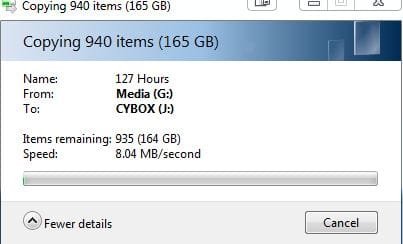
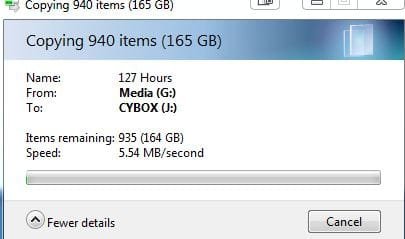
I have a hotway 4 bay usb 3.0/e-sata box that is currently in RAID and when connected to either e-sata or USB3.0 I am experiencing really slow speeds. On average 2.48MB/s.

To describe what happens, the speed shows anywhere from 70-200MB/s when I first try to copy things over (File types and sizes seem to be irrelevant as Ive tried different types and sizes), about 2 seconds in to the file transfer it then seems to freeze for a moment and then the speed slows drastically to above mentioned speeds.:mad:


Here are some details on my system,

windows 7 64bit home premium
gigabyte z68-ud5-b3
corsair force gt 120gb ssd

hotway 4 bay usb3.0/esata PRORAID box
with 3x WD caviar green and 1X Seagate barracuda all 1TB
(Currently in raid 10, but experience this in RAID 5 aswell, have not tried RAID 0/1)

Any help would be greatly appreciated!
 

My Computer My Computer

OS
Windows 7 home premium 64 bit
CPU
intel core i5 2500
Motherboard
Gigabyte z68-ud5-b3
Memory
16gb 1333mHz
Hard Drives
Corsair force GT 120gb SSD
2x 2tb WD caviar green
4x 1tb WD caviar green
PSU
750 WATT antec
Internet Speed
Telstra ULTIMATE 100mbps d / 1mbps u
Task Manager -> Resource Monitor (tile at bottom left)

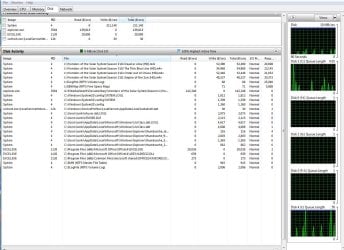
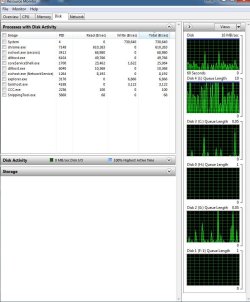
Once that's opened, click the DISK tab at the top. Slide the slider to have the lower portion be most of the screen. It is showing most active files and their rate of xfer AND the I/O time itself (rightmost column).

Fire up your xfer and go back and see what the numbers look like on this Resource Monitor screen. Screen shot and repost.
 

My Computer My Computer

Computer type
PC/Desktop
Computer Manufacturer/Model Number
Custom
OS
Windows 7
CPU
AMD Phenom II X2 (dual-core)
Motherboard
GA-MA785GM-US2H
Memory
4G
Graphics Card(s)
integrated ATI HD 4200
Sound Card
integrated
Monitor(s) Displays
Samsung 24"
Screen Resolution
1920x1080
Hard Drives
1 SSD - Samsung 840 - 500 GB - OS and DATA partitions
1 SSD - Intel 320 - 120 GB (used for backups) - Misc/BACKUP
1 SATA HD - WD, 500 GB - BACKUP
PSU
Ultra X4 500W
Case
Ultra X-blaster
Keyboard
Microsoft Digital Media Pro
Mouse
Logitech WIRED!
Internet Speed
15 Mbps FIOS
Hi JimLewandowski,

THanks for your reply, please find attached screenies of what I interpreted as what you asked of me.

Your help is greatly appreciated
 

Attachments

  • BEFORE.JPG
    BEFORE.JPG
    96.2 KB · Views: 29
  • rightafter.JPG
    rightafter.JPG
    94.4 KB · Views: 21
  • Afterthat.JPG
    Afterthat.JPG
    97.7 KB · Views: 12
  • CopyWindow.JPG
    CopyWindow.JPG
    20.4 KB · Views: 6
  • copywindow2.JPG
    copywindow2.JPG
    20.1 KB · Views: 6

My Computer My Computer

OS
Windows 7 home premium 64 bit
CPU
intel core i5 2500
Motherboard
Gigabyte z68-ud5-b3
Memory
16gb 1333mHz
Hard Drives
Corsair force GT 120gb SSD
2x 2tb WD caviar green
4x 1tb WD caviar green
PSU
750 WATT antec
Internet Speed
Telstra ULTIMATE 100mbps d / 1mbps u
You need the MIDDLE pane (DISK I/O) slid open (click arrow to expand?) as that's 99% of the important data. The top and bottom don't have much useful information for this task.
 

My Computer My Computer

Computer type
PC/Desktop
Computer Manufacturer/Model Number
Custom
OS
Windows 7
CPU
AMD Phenom II X2 (dual-core)
Motherboard
GA-MA785GM-US2H
Memory
4G
Graphics Card(s)
integrated ATI HD 4200
Sound Card
integrated
Monitor(s) Displays
Samsung 24"
Screen Resolution
1920x1080
Hard Drives
1 SSD - Samsung 840 - 500 GB - OS and DATA partitions
1 SSD - Intel 320 - 120 GB (used for backups) - Misc/BACKUP
1 SATA HD - WD, 500 GB - BACKUP
PSU
Ultra X4 500W
Case
Ultra X-blaster
Keyboard
Microsoft Digital Media Pro
Mouse
Logitech WIRED!
Internet Speed
15 Mbps FIOS
I think this is better,
Thanks agian jim, if you can help it would be great
 

Attachments

  • 30mbps.JPG
    30mbps.JPG
    225.1 KB · Views: 24
  • 16mbps.JPG
    16mbps.JPG
    213.9 KB · Views: 13
  • 10mbps.JPG
    10mbps.JPG
    172.3 KB · Views: 12
  • 5mbps.JPG
    5mbps.JPG
    175.6 KB · Views: 12

My Computer My Computer

OS
Windows 7 home premium 64 bit
CPU
intel core i5 2500
Motherboard
Gigabyte z68-ud5-b3
Memory
16gb 1333mHz
Hard Drives
Corsair force GT 120gb SSD
2x 2tb WD caviar green
4x 1tb WD caviar green
PSU
750 WATT antec
Internet Speed
Telstra ULTIMATE 100mbps d / 1mbps u
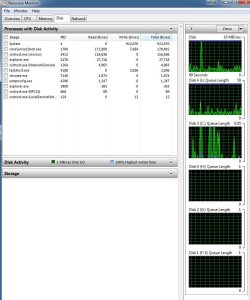
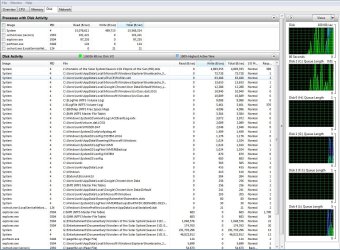
Screen shot #1 is good performance. 5 megaBYTES xferrd in .389 seconds or roughly 15 MB/sec throughput.

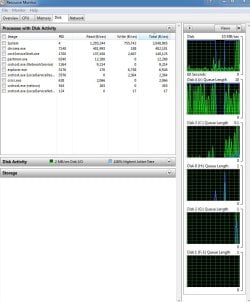
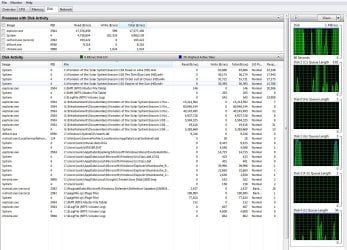
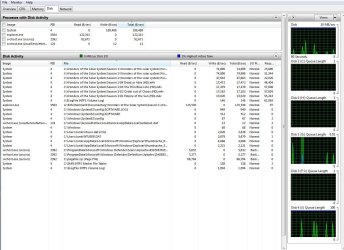
The 2nd-4th screens, something is seriously awry. Xferring only 80K/sec but it's taking 20 SECONDS?

I assume you're copying FROM drive G to drive J.

Also, the disk queue length for J is 5 (normal, 1st screen), but shoots up to 100 (2nd-4th). That implies to me the performannce slowdown IS within the disk subsystem (vs. CPU wait or some other Windows arena).

Can you give me more background on your RAID? I know what RAID is but am not up to snuff on each RAID subtype/configuration.

Explain what type of drives/configuration G and J are?
 

My Computer My Computer

Computer type
PC/Desktop
Computer Manufacturer/Model Number
Custom
OS
Windows 7
CPU
AMD Phenom II X2 (dual-core)
Motherboard
GA-MA785GM-US2H
Memory
4G
Graphics Card(s)
integrated ATI HD 4200
Sound Card
integrated
Monitor(s) Displays
Samsung 24"
Screen Resolution
1920x1080
Hard Drives
1 SSD - Samsung 840 - 500 GB - OS and DATA partitions
1 SSD - Intel 320 - 120 GB (used for backups) - Misc/BACKUP
1 SATA HD - WD, 500 GB - BACKUP
PSU
Ultra X4 500W
Case
Ultra X-blaster
Keyboard
Microsoft Digital Media Pro
Mouse
Logitech WIRED!
Internet Speed
15 Mbps FIOS
G:/ is just a single drive
J:/ is currently in raid 5, which is similar to raid 0 but with parity striped across all four disks.
So performance i think shouldn't be slowed at all..
 

My Computer My Computer

OS
Windows 7 home premium 64 bit
CPU
intel core i5 2500
Motherboard
Gigabyte z68-ud5-b3
Memory
16gb 1333mHz
Hard Drives
Corsair force GT 120gb SSD
2x 2tb WD caviar green
4x 1tb WD caviar green
PSU
750 WATT antec
Internet Speed
Telstra ULTIMATE 100mbps d / 1mbps u
OK. I'm guessing one or more of those RAID drives is whacked. Others here might be able to help you with SMART readings to see what shape each physical drive in that RAID is in.

There might be some HDtach (or HDtune)-like product that lets you drill down and see the performance of each PHYSICAL drive in that RAID.
 

My Computer My Computer

Computer type
PC/Desktop
Computer Manufacturer/Model Number
Custom
OS
Windows 7
CPU
AMD Phenom II X2 (dual-core)
Motherboard
GA-MA785GM-US2H
Memory
4G
Graphics Card(s)
integrated ATI HD 4200
Sound Card
integrated
Monitor(s) Displays
Samsung 24"
Screen Resolution
1920x1080
Hard Drives
1 SSD - Samsung 840 - 500 GB - OS and DATA partitions
1 SSD - Intel 320 - 120 GB (used for backups) - Misc/BACKUP
1 SATA HD - WD, 500 GB - BACKUP
PSU
Ultra X4 500W
Case
Ultra X-blaster
Keyboard
Microsoft Digital Media Pro
Mouse
Logitech WIRED!
Internet Speed
15 Mbps FIOS
Back
Top