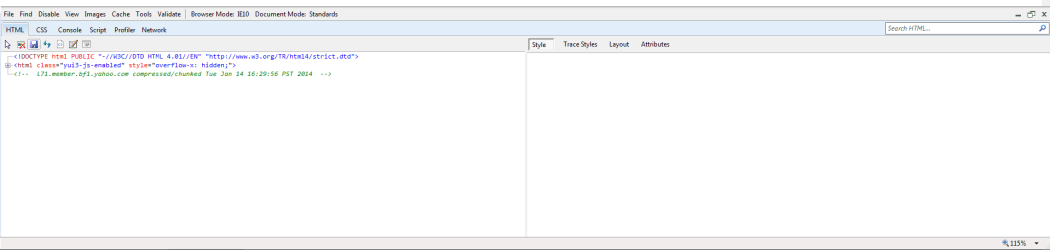
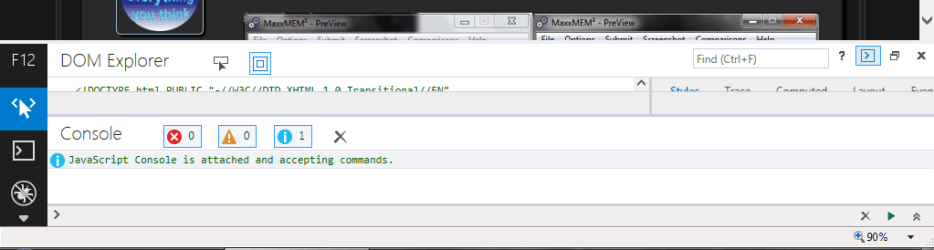
Below are examples of what I see when pressing F12 with IE11 on different machines. Both have the same set of updates. The first is on a Sandy Bridge with a i5-2550K, second an i7-3770K. Both are running w7 Ult 64bit.
EDIT: First image is from IE10, my mistake.
Why the difference?
Last edited:
My Computer
Computer type
PC/Desktop
Computer Manufacturer/Model Number
Home Built Desktop By DataTech
OS
Windows 7 Ultimate X64 SP1
CPU
Intel i5-2550K, Differing ~4.4-4.8GHz No built in GPU
Motherboard
ASUS P8Z68-V PRO/GEN3
Memory
16GB G.Skill Sniper 1866MHz @ 2133MHz 2x8GB
Graphics Card(s)
ASUS GTX650TIB-DC2OC-2GD5, (650TI Boost)
Sound Card
Onboard Realtek 5-1
Monitor(s) Displays
Samsung P2570HD
Screen Resolution
1920x1080
Hard Drives
Samsung 840 Pro 256GB SSD for OS, 500GB Seagate Constellation (Enterprise drive) for Data
PSU
Corsair HX650W
Case
Inwin Dragon Rider
Cooling
Hyper 212 EVO w/two Noctua fans, push-pull, @1300 RPM
Keyboard
E-Z Eyes, bright yellow keys with large characters
Mouse
steelseries SENSEI Laser Pro Gaming
Internet Speed
48-51Mbs Mbs down, 11 Mbs up Xfinity Cable
Antivirus
Norton Internet Security 2013
Browser
IE 10, Opera, Pale Moon if needed
Other Info
4 case fans, LG BluRay-RE, ASUS DVD-RW, Mr. Fusion power supply, 1.21 gigawatts.
A change of pace, how can I get IE11 to display a settings console like IE10? I constantly have to change the doc mode because the dark from skin won't display things properly.
My Computer
Computer type
PC/Desktop
Computer Manufacturer/Model Number
Home Built Desktop By DataTech
OS
Windows 7 Ultimate X64 SP1
CPU
Intel i5-2550K, Differing ~4.4-4.8GHz No built in GPU
Motherboard
ASUS P8Z68-V PRO/GEN3
Memory
16GB G.Skill Sniper 1866MHz @ 2133MHz 2x8GB
Graphics Card(s)
ASUS GTX650TIB-DC2OC-2GD5, (650TI Boost)
Sound Card
Onboard Realtek 5-1
Monitor(s) Displays
Samsung P2570HD
Screen Resolution
1920x1080
Hard Drives
Samsung 840 Pro 256GB SSD for OS, 500GB Seagate Constellation (Enterprise drive) for Data
PSU
Corsair HX650W
Case
Inwin Dragon Rider
Cooling
Hyper 212 EVO w/two Noctua fans, push-pull, @1300 RPM
Keyboard
E-Z Eyes, bright yellow keys with large characters
Mouse
steelseries SENSEI Laser Pro Gaming
Internet Speed
48-51Mbs Mbs down, 11 Mbs up Xfinity Cable
Antivirus
Norton Internet Security 2013
Browser
IE 10, Opera, Pale Moon if needed
Other Info
4 case fans, LG BluRay-RE, ASUS DVD-RW, Mr. Fusion power supply, 1.21 gigawatts.
Yea that's one of the reasons I have not returned to ie11,
The other reason no matter what change is made in developer tools in ie11 does not stick if f12 is closed ie11 reverts back to edge mode=Very annoying,
Cheers.
It's funny you mention a different doc mode on a darker theme,
If you notice in ie10 this site already uses a different doc mode than if you use sf classic theme which uses ie7 standards,
A dark theme uses ie9 doc mode/ very interesting change.
2nd ASUS X299 Apex/Intel i9-9940x with Custom water loop/7H-Prem-x64/Corsair 450D case/Ram Trident-z 3600C16 4x8gb / Samsung970Evo plus 500gb SSD/Dual ssd EZ swap evo/PSU EVGA SuperNova 1200w-P2 80+Platinum/GPU Titan Xp /8-ML-140 on push-pull on 2-280GTX rads
Your welcome,
I also would like to get a hold of the buzzard,
It just shows how ie11 is not ready for windows 7 and a Mouse,
I've found many issues with ie11 and mouse usage which are most mouse driver issues but I have a Microsoft mouse
Even if there was a way to change the interface,
Every time you close f12 the setting would not stick,
ie10 as long as you open items or links in the same tab or window the setting stuck/ huge step backwards,
Cheers.
My Computer
Computer type
PC/Desktop
Computer Manufacturer/Model Number
Custom assembled by me :}
OS
Win-7-Pro64bit 7-H-Prem-64bit
CPU
i7-5930K 2nd i9-9940x both water blocked VRM's too
2nd ASUS X299 Apex/Intel i9-9940x with Custom water loop/7H-Prem-x64/Corsair 450D case/Ram Trident-z 3600C16 4x8gb / Samsung970Evo plus 500gb SSD/Dual ssd EZ swap evo/PSU EVGA SuperNova 1200w-P2 80+Platinum/GPU Titan Xp /8-ML-140 on push-pull on 2-280GTX rads
I installed Pale Moon as suggested but there's no way to save selected cookies. I don't like logging it on each visit, and it's a Fire Fox browser, resource hog.
My Computer
Computer type
PC/Desktop
Computer Manufacturer/Model Number
Home Built Desktop By DataTech
OS
Windows 7 Ultimate X64 SP1
CPU
Intel i5-2550K, Differing ~4.4-4.8GHz No built in GPU
Motherboard
ASUS P8Z68-V PRO/GEN3
Memory
16GB G.Skill Sniper 1866MHz @ 2133MHz 2x8GB
Graphics Card(s)
ASUS GTX650TIB-DC2OC-2GD5, (650TI Boost)
Sound Card
Onboard Realtek 5-1
Monitor(s) Displays
Samsung P2570HD
Screen Resolution
1920x1080
Hard Drives
Samsung 840 Pro 256GB SSD for OS, 500GB Seagate Constellation (Enterprise drive) for Data
PSU
Corsair HX650W
Case
Inwin Dragon Rider
Cooling
Hyper 212 EVO w/two Noctua fans, push-pull, @1300 RPM
Keyboard
E-Z Eyes, bright yellow keys with large characters
Mouse
steelseries SENSEI Laser Pro Gaming
Internet Speed
48-51Mbs Mbs down, 11 Mbs up Xfinity Cable
Antivirus
Norton Internet Security 2013
Browser
IE 10, Opera, Pale Moon if needed
Other Info
4 case fans, LG BluRay-RE, ASUS DVD-RW, Mr. Fusion power supply, 1.21 gigawatts.
I installed Pale Moon as suggested but there's no way to save selected cookies. I don't like logging it on each visit, and it's a Fire Fox browser, resource hog.
I use Pale Moon for websites where cookies can be kept. I use IE for websites where I don't want anything kept. And I use Chrome for one website that works best with a Chrome extension. I generally have all 3 open at the same time.
For me, 3 tabs (each showing this thread) in IE11-64bit add up to 164M working set.
Those same 3 tabs in Pale Moon = 166M working set.
The private working set is twice as big for Pale Moon, but I have plenty of RAM - so I don't much care.
If I assigned 4GB to one VM and 3GB to another VM - that only leaves me with 1GB for the host (with a 1GB swap file). Under that load, Windows 7's memory management seems to let Pale Moon only have about 100M working set.
Would this mean that the more RAM that you have available, the more RAM Pale Moon (and some other apps) will reserve? Thus making them appear to hog RAM.