F7 Dual Boot?

SinisterKidxX

New member
Local time
4:51 PM
Messages
4
I have searched on how to do dual boot with 7/98, so please don't say search.

I'm looking to do a dual boot using 7 and 98 and have never attempted anything like this before. I'm semi savy with computers, I've built one from scrap and installed everything, but i'm not technical when it comes to the detail of software.

Now in class while starting up my laptop, Dell Inspirion 1545, i was hitting F7 and it came to this screen asking what version of windows I wanted to boot. Now it only had 7 since thats all thats on the comptuer but can i just load in a windows 98 disc and set it to where unless I hit f7 on start up itll just boot into 7?

Sorry if that's confusing. Help is appreciated I'm trying to play some good ol' 98 games which wont work on either xp or 7 and of course there are no patches to fix it :(
 

My Computer

OS
7 and hopefully 98

My Computer

Computer Manufacturer/Model Number
Apple Macbook Pro (April 2009)
OS
W7 Ult. x64 | OS X
CPU
Intel Mobile Core 2 Duo 2.93Ghz [T9800 Penryn]
Motherboard
NVIDIA nForce 730i Rev. B1 [Mac-F2268EC8 (U2E1)]
Memory
4096MB Samsung DDR3 Dual Channel [PC3-8500F 1066Mhz]
Graphics Card(s)
NVIDIA GeForce 9600M GT 512MB [G96M Rev. C1]
Sound Card
SB X-Fi Surround 5.1 USB | Onboard Realtek (Disabled)
Monitor(s) Displays
Acer x223wbd 22" | Apple Anti-Glare 17" (Disabled)
Screen Resolution
{Current} 1440x900 {Acer} 1680x1050 {Apple} 1920x1200
Hard Drives
{Internal}
Seagate Momentus 320GB 2.5" 7200RPM [ST9320421AS]

{Externals}
LaCie 320GB USB 2.0 HDD [301284UR]
LaCie 750GB USB 2.0 FW400 eSATA HDD [301314U]
LaCie 1TB USB 2.0 HDD [301304UR]
PSU
Magsafe
Case
Aluminum/Unibody (MBP52)
Cooling
2 x 6000 RPM Fans
Keyboard
Logitech G-15v2 [PN 920-000379]
Mouse
Logitech G-9 [PN 910-000338]
Internet Speed
12Mbps/2.5Mbps w/ 24Mbps Speed Boost [Comcast]
Other Info
Logitech X-540 Speakers [PN 970223-0122]
Sennheiser PC-151 Headset
how am i supposed to do this if i dont have a windows 7 cd or key? the laptop came with it all installed like most computers bought at the store.
 

My Computer

OS
7 and hopefully 98
Instead of dual booting you may want to run Windows 98 as a virtual machine inside of Windows 7. Your PC specs will support 98 running as a virtual machine. You can do this by using programs such as VMware Player or VirtualBox. I recommend using VMware player if you have the windows 98 cd because it much easier to set up (but that's only my opinion:D).
 
Last edited:

My Computer

Computer Manufacturer/Model Number
Self-built on 31/1/11
OS
Windows 7 Ultimate 64 bit
CPU
Intel i5 2400 @ 3.80 GHz
Motherboard
Ashrock P67 Extreme 4
Memory
Mushkin Silverline 996768 4GB
Graphics Card(s)
MSI GTX 460 760MB Cyclone Overclocked
Sound Card
Integrated
Monitor(s) Displays
Asus VH202T 20" Widescreen
Screen Resolution
1600x900
Hard Drives
SSD: OCZ Vertex 2 60GB
HDD: Hitachi Deskstar 7K1000.C 500GB
PSU
Silverstone Strider 500W
Case
Zalman Z9 Plus
Cooling
Cooler Master Hyper 212 Plus
Keyboard
Logitech Wireless Keyboard MK520
Mouse
Logitech M310
Internet Speed
3 Mbps
Other Info
UEFI: Ashrock P67/
Network Card :TP-Link WN350GD/
WEI: 7.4/
ODD: Lite-On IHAS324
You do in fact have a Product Key on the COA sticker on your machine. That key will allow you to clean reinstall Win7 from any installer of your version, or the Recovery disks although they will have the preinstalled bloatware - but I would make them anyway for this purpose.

When you come across a clean-copy of your version Win7, it is a valuable find. A clean reinstall is a better install now than new computer, since new computers come with the bloatware that always compromises performance.
 
Last edited:
Instead of dual booting you may want to run Windows 98 as a virtual machine inside of Windows 7. Your PC specs will support 98 running as a virtual machine. You can do this by using programs such as VMware Player or VirtualBox. I recommend using VMware player if you have the windows 98 cd because it much easier to set up (but that's only my opinion:D).

can anybody confirm this?? This sounds like it would be much much easier than dual booting.
 

My Computer

OS
7 and hopefully 98
I can confirm it but i don't think you trust me.:D:p

I successfully have installed windows 98 on VMware player.

Details

These are instructions for setting up windows 98 which i have created for VMware player.

Download and install it. You can download Vmware player from http://www.vmware.com/products/player/. It is free but you have to register (All they need is an email and name).

Instructions

1. Open VMware player and click "Create a new virtual machine".

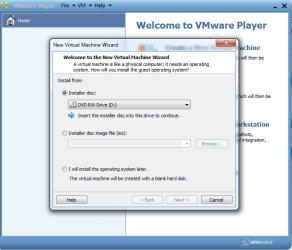
2. Install from disk (insert your Windows 98 disk in to the CD drive).

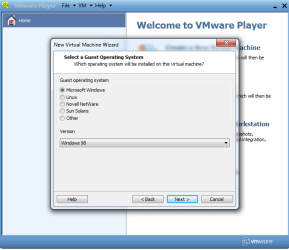
3. Select 'Microsoft Windows' and then 'Windows 98'.

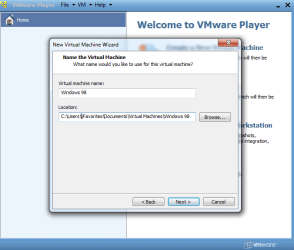
4. Name your machine and select where you want to install it.

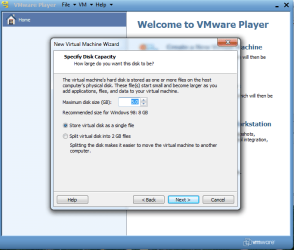
5. Select how big you want the disk size for Windows 98. If you going to use it a lot you want to have a few gigabites.

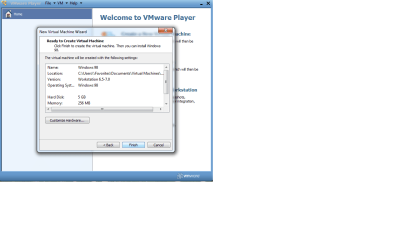
6. Click 'finish' if your happy with the hardware settings.

7. The start your 98 from the VMware player menu . Importent: keep the cd in because now vmware will install Windows 98. Once install has finished you can eject the cd.

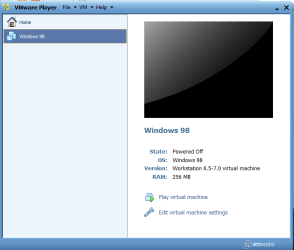
8. You now have Windows 98 as a virtual machine running inside of windows. Vmware will ask you if you want to download VMware tools for windows 98 select yes (it enables advanced features of windows 98). Once the download has finished select to to boot from CD ROM. It will ask if if you want to enable a feature to use if big hard drives (over 512mb) select yes. Windows 98 will restart, when it has restarted select to boot from CD ROM again. The windows 98 install screen will now pop up. This will guide you through setting up windows 98. This took me about 40 minutes. Once windows 98 has been installed you may notice that windows 98 cant go full screen and certain drivers wont work. This can easily be fixed by clicking VM (on the top of the screen) and then clicking install Vmware tools. This should enable drivers and full screen once you have restarted windows 98. If it doesn't change the screen resolution you can go to http://www.helpwithpcs.com/tipsandtricks/change_resolution_win_98.htm.

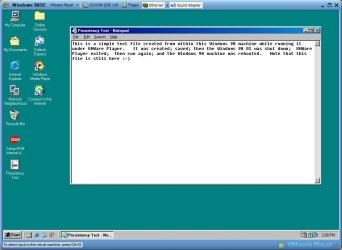
Windows 98 will run in a window inside of windows 7 like any other application. When ever you want to start Windows 98, launch VMware player and select your Windows 98 Virtual machine from the menu.
 

Attachments

  • step 1.png
    step 1.png
    14.7 KB · Views: 5
  • step 7.png
    step 7.png
    15.1 KB · Views: 5
  • step 6.png
    step 6.png
    23.3 KB · Views: 7
  • step 5.png
    step 5.png
    21.8 KB · Views: 6
  • step 4.png
    step 4.png
    30.1 KB · Views: 6
  • step 3.png
    step 3.png
    17.3 KB · Views: 5
  • step 2.png
    step 2.png
    20.4 KB · Views: 5
  • W98VMP.jpg
    W98VMP.jpg
    93.5 KB · Views: 9
Last edited:

My Computer

Computer Manufacturer/Model Number
Self-built on 31/1/11
OS
Windows 7 Ultimate 64 bit
CPU
Intel i5 2400 @ 3.80 GHz
Motherboard
Ashrock P67 Extreme 4
Memory
Mushkin Silverline 996768 4GB
Graphics Card(s)
MSI GTX 460 760MB Cyclone Overclocked
Sound Card
Integrated
Monitor(s) Displays
Asus VH202T 20" Widescreen
Screen Resolution
1600x900
Hard Drives
SSD: OCZ Vertex 2 60GB
HDD: Hitachi Deskstar 7K1000.C 500GB
PSU
Silverstone Strider 500W
Case
Zalman Z9 Plus
Cooling
Cooler Master Hyper 212 Plus
Keyboard
Logitech Wireless Keyboard MK520
Mouse
Logitech M310
Internet Speed
3 Mbps
Other Info
UEFI: Ashrock P67/
Network Card :TP-Link WN350GD/
WEI: 7.4/
ODD: Lite-On IHAS324
I have waaaaaaaaaayyyyyy to much time on my hands :D

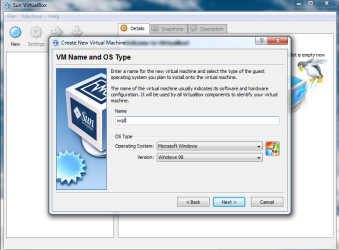
This is how to set up Windows 98 as a virtual machine on VirtualBox.

I don't have windows 98 but i do know how to set it up on Virtual box.

But I recommend using VMware player before you try this.

Download and install virtual box. VirtualBox is free an you can download it from Downloads - VirtualBox.

Instructions
Insert Windows 98 cd into cd drive.
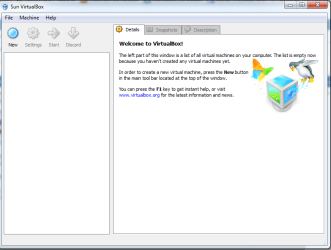
1. Open VirtualBox and click 'new'.
2. Click next and then select Microsoft Windows and then Windows 98. You can name it what ever you want.
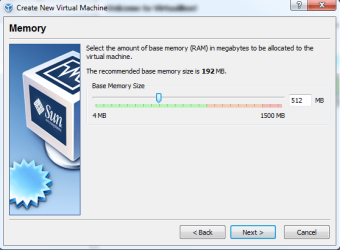
3. Select how much ram you want Windows 98 to use. I would select 512 megabites or more if you are going to play games.
4. Select boot hard disk and then select create a hard disk.
5. Press next and select dynamically expanding.
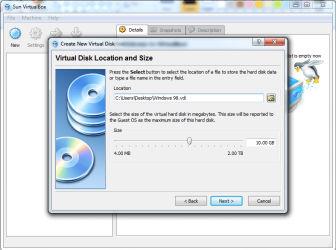
6. Choose where you want to store Windows 98 and how big The disk space will be.
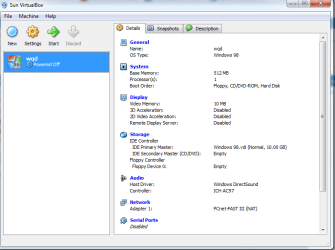
7.Click finish and then click finish again.
8. Now double click your Windows 98 machine.
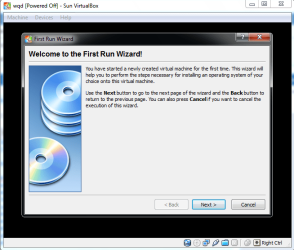
9. A new window should pop up called "First Run Wizard" just click next.
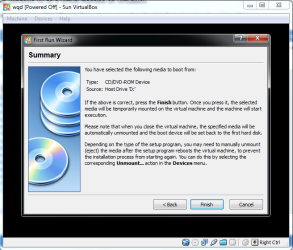
10. Select 'CD/DVD-ROM Device'.
11. If your happy with the settings just click 'finish'.
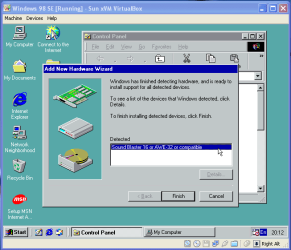
12. Windows 98 will now install on Virtual Box.
13. To launch Windows 98 fist launch Virtual box and then double click your Windows 98 Virtual Machine.
 

Attachments

  • step 9.png
    step 9.png
    38 KB · Views: 2
  • step 8.png
    step 8.png
    31.6 KB · Views: 1
  • step 7.png
    step 7.png
    23.7 KB · Views: 0
  • step 6.png
    step 6.png
    49.7 KB · Views: 3
  • step 5.png
    step 5.png
    28.5 KB · Views: 1
  • step 4.png
    step 4.png
    45.3 KB · Views: 3
  • step 3.png
    step 3.png
    22.7 KB · Views: 1
  • step 2.png
    step 2.png
    49.4 KB · Views: 1
  • step 1.png
    step 1.png
    25 KB · Views: 1
  • win98soundscreenshot06me3.png
    win98soundscreenshot06me3.png
    15.7 KB · Views: 2
Last edited:

My Computer

Computer Manufacturer/Model Number
Self-built on 31/1/11
OS
Windows 7 Ultimate 64 bit
CPU
Intel i5 2400 @ 3.80 GHz
Motherboard
Ashrock P67 Extreme 4
Memory
Mushkin Silverline 996768 4GB
Graphics Card(s)
MSI GTX 460 760MB Cyclone Overclocked
Sound Card
Integrated
Monitor(s) Displays
Asus VH202T 20" Widescreen
Screen Resolution
1600x900
Hard Drives
SSD: OCZ Vertex 2 60GB
HDD: Hitachi Deskstar 7K1000.C 500GB
PSU
Silverstone Strider 500W
Case
Zalman Z9 Plus
Cooling
Cooler Master Hyper 212 Plus
Keyboard
Logitech Wireless Keyboard MK520
Mouse
Logitech M310
Internet Speed
3 Mbps
Other Info
UEFI: Ashrock P67/
Network Card :TP-Link WN350GD/
WEI: 7.4/
ODD: Lite-On IHAS324
Not that I don't trust you... just want somebody else to back it up. But looks like you know what your talking about so i will try and do that all later today. hopefully it works! thanks!
 

My Computer

OS
7 and hopefully 98
how am i supposed to do this if i dont have a windows 7 cd or key? the laptop came with it all installed like most computers bought at the store.

There should be an icon on your desktop to "Make Recovery Disks" and you should do that.

Since you have a vaild win7 key, nothing stops you from downloading a copy and setting it up on a flash drive... Technically it's semi-illegal, but in reality it's the only way most people get a "clean boot" version and you did pay for Win7 when you bought the computer.
 

My Computer

Computer Manufacturer/Model Number
Homebrew
OS
XP Pro SP3 X86 / Win7 Pro X86
CPU
Amd 64 x2 4200 (2.4ghz)
Motherboard
Asus M2N-MX SE Plus
Memory
Kingston DDR2 800 2gb
Graphics Card(s)
Nvidia GF-8400
Sound Card
Realtek on Motherboard
Monitor(s) Displays
Acer x-193bw
Screen Resolution
1440 x 900
Hard Drives
Western Digital 500g
PSU
350watt In-Win
Case
In-Win
Cooling
Air
Keyboard
yes
Mouse
yes
Internet Speed
5mpbs
Other Info
Also ASRock ION 330 as HTPC (on XP).
Acer Aspire as GP netbook (on XP).
Back
Top