
facebook not responding

carol w

New member
Member
Local time
7:01 PM
Messages
47
Hi Everyone,
When I click on a friend's name I get a message that says facebook.com is not responding. By the task bar I see this and it says recover webpage and then it works after a minute. I deleted my cookies and tried to reset my browser setting. After that I had to "go back" to another time as I couldn't get like file view etc.....nothing to click on to bring them back. Do you have any idea what is going on? The rest of my computer is working good. Thank you Carol
 

My Computer

OS
windows 7 home 64 bit
Hello Carol,

I may not know a solution, but we can do a couple troubleshooting steps to see if it helps any.

Reset Internet Explorer (:info:You are able to select an option to save browsing history): How to reset Internet Explorer settings
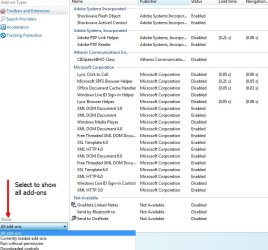
Go to Options, and click Manage Add-ons. Use the snipping tool to take a screenshot of all the add-ons and post here. This will allow me to recommend whether or not some add-ons are causing any of the trouble.
How to upload pictures: http://www.sevenforums.com/tutorials/9733-screenshots-files-upload-post-seven-forums.html
Example of what mine looks like:
Manage Add-ons.jpg

Make sure you have all windows updates installed. Some of them are geared towards IE and making it better. After all of this, restart the computer and try again. If you are still having trouble, I'll look at those add-ons and your security programs (which can at times cause conflicts). Speaking of which, would you please tell me which Antivirus program you are using?

Make sure tracking protection lists are disabled. This will ensure that it is not the cause of your problems. You may have to restart IE for this to take effect. This is located in the same place as your add-ons, but it will be listed under Tracking Protection.
 

My Computer

Computer type
PC/Desktop
Computer Manufacturer/Model Number
Custom Asus Build
OS
Microsoft Windows 8.1 Pro 64-bit
CPU
Intel(R) Core(TM) i3-4130 CPU @ 3.40GHz
Motherboard
B85M-E
Memory
8.00 GB
Graphics Card(s)
None
Sound Card
Realtek High Definition Audio
Monitor(s) Displays
Asus 23.6" Monitor
Screen Resolution
1920 x 1080 x 32 bits (4294967296 colors) @ 60 Hz
Hard Drives
INTEL SSDSC2BW180A4
Samsung SSD 840 PRO Series
PSU
Seasonic S12II-380Bronze
Case
Lian Li
Cooling
Fan, Passive
Keyboard
Logitech K120
Mouse
Microsoft Touch Mouse
Internet Speed
4ms Ping, 19.0 Mbps Download, 19.0 Mbps Upload
Antivirus
Eset Endpoint
Browser
Internet Explorer, Chrome
Hi Dusty, Wow I never thought about a add -on. The only thing I did in the last few weeks was to add malarebytes anti- malware.
I uninstalled it and I can't believe it. My whole computer is so much faster and facebook is working good. I don't understand it but it is good. I do have avast antivirus. Thanks for helping me. yeah!!!!!Carol
 

My Computer

OS
windows 7 home 64 bit
This will have to be the first time malwarebytes has had this problem, to my knowledge. Did you buy it, or use the trial version? It could be a conflict with Avast, though I wouldn't think so.

If you install the Free version of Malwarebytes, it should provide a very good manual scan that should only take resources when you are using the scan. However, the paid-for version is supposed to be very good as well, though understandably, it will take some resources. If your computer is slower, I would opt for the free version.

Glad you found out what was causing the trouble!
 

My Computer

Computer type
PC/Desktop
Computer Manufacturer/Model Number
Custom Asus Build
OS
Microsoft Windows 8.1 Pro 64-bit
CPU
Intel(R) Core(TM) i3-4130 CPU @ 3.40GHz
Motherboard
B85M-E
Memory
8.00 GB
Graphics Card(s)
None
Sound Card
Realtek High Definition Audio
Monitor(s) Displays
Asus 23.6" Monitor
Screen Resolution
1920 x 1080 x 32 bits (4294967296 colors) @ 60 Hz
Hard Drives
INTEL SSDSC2BW180A4
Samsung SSD 840 PRO Series
PSU
Seasonic S12II-380Bronze
Case
Lian Li
Cooling
Fan, Passive
Keyboard
Logitech K120
Mouse
Microsoft Touch Mouse
Internet Speed
4ms Ping, 19.0 Mbps Download, 19.0 Mbps Upload
Antivirus
Eset Endpoint
Browser
Internet Explorer, Chrome
Dusty,

Carol may have tried the 14day free trial of the Pro version, that could/would cause problems with its Realtime Proactive Protection running with Avast.
Malwarebytes : Start your trial of Malwarebytes Anti-Malware PRO

For proper removal from XP, Vista, or 7 see this link:
uninstall Malwarebytes' anti-malware tool - Malwarebytes Forum

Presently, Mbam is doing some site maintenance, and I am seeing a mobil version of their site while using FireFox14.0.1, IE8 seems to render okay.
08-04-2012 - 9:05pm edt - 01:05UTC
 

My Computer

Computer type
PC/Desktop
Computer Manufacturer/Model Number
Gateway DX4831-01e (Mid-Tower Desktop)
OS
Originally Win 7 Hm Prem x64 Ver 6.1.7600 Build 7601-SP1 | Upgraded to Windows 10 December 14, 2019
CPU
Intel i3 530 2.93GHz, 2933MHz 2 Cores 4 Logical Processors
Motherboard
Gateway H57M01 133 megahertz
Memory
6GB of 1,333MHz DDR3 SDRAM
Graphics Card(s)
32MB Intel Graphics Media Accelerator HD IGChip
Sound Card
Realtek High Definition Audio
Monitor(s) Displays
Gateway HX2000 20inch TFT active matrix TN
Screen Resolution
1600 x 900 x 59 hertz
Hard Drives
WDC WD10EADS-00M2B0 [HDD] (1000.20 GB) -- drive 0,
HL-DT-ST DVDRAM GH41N [CD-ROM dr]
Four card readers, and Four USB 2.0
PSU
300watts.
Case
Mid-Tower Desktop
Cooling
Stock from Gateway
Keyboard
Natural Ergonomic Keyboard 4000, see Other Info
Mouse
Orig. Gateway wore out now using Insignia USB wired optical
Internet Speed
Vz FIOS 10ms png 57.64Mbps down 65.53Mbps up Speedtest.org
Antivirus
Zamana Anti-logger with Anti-malware, MSE, Windows Firewall,
Browser
IE11.0.9600.19399-Upd ver11.0.135, Firefox 68.0.1 x64
Other Info
System Specs by Belarc.

BIOS: American Megatrends Inc. P01-A0 11/17/2009

Replaced the MS 'Natural' Standard PS/2 Enhanced 101-102 Keyboard with a new Natural Ergonomic Keyboard 4000 on August 1st 2014.

Canon Pixma MG3222 Printer.

Updated to IE11 on 12102015 | Fios Quantum Router g1100

Additional AV: SpywareBlaster, manual Mbam, SAS
Dusty,

Carol may have tried the 14day free trial of the Pro version, that could/would cause problems with its Realtime Proactive Protection running with Avast.
Malwarebytes : Start your trial of Malwarebytes Anti-Malware PRO
Yea, I was thinking the same thing. But I still am shocked that it would cause that particular problem.
It may be that the computer in question just doesn't have that much memory to spare. It should work flawlessly with antiviruses, even the real time protection feature. Although, as you say, there could always still be some kind of conflict.
 

My Computer

Computer type
PC/Desktop
Computer Manufacturer/Model Number
Custom Asus Build
OS
Microsoft Windows 8.1 Pro 64-bit
CPU
Intel(R) Core(TM) i3-4130 CPU @ 3.40GHz
Motherboard
B85M-E
Memory
8.00 GB
Graphics Card(s)
None
Sound Card
Realtek High Definition Audio
Monitor(s) Displays
Asus 23.6" Monitor
Screen Resolution
1920 x 1080 x 32 bits (4294967296 colors) @ 60 Hz
Hard Drives
INTEL SSDSC2BW180A4
Samsung SSD 840 PRO Series
PSU
Seasonic S12II-380Bronze
Case
Lian Li
Cooling
Fan, Passive
Keyboard
Logitech K120
Mouse
Microsoft Touch Mouse
Internet Speed
4ms Ping, 19.0 Mbps Download, 19.0 Mbps Upload
Antivirus
Eset Endpoint
Browser
Internet Explorer, Chrome
I have not only the full version of Malwarebytes, but Superantispyware running real time with Avast with no issues. My PC is more then decent, but no monster like some of yours ;)

A Guy
 

My Computer

Computer type
PC/Desktop
OS
Windows 10 Home x64
CPU
INTEL Core i5-750 Quad-Core 3.37GHz
Motherboard
ASUS P7P55D
Memory
HyperX Fury Black Series 8GB (2 x 4GB) 1866Mhz
Graphics Card(s)
EVGA GeForce GTX 750 Superclocked 1GB 128-Bit GDDR5
Monitor(s) Displays
LG 32MA68HY 32" IPS
Screen Resolution
1920 x 1080
Hard Drives
Samsung 840 Evo 120GB, SEAGATE 500GB Barracuda® 7200.12, SATA 3 Gb/s, 7200 RPM, 16MB cache
PSU
ANTEC TruePower New TP-550, 80 PLUS, 550W
Case
ANTEC Three Hundred Illusion
Cooling
COOLER MASTER Hyper 212 Plus, 4 x 120mm 1 x 140mm Noctua's
Internet Speed
85 + Mbps
Antivirus
Avast
Browser
Vivaldi
no it isn't fixed....I was wrong......now I have to install malwarebytes again.......should I run
Download and run mbam-clean.exe from here first......dusty all that for me to do is to much for me as I don't understand it all......thanks everyone......is there a easier way ? thanks Carol
 

My Computer

OS
windows 7 home 64 bit
Hi Carol good morning!
I am Anak, and I hope I can help until Dusty returns.


Step 1:

First of all try to relax, and stay calm, take a few deep breaths. No problem is that large that it can not be corrected if done in a step by step fashion.

Step 2:
Can you tell us the make, and model of your Computer? It will help us in trying to understand the nature of your problem.

We will also need to know what browser you are running. Dusty gave you the instructions for Internet Explorer, but I do not see where you confirmed that.

Don't worry about filling in your System Specs, the make, and model will be sufficient for now.

Step 3:
Now, can you describe why you feel your machine is not running right, and you have to re-install Malwarebytes (mbam)?

I would like to ask you if you remember about when your problems with Facebook started?

Where you sure you were logged-in?

Does your friend allow access to his/hers page?

Do you run regular anti-malware scans? Any results good or bad?


   Note
Read over the next steps, but do not do them until you feel comfortable, please ask any question of any procedure if the steps are not clear to you.
These steps will help you to run the Removal Tool.

It may help if you copy/paste this post in order to help you.

Go up to Thread Tools at the top of your first post, click on it to open, then click on Printable Version, and you will be able to print the entire thread including this post with steps.

Step 1:

If it will make you feel better, you shouldn't necessarily have to re-install mbam.

It will help if you go back to the page/post I offered here: uninstall Malwarebytes' anti-malware tool - Malwarebytes Forum, and copy/paste Firefox's instructions for Windows Vista, and 7 into your word processor so you can print them out, and go over them as you run the removal tool.

Step 2:
It will help if you download the removal tool to your Desktop first:Here

Step 3:
You have already done the first three steps, correct? But you probably have not restarted your machine, if not do that now.

Step 4:
Run the removal tool. If there is a warning note about SHGetValue ignore it, and let the tool finish running.
When the tool is finished it will ask to restart your machine, allow it to do so.


Finally:
I know this is a lot, but relax, take a deep breath, and go step by step.

We need answers in steps two, and three.
One through four (The Note) concern the removal tool, and can be done after we receive more information, and you are comfortable in running it.

Reference: FaceBook Help Center | Something's not working
 

My Computer

Computer type
PC/Desktop
Computer Manufacturer/Model Number
Gateway DX4831-01e (Mid-Tower Desktop)
OS
Originally Win 7 Hm Prem x64 Ver 6.1.7600 Build 7601-SP1 | Upgraded to Windows 10 December 14, 2019
CPU
Intel i3 530 2.93GHz, 2933MHz 2 Cores 4 Logical Processors
Motherboard
Gateway H57M01 133 megahertz
Memory
6GB of 1,333MHz DDR3 SDRAM
Graphics Card(s)
32MB Intel Graphics Media Accelerator HD IGChip
Sound Card
Realtek High Definition Audio
Monitor(s) Displays
Gateway HX2000 20inch TFT active matrix TN
Screen Resolution
1600 x 900 x 59 hertz
Hard Drives
WDC WD10EADS-00M2B0 [HDD] (1000.20 GB) -- drive 0,
HL-DT-ST DVDRAM GH41N [CD-ROM dr]
Four card readers, and Four USB 2.0
PSU
300watts.
Case
Mid-Tower Desktop
Cooling
Stock from Gateway
Keyboard
Natural Ergonomic Keyboard 4000, see Other Info
Mouse
Orig. Gateway wore out now using Insignia USB wired optical
Internet Speed
Vz FIOS 10ms png 57.64Mbps down 65.53Mbps up Speedtest.org
Antivirus
Zamana Anti-logger with Anti-malware, MSE, Windows Firewall,
Browser
IE11.0.9600.19399-Upd ver11.0.135, Firefox 68.0.1 x64
Other Info
System Specs by Belarc.

BIOS: American Megatrends Inc. P01-A0 11/17/2009

Replaced the MS 'Natural' Standard PS/2 Enhanced 101-102 Keyboard with a new Natural Ergonomic Keyboard 4000 on August 1st 2014.

Canon Pixma MG3222 Printer.

Updated to IE11 on 12102015 | Fios Quantum Router g1100

Additional AV: SpywareBlaster, manual Mbam, SAS
Hi Anak, I love that 1st step you gave me. Now I am relaxed and taking my time.
I have internet exployer 9 and my computer is a windows 7 home premium,Acer aspire X3400,AMD athlon(tm)IIX4
645 proc 3.10ghxessor,4GB(3.75GB usable) 64 bit,service pak 1.This is step 2.yeah!!!! carol now I will see what step 3 is. Easier one step at a time. thanks carol
 

My Computer

OS
windows 7 home 64 bit
also it started after I allowed a friend to check her facebook and there were some sex things there so this was the only time I allowed her to use my computer.My friend used her own facebook but her facebook kept adding names automaticaly so I got her to delete her facebook on my computer.
when I click on a friends name sometimes I get,Facebook.com is not responding. Just above the task bar I then click on Recover Webpage and then in a couple of seconds it works. Kindof freezes.
No I didn't run anti-malware scans as I thought it did it itself? Yes I was logged in and my friend allows access to their pages. Now I will try what you said. thanks carol
 

My Computer

OS
windows 7 home 64 bit
Hello Carol,

Please let me know the previous steps that you don't understand. I can make it as easy as you would like, just let me know.

Some new steps to take. Do you have an antivirus? If so, please use it to do a full scan to check for malware. Malwarebytes is great for this as an additional scanner, and you can use the free version (not the trial version).

Also, please list your processes that you have running. go into task manager. Type Task Manager into your start menu search bar and click the text that displays at the top. Next, click on the Processes tab. Then click Show processes from all users at the bottom. I will need to see all of the list. You can expand the window and take a snapshot using this: http://www.sevenforums.com/tutorials/9733-screenshots-files-upload-post-seven-forums.html - upload it here.
That link has a link to a tool called snipping tool that you can use that may work best for you. Take this all slowly, and if it doesn't work, try again.
 

My Computer

Computer type
PC/Desktop
Computer Manufacturer/Model Number
Custom Asus Build
OS
Microsoft Windows 8.1 Pro 64-bit
CPU
Intel(R) Core(TM) i3-4130 CPU @ 3.40GHz
Motherboard
B85M-E
Memory
8.00 GB
Graphics Card(s)
None
Sound Card
Realtek High Definition Audio
Monitor(s) Displays
Asus 23.6" Monitor
Screen Resolution
1920 x 1080 x 32 bits (4294967296 colors) @ 60 Hz
Hard Drives
INTEL SSDSC2BW180A4
Samsung SSD 840 PRO Series
PSU
Seasonic S12II-380Bronze
Case
Lian Li
Cooling
Fan, Passive
Keyboard
Logitech K120
Mouse
Microsoft Touch Mouse
Internet Speed
4ms Ping, 19.0 Mbps Download, 19.0 Mbps Upload
Antivirus
Eset Endpoint
Browser
Internet Explorer, Chrome
Hi Carol, Dusty,

Carol,
That is great that you are relaxed now.

Some anti-malware scans can be set to run automatically, you would have to check for that, but for the present time it would be helpful if you make sure they are set to run manually.

Not to sound harsh, but having your friend use your machine should be a learning experience.


Dusty,
From what Carol has explained, her machine specs listed here: Acer Support: Specifications, show that it could have Norton, and McAfee installed. It is listed in the Software section.

Do you think she should check to see if they remain on her machine, and if so remove them?
She is using Avast, and we will have to know what version/suite she is running.

From her experience with her friend using her machine I would also suggest running some online scans, such as Microsoft Safety Scanner - Antivirus | Remove Spyware, Malware, Viruses Free for starters.
It is a large download (70.6MB), and I do not know what Carol has for ISP speed.
 

My Computer

Computer type
PC/Desktop
Computer Manufacturer/Model Number
Gateway DX4831-01e (Mid-Tower Desktop)
OS
Originally Win 7 Hm Prem x64 Ver 6.1.7600 Build 7601-SP1 | Upgraded to Windows 10 December 14, 2019
CPU
Intel i3 530 2.93GHz, 2933MHz 2 Cores 4 Logical Processors
Motherboard
Gateway H57M01 133 megahertz
Memory
6GB of 1,333MHz DDR3 SDRAM
Graphics Card(s)
32MB Intel Graphics Media Accelerator HD IGChip
Sound Card
Realtek High Definition Audio
Monitor(s) Displays
Gateway HX2000 20inch TFT active matrix TN
Screen Resolution
1600 x 900 x 59 hertz
Hard Drives
WDC WD10EADS-00M2B0 [HDD] (1000.20 GB) -- drive 0,
HL-DT-ST DVDRAM GH41N [CD-ROM dr]
Four card readers, and Four USB 2.0
PSU
300watts.
Case
Mid-Tower Desktop
Cooling
Stock from Gateway
Keyboard
Natural Ergonomic Keyboard 4000, see Other Info
Mouse
Orig. Gateway wore out now using Insignia USB wired optical
Internet Speed
Vz FIOS 10ms png 57.64Mbps down 65.53Mbps up Speedtest.org
Antivirus
Zamana Anti-logger with Anti-malware, MSE, Windows Firewall,
Browser
IE11.0.9600.19399-Upd ver11.0.135, Firefox 68.0.1 x64
Other Info
System Specs by Belarc.

BIOS: American Megatrends Inc. P01-A0 11/17/2009

Replaced the MS 'Natural' Standard PS/2 Enhanced 101-102 Keyboard with a new Natural Ergonomic Keyboard 4000 on August 1st 2014.

Canon Pixma MG3222 Printer.

Updated to IE11 on 12102015 | Fios Quantum Router g1100

Additional AV: SpywareBlaster, manual Mbam, SAS
I downloaded malwarebytes again and ran a quick scan and my computer is good. Wonder if it is possible to get a new facebook if that will solve the problem?carol
 

My Computer

OS
windows 7 home 64 bit
No, probably not^

Carol, as Anak said, go into your control panel>uninstall programs and let us know what you have installed. Some of it may slow down your computer, and we can make suggestions on what to remove that would benefit you. The best way to show us is to upload a screenshot, perhaps with snipping tool: http://www.sevenforums.com/tutorials/9733-screenshots-files-upload-post-seven-forums.html

If you have more than a single antivirus program installed, they can conflict and cause slowdowns. Some antivirus companies offer uninstaller tools for their antivirus product, others are easily uninstalled through control panel, and still others do not come off so easily. It may be best to use a special removal program, such as the free Revo, but someone may have to show you how. After I see that list, I will let you know what next steps you might take.

Additionally, let me know what antivirus program you are using. Make sure it is updated, make sure windows itself is updated, and run a full scan with your antivirus to make sure windows is malware-free. A good additional scanner is the free malwarebytes that works well with antivirus programs, found here: http://download.cnet.com/Malwarebyt...4572.html?part=dl-10804572&subj=dl&tag=button - if interested
 

My Computer

Computer type
PC/Desktop
Computer Manufacturer/Model Number
Custom Asus Build
OS
Microsoft Windows 8.1 Pro 64-bit
CPU
Intel(R) Core(TM) i3-4130 CPU @ 3.40GHz
Motherboard
B85M-E
Memory
8.00 GB
Graphics Card(s)
None
Sound Card
Realtek High Definition Audio
Monitor(s) Displays
Asus 23.6" Monitor
Screen Resolution
1920 x 1080 x 32 bits (4294967296 colors) @ 60 Hz
Hard Drives
INTEL SSDSC2BW180A4
Samsung SSD 840 PRO Series
PSU
Seasonic S12II-380Bronze
Case
Lian Li
Cooling
Fan, Passive
Keyboard
Logitech K120
Mouse
Microsoft Touch Mouse
Internet Speed
4ms Ping, 19.0 Mbps Download, 19.0 Mbps Upload
Antivirus
Eset Endpoint
Browser
Internet Explorer, Chrome
Dusty,

I've been checking around, and found that Facebook (Fb) is very dependent on Java, and Java script, and doesn't work very well with IE.

At the least Carol should check to make sure she follows your original advice on Resetting Internet Explorer in post #2.

Then checking that any Java that is installed is updated, and secure.
This page should do it automatically all Carol would have to do is click on this link to see if her Java is okay: https://www.java.com/en/download/testjava.jsp

This one takes a little longer to verify the Installation: https://www.java.com/en/download/installed.jsp

I'm going to be gone for a while, how long I don't know. There is a strong cold front coming in, and I have to go an' "batten down the hatches", could have storms till midnight.

I'm near Harrisburg: State college Radar
 

My Computer

Computer type
PC/Desktop
Computer Manufacturer/Model Number
Gateway DX4831-01e (Mid-Tower Desktop)
OS
Originally Win 7 Hm Prem x64 Ver 6.1.7600 Build 7601-SP1 | Upgraded to Windows 10 December 14, 2019
CPU
Intel i3 530 2.93GHz, 2933MHz 2 Cores 4 Logical Processors
Motherboard
Gateway H57M01 133 megahertz
Memory
6GB of 1,333MHz DDR3 SDRAM
Graphics Card(s)
32MB Intel Graphics Media Accelerator HD IGChip
Sound Card
Realtek High Definition Audio
Monitor(s) Displays
Gateway HX2000 20inch TFT active matrix TN
Screen Resolution
1600 x 900 x 59 hertz
Hard Drives
WDC WD10EADS-00M2B0 [HDD] (1000.20 GB) -- drive 0,
HL-DT-ST DVDRAM GH41N [CD-ROM dr]
Four card readers, and Four USB 2.0
PSU
300watts.
Case
Mid-Tower Desktop
Cooling
Stock from Gateway
Keyboard
Natural Ergonomic Keyboard 4000, see Other Info
Mouse
Orig. Gateway wore out now using Insignia USB wired optical
Internet Speed
Vz FIOS 10ms png 57.64Mbps down 65.53Mbps up Speedtest.org
Antivirus
Zamana Anti-logger with Anti-malware, MSE, Windows Firewall,
Browser
IE11.0.9600.19399-Upd ver11.0.135, Firefox 68.0.1 x64
Other Info
System Specs by Belarc.

BIOS: American Megatrends Inc. P01-A0 11/17/2009

Replaced the MS 'Natural' Standard PS/2 Enhanced 101-102 Keyboard with a new Natural Ergonomic Keyboard 4000 on August 1st 2014.

Canon Pixma MG3222 Printer.

Updated to IE11 on 12102015 | Fios Quantum Router g1100

Additional AV: SpywareBlaster, manual Mbam, SAS
I can't find where I posted answer 3 but here goes again. My friend used her facebook ,I was signed out and she was signed in, she had some sex things come on her facebook so I took her off my computer and I think it started after that. No I didn't run regular malware scans as I thought it did it on it's own.
I downloaded malwarebytes again and my computer had nothing wrong.
Wondering if I should get rid of facebook and get another one. I could use a different address.I took all the check marks off notifactions on facebook except comfirm a friend and post on my wall.
thanks carol
 

My Computer

OS
windows 7 home 64 bit
Can't use the snipping tool but here is what I have in my control panel under programs
acer arcade deluxe
acer recovery management
acer games
acer registration
acer screensaver
acer updater
adobe air
adobe flash player11 activex
adobe reader x 10(1.2)
arcsoft photo studio 5.5
arcsoft print creations
arcsoft print creations-album page
arcsoft print creations-funhouse
arcsoft print creations-greeting card
arcsoft print creations-photo book
arcsoft print creations-photo calender
arcsoft print-creations-slimline card
avast-free antivirus
bingbar
canoscan toolbox 4.9
coupon printer for windows
google chrome
google toolbox for internet exployer
hotkey utility
all my hp printer stuff
identity card
java tm 6 update 33
jave tm 7update 5
java fx 2.1.1
kodak easyshare
some more to come as I am doing this one by one
 

My Computer

OS
windows 7 home 64 bit
malwarebytes antivirus 1.62.01300 did it today
manual canoscan lide 25
microsoft netframework
microsoft lifecam
microsoft office 2010 don't use it
microsoft office click-run
microsoft office starter 2010
microsoft silverlight
microsoft visual c++ 2005 atl update
microsoft sql server 2005 compact
microsoft visual c++ 2005redistributable
" " " 2008x64
" " " "x 86
" " " 2008x86
" " " 2008x86
" " " 2008x86
mozilla firefox 4.01 only used a couple of times
msxml 4.0 sp2
" " "
my winlockersuite
nero 9 essentials
nivida drivers more to come


microsoft visualc++ 2008
 

My Computer

OS
windows 7 home 64 bit
nvida forceware network
open office 3.3 never use
quick time
realtek high definition audio driver
scansoft omnpage
skype click to call
scype 5.5 never used
welcome center
windows live essentials 2011
windows live mesh active xcontrol for remote connection
finished carol need a rest
 

My Computer

OS
windows 7 home 64 bit
Back
Top