Factory reset dilema (offerd to help uncle)

Florist

New member
Local time
2:26 AM
Messages
4
Hello there Forum-ites !

I'm coming at you with a bad first post... sorry

I offered to help my uncle with his laptop, Fujitsu LifeBook AH-530
after many scans with programs such as MalwareBytes, SuperAntiSpywear and (another i forget)
each showing various Trojans amongst other problems.

I have been trawling the web all day now, browsing digital river and various tech sites finally landing here.

I give in and decide a Factory-Reset is in order,
Trouble is the laptop came with no "rescue" disk and has no recovery partition.
Fuji's website and forum are no help...

It is an OEM win7x64 i have the key (i think)
I wish to just wipe it all clean and be done with it.

what can i do ?

cheers!
 

My Computer My Computer

Computer type
PC/Desktop
Computer Manufacturer/Model Number
Custom rig
OS
windows 7x64
CPU
i7 860 @ 3.6
Motherboard
ASUS Maximus III Gene
Memory
16gb patriot
Graphics Card(s)
MSI R7950 Twin FrozR 3gb
Sound Card
none
Monitor(s) Displays
Maestro-242DX 1920x1080@ 60Hz
Screen Resolution
1920x1080
Hard Drives
Western Digital 1TB
PSU
Modular Corsair 750w
Case
open air (mobo tray)
Cooling
Corsair H50
Keyboard
Logitech G110
Mouse
CM Storm Inferno
Internet Speed
Fibre 60mb
Antivirus
MSE
Browser
FireFox
If you do not have a Windows 7 installation DVD, you can download a legal copy with SP1 integrated from here:

Windows 7 Direct Download Links

Make sure you get the same version you have, Home Premium, Pro or Ultimate and 32 or 64 bit. Note that Basic or Starter is not available.

I recommend using ImgBurn at 4X speed (or the slowest available) to create the DVD from the downloaded .iso file.

You can do this on any computer capable of burning a DVD.

YOU MUST HAVE A VALID KEY TO INSTALL THIS .ISO. The one on the COA sticker on your computer will work.

You can also create a bootable USB Flash drive (4GB or larger) to install Windows 7 from.

  1. Download and run Universal USB Installer – Easy as 1 2 3
  2. Select Windows 7 from the first drop down list, all the way to the bottom
  3. Select the downloaded Windows 7 iso file
  4. Select your USB flash drive
  5. Click Create

For techies or folks who work on computers: Create Windows 7 Universal ISO With All Editions Selection On Install with ei.cfg Removal Utility.
This will fit on a 6GB flash drive or can be burned to a DVD.

If the COA sticker is messed up, you can run this VBS script to get the current key: ShowKey.vbs
 

My Computer My Computer

Computer type
PC/Desktop
Computer Manufacturer/Model Number
Lenovo IdeaCenter 450
OS
Windows 10 Pro X64
CPU
Intel Quad Core i7-4770 @ 3.4Ghz
Memory
16.0GB PC3-12800 DDR3 SDRAM 1600 MHz
Graphics Card(s)
Intel Integrated HD Graphics
Sound Card
Realtek HD Audio
Monitor(s) Displays
HP 22" LCD
Screen Resolution
1680 x 1050
Hard Drives
250GB Samsung EVO SATA-3 SSD
2TB Seagate ST2000DM001 SATA-2
1.5TB Seagate ST3150041AS SATA
Keyboard
Dell USB
Mouse
Lenovo USB
Internet Speed
Cable via Road Runner 3MB Upload, 30MB Download
Antivirus
Windows Defender, MBAM Pro, MBAE
Browser
Seamonkey
Other Info
UEFI/GPT
PLDS DVD-RW DH16AERSH
If you have no recovery disks or partition, then it's not possible to do a factory-reset, as it comes from those disk precisely.
It's entirely possible, and much more preferable, to do a clean install of Windows, from an original Windows disk (which can be downloaded from digital river), using the serial you have for the computer. It has the advantage that, being a bare bones Windows, it's much cleaner that the OEM default install, that often has programs you don't want and are just bloat.
 

My Computer My Computer

Computer type
Laptop
Computer Manufacturer/Model Number
Toshiba Sattelite A665-S6092
OS
Windows 7 Ultimate x64
CPU
Intel Core i7-740QM
Memory
8 GB DDR3
Graphics Card(s)
NVIDIA GeForce 330GT
Screen Resolution
1366x768
Hard Drives
Samsung 840 SSD 500GB
1TB USB3 external HD
Cooling
Coolermaster Notepal U3 notebook cooling pad
Internet Speed
3mbps ASDL
Antivirus
ClamWin 0.98.7
Browser
Opera 12.17 x86 (main), Firefox 38 (sec), IE11 (last resort)
Ok thanks allot guys,
Just as i suspected hence why i was browsing digital river...

More or less wanted confirmation that it would work without issues.

trouble began as he is a new user, trying to watch sports stream for free (with all manner of dodgy .exe players)
also has this pop up from a "registry optimizer" buy now we fix it cheap etc... heh

Again thanks allot guys i can rest now :)
 

My Computer My Computer

Computer type
PC/Desktop
Computer Manufacturer/Model Number
Custom rig
OS
windows 7x64
CPU
i7 860 @ 3.6
Motherboard
ASUS Maximus III Gene
Memory
16gb patriot
Graphics Card(s)
MSI R7950 Twin FrozR 3gb
Sound Card
none
Monitor(s) Displays
Maestro-242DX 1920x1080@ 60Hz
Screen Resolution
1920x1080
Hard Drives
Western Digital 1TB
PSU
Modular Corsair 750w
Case
open air (mobo tray)
Cooling
Corsair H50
Keyboard
Logitech G110
Mouse
CM Storm Inferno
Internet Speed
Fibre 60mb
Antivirus
MSE
Browser
FireFox
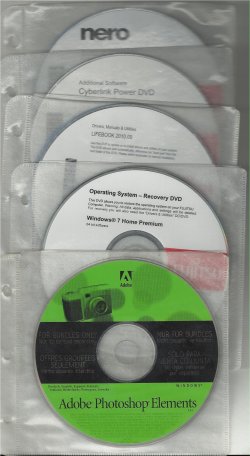
You can use the DVD's that come with the Fujitsu notebook.

DVD set - 1.jpg
 

My Computer My Computer

OS
ME/XP/Vista/Win7
Yeah well I am with Greg again but whatever happened to the good old power on and tap the dedicated F or whatever key - 0 was Toshiba's and F12 is supposedly the Fujitsu.

Personally I downloaded and ISO slipped in a new drive and use the sticker code to activate - no bloat! Certainly made the Toshiba's fly.
 

My Computer My Computer

Computer type
PC/Desktop
Computer Manufacturer/Model Number
Own build (new) Desk1 / Asus ROG Win 7 / Desk2 1st build
OS
Desk1 7 Home Prem / Desk2 10 Pro / Main lap Asus ROG 10 Pro 2 laptop Toshiba 7 Pro Asus P2520 7 & 10
CPU
Desk1 i5 3750K / Laptop i7 GTX 860M / Desk2 i5 2500
Motherboard
Desk1 Asus P877-V / Desk2 Gigabyte H67 UD3H / Laptop ?
Memory
Desk1 8GB (1866) / Desk2 16GB (1333) / Laptop 8Gb DDR3
Graphics Card(s)
Desk 1& 2NVidia GTX 650 & Laptops on board Intel
Sound Card
Desk 1 & 2 -XONAR DG Realtek High Def audio Laptop
Monitor(s) Displays
Desk 1 Benq HD 2450 / Desk2 Philips 24" / Laptop 17.5"
Screen Resolution
1920x1080 D1 & D2 & Laptop 1
Hard Drives
Desk1 Samsung 120GB 830 SSD
Asus ROG 256GB 850 Pro SSD
Desk2 Samsung 840 256 SSD
Toshiba 120GB EVO
PSU
Desk 1 Corsair HX 1050/ Laptop ? / Desk 2 Corsair HX 650
Case
Desk 1 Cooler HAF XM ? Toshiba laptop / Desk2 Coolermaster
Cooling
Fans on all Desk1 -2 Desk2 - all Coolermasters 5 Laptop ?
Keyboard
Desk 1 MS Sidewinder X6 Desk 2 MS Sidewinder X 4
Mouse
Desk 1&2 - Gigabyte MS 900 gamer - laptop - Logitec wireless
Internet Speed
ADSL2+
Other Info
One other Desktop (tester) and spare Toshba laptop both with SSD's
Running Kaspersky 2016 ISS on all machines config'd identically
Logitec audio stereo systems on each machine (x3)
Canon MG5250MFC
Router/modem TP-Link running WPA2SK
Since you're going to reinstall from a non-OEM disk, you'll have to locate device drivers -- which would have been installed automatically with an OEM restore. One way to make this an easier process is to install DoubleDriver, use that to copy all your existing drivers to a USB stick and then, when you have the reinstall up and running, use the USB stick to restore any drivers it did not install.
 

My Computer My Computer

Computer type
PC/Desktop
Computer Manufacturer/Model Number
Custom
OS
Win7 Pro 32-bit, Win8 Pro 32-bit
CPU
AMD Phenom II X6 1090T
Motherboard
Gigabyte
Memory
4GB ddr3 1300
Graphics Card(s)
AMD HD 4290 onboard
Sound Card
Builtin Realtek HD Audio
Monitor(s) Displays
Samsung 24" widescreen, LG 23" widescreen
Screen Resolution
1920x1200/1920x1080
Hard Drives
Kingston 256GB SSD
Keyboard
Logitech Illuminated Keyboard
Mouse
Logitech M705 wireless mouse
Antivirus
Norton Av 2013
Browser
IE v10
Win7 is driver-complete in the installer and then quickly updated during all rounds of Important and Optional Windows Updates.

You should not have more than a couple of missing drivers on modern hardware to import from the Support Downloads webpage for the PC model or device.

Put your network driver in the backup so you can get online quickly if it isn't provided during install, to do all rounds of Updates.
 
You are real busy beavers. Didn't you see that the OP was already happy in post #4. LOL
 

My Computer My Computer

Computer Manufacturer/Model Number
HP, Dell, Gateway, Toshiba - 4 laptops and 2 desktops
OS
Vista, Windows7, Mint Mate, Zorin, Windows 8
CPU
from 1.6GHz Duo to i7
Monitor(s) Displays
2x HP w2207
Hard Drives
5x HDD, 7x SSD, 12x Externals
Keyboard
with trackball - no mices
Mouse
Trackball mice
Internet Speed
DSL 6000
If the COA sticker is messed up, you can run this VBS script to get the current key: ShowKey.vbs

You don't get the key of COA sticker by running the script!! You get the default OEM key.
 

My Computer My Computer

Computer type
Laptop
Computer Manufacturer/Model Number
ACER ASPIRE 5742G
OS
Microsoft Windows 7 Home Premium 64-bits 7601 Multiprocessor Free Service Pack 1
CPU
Intel(R) Core(TM) i3 CPU M 370 @ 2.40GHz
Motherboard
Acer Aspire 5742G
Memory
4,00 GB
Graphics Card(s)
ATI Mobility Radeon HD 5400 Series
Sound Card
(1) AMD High Definition Audio Device (2) Realtek High Defi
Screen Resolution
1366 x 768 x 32 bits (4294967296 colors) @ 60 Hz
Hard Drives
WDC WD5000BEVT-22ZAT0
Hmmm, that's true. forgot about that. Guess it's only useful with a Retail or downloaded install.
 

My Computer My Computer

Computer type
PC/Desktop
Computer Manufacturer/Model Number
Lenovo IdeaCenter 450
OS
Windows 10 Pro X64
CPU
Intel Quad Core i7-4770 @ 3.4Ghz
Memory
16.0GB PC3-12800 DDR3 SDRAM 1600 MHz
Graphics Card(s)
Intel Integrated HD Graphics
Sound Card
Realtek HD Audio
Monitor(s) Displays
HP 22" LCD
Screen Resolution
1680 x 1050
Hard Drives
250GB Samsung EVO SATA-3 SSD
2TB Seagate ST2000DM001 SATA-2
1.5TB Seagate ST3150041AS SATA
Keyboard
Dell USB
Mouse
Lenovo USB
Internet Speed
Cable via Road Runner 3MB Upload, 30MB Download
Antivirus
Windows Defender, MBAM Pro, MBAE
Browser
Seamonkey
Other Info
UEFI/GPT
PLDS DVD-RW DH16AERSH
You are real busy beavers. Didn't you see that the OP was already happy in post #4. LOL
Yeah I did notice but was wondering why it was going around the houses when a simple power up and the default key would do basically the same thing :)
 

My Computer My Computer

Computer type
PC/Desktop
Computer Manufacturer/Model Number
Own build (new) Desk1 / Asus ROG Win 7 / Desk2 1st build
OS
Desk1 7 Home Prem / Desk2 10 Pro / Main lap Asus ROG 10 Pro 2 laptop Toshiba 7 Pro Asus P2520 7 & 10
CPU
Desk1 i5 3750K / Laptop i7 GTX 860M / Desk2 i5 2500
Motherboard
Desk1 Asus P877-V / Desk2 Gigabyte H67 UD3H / Laptop ?
Memory
Desk1 8GB (1866) / Desk2 16GB (1333) / Laptop 8Gb DDR3
Graphics Card(s)
Desk 1& 2NVidia GTX 650 & Laptops on board Intel
Sound Card
Desk 1 & 2 -XONAR DG Realtek High Def audio Laptop
Monitor(s) Displays
Desk 1 Benq HD 2450 / Desk2 Philips 24" / Laptop 17.5"
Screen Resolution
1920x1080 D1 & D2 & Laptop 1
Hard Drives
Desk1 Samsung 120GB 830 SSD
Asus ROG 256GB 850 Pro SSD
Desk2 Samsung 840 256 SSD
Toshiba 120GB EVO
PSU
Desk 1 Corsair HX 1050/ Laptop ? / Desk 2 Corsair HX 650
Case
Desk 1 Cooler HAF XM ? Toshiba laptop / Desk2 Coolermaster
Cooling
Fans on all Desk1 -2 Desk2 - all Coolermasters 5 Laptop ?
Keyboard
Desk 1 MS Sidewinder X6 Desk 2 MS Sidewinder X 4
Mouse
Desk 1&2 - Gigabyte MS 900 gamer - laptop - Logitec wireless
Internet Speed
ADSL2+
Other Info
One other Desktop (tester) and spare Toshba laptop both with SSD's
Running Kaspersky 2016 ISS on all machines config'd identically
Logitec audio stereo systems on each machine (x3)
Canon MG5250MFC
Router/modem TP-Link running WPA2SK
I often update and add caveats to threads years later since they remain alive and referenced via Google.

In fact searching an issue via Google will sometimes turn up our old threads with incomplete or outdated fixes, where newer tutorials or methods are available. Updating them will sometimes goose them up to the top of the results list.
 
  • Like
Reactions: whs
Back
Top