
Factory reset not working because HDD is Dynamic

Kari

An Angry Old Man
Guru
VIP
SF Team
Local time
2:57 PM
Messages
17,473
Location
A Finnish ex-pat in Leipzig, Germany
Dear fellow geeks, I need help to restore an HP Envy 17 to factory conditions. Problem is, HP recovery does not work when HDD is dynamic. Have now tried to burn a recovery DVD set 5 times, it fails every time when verifying disk 1 so factory recovery using recovery partition is my only (?) option.

I tried to convert HDD0 to basic using Diskpart (deleted all volumes, converted to basic) and then restoring from an image only system reserved plus partitions C: (OS) and E: (recovery), unselecting all other drives and partitions; still after recovery HDD0 is again dynamic with two extra partitions.

Disk management:
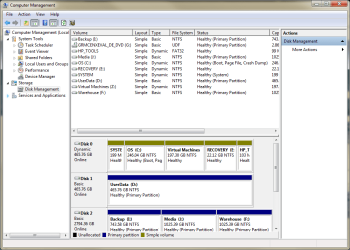
Capture.PNG

Questions:
  1. Would it work if I instead of image just did a full backup of Recovery partition, converted HDD0 to basic using Diskpart, re-created Recovery partition and restored it using backup (no image)?
  2. Could I / is it possible to move this recovery partition to an external USB stick (have big enough 32GB stick) or USB HDD and do recovery from there?
  3. Tried 5 DVDs from 3 different manufacturers, burning recovery disks always fails on verifying first disk 1. Any ideas why?

I am keenly waiting ideas: How could I do a factory recovery when A) burning recovery disks fails, B) HP Factory Recovery does not allow image to be restored when target is a dynamic disk, and C) when restoring an image including recovery partition to a basic disk it is automatically converted to dynamic?

Summary: System Image I have now restored a few times is made using Windows native imaging tool, and it is working except it converts HDD0 to dynamic. How to avoid HDD conversion when restorimg system image?

Kari
 

My Computer My Computer

At a glance

Windows 10 Pro x64 EN-GB1.6 GHz Intel Core i7-720QM Processor6 GBATI Mobility Radeon HD 5850 Graphics
Computer type
Laptop
Computer Manufacturer/Model Number
HP ENVY 17-1150eg
OS
Windows 10 Pro x64 EN-GB
CPU
1.6 GHz Intel Core i7-720QM Processor
Memory
6 GB
Graphics Card(s)
ATI Mobility Radeon HD 5850 Graphics
Sound Card
Beats sound system with integrated subwoofer
Monitor(s) Displays
17" laptop display, 22" LED and 32" Full HD TV through HDMI
Screen Resolution
1600*900 (1), 1920*1080 (2&3)
Hard Drives
Internal: 2 x 500 GB SATA Hard Disk Drive 7200 rpm
External: 2TB for backups, 3TB USB3 network drive for media
Cooling
As Envy runs a bit warm, I have it on a Cooler Master pad
Keyboard
Logitech diNovo Media Desktop Laser (bluetooth)
Mouse
Logitech Performance Mouse MX
Internet Speed
50/10 Mbps VDSL
Antivirus
Windows Defender 4.3.9431.0
Browser
Maxthon 3.5.2., IE11
Hi Kari,

1. you have to delete one partition. The next steps will only work when you have only 4 partitions.

2. reconvert the remaining 4 partitions to primary. For that you need the bootable CD of PW V4.2. You can download it from this site (Greg made that available). It is the pw422 file. This is a .iso.

3. whilst in PW I would make the C partition (or any of the other partitions) logical. The controls are in the Partition Tab > Modify (after you highlighted the C partition). Only then you have the possibility to create extra (simple) logical partitions.
 

My Computer My Computer

At a glance

Vista, Windows7, Mint Mate, Zorin, Windows 8from 1.6GHz Duo to i7
Computer Manufacturer/Model Number
HP, Dell, Gateway, Toshiba - 4 laptops and 2 desktops
OS
Vista, Windows7, Mint Mate, Zorin, Windows 8
CPU
from 1.6GHz Duo to i7
Monitor(s) Displays
2x HP w2207
Hard Drives
5x HDD, 7x SSD, 12x Externals
Keyboard
with trackball - no mices
Mouse
Trackball mice
Internet Speed
DSL 6000
Wolfgang, that's my problem. I delete that Z: (Virtual Machines), as well as the one without letter (HP Tools) which is in anyway empty. Then I restore image, only partitions system reserved, C: and E:, but after recovery I have all 5 partitions and a dynamic disk.

Kari
 

My Computer My Computer

At a glance

Windows 10 Pro x64 EN-GB1.6 GHz Intel Core i7-720QM Processor6 GBATI Mobility Radeon HD 5850 Graphics
Computer type
Laptop
Computer Manufacturer/Model Number
HP ENVY 17-1150eg
OS
Windows 10 Pro x64 EN-GB
CPU
1.6 GHz Intel Core i7-720QM Processor
Memory
6 GB
Graphics Card(s)
ATI Mobility Radeon HD 5850 Graphics
Sound Card
Beats sound system with integrated subwoofer
Monitor(s) Displays
17" laptop display, 22" LED and 32" Full HD TV through HDMI
Screen Resolution
1600*900 (1), 1920*1080 (2&3)
Hard Drives
Internal: 2 x 500 GB SATA Hard Disk Drive 7200 rpm
External: 2TB for backups, 3TB USB3 network drive for media
Cooling
As Envy runs a bit warm, I have it on a Cooler Master pad
Keyboard
Logitech diNovo Media Desktop Laser (bluetooth)
Mouse
Logitech Performance Mouse MX
Internet Speed
50/10 Mbps VDSL
Antivirus
Windows Defender 4.3.9431.0
Browser
Maxthon 3.5.2., IE11
Did you take the image from the dynamics or did you convert them first to primaries.
 

My Computer My Computer

At a glance

Vista, Windows7, Mint Mate, Zorin, Windows 8from 1.6GHz Duo to i7
Computer Manufacturer/Model Number
HP, Dell, Gateway, Toshiba - 4 laptops and 2 desktops
OS
Vista, Windows7, Mint Mate, Zorin, Windows 8
CPU
from 1.6GHz Duo to i7
Monitor(s) Displays
2x HP w2207
Hard Drives
5x HDD, 7x SSD, 12x Externals
Keyboard
with trackball - no mices
Mouse
Trackball mice
Internet Speed
DSL 6000
As far as I know I did the image from a basic disk with 4 partitions. That no-letter-partition HP Tools is as I mentioned earlier empty, I have not seen it before and can not understand where it comes from. It normally only exists on HP laptops with a Linux based QuickWeb system, which allows laptop to be booted in seconds to a simplified GUI to surf, check mail and watch DVDs.

My Envy does not have this QuickWeb thus this partition being empty. IMO it is the reason why the disk is converted to dynamic, being the fifth partition. But, I am quite sure it wasn't there earlier, I believe my mistake has been to allow HP Update Tool update the laptop.

So, as far as I know the image has been made from basic disk but of course when I think of it, that must be wrong; 5 partitions on that image, it must be dynamic disk, so it's my own fault.

I gave up, installing Ultimate from scratch as we speak.

Kari
 

My Computer My Computer

At a glance

Windows 10 Pro x64 EN-GB1.6 GHz Intel Core i7-720QM Processor6 GBATI Mobility Radeon HD 5850 Graphics
Computer type
Laptop
Computer Manufacturer/Model Number
HP ENVY 17-1150eg
OS
Windows 10 Pro x64 EN-GB
CPU
1.6 GHz Intel Core i7-720QM Processor
Memory
6 GB
Graphics Card(s)
ATI Mobility Radeon HD 5850 Graphics
Sound Card
Beats sound system with integrated subwoofer
Monitor(s) Displays
17" laptop display, 22" LED and 32" Full HD TV through HDMI
Screen Resolution
1600*900 (1), 1920*1080 (2&3)
Hard Drives
Internal: 2 x 500 GB SATA Hard Disk Drive 7200 rpm
External: 2TB for backups, 3TB USB3 network drive for media
Cooling
As Envy runs a bit warm, I have it on a Cooler Master pad
Keyboard
Logitech diNovo Media Desktop Laser (bluetooth)
Mouse
Logitech Performance Mouse MX
Internet Speed
50/10 Mbps VDSL
Antivirus
Windows Defender 4.3.9431.0
Browser
Maxthon 3.5.2., IE11
Why reinstall. I would get rid of that empty partition, convert the dynamics back into primaries and you are back in business. Then I would make one of the partitions logical so that you have some slack.
 

My Computer My Computer

At a glance

Vista, Windows7, Mint Mate, Zorin, Windows 8from 1.6GHz Duo to i7
Computer Manufacturer/Model Number
HP, Dell, Gateway, Toshiba - 4 laptops and 2 desktops
OS
Vista, Windows7, Mint Mate, Zorin, Windows 8
CPU
from 1.6GHz Duo to i7
Monitor(s) Displays
2x HP w2207
Hard Drives
5x HDD, 7x SSD, 12x Externals
Keyboard
with trackball - no mices
Mouse
Trackball mice
Internet Speed
DSL 6000
No, I gave up because whatever I did, after the image restore had finished and I should start factory recovery, the disk was again dynamic.

Clean install from fast USB, manually reinstalling drivers and the part of bloatware I wanted. Up and running now, both internal disks basic :)

Kari
 

My Computer My Computer

At a glance

Windows 10 Pro x64 EN-GB1.6 GHz Intel Core i7-720QM Processor6 GBATI Mobility Radeon HD 5850 Graphics
Computer type
Laptop
Computer Manufacturer/Model Number
HP ENVY 17-1150eg
OS
Windows 10 Pro x64 EN-GB
CPU
1.6 GHz Intel Core i7-720QM Processor
Memory
6 GB
Graphics Card(s)
ATI Mobility Radeon HD 5850 Graphics
Sound Card
Beats sound system with integrated subwoofer
Monitor(s) Displays
17" laptop display, 22" LED and 32" Full HD TV through HDMI
Screen Resolution
1600*900 (1), 1920*1080 (2&3)
Hard Drives
Internal: 2 x 500 GB SATA Hard Disk Drive 7200 rpm
External: 2TB for backups, 3TB USB3 network drive for media
Cooling
As Envy runs a bit warm, I have it on a Cooler Master pad
Keyboard
Logitech diNovo Media Desktop Laser (bluetooth)
Mouse
Logitech Performance Mouse MX
Internet Speed
50/10 Mbps VDSL
Antivirus
Windows Defender 4.3.9431.0
Browser
Maxthon 3.5.2., IE11
Understand. A fresh install never hurts. It's just a lot of work. Last time it took me 3 days - updates galore forever.
 

My Computer My Computer

At a glance

Vista, Windows7, Mint Mate, Zorin, Windows 8from 1.6GHz Duo to i7
Computer Manufacturer/Model Number
HP, Dell, Gateway, Toshiba - 4 laptops and 2 desktops
OS
Vista, Windows7, Mint Mate, Zorin, Windows 8
CPU
from 1.6GHz Duo to i7
Monitor(s) Displays
2x HP w2207
Hard Drives
5x HDD, 7x SSD, 12x Externals
Keyboard
with trackball - no mices
Mouse
Trackball mice
Internet Speed
DSL 6000
Back
Top