Factory Setting Restore

eriicck

New member
Local time
12:21 AM
Messages
3
I have an HP Pavilion desktop, originally I had XP installed. I later installed Windows 7 Ultimate x64 but I no longer have the disk for the installation.

I want to bring my computer back to factory settings but I also want to keep windows 7. Is it possible for me to do this?

Is there a Windows 7 file or folder that I can backup onto a usb and just reinstall?

Thank you
 

My Computer

OS
HP Pavilion Windows 7 Ultimate x64
Welcome to Windows Seven Forums.

A factory restore will format your hard drive and wipe out Windows 7.

Do you still have the product key for Windows 7? How did you acquire the software?
 

My Computer

Computer Manufacturer/Model Number
HP Pavilion Elite 495UK
OS
Windows 7 Ultimate SP1 64-Bit
CPU
Intel Core i7 870 @ 2.93GHz
Motherboard
MSI 2A9C (CPU1)
Memory
8Gb Dual-Channel DDR3 @ 664MHz
Graphics Card(s)
nVidia GeForce GTX 460 1024MB dedicated RAM
Sound Card
Realtek HD Audio
Monitor(s) Displays
HP2310i
Screen Resolution
1920 x 1080
Hard Drives
1x1954GB Hitachi HDS22020ALA 330 (RAID), 1x1954GB Hitachi External for backup and storage
PSU
460W
Case
HP Elite
Cooling
Air cooled
Keyboard
Logitech K750 solar-powered keyboard
Mouse
Logitech Wireless M180 mouse
Internet Speed
2Mb
Other Info
Pure Avanti Flow Internet Radio with iPod Dock, 64Gb iPod, HP USB Speakers, Sony MDR-V500 Headphones, Sony Vaio F-Series Laptop
A friend of mine gave me the CD and I misplaced it :/ So there's no way to get windows 7 back unless I buy a new one?
 

My Computer

OS
HP Pavilion Windows 7 Ultimate x64
That's about the size of it.
 

My Computer

Computer Manufacturer/Model Number
HP Pavilion Elite 495UK
OS
Windows 7 Ultimate SP1 64-Bit
CPU
Intel Core i7 870 @ 2.93GHz
Motherboard
MSI 2A9C (CPU1)
Memory
8Gb Dual-Channel DDR3 @ 664MHz
Graphics Card(s)
nVidia GeForce GTX 460 1024MB dedicated RAM
Sound Card
Realtek HD Audio
Monitor(s) Displays
HP2310i
Screen Resolution
1920 x 1080
Hard Drives
1x1954GB Hitachi HDS22020ALA 330 (RAID), 1x1954GB Hitachi External for backup and storage
PSU
460W
Case
HP Elite
Cooling
Air cooled
Keyboard
Logitech K750 solar-powered keyboard
Mouse
Logitech Wireless M180 mouse
Internet Speed
2Mb
Other Info
Pure Avanti Flow Internet Radio with iPod Dock, 64Gb iPod, HP USB Speakers, Sony MDR-V500 Headphones, Sony Vaio F-Series Laptop
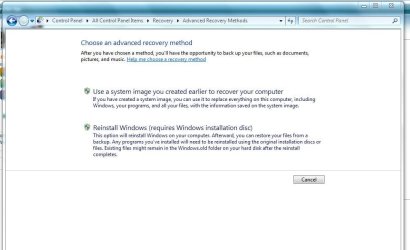
Below are unfortunately the only options to reinstall Windows 7

All I can suggest is to use a system restore point :(

Equally you could call Microsoft and explain your situation to them

recover.JPG
 

My Computer

Computer type
PC/Desktop
Computer Manufacturer/Model Number
Custom Built
OS
Windows 7 Professional x64 SP1 ; Windows Server 2012 R2 Standard
CPU
Intel Core i5 2400 @ 3.10GHz
Motherboard
Foxconn H67MP-S/-V/H67MP
Memory
8.0GB DDR3 @ 665MHz (2GBx4)
Graphics Card(s)
AMD Radeon HD 6870
Sound Card
Realtek High Definition Audio
Monitor(s) Displays
AOC 2243W & SMB1930NW
Screen Resolution
1440x900 & 1920x1080
Hard Drives
977GB Seagate ST31000524AS ATA Drive (SATA)
250GB WD iSCSI attached Drive
PSU
750W Gaming PSU
Case
Novatech Night
Cooling
Fan
Keyboard
Dell Standard PS/2 Keyboard
Mouse
R.A.T 07 Gaming Mouse
Internet Speed
Download: 10 Mbps Ping: 30ms Upload: 0.81 Mbps
Browser
Google Chrome
Other Info
Optiarc DVD RW AD-5260S ATA Device
A system restore point would be pointless since most of the restore points don't go too far back.

And I doubt microsoft would be able to do anything about this.
 

My Computer

OS
HP Pavilion Windows 7 Ultimate x64
How was the copy of Win7 which your friend gave you activated? Was it a $100+ gift?

Most people keep track of property worth more than $100 which is why we normally only see students who got the $40 deal not backing up their Product Keys, although some can still recover them using their receipt email or bank statement they might still have.

If you tell us more about this copy of Win7 then maybe we can help you reinstall it.
 
Do I understand this right - you want to reset the PC to factory settings which in your case would be XP. And then you want to add your current Windows7 installation to that XP setup.

I think that should be possible on a desktop - especially if you hae 2 HDDs in the box. It would take a Win7 image and an XP reinstallation from the XP recovery partition (if that still exists).

If you want to persue this route, post a picture of your Disk Management first so that we get an idea of your real estate.
 

My Computer

Computer Manufacturer/Model Number
HP, Dell, Gateway, Toshiba - 4 laptops and 2 desktops
OS
Vista, Windows7, Mint Mate, Zorin, Windows 8
CPU
from 1.6GHz Duo to i7
Monitor(s) Displays
2x HP w2207
Hard Drives
5x HDD, 7x SSD, 12x Externals
Keyboard
with trackball - no mices
Mouse
Trackball mice
Internet Speed
DSL 6000
Back
Top