"Fade" behind windows? I have a problem, but not even sure what it is!
Hi guys, sorry for a terrible title, and probably wrong category, but I don;t know what happened. I don't even know what to type in google to help me resolve my issue. I have this weird fade/blur/shadow, don't even know how to name it behind everything that I do on my desktop:
<--- The red areas is what I mean, I hope you can see.
Here you can see it better I suppose:
Does anyone know how to solve it? I just bought the machine, and installed the system. I hope that at least the problem is clear enough, don't know about the solution. Thank You All.
I'm not sure what the problem is.
The circled areas look like the Windows default wallpaper.
If you mean the shading on the window edges, that looks like a theme effect.
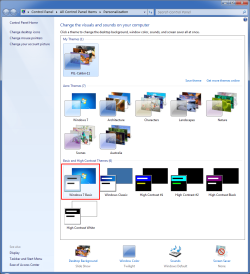
Try changing your theme to "Windows 7 Basic" (or one of the other themes in that section).
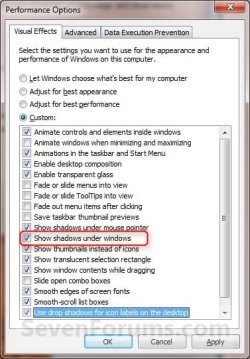
Also, check if you have "Enable transparency" selected.
My Computer
At a glance
W7 Ultimate SP1, LM19.2 MATE, W10 Home 1703, ...AMD Phenom II x6 1100T, 3.3 GHz12GB DDR3 1333 G-Skill (4GB x 2), G-Skill (2G...NVIDIA GeForce GTX 660
Computer type
PC/Desktop
Computer Manufacturer/Model Number
n/a
OS
W7 Ultimate SP1, LM19.2 MATE, W10 Home 1703, W10 Pro 1703 VM, #All 64 bit
CPU
AMD Phenom II x6 1100T, 3.3 GHz
Motherboard
ASUS M4A88T-M/USB3 (AM3)
Memory
12GB DDR3 1333 G-Skill (4GB x 2), G-Skill (2GB x 2)
Graphics Card(s)
NVIDIA GeForce GTX 660
Sound Card
Realtek?
Monitor(s) Displays
Samsung S23B350
Screen Resolution
1920x1080
Hard Drives
WD Green 2TB (SATA), WD Green 3TB (SATA), WD Blue 4TB (SATA), WD Blue 6TB (SATA)

 <--- The red areas is what I mean, I hope you can see.