Fail: Install Win7 from USB

Taccu

New member
Local time
9:28 AM
Messages
15
Hey

First of all, i'm german, so please execuse me for my bad english.

Now, spot on the problem

This PC here:
Builder: Dell
Type: Optilex 755
CPU: P5
RAM: 1024 MB
HDD: 150 GB

i want to install Win7 Prof, cause there's only a CD ROM Drive, i have to boot it from USB.

The Win7 Installation Assistent popped up and all seems to work correctly.
NOWWWW !!!!

At the point where you can choose the Partition on which you want to install Win7, it fails.

"System partition could not be created or found"


Some Information to regard: In BIOS the hard disk is set on top of the boot priority


thanks taccu
 

My Computer

Computer Manufacturer/Model Number
Selfmade
OS
Windows 7
CPU
AMD 6400+
Motherboard
Asus AM2
Memory
4096 MB
Graphics Card(s)
Gforce 9800 GTX+
Sound Card
SoundMAX Integrated Digital HD Audio
Monitor(s) Displays
LG Flatron W2252TQ
Screen Resolution
1680x1050
Case
Crap
Internet Speed
DSL 6000
Hello Taccu.


Let's try to get this sorted for you.


You are trying to install from ...

USB or DVD

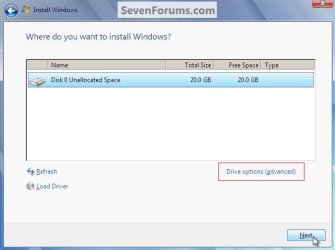
When you get to the dialog box like in this snip below there's nothing listed at all?

click to enlarge
New Partition.jpg
 

My Computer

Computer Manufacturer/Model Number
* BFK Customs *
OS
W 7 64-bit Ultimate
CPU
Intel Q9550 Yorkfield
Motherboard
ASUS P5Q Pro
Memory
8GB Dominator 8500C5D
Graphics Card(s)
ATI : XFX 5870
Sound Card
Realtek HD Audio 7-1
Monitor(s) Displays
1x 47" LCD HDMI & 3x 26" LCD HDMI
Screen Resolution
1920x1080P & 1920x1200
Hard Drives
1x 80GB Intel X25-M G2 SSD : 1x 500GB & 1x 640GB WD Caviar Black(s)
PSU
Corsair 620HX
Case
Cooler Master RC-690
Cooling
Tuniq Tower 120, 2x 140mm and 3x 120mm case fans
Keyboard
Microsoft 500
Mouse
Razer Diamondback 3G
Internet Speed
14 Mb/s
Other Info
1x Koutech 3Gb/s SATA HDD Hot Swap Rack
Your post is very confusing.

If you want to boot from usb, usb should be at the top of the boot priority list in the bios.

Is there an option to boot from usb at all in your bios?
 

My Computer

Computer Manufacturer/Model Number
Too many to describe...
OS
Windows 7 x64 pro/ Windows 7 x86 Pro/ XP SP3 x86

My Computer

Computer Manufacturer/Model Number
Selfmade
OS
Windows 7
CPU
AMD 6400+
Motherboard
Asus AM2
Memory
4096 MB
Graphics Card(s)
Gforce 9800 GTX+
Sound Card
SoundMAX Integrated Digital HD Audio
Monitor(s) Displays
LG Flatron W2252TQ
Screen Resolution
1680x1050
Case
Crap
Internet Speed
DSL 6000
Check for newer BIOS version update, set SATA controller in BIOS setup to AHCI first, then IDE if necessary.

If update not available, then clear the CMOS: http://pcsupport.about.com/od/fixtheproblem/tp/clearcmos.htm


Try wiping the HD, creating a partition, format and set to active. Boot installer, press Shift F10 at bootup or select Repair console to open Command Line, type:
DISKPART
LIST DISK
SELECT DISK 0 (or Win7 HD #)
CLEAN ALL
CREATE PARTITION PRIMARY
SELECT PARTITION 1
FORMAT
ACTIVE
EXIT
 
ok

i installed a dvd drive, took the original win7 dvd and the installation worked.

So something must be wrong with the usb stick.

Will make some tests.
 

My Computer

Computer Manufacturer/Model Number
Selfmade
OS
Windows 7
CPU
AMD 6400+
Motherboard
Asus AM2
Memory
4096 MB
Graphics Card(s)
Gforce 9800 GTX+
Sound Card
SoundMAX Integrated Digital HD Audio
Monitor(s) Displays
LG Flatron W2252TQ
Screen Resolution
1680x1050
Case
Crap
Internet Speed
DSL 6000
Well I'm glad to see you have it sorted and thanks for the update.
 

My Computer

Computer Manufacturer/Model Number
* BFK Customs *
OS
W 7 64-bit Ultimate
CPU
Intel Q9550 Yorkfield
Motherboard
ASUS P5Q Pro
Memory
8GB Dominator 8500C5D
Graphics Card(s)
ATI : XFX 5870
Sound Card
Realtek HD Audio 7-1
Monitor(s) Displays
1x 47" LCD HDMI & 3x 26" LCD HDMI
Screen Resolution
1920x1080P & 1920x1200
Hard Drives
1x 80GB Intel X25-M G2 SSD : 1x 500GB & 1x 640GB WD Caviar Black(s)
PSU
Corsair 620HX
Case
Cooler Master RC-690
Cooling
Tuniq Tower 120, 2x 140mm and 3x 120mm case fans
Keyboard
Microsoft 500
Mouse
Razer Diamondback 3G
Internet Speed
14 Mb/s
Other Info
1x Koutech 3Gb/s SATA HDD Hot Swap Rack
1 thing I noticed was that the image you posted was only of a 20GB drive so somewhere it's reading your partitions incorrectly which could be an error with the USB stick. Let us know how you get on using Windows 7 now you've got it installed. Also, try to format the USB stick in Windows 7 (if you have no critical data on it) and see if Windows produces any error report.


OS
 

My Computer

Computer Manufacturer/Model Number
Compaq Desktop
OS
Windows 7 Ultimate x64
CPU
AMD Sempron Dual Core
Memory
3GB
Graphics Card(s)
NVIDIA GeForce 6150SE nForce 430
Screen Resolution
1024x768
Hard Drives
150GB Sata
1 thing I noticed was that the image you posted was only of a 20GB drive so somewhere it's reading your partitions incorrectly which could be an error with the USB stick. Let us know how you get on using Windows 7 now you've got it installed. Also, try to format the USB stick in Windows 7 (if you have no critical data on it) and see if Windows produces any error report.


OS


Hello Jeff.


He just re-posted the same snip I put up of a VB install for a visual aid, look at my post #2 above.

;)
 

My Computer

Computer Manufacturer/Model Number
* BFK Customs *
OS
W 7 64-bit Ultimate
CPU
Intel Q9550 Yorkfield
Motherboard
ASUS P5Q Pro
Memory
8GB Dominator 8500C5D
Graphics Card(s)
ATI : XFX 5870
Sound Card
Realtek HD Audio 7-1
Monitor(s) Displays
1x 47" LCD HDMI & 3x 26" LCD HDMI
Screen Resolution
1920x1080P & 1920x1200
Hard Drives
1x 80GB Intel X25-M G2 SSD : 1x 500GB & 1x 640GB WD Caviar Black(s)
PSU
Corsair 620HX
Case
Cooler Master RC-690
Cooling
Tuniq Tower 120, 2x 140mm and 3x 120mm case fans
Keyboard
Microsoft 500
Mouse
Razer Diamondback 3G
Internet Speed
14 Mb/s
Other Info
1x Koutech 3Gb/s SATA HDD Hot Swap Rack
He just re-posted the same snip I put up of a VB install for a visual aid, look at my post #2 above.

;)

:roflmao: ah, now I see :o

But still, my other advice stands ;)
 

My Computer

Computer Manufacturer/Model Number
Compaq Desktop
OS
Windows 7 Ultimate x64
CPU
AMD Sempron Dual Core
Memory
3GB
Graphics Card(s)
NVIDIA GeForce 6150SE nForce 430
Screen Resolution
1024x768
Hard Drives
150GB Sata
Sometimes you'll need to try another method to get a properly booting USB stick installer. The method that always works for me is to use UltraISO trial version: load ISO, select Write Image file on Bootable Tab, Format first, Write to stick.
 
Back
Top