
You are using an out of date browser. It may not display this or other websites correctly.
You should upgrade or use an alternative browser.
You should upgrade or use an alternative browser.
fail to open Local group policy
- Thread starter attari19
- Start date

hi and welcome..
Make sure you run as administrator for permission.
Make sure you run as administrator for permission.
My Computer
- Computer Manufacturer/Model Number
- built up
- OS
- windows 7
- CPU
- Phenom II AMD Dragon 3.5Ghz
- Memory
- DDR3 4GB
- Graphics Card(s)
- ATI Radeon 512Mb
- Monitor(s) Displays
- HP L1506
- Screen Resolution
- 1152 x 864
- Hard Drives
- WDC 1 TB SATA-II Green Power
- Keyboard
- HP wireless keyboard
- Mouse
- HP Optic
- Internet Speed
- 1GB
Fail to opne Local Group Policy
Hi & Welcom to all Expert,
I enable Administrator account and I Make sure I run as administrator for permission to open gpedit.msc (local group policy) but not open i try multi time and search this sulotion on net but not success.
Please help me......
Hi & Welcom to all Expert,
I enable Administrator account and I Make sure I run as administrator for permission to open gpedit.msc (local group policy) but not open i try multi time and search this sulotion on net but not success.
Please help me......
My Computer
- OS
- Windows 7
The Local Group Policy Editor will only be available in the Windows 7 Professional, Ultimate, and Enterpise editions. You will not have the Local Group Policy Editor available in the Windows 7 Starter and Home Premium editions.
My Computer
- OS
- Windows 7
fail to open Local Group Policy
Hi , & WelCome
I use Windows 7 Ultimate Version and logon as Administrator but not open gpedit.msc (local group policy).......i m to much facing trubbles...... Please do something all Expert of windows 7.....
Hi , & WelCome
I use Windows 7 Ultimate Version and logon as Administrator but not open gpedit.msc (local group policy).......i m to much facing trubbles...... Please do something all Expert of windows 7.....
My Computer
- OS
- Windows 7
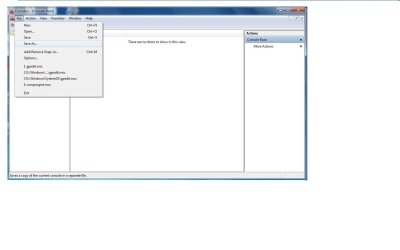
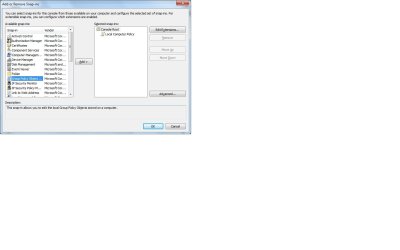
Group Policy editor is a snap-in for Microsoft Management Console (mmc). It should appear in the snap-in list when you start mmc. If not you will have to add it.
Type mmc in the start area of the search menu and press enter. This will start Microsoft Management Console. Click the file menu. Youshould see gpedit.msc in the drop down list. If not, you will have to add it as a snap-in on the same menu.
Type mmc in the start area of the search menu and press enter. This will start Microsoft Management Console. Click the file menu. Youshould see gpedit.msc in the drop down list. If not, you will have to add it as a snap-in on the same menu.
Attachments
My Computer
- OS
- Windows 7
Fail to opne Local Group Policy
Hi,
I do the same as you say through MMC but
when i open Local group policy but not open properly and show message fail to open Local group policy on this computer....... You may not have apprpriate right.
Description: Unspecified Error
but i m using Ultimat edition and i log as user name :Administrator and Account type administrator too. i can't solve this issue.....
Please do somthing for me.....
Thanks to All expert.
Hi,
I do the same as you say through MMC but
when i open Local group policy but not open properly and show message fail to open Local group policy on this computer....... You may not have apprpriate right.
Description: Unspecified Error
but i m using Ultimat edition and i log as user name :Administrator and Account type administrator too. i can't solve this issue.....
Please do somthing for me.....
Thanks to All expert.
My Computer
- OS
- Windows 7
If you don't have the proper rights and you are logged on as an administrator then probably your user profile is corrupted.
The only thing that I can tell you is to create another administrative user account to try it from. Better yet, unlock the secret administrator account by typing:
Net user administrator /active:yes
from an administrative command prompt.
If it works, copy everything from your old profile to your new profile and delete your old profile.
The only thing that I can tell you is to create another administrative user account to try it from. Better yet, unlock the secret administrator account by typing:
Net user administrator /active:yes
from an administrative command prompt.
If it works, copy everything from your old profile to your new profile and delete your old profile.
Last edited by a moderator:
My Computer
- OS
- Windows 7
fail to open Local group policy problems
Go to C:\Windows\System32\GroupPolicy\Machine. In this Machine folder there is a Script folder and the Registry.pol file/object. Please delete Registry.pol and that should do it. You may need to restart your computer for this but should end your troubles.
Go to C:\Windows\System32\GroupPolicy\Machine. In this Machine folder there is a Script folder and the Registry.pol file/object. Please delete Registry.pol and that should do it. You may need to restart your computer for this but should end your troubles.
My Computer
- Computer type
- PC/Desktop
- OS
- Windows 7 Pro

- Local time
- 2:07 PM
- Messages
- 5,063
For Future Reference
=============================
Welcome to Windows Seven Forums.
To avoid a lot of Q & A about your hardware and OS configuration, please click on this link to
Edit System Specs
It would save a lot of back and forth as to the type of Windows you are running.
=============================
Welcome to Windows Seven Forums.
To avoid a lot of Q & A about your hardware and OS configuration, please click on this link to
Edit System Specs
It would save a lot of back and forth as to the type of Windows you are running.
My Computer
- Computer Manufacturer/Model Number
- HP Media Center
- OS
- Windows 7 32 bit
- CPU
- AMD 5200+ dual core
- Memory
- 2 GB
- Graphics Card(s)
- NVidia GeForce 6150SE 128 MB
- Monitor(s) Displays
- CRT
- Screen Resolution
- 1280x1024
- Hard Drives
- 500 GB Sata internal :
SIIG USB 3.0 docking stations w/WD Caviar Black 6 Gb/s drives
- Keyboard
- PS/2
- Mouse
- PS/2 Wheel Mouse
- Other Info
- SIIG USB 3.0 PCIexpress card.