failed hard drive

DrBejar

New member
Member
VIP
Local time
10:50 PM
Messages
188
Location
Bass Town
Hey everyone!

I was told hard drives can break down & have to be replaced.
hard drives with moving parts that is.
My question is if my hard drive where to fail, I would have to buy a new one and install windows vista first to go to my windows 7 or can i just install windows 7 on it?
Not sure if you understand what I mean, if not let me know please.

I just want to keep this in mind because you never know what can happen.


Happy birthday to me (-:
 

My Computer

Computer Manufacturer/Model Number
ASUSTeK Computer INC
OS
Windows 7 Professional x64
CPU
AMD Athlon 64x2 Dual core Processor 5400+
Motherboard
ASUSTek Computer INC
Memory
5GB DDR2
Graphics Card(s)
ATi Radeon Hd 4650
Sound Card
Realtek High Definition Audio
Screen Resolution
1680x1024 AOC
Hard Drives
250GB
Internet Speed
28mbps
Well it depends if you bought a full install of windows 7 or just the upgrade. If you only bought the upgrade then you have to install vista then go to W7.
 

My Computer

Computer type
PC/Desktop
Computer Manufacturer/Model Number
Custom
OS
Windows 8.1 Pro x64
CPU
Intel Core i5-4570 CPU @ 3.20GHz
Motherboard
Gigabyte Z87-D3HP-CF
Memory
8GB DDR3-1596 - Dual Channel
Graphics Card(s)
NVIDIA GeForce GTX 750 Ti SC
Sound Card
Onboard
Monitor(s) Displays
Samsung
Screen Resolution
1920x1080
Hard Drives
SSD - 120GB
Second - 1TB
Antivirus
MSE
Browser
Chrome

My Computer

Computer type
PC/Desktop
Computer Manufacturer/Model Number
Built them myself, Science Experiments !
OS
Win7 Enterprise, Win7 x86 (Ult 7600), Win7 x64 Ult 7600, TechNet RTM on AMD x64 (2.8Ghz)
CPU
AMD fx8350 4ghz, AMD-32 2400mhz, AMD-64 3200mhz, AMDx64 2.8G
Motherboard
SIS 755, ECS-K8M890M-M (Ult 7600), GigaByte & others
Memory
2gb, 4gb on the Ult 7600, 4gb on Technet RTM, 32gb on FX8350
Graphics Card(s)
Draw my own Graphics, several nVidia cards
Sound Card
on motherboard
Monitor(s) Displays
19" flat scr, 28" I-Inc widescr,22" Emprex Widescr, 23" Acer
Screen Resolution
1280 x 1024, 1440 x 900, 1920 x 1080
Hard Drives
6 pata Ide HD's & 2 Sata HD's
added 80gb external on Ult 7600 computer,
numerous extra 1tb, 2TB, 3Tb SATA HD's
A collection of ext HD Docks w/ HDs
PSU
430w, 550w, 600w, 700, 800, etc
Case
All Generic Full Towers
Cooling
Open Air & a few fans, some w/ colored LEDs
Keyboard
Compaq & Dell recycled from GoodWill
Mouse
Made in China Optical Wired Mouse
Internet Speed
Fast Cable InterNet
Antivirus
AVG Free on 24 different Desktops, NO Problems!
Browser
IE 8 is preferred, but use FireFox sometimes
Other Info
Linksys Routers, switches, & Hubs
Too Many USB Flash Drives to count, Biggest is 64GB !
Eight computers in my home network.
Sixteen computers at my business network.
Linked via TeamViewer !
Lots of old used spare computer parts everywhere!
Forgot about that tutorial. Thanks guys,

and happy birthday
 

My Computer

Computer type
PC/Desktop
Computer Manufacturer/Model Number
Custom
OS
Windows 8.1 Pro x64
CPU
Intel Core i5-4570 CPU @ 3.20GHz
Motherboard
Gigabyte Z87-D3HP-CF
Memory
8GB DDR3-1596 - Dual Channel
Graphics Card(s)
NVIDIA GeForce GTX 750 Ti SC
Sound Card
Onboard
Monitor(s) Displays
Samsung
Screen Resolution
1920x1080
Hard Drives
SSD - 120GB
Second - 1TB
Antivirus
MSE
Browser
Chrome
So I do it like if i'm installing windows, but what do i do different?
I know it shows me, but I'm not that smart to find out :cry:

Thank you guys for the b-day! :-D
 

My Computer

Computer Manufacturer/Model Number
ASUSTeK Computer INC
OS
Windows 7 Professional x64
CPU
AMD Athlon 64x2 Dual core Processor 5400+
Motherboard
ASUSTek Computer INC
Memory
5GB DDR2
Graphics Card(s)
ATi Radeon Hd 4650
Sound Card
Realtek High Definition Audio
Screen Resolution
1680x1024 AOC
Hard Drives
250GB
Internet Speed
28mbps
I got it thank you guys!
I just had to get my reading on! :)
 

My Computer

Computer Manufacturer/Model Number
ASUSTeK Computer INC
OS
Windows 7 Professional x64
CPU
AMD Athlon 64x2 Dual core Processor 5400+
Motherboard
ASUSTek Computer INC
Memory
5GB DDR2
Graphics Card(s)
ATi Radeon Hd 4650
Sound Card
Realtek High Definition Audio
Screen Resolution
1680x1024 AOC
Hard Drives
250GB
Internet Speed
28mbps
DrBejar,
Happy Birthday and many happy returns too! Have a nice apple pie on me and send the bill across the Atlantic,for me to pay!

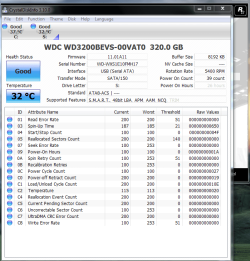
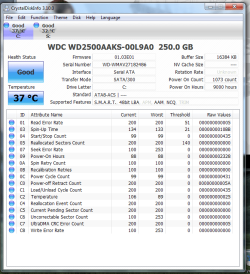
Your internal HD is only 250GB,so where do you store the backup & Restore! As my signature tune sings, get a large enough (space wise) external HD to store B&R and in the "event of a failing disk" you get to lose nothing, b'cause everything is backed up! Periodically check the heath of the internal disk using @mjf's advise, an execellent and a small footprint utility called "crystalDiskInfo". download from : CrystalDiskInfo - Software - Crystal Dew World .Have a nice day!

Regards,
Sreedhav
 

My Computer

Computer Manufacturer/Model Number
Sony Vaio C series VPCCB35FN laptop
OS
MS Windows 7 Home Premium 64-bit SP1
CPU
IntelCore [email protected]; Sandy Bridge 32nm Tech.
Motherboard
Sony Vaio Version:C609NJYJ
Memory
4096Mb RAM; Single ChannelDDR3@665MHz; DRAM Freq:662MHz
Graphics Card(s)
AMD Radeon HD 6630M; GPU:Whistler;BIOS Core&mem Clock:123.36
Sound Card
REALTEK High Definition Audio Device; INTEL Display Card
Monitor(s) Displays
Generic PnP Intel HD;Resolution:1920*1040 Pixels; BPP:32bits
Screen Resolution
Current Resolution:1920*1080 Pixels; Monitor Frequency:60Hz
Hard Drives
Internal HD:TOSHIBA MK5061GSY; Real Size:488 GB;NTFS; 3 Partitions; SATA; HEADS:16

External HDD: WD Elements 1023 PORTABLE; Estimated Size: 1TB; NTFS; 3 Partitions
Cooling
Lateral Exhaust with a Cooling Pad Placed Beneath.
Keyboard
Logitech Bluetooth+ Generic Integrated K-B
Mouse
Logitech Bluetooth
Internet Speed
2MBPS
Other Info
1)Trend Micro Titanium Maximum Security Suite Version:3
2)SAS-PRO

3)MBAM--PRO


4)WATERFOX+IE9 +WOT+LINKEXTEND+ DRWEBCUREIT LINK CHECKER

5)SPYWAREBLASTER

6) WINPATROL PLUS

7) SANDBOXIE and
8) A BIT OF COMMON SENSE.
fffffff.PNG External drive

Capture.PNG Hard drive from comp, think people call it internal

Thanks for that link Sreedhav!
I have
my back up, when i buy the new drive, i do a clean install and how would i get the B&R I have on my external?
or
is there something I should do first to get to my B&R?
 
Last edited:

My Computer

Computer Manufacturer/Model Number
ASUSTeK Computer INC
OS
Windows 7 Professional x64
CPU
AMD Athlon 64x2 Dual core Processor 5400+
Motherboard
ASUSTek Computer INC
Memory
5GB DDR2
Graphics Card(s)
ATi Radeon Hd 4650
Sound Card
Realtek High Definition Audio
Screen Resolution
1680x1024 AOC
Hard Drives
250GB
Internet Speed
28mbps
Back
Top