Solved Failed install windows7 home to windows7 enterprise

Katzplay

New member
Local time
10:42 PM
Messages
25
I have an HP Compaq dx2000mt desktop that has windows7 32bit enterprise installed on it. I tried to install windows7 home 32bit to replace the enterprise OS. As I was installing it stated the old OS would be marked, XXX.old and it went forward, then came to a point where there were booting errors. and it stopped installing. Now I am left with a half install, and a full OS the boot section now in its own drive named disk 0 system reserved.
I partioned the C drive and allocated 20gb and tried to install there. I received the same errors seems that my boot.ini is stuck in the system reserved and I cant figure out how to incorporate disk 0 over to disk C, so that my boot is in the same disk drive.
I have really messed this one up. I have installed an operating system before and never had so much trouble.
Any advice would be helpful.
And please if you have an answer, something for me to do, it needs to be A.B.C.'d out step by step as Im not an expert. But I guess I already proved that... :confused:
Thank you in advance.
Katz
 

My Computer My Computer

At a glance

windows 7 64 bit home edition6GB
Computer type
PC/Desktop
Computer Manufacturer/Model Number
compaq CQ5720F
OS
windows 7 64 bit home edition
Memory
6GB
PSU
AMD Athion IIX2 250 Processor 3.00
Antivirus
Norton
Browser
Chrome

My Computer My Computer

At a glance

Windows 10 Pro x64Intel Core i7 6700KGSkill TridentZ RGB 16GB 3600 16-16-16-36EVGA GTX 980 Ti SC x2
Computer type
PC/Desktop
Computer Manufacturer/Model Number
Skylake Special #666
OS
Windows 10 Pro x64
CPU
Intel Core i7 6700K
Motherboard
Asus Sabertooth Z170 Mark 1
Memory
GSkill TridentZ RGB 16GB 3600 16-16-16-36
Graphics Card(s)
EVGA GTX 980 Ti SC x2
Sound Card
Realtek High Definition
Monitor(s) Displays
AOC G2460PG
Screen Resolution
1920 x 1080 144Hz
Hard Drives
Samsung 860 Pro 256GB, Seagate Barracuda 4TB x2
PSU
EVGA 1000 P2, EVGA White Custom Braided Cables
Case
Corsair Vengeance C70 Gunmetal Black
Cooling
Corsair H100i v2, Corsair ML120 x2, Thermal Grizzly Kryonaut
Keyboard
Logitech G910 Orion Spectrum
Mouse
Logitech G700s
Internet Speed
Verizon Fios Quantum Gateway 75/75
Antivirus
Windows Defender, Malwarebytes Free 3.8.3
Browser
Chrome
Other Info
Corsair SP120 x4, LG Blu-ray Drive, Durabrand HT-395 100 Watt Dolby Digital Amp, Corsair H2100 Wireless 7.1 Headset
Thank you very much for the instructions. I am still getting an error OxcOOOOOOe
The installation was in full then on reboot that is where I got this message and that the installation was rolled back and my current version was back.
I dont have any of the disks on the win7 enterprise that is why Im trying to install win7 home instead so I will have the disks.
I am trying to use a new volume I named E: I formatted it before install and all went well up to the reboot as Id stated.
 

Attachments

  • boot_error_status_0xC000000E.png
    boot_error_status_0xC000000E.png
    12.5 KB · Views: 1

My Computer My Computer

At a glance

windows 7 64 bit home edition6GB
Computer type
PC/Desktop
Computer Manufacturer/Model Number
compaq CQ5720F
OS
windows 7 64 bit home edition
Memory
6GB
PSU
AMD Athion IIX2 250 Processor 3.00
Antivirus
Norton
Browser
Chrome
Im also getting a microsoft teredo tunneling adapter driver error message
 

My Computer My Computer

At a glance

windows 7 64 bit home edition6GB
Computer type
PC/Desktop
Computer Manufacturer/Model Number
compaq CQ5720F
OS
windows 7 64 bit home edition
Memory
6GB
PSU
AMD Athion IIX2 250 Processor 3.00
Antivirus
Norton
Browser
Chrome
I found that if I took out the bootable USB during reboot while installation was taking place, that it finally installed. So now I have duel OS. One windows 7 enterprise and the other the new install win7 home, to which I did down load from the links here, and thank you very much for that. I did already have it from where I purchased it, but it was just nice to know it was a fresh install.
So my next thought is can I now delete all I can on the enterprise and reallocate most the gb over to the new OS.
 

My Computer My Computer

At a glance

windows 7 64 bit home edition6GB
Computer type
PC/Desktop
Computer Manufacturer/Model Number
compaq CQ5720F
OS
windows 7 64 bit home edition
Memory
6GB
PSU
AMD Athion IIX2 250 Processor 3.00
Antivirus
Norton
Browser
Chrome
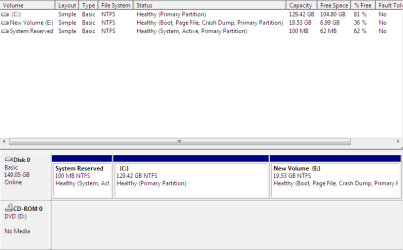
Ive cleaned up enterprise and Im now on win7 home. This is the screenshot.
E: is the win7 home
C: is win7 enterprise
 

Attachments

  • Screenshot_1.png
    Screenshot_1.png
    10 KB · Views: 1

My Computer My Computer

At a glance

windows 7 64 bit home edition6GB
Computer type
PC/Desktop
Computer Manufacturer/Model Number
compaq CQ5720F
OS
windows 7 64 bit home edition
Memory
6GB
PSU
AMD Athion IIX2 250 Processor 3.00
Antivirus
Norton
Browser
Chrome
Because you ran the installer from OS instead of correctly booting it The new OS will not boot as C. I would do it over and this time follow Reinstall tutorial below.

If you have everything off the old OS then delete all partitions during install.
 
I now have two separate installs. while its booting up I have choices to go with win7 entertainment or win7 home...
So I guess Im not understanding what you mean. Im on the new install right now (E). but I can also reboot and use the old one. (C)
 

My Computer My Computer

At a glance

windows 7 64 bit home edition6GB
Computer type
PC/Desktop
Computer Manufacturer/Model Number
compaq CQ5720F
OS
windows 7 64 bit home edition
Memory
6GB
PSU
AMD Athion IIX2 250 Processor 3.00
Antivirus
Norton
Browser
Chrome
Your screenshot was booted into E as signified by Boot flag. An OS should be C when booted or it was installed wrongly from another OS instead of booting installation media.
 
I didn't know. I did that on purpose as the C drive was all messy and I wanted to be off of it. So thats why I installed on E drive.
 

My Computer My Computer

At a glance

windows 7 64 bit home edition6GB
Computer type
PC/Desktop
Computer Manufacturer/Model Number
compaq CQ5720F
OS
windows 7 64 bit home edition
Memory
6GB
PSU
AMD Athion IIX2 250 Processor 3.00
Antivirus
Norton
Browser
Chrome
Win7 is designed to always boot as C when it is correctly booted to install.

I would do it over this time using the Drive Options pictured in Steps7/8 of the Vlean Install tutorial you were given. Did you even read it?
 
Yes I read it. and I didnt follow it. Its my fault. I wanted to avoid C as it was so messy and the person Im doing this for doesnt do anything with it much but watch tv. So I just wanted to put on a clean win7 and avoid all the mess on C.
I apologize for not going by the book.
 

My Computer My Computer

At a glance

windows 7 64 bit home edition6GB
Computer type
PC/Desktop
Computer Manufacturer/Model Number
compaq CQ5720F
OS
windows 7 64 bit home edition
Memory
6GB
PSU
AMD Athion IIX2 250 Processor 3.00
Antivirus
Norton
Browser
Chrome
If you wanted to avoid C why did you install from it. You didn't even need to go there.

Why would you ask for help and then just ignore all of it?

It doesn't matter what a partition is lettered if you install Win7 from boot there it will be C.
 
I do believe I stated I wasn't an expert here, I don't need a tongue lashing.
I wasn't trying to load from C on purpose. I couldn't get it to load from rebooting, so I opened up the install in C.
Its not from lack of reading, its lack of understanding. again I stated I wasn't sure of what I'm doing.
And asking for help is just that, asking for help not a reprimand.
You're obviously very knowledgeable in computers and have forgotten what it was like to not know a thing, you never had the patience to deal with those like myself.
I'm trying to do a favor here for a friend by fixing what was left of his destroyed computer, I'm surprised I even got it to boot up, let alone install an OS to it.
Now since your already pissed at me, I will ask another stupid question.
In system Configurations there is
Windows 7 (E:\Windows) : Current OS; Default OS
Windows 7 (C:\Windows)
Will I completely destroy my computer if I delete the second boot, so as it will just notice the top OS and boot smoothly.
If I delete the second (C) I'm afraid to loose that entire partion, and that being the main hard drive, I need to know that so I know what to do.
 

My Computer My Computer

At a glance

windows 7 64 bit home edition6GB
Computer type
PC/Desktop
Computer Manufacturer/Model Number
compaq CQ5720F
OS
windows 7 64 bit home edition
Memory
6GB
PSU
AMD Athion IIX2 250 Processor 3.00
Antivirus
Norton
Browser
Chrome
Where did you get the idea I'm pissed at you? Everything I said was matter-of-fact and not to reprimand or make you feel bad at all. Is it conceivable that dealing with dozens of these cases a day might make someone terse? I am a volunteer even if they gave me the highest award in the tech field.

I was prepared to give you simple steps to delete the old OS and recover its space into the new one , which requires some surgery since the boot files are on the old one. I have done this literally thousands of times here without a single failure and know of no place else that does.

However when I saw that you had installed from an OS and were stuck with Win7 on E I had to focus on that since almost no one wants Win7 to boot as any other than C.

Nevertheless if you want to keep it that way we can proceed with the steps to make the new install bootable on its own, confirm that, delete the old one and recover its space into E.

However there may be unintended consequences down the road from having Win7 be on E so I first gave you the option to start over and do it correctly.

Think it over and decide what you want to do.
 
My misunderstanding. Appologies, :(
I'm just frustrated as you can well appreciate. I've been at this for days, first cleaning ou all the garbage on C just so I could move smoothly, then when the install finally took, I saw the end tunnel light too soon.
Again, so sorry. I'm going to wrap it up for tonight, patience is finished, lol. Tomorrow will allow a clearer thought.
Your saying I should install over the enterprise with home on C?
I have everything set up on E, and I'm unaware of what issues would be if I used E instead. This guy probably won't use it very long and he only watches netflix, google a few things and that's it. He wont be doing anything major.
Seems it would be easier to just keep E going, but that may be a blind thought.
Ill sleep on it and try again tomorrow.
And thank you for your help and patience.
 

My Computer My Computer

At a glance

windows 7 64 bit home edition6GB
Computer type
PC/Desktop
Computer Manufacturer/Model Number
compaq CQ5720F
OS
windows 7 64 bit home edition
Memory
6GB
PSU
AMD Athion IIX2 250 Processor 3.00
Antivirus
Norton
Browser
Chrome
Boot the installer, Delete all partitions using the Drive Options pictured in Steps 7/8 of http://www.sevenforums.com/tutorials/1649-clean-install-windows-7-a.html, create and format New or just click Next and the installer will do it for you.

To keep E follow these same steps to move the boot files to E instead of C (ignore the title): http://www.sevenforums.com/tutorials/209885-bootmgr-move-c-easybcd.html

Note that you must mark E Active to complete the job done by EasyBCD.

Once E holds the System Active flags on its partition in Disk Mgmt, you can delete C and resize E into its space using Partition Wizard to Resize Partition - Video Help.
 
Back
Top