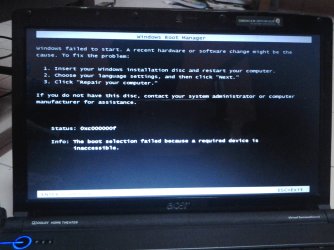
failed to startup

superboy123

New member
Local time
5:32 AM
Messages
19
Location
lahad datu
I does not have window 7 disk installation.....how to fix it manually....please help me...the pitcure is my problem...
 

Attachments

  • DSC_0017.JPG
    DSC_0017.JPG
    242.7 KB · Views: 16

My Computer

OS
window 7 ultimate 32bit
Memory
2GB
Graphics Card(s)
intel pentium
Screen Resolution
1366x768
Please help me.....i have important file at my laptop...
 

My Computer

OS
window 7 ultimate 32bit
Memory
2GB
Graphics Card(s)
intel pentium
Screen Resolution
1366x768
If you do not have a Windows 7 installation DVD, you can download a legal copy with SP1 integrated from here: Official Windows 7 SP1 ISO from Digital River.
Make sure you get the same version you have, Home Premium, Pro or Ultimate and 32 or 64 bit. Note that Basic or Starter is not available.

I recommend using ImgBurn at 4X speed (or the slowest available) to create the DVD from the downloaded .iso file.

You can do this on any computer capable of burning a DVD.
For techies or folks who work on computers: Create Windows 7 Universal ISO With All Editions Selection On Install with ei.cfg Removal Utility.
This will fit on a 6GB flash drive or can be burned to a DVD.
 

My Computer

Computer type
PC/Desktop
Computer Manufacturer/Model Number
Lenovo IdeaCenter 450
OS
Windows 10 Pro X64
CPU
Intel Quad Core i7-4770 @ 3.4Ghz
Memory
16.0GB PC3-12800 DDR3 SDRAM 1600 MHz
Graphics Card(s)
Intel Integrated HD Graphics
Sound Card
Realtek HD Audio
Monitor(s) Displays
HP 22" LCD
Screen Resolution
1680 x 1050
Hard Drives
250GB Samsung EVO SATA-3 SSD
2TB Seagate ST2000DM001 SATA-2
1.5TB Seagate ST3150041AS SATA
Keyboard
Dell USB
Mouse
Lenovo USB
Internet Speed
Cable via Road Runner 3MB Upload, 30MB Download
Antivirus
Windows Defender, MBAM Pro, MBAE
Browser
Seamonkey
Other Info
UEFI/GPT
PLDS DVD-RW DH16AERSH
Back
Top
