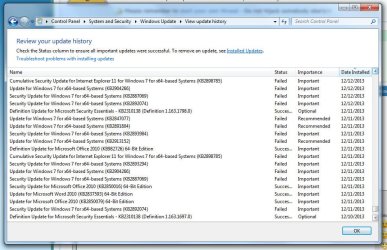
Failed updates (since 12/2013) Error codes 80246007, 80070002, 800736B

msk

New member
Local time
8:43 AM
Messages
10
Hello,

Thanks goodness I found this site. I have been struggling since Dec 2013 with failed updates. I have tried all the included fixes and went through all the steps of "Windows Update Posting Instructions" post. I have taken screenshots of my error as well as a shot of when the errors started and what updates were failing at the time. Unfortunately my CBS zip is 1.15GB. So if I can get help on where to host that so you can reference it, that would be great.

I am running Windows 7 Home Premium and it would be amazing if I could get some help on this way too longstanding problem. Thanks!

MSK.
 

Attachments

  • errorcodes.jpg
    errorcodes.jpg
    77.1 KB · Views: 0
  • historyoffails.jpg
    historyoffails.jpg
    131.8 KB · Views: 0

My Computer My Computer

At a glance

Windows 7 Home PremiumIntel i7-2600 @ 3.4 GHz8 GBNVIDIA GeForce GTX 550 Ti
Computer type
PC/Desktop
Computer Manufacturer/Model Number
Build
OS
Windows 7 Home Premium
CPU
Intel i7-2600 @ 3.4 GHz
Motherboard
ASMedia
Memory
8 GB
Graphics Card(s)
NVIDIA GeForce GTX 550 Ti
Hard Drives
1 - Solid State 125GB
1 - HDD 2 TB
How big is the CBS.log file on its own, both unzipped and zipped? - try posting that only, to a fileshare site such as OneDrive, if it's over the 8MB limit.

Please post the CheckSUR.log file from the CBS folder - that should be small enough.
 

My Computer My Computer

At a glance

Win 7 x64 Home Premium (and x86 VirtualBox VM...i3 370M/i7 6500U8GB - finally :)/8GBit's an i3, dude!/dual Intel&nVidia
Computer type
Laptop
Computer Manufacturer/Model Number
Asus K52F or Lenovo B51-80
OS
Win 7 x64 Home Premium (and x86 VirtualBox VM)/Win10
CPU
i3 370M/i7 6500U
Motherboard
Asus/Lenovo
Memory
8GB - finally :)/8GB
Graphics Card(s)
it's an i3, dude!/dual Intel&nVidia
Sound Card
onboard
Monitor(s) Displays
15.6" built-in
Screen Resolution
1366x768/1920x1080
Hard Drives
750GB Seagate internal
Sundry external drives attached to other computers on the local network
1TB SSD on the Lenovo
PSU
n/a
Internet Speed
as much as I can get - usually on a dongle/phone, so <1MB/s
Antivirus
MSE/Defender
Browser
IE11/12/Edge/Chrome/FF(if I must)
Thanks very much for your response. Sorry for my delayed reply. I have attached the CheckSUR.log file. I have also taken a screen shot of the CBS folder.
 

Attachments

My Computer My Computer

At a glance

Windows 7 Home PremiumIntel i7-2600 @ 3.4 GHz8 GBNVIDIA GeForce GTX 550 Ti
Computer type
PC/Desktop
Computer Manufacturer/Model Number
Build
OS
Windows 7 Home Premium
CPU
Intel i7-2600 @ 3.4 GHz
Motherboard
ASMedia
Memory
8 GB
Graphics Card(s)
NVIDIA GeForce GTX 550 Ti
Hard Drives
1 - Solid State 125GB
1 - HDD 2 TB
Just curious, as in your 'system specs' you say "System Manufacturer/Model Number Build"

What is this?
 

My Computer My Computer

At a glance

Windows 7 Ultimate 32bit SP1Intel(R) Core(TM)2 Quad CPU @ 2.40GHz, 2400 MHz4 GBATI Radeon HD 2600 Pro
Computer type
PC/Desktop
Computer Manufacturer/Model Number
Bruce ... somewhere in his 40's
OS
Windows 7 Ultimate 32bit SP1
CPU
Intel(R) Core(TM)2 Quad CPU @ 2.40GHz, 2400 MHz
Motherboard
INTEL/D975XBX2
Memory
4 GB
Graphics Card(s)
ATI Radeon HD 2600 Pro
Monitor(s) Displays
Samsung SyncMaster 914v
Screen Resolution
1280 x 1024
Hard Drives
2/500GB each ... ST3500630AS ATA Device.
One is not connected
PSU
Rocketfish 700 W
Case
G.Skill Gigabyte Chassis
Keyboard
Standard PS/2 Keyboard
Mouse
Microsoft PS/2 Mouse
Internet Speed
DSL
Antivirus
Avira Internet Security
Browser
IE 11
Other Info
ATI HDMI Audio
Here is the link to the onedrive compressed file of the CBS (it is only 62MB compressed)

Microsoft services

The system is a build. I bought each component separate and put it together as opposed to a Dell or something from Futureshop.
 

My Computer My Computer

At a glance

Windows 7 Home PremiumIntel i7-2600 @ 3.4 GHz8 GBNVIDIA GeForce GTX 550 Ti
Computer type
PC/Desktop
Computer Manufacturer/Model Number
Build
OS
Windows 7 Home Premium
CPU
Intel i7-2600 @ 3.4 GHz
Motherboard
ASMedia
Memory
8 GB
Graphics Card(s)
NVIDIA GeForce GTX 550 Ti
Hard Drives
1 - Solid State 125GB
1 - HDD 2 TB
The Build was selected from a list of options presented when I registered. Wasn't sure how to classify it since it isn't a dell or something from Bestbuy, I bought all the components separate and built my system.

I was also able to compress the CBS file into a zip at 62MB. I posted a link, but the mod has to approve it first I believe.
 
Last edited:

My Computer My Computer

At a glance

Windows 7 Home PremiumIntel i7-2600 @ 3.4 GHz8 GBNVIDIA GeForce GTX 550 Ti
Computer type
PC/Desktop
Computer Manufacturer/Model Number
Build
OS
Windows 7 Home Premium
CPU
Intel i7-2600 @ 3.4 GHz
Motherboard
ASMedia
Memory
8 GB
Graphics Card(s)
NVIDIA GeForce GTX 550 Ti
Hard Drives
1 - Solid State 125GB
1 - HDD 2 TB
It's not the biggest CBS.log I've ever seen - but's getting there! a 1.2GB text file ;)

The problem is that there's not a lot of useful information in it :(

There are 85 'assembly not found' errors in the day that you posted the report - from the same sequence of installs.

One of the errors that you show on your screen grabs is actually a common one, often caused by a specific error.
Let's see if my suspicion is correct...


I need to see afull copy of the report produced by the MGADiag tool

(download andsave to desktop - http://go.microsoft.com/fwlink/?linkid=52012)

Once saved, run the tool.

Click on theContinue button, which will produce the report.

To copy the report to your response, click onthe Copy button in the tool (ignore any error messages at this point), and thenpaste (using either r-click/Paste, or Ctrl+V ) into your response.x
 

My Computer My Computer

At a glance

Win 7 x64 Home Premium (and x86 VirtualBox VM...i3 370M/i7 6500U8GB - finally :)/8GBit's an i3, dude!/dual Intel&nVidia
Computer type
Laptop
Computer Manufacturer/Model Number
Asus K52F or Lenovo B51-80
OS
Win 7 x64 Home Premium (and x86 VirtualBox VM)/Win10
CPU
i3 370M/i7 6500U
Motherboard
Asus/Lenovo
Memory
8GB - finally :)/8GB
Graphics Card(s)
it's an i3, dude!/dual Intel&nVidia
Sound Card
onboard
Monitor(s) Displays
15.6" built-in
Screen Resolution
1366x768/1920x1080
Hard Drives
750GB Seagate internal
Sundry external drives attached to other computers on the local network
1TB SSD on the Lenovo
PSU
n/a
Internet Speed
as much as I can get - usually on a dongle/phone, so <1MB/s
Antivirus
MSE/Defender
Browser
IE11/12/Edge/Chrome/FF(if I must)
Diagnostic Report (1.9.0027.0):
-----------------------------------------
Windows Validation Data-->
Validation Code: 0
Cached Online Validation Code: 0x0
Windows Product Key: *****-*****-3V2Q3-XRVXY-GHYXH
Windows Product Key Hash: NuxoasK8NXXjePR0KeDoZGAGNd4=
Windows Product ID: 00359-OEM-8703352-37014
Windows Product ID Type: 3
Windows License Type: OEM System Builder
Windows OS version: 6.1.7601.2.00010300.1.0.003
ID: {702031D8-48FE-4FF6-A07F-F3F23840048F}(1)
Is Admin: Yes
TestCab: 0x0
LegitcheckControl ActiveX: Registered, 1.9.42.0
Signed By: Microsoft
Product Name: Windows 7 Home Premium
Architecture: 0x00000009
Build lab: 7601.win7sp1_gdr.130828-1532
TTS Error:
Validation Diagnostic:
Resolution Status: N/A
Vista WgaER Data-->
ThreatID(s): N/A, hr = 0x80070002
Version: N/A, hr = 0x80070002
Windows XP Notifications Data-->
Cached Result: N/A, hr = 0x80070002
File Exists: No
Version: N/A, hr = 0x80070002
WgaTray.exe Signed By: N/A, hr = 0x80070002
WgaLogon.dll Signed By: N/A, hr = 0x80070002
OGA Notifications Data-->
Cached Result: N/A, hr = 0x80070002
Version: N/A, hr = 0x80070002
OGAExec.exe Signed By: N/A, hr = 0x80070002
OGAAddin.dll Signed By: N/A, hr = 0x80070002
OGA Data-->
Office Status: 109 N/A
OGA Version: N/A, 0x80070002
Signed By: N/A, hr = 0x80070002
Office Diagnostics: 025D1FF3-364-80041010_025D1FF3-229-80041010_025D1FF3-230-1_025D1FF3-517-80040154_025D1FF3-237-80040154_025D1FF3-238-2_025D1FF3-244-80070002_025D1FF3-258-3
Browser Data-->
Proxy settings: N/A
User Agent: Mozilla/4.0 (compatible; MSIE 8.0; Win32)
Default Browser: C:\Program Files (x86)\Google\Chrome\Application\chrome.exe
Download signed ActiveX controls: Prompt
Download unsigned ActiveX controls: Disabled
Run ActiveX controls and plug-ins: Allowed
Initialize and script ActiveX controls not marked as safe: Disabled
Allow scripting of Internet Explorer Webbrowser control: Disabled
Active scripting: Allowed
Script ActiveX controls marked as safe for scripting: Allowed
File Scan Data-->
Other data-->
Office Details: <GenuineResults><MachineData><UGUID>{702031D8-48FE-4FF6-A07F-F3F23840048F}</UGUID><Version>1.9.0027.0</Version><OS>6.1.7601.2.00010300.1.0.003</OS><Architecture>x64</Architecture><PKey>*****-*****-*****-*****-GHYXH</PKey><PID>00359-OEM-8703352-37014</PID><PIDType>3</PIDType><SID>S-1-5-21-467610228-3221919925-3101740891</SID><SYSTEM><Manufacturer>To Be Filled By O.E.M.</Manufacturer><Model>To Be Filled By O.E.M.</Model></SYSTEM><BIOS><Manufacturer>American Megatrends Inc.</Manufacturer><Version>P2.80</Version><SMBIOSVersion major="2" minor="7"/><Date>20130117000000.000000+000</Date></BIOS><HWID>E3F03F07018400FE</HWID><UserLCID>0409</UserLCID><SystemLCID>0409</SystemLCID><TimeZone>Eastern Standard Time(GMT-05:00)</TimeZone><iJoin>0</iJoin><SBID><stat>3</stat><msppid></msppid><name></name><model></model></SBID><OEM/><GANotification/></MachineData><Software><Office><Result>109</Result><Products/><Applications/></Office></Software></GenuineResults>
Spsys.log Content: 0x80070002
Licensing Data-->
Software licensing service version: 6.1.7601.17514
Name: Windows(R) 7, HomePremium edition
Description: Windows Operating System - Windows(R) 7, OEM_COA_NSLP channel
Activation ID: 586bc076-c93d-429a-afe5-a69fbc644e88
Application ID: 55c92734-d682-4d71-983e-d6ec3f16059f
Extended PID: 00359-00174-033-537014-02-1033-7600.0000-1972013
Installation ID: 014696332923116265881971927550051752565916740541858454
Processor Certificate URL: SpcService Web Service
Machine Certificate URL: RacService Web Service
Use License URL: UseLicenseService Web Service
Product Key Certificate URL: PkcService Web Service
Partial Product Key: GHYXH
License Status: Licensed
Remaining Windows rearm count: 4
Trusted time: 7/7/2015 9:05:34 PM
Windows Activation Technologies-->
HrOffline: 0x00000000
HrOnline: N/A
HealthStatus: 0x0000000000000000
Event Time Stamp: N/A
ActiveX: Registered, Version: 7.1.7600.16395
Admin Service: Registered, Version: 7.1.7600.16395
HealthStatus Bitmask Output:

HWID Data-->
HWID Hash Current: NAAAAAEAAgABAAIAAQACAAAAAgABAAEAln0mUZsrdMTCvyAH/kY+VdgsSjpHVeoJTjwucw==
OEM Activation 1.0 Data-->
N/A
OEM Activation 2.0 Data-->
BIOS valid for OA 2.0: yes, but no SLIC table
Windows marker version: N/A
OEMID and OEMTableID Consistent: N/A
BIOS Information:
ACPI Table Name OEMID Value OEMTableID Value
APIC ALASKA A M I
FACP ALASKA A M I
HPET ALASKA A M I
MCFG ALASKA A M I
FPDT ALASKA A M I
SSDT Intel_ AoacTabl
AAFT ALASKA OEMAAFT
SSDT Intel_ AoacTabl
BGRT ALASKA A M I

 

My Computer My Computer

At a glance

Windows 7 Home PremiumIntel i7-2600 @ 3.4 GHz8 GBNVIDIA GeForce GTX 550 Ti
Computer type
PC/Desktop
Computer Manufacturer/Model Number
Build
OS
Windows 7 Home Premium
CPU
Intel i7-2600 @ 3.4 GHz
Motherboard
ASMedia
Memory
8 GB
Graphics Card(s)
NVIDIA GeForce GTX 550 Ti
Hard Drives
1 - Solid State 125GB
1 - HDD 2 TB
Hmm - I'm not seeing the errors there that I expected to see, so the problem lies elsewhere....

Please upload the C:\Windows\Windowsupdate.log file (and a new CBS.log file, if the file size has dropped)
 

My Computer My Computer

At a glance

Win 7 x64 Home Premium (and x86 VirtualBox VM...i3 370M/i7 6500U8GB - finally :)/8GBit's an i3, dude!/dual Intel&nVidia
Computer type
Laptop
Computer Manufacturer/Model Number
Asus K52F or Lenovo B51-80
OS
Win 7 x64 Home Premium (and x86 VirtualBox VM)/Win10
CPU
i3 370M/i7 6500U
Motherboard
Asus/Lenovo
Memory
8GB - finally :)/8GB
Graphics Card(s)
it's an i3, dude!/dual Intel&nVidia
Sound Card
onboard
Monitor(s) Displays
15.6" built-in
Screen Resolution
1366x768/1920x1080
Hard Drives
750GB Seagate internal
Sundry external drives attached to other computers on the local network
1TB SSD on the Lenovo
PSU
n/a
Internet Speed
as much as I can get - usually on a dongle/phone, so <1MB/s
Antivirus
MSE/Defender
Browser
IE11/12/Edge/Chrome/FF(if I must)
Really sorry. I missed this reply.

Here is the updated CBS file: Microsoft services

And I have attached the Windowsupdate.log file as well. Thanks again for all your help!
 

My Computer My Computer

At a glance

Windows 7 Home PremiumIntel i7-2600 @ 3.4 GHz8 GBNVIDIA GeForce GTX 550 Ti
Computer type
PC/Desktop
Computer Manufacturer/Model Number
Build
OS
Windows 7 Home Premium
CPU
Intel i7-2600 @ 3.4 GHz
Motherboard
ASMedia
Memory
8 GB
Graphics Card(s)
NVIDIA GeForce GTX 550 Ti
Hard Drives
1 - Solid State 125GB
1 - HDD 2 TB
Hope my reply wasn't too late. Hope there is still a chance for a fix. Thanks!
 

My Computer My Computer

At a glance

Windows 7 Home PremiumIntel i7-2600 @ 3.4 GHz8 GBNVIDIA GeForce GTX 550 Ti
Computer type
PC/Desktop
Computer Manufacturer/Model Number
Build
OS
Windows 7 Home Premium
CPU
Intel i7-2600 @ 3.4 GHz
Motherboard
ASMedia
Memory
8 GB
Graphics Card(s)
NVIDIA GeForce GTX 550 Ti
Hard Drives
1 - Solid State 125GB
1 - HDD 2 TB
The CBS.log file here is 2.5GB in size! - not quite the largest I've ever seen, but getting there...
Unfortunately, I have nothing that can really read a file that large, let alone parse it for the errors it contains.
It may however give us a clue as to what's wrong, since often, a bloated CBS log is associated with problems with the TrustedInstaller service.

Please download the Farbar Service Scanner from

Farbar Service Scanner Download

Right-click on the saved file and select 'Run as Administrator', and tick all the options, then click on the Scan button - copy and paste the report to your response.
 

My Computer My Computer

At a glance

Win 7 x64 Home Premium (and x86 VirtualBox VM...i3 370M/i7 6500U8GB - finally :)/8GBit's an i3, dude!/dual Intel&nVidia
Computer type
Laptop
Computer Manufacturer/Model Number
Asus K52F or Lenovo B51-80
OS
Win 7 x64 Home Premium (and x86 VirtualBox VM)/Win10
CPU
i3 370M/i7 6500U
Motherboard
Asus/Lenovo
Memory
8GB - finally :)/8GB
Graphics Card(s)
it's an i3, dude!/dual Intel&nVidia
Sound Card
onboard
Monitor(s) Displays
15.6" built-in
Screen Resolution
1366x768/1920x1080
Hard Drives
750GB Seagate internal
Sundry external drives attached to other computers on the local network
1TB SSD on the Lenovo
PSU
n/a
Internet Speed
as much as I can get - usually on a dongle/phone, so <1MB/s
Antivirus
MSE/Defender
Browser
IE11/12/Edge/Chrome/FF(if I must)
Farbar Service Scanner Version: 26-07-2015
Ran by Home (administrator) on 29-07-2015 at 02:30:30
Running from "C:\Users\Home\Desktop\Windows Fix"
Microsoft Windows 7 Home Premium Service Pack 1 (X64)
Boot Mode: Normal
****************************************************************
Internet Services:
============
Connection Status:
==============
Localhost is accessible.
LAN connected.
Google IP is accessible.
Google.com is accessible.
Yahoo.com is accessible.

Windows Firewall:
=============
Firewall Disabled Policy:
==================

System Restore:
============
System Restore Policy:
========================

Action Center:
============

Windows Update:
============
Windows Autoupdate Disabled Policy:
============================

Windows Defender:
==============
WinDefend Service is not running. Checking service configuration:
The start type of WinDefend service is set to Demand. The default start type is Auto.
The ImagePath of WinDefend service is OK.
The ServiceDll of WinDefend service is OK.

Windows Defender Disabled Policy:
==========================
[HKEY_LOCAL_MACHINE\SOFTWARE\Microsoft\Windows Defender]
"DisableAntiSpyware"=DWORD:1

Other Services:
==============

File Check:
========
C:\Windows\System32\nsisvc.dll => File is digitally signed
C:\Windows\System32\drivers\nsiproxy.sys => File is digitally signed
C:\Windows\System32\dhcpcore.dll => File is digitally signed
C:\Windows\System32\drivers\afd.sys => File is digitally signed
C:\Windows\System32\drivers\tdx.sys => File is digitally signed
C:\Windows\System32\Drivers\tcpip.sys => File is digitally signed
C:\Windows\System32\dnsrslvr.dll => File is digitally signed
C:\Windows\System32\mpssvc.dll => File is digitally signed
C:\Windows\System32\bfe.dll => File is digitally signed
C:\Windows\System32\drivers\mpsdrv.sys => File is digitally signed
C:\Windows\System32\SDRSVC.dll => File is digitally signed
C:\Windows\System32\vssvc.exe => File is digitally signed
C:\Windows\System32\wscsvc.dll => File is digitally signed
C:\Windows\System32\wbem\WMIsvc.dll => File is digitally signed
C:\Windows\System32\wuaueng.dll => File is digitally signed
C:\Windows\System32\qmgr.dll => File is digitally signed
C:\Windows\System32\es.dll => File is digitally signed
C:\Windows\System32\cryptsvc.dll => File is digitally signed
C:\Program Files\Windows Defender\MpSvc.dll => File is digitally signed
C:\Windows\System32\ipnathlp.dll => File is digitally signed
C:\Windows\System32\iphlpsvc.dll => File is digitally signed
C:\Windows\System32\svchost.exe => File is digitally signed
C:\Windows\System32\rpcss.dll => File is digitally signed

**** End of log ****
 

My Computer My Computer

At a glance

Windows 7 Home PremiumIntel i7-2600 @ 3.4 GHz8 GBNVIDIA GeForce GTX 550 Ti
Computer type
PC/Desktop
Computer Manufacturer/Model Number
Build
OS
Windows 7 Home Premium
CPU
Intel i7-2600 @ 3.4 GHz
Motherboard
ASMedia
Memory
8 GB
Graphics Card(s)
NVIDIA GeForce GTX 550 Ti
Hard Drives
1 - Solid State 125GB
1 - HDD 2 TB
That looks OK.
maybe this will show up something...

Please open an Elevated (Administrator) Command Prompt window and use the following commands....

net start TrustedInstaller
sc qc TrustedInstaller
sc queryex TrustedInstaller
sc qprivs TrustedInstaller
sc qsidtype TrustedInstaller
sc sdshow TrustedInstaller


Copy and paste the output to your reply

Here are some instructions to make life easier :)
1) To open an Elevated Command Prompt Window (the ECP window), click on Start, All Programs, Accessories – then right-click on Command Prompt, and select Run as Administrator. Accept the UAC prompt.
2) To run the commands easier, highlight the block of commands, and right-click on the highlight – select Copy. In the CP Window, click on the black/white icon at top left – select Paste. The commands will run but may not complete the last command, so hit the Enter Key once.
3) To copy the results... click on the Black/White icon in the top left, and select Edit... 'Select All', and hit the Enter key - then use Ctrl+V or r-click+Paste to paste it into your response.
 

My Computer My Computer

At a glance

Win 7 x64 Home Premium (and x86 VirtualBox VM...i3 370M/i7 6500U8GB - finally :)/8GBit's an i3, dude!/dual Intel&nVidia
Computer type
Laptop
Computer Manufacturer/Model Number
Asus K52F or Lenovo B51-80
OS
Win 7 x64 Home Premium (and x86 VirtualBox VM)/Win10
CPU
i3 370M/i7 6500U
Motherboard
Asus/Lenovo
Memory
8GB - finally :)/8GB
Graphics Card(s)
it's an i3, dude!/dual Intel&nVidia
Sound Card
onboard
Monitor(s) Displays
15.6" built-in
Screen Resolution
1366x768/1920x1080
Hard Drives
750GB Seagate internal
Sundry external drives attached to other computers on the local network
1TB SSD on the Lenovo
PSU
n/a
Internet Speed
as much as I can get - usually on a dongle/phone, so <1MB/s
Antivirus
MSE/Defender
Browser
IE11/12/Edge/Chrome/FF(if I must)
Microsoft Windows [Version 6.1.7601]
Copyright (c) 2009 Microsoft Corporation. All rights reserved.
C:\Windows\system32>net start TrustedInstaller
The requested service has already been started.
More help is available by typing NET HELPMSG 2182.

C:\Windows\system32>net start TrustedInstaller
The requested service has already been started.
More help is available by typing NET HELPMSG 2182.

C:\Windows\system32> sc qc TrustedInstaller
[SC] QueryServiceConfig SUCCESS
SERVICE_NAME: TrustedInstaller
TYPE : 10 WIN32_OWN_PROCESS
START_TYPE : 3 DEMAND_START
ERROR_CONTROL : 1 NORMAL
BINARY_PATH_NAME : C:\Windows\servicing\TrustedInstaller.exe
LOAD_ORDER_GROUP : ProfSvc_Group
TAG : 0
DISPLAY_NAME : Windows Modules Installer
DEPENDENCIES :
SERVICE_START_NAME : localSystem
C:\Windows\system32> sc queryex TrustedInstaller
SERVICE_NAME: TrustedInstaller
TYPE : 10 WIN32_OWN_PROCESS
STATE : 4 RUNNING
(STOPPABLE, NOT_PAUSABLE, ACCEPTS_SHUTDOWN)
WIN32_EXIT_CODE : 0 (0x0)
SERVICE_EXIT_CODE : 0 (0x0)
CHECKPOINT : 0x0
WAIT_HINT : 0x0
PID : 5536
FLAGS :
C:\Windows\system32> sc qprivs TrustedInstaller
[SC] QueryServiceConfig2 SUCCESS
SERVICE_NAME: TrustedInstaller
PRIVILEGES :
C:\Windows\system32> sc qsidtype TrustedInstaller
[SC] QueryServiceConfig2 SUCCESS
SERVICE_NAME: TrustedInstaller
SERVICE_SID_TYPE: UNRESTRICTED
C:\Windows\system32> sc sdshow TrustedInstaller
D:(A;CI;CCDCLCSWRPWPDTLOCRSDRCWDWO;;;SY)(A;;CCDCLCSWRPWPDTLOCRRC;;;BA)(A;;CCLCSW
LOCRRC;;;IU)(A;;CCLCSWLOCRRC;;;SU)S:(AU;SAFA;WDWO;;;BA)
C:\Windows\system32>
 

My Computer My Computer

At a glance

Windows 7 Home PremiumIntel i7-2600 @ 3.4 GHz8 GBNVIDIA GeForce GTX 550 Ti
Computer type
PC/Desktop
Computer Manufacturer/Model Number
Build
OS
Windows 7 Home Premium
CPU
Intel i7-2600 @ 3.4 GHz
Motherboard
ASMedia
Memory
8 GB
Graphics Card(s)
NVIDIA GeForce GTX 550 Ti
Hard Drives
1 - Solid State 125GB
1 - HDD 2 TB
I hope you can find something in there.
 

My Computer My Computer

At a glance

Windows 7 Home PremiumIntel i7-2600 @ 3.4 GHz8 GBNVIDIA GeForce GTX 550 Ti
Computer type
PC/Desktop
Computer Manufacturer/Model Number
Build
OS
Windows 7 Home Premium
CPU
Intel i7-2600 @ 3.4 GHz
Motherboard
ASMedia
Memory
8 GB
Graphics Card(s)
NVIDIA GeForce GTX 550 Ti
Hard Drives
1 - Solid State 125GB
1 - HDD 2 TB
Back
Top