Solved Failing HD: commencing operation Salvage

Dark Eyes

New member
Local time
5:24 AM
Messages
19
Hi Everyone,

I think my HD is dying a slow death as I am experiencing an array of windows related errors which has been getting worse and worse over time.
I thought I could get away with it, but now windows is slow, taking ages to load and recently failed to boot up for the first time (blue screen of death after waiting 10 minutes stuck on the 7 logo.)

So, I have got myself a new HD which is connected and ready to go for the transfer.
This is where I need some advice on the best way to perform this task as I've read a number of different procedures.

Let me know if you need any more info.

Thanks,


The Eyes
 

My Computer My Computer

OS
Windows 7 x64
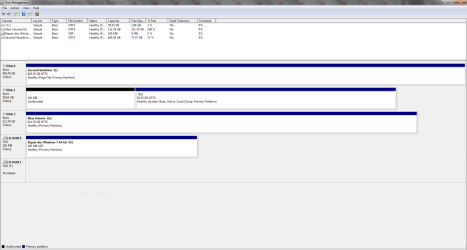
Disk Management:
 

Attachments

  • Capture.PNG
    Capture.PNG
    31.5 KB · Views: 18

My Computer My Computer

OS
Windows 7 x64
BACK UP to an external device NOW, if you suspect its dying, and use it to transfer to the new HDD.
Macrium or Acronis( Complete system)

Roy
 

My Computer My Computer

Computer type
PC/Desktop
Computer Manufacturer/Model Number
medionl/Aspire 6930G/acer x55a
OS
W7 home premium 32bit/W7HP 64bit/w10 tp insider ring
CPU
E5300 dual core
Motherboard
medion MS7366
Memory
3gb
Graphics Card(s)
Nvidia Geforce 7100 Nforce 630i
Monitor(s) Displays
avixc
Internet Speed
n (isp resticted to 72)
Antivirus
mse/pands
Browser
palemoon
Other Info
Belkin Fd7050 n USB using Railink RT2870 drivers, more upto date
Hi Roy,

Thanks for responding.

I managed to borrow my dads external drive.
Downloaded Macrium and proceeded to create a disk image backup, but I was me with 'mft corrupt - error code = 6. please run 'chkdsk /r'

So I ran the chkdsk which seemed to do all kinds of things and took a long time complete.
After that, it restarted and everything loaded. clicked on macrium, but it didn't work, 'reflectbin.exe is not a valid Win32 application.'

I decided then to try Acronis and it almost managed to back up the c:, but was met with 'failed to read data from the disk' with one minute to go.

I have a picture of the options it gave me, not really sure what to do.
 

Attachments

  • Capture.PNG
    Capture.PNG
    41.1 KB · Views: 4

My Computer My Computer

OS
Windows 7 x64
Boot your computer with a Linux USB flash drive. - lubuntu | lightweight, fast, easier
Copy all data to another disk.

Once the data is safe, boot windows and run sfc / scannow.
schedule another check disk chkdsk /r
If it finds bad blocks or bad clusters, your disk is dead.

Reinstall windows on a blank HDD or SSD. Clean Install Windows 7
You can install Win 7 and programs on a 128G SSD and move /Users to a HDD. You'll have the speed of a SSD and space of a HDD - Use Kari tutorial - User Profiles - Create and Move During Windows 7 Installation
 

My Computers My Computers

System One System Two

  • Computer type
    PC/Desktop
    Computer Manufacturer/Model Number
    custom build
    OS
    Windows 7 HP 64
    CPU
    i5 6600K - 800MHz to 4200MHz
    Motherboard
    GA-Z170-HD3P
    Memory
    4+4G GSkill DDR4 3000
    Graphics Card(s)
    IG - Intel 530
    Monitor(s) Displays
    Samsung 226BW
    Screen Resolution
    1680x1050
    Hard Drives
    (1) -1 SM951 – 128GB M.2 AHCI PCIe SSD drive for Windows 7 and Lubuntu
    (2) -1 WD SATA 3 - 1T for Data
    (3) -1 WD SATA 3 - 1T for backup
    PSU
    Thermaltake 450W TR2 gold
    Keyboard
    Old and good Chicony mechanical keyboard
    Mouse
    Logitech mX performance - 9 buttons (had to disable some)
    Internet Speed
    500Mb/s
    Browser
    Firefox 64
    Other Info
    TinyWall firewall
  • Computer type
    Laptop
    System Manufacturer/Model Number
    Asus Q550LF
    OS
    Windows 7 Pro
    CPU
    i7-4500U 800MHz to 3.0GHz
    Motherboard
    Asus Q550LF
    Memory
    (4+4)G DDR3 1600
    Graphics Card(s)
    IG intel 4400 + NVIDIA GeForce GT 745M
    Sound Card
    Realtek
    Monitor(s) Displays
    LG Display LP156WF4-SPH1
    Screen Resolution
    1920 x 1080
    Hard Drives
    BX500 120G SSD for Windows and programs +
    1T HDD for data
    Internet Speed
    500 Mb/s
    Browser
    Firefox
    Other Info
    TinyWall firewall
Hi Megahertz

Ok, well I managed to manually transfer all my important stuff off the failing drive before windows crashed again and I couldn't load it with bluescreens on startup. So I had to repair windows or something. afterwards, Windows finally loaded but drivers were missing and more programs stopped working. Office 2010 was a victim, Acronis too and also I am unable to connect to the internet.
So I tried windows image backup as a last hope and amazingly it worked, I did it for the new HD and the external drive for good measure.

What do you reckon is the next best course of action?

Just a side note, my 2nd hd has allot of stuff like games on it. So depending on what I do next, how would the restore or fresh install process effect this drive?

Thanks for the help so far, this sure is scary situation I'm in.
 

My Computer My Computer

OS
Windows 7 x64
When a disk is dying, the more you stress it, the fast it will go. That's why I recommended you to use another OS on another disk (Linux - USB flash) to save your data.

Buy a 128G SSD and do a clean install. Clean Install Windows 7
On the SSD install Win 7 and programs and use the HDD to store data. Move the \Users folder to the HDD using Kari tutorial. User Profiles - Create and Move During Windows 7 Installation

ALWAYS disconnect all other drives when installing Win 7
 

My Computers My Computers

System One System Two

  • Computer type
    PC/Desktop
    Computer Manufacturer/Model Number
    custom build
    OS
    Windows 7 HP 64
    CPU
    i5 6600K - 800MHz to 4200MHz
    Motherboard
    GA-Z170-HD3P
    Memory
    4+4G GSkill DDR4 3000
    Graphics Card(s)
    IG - Intel 530
    Monitor(s) Displays
    Samsung 226BW
    Screen Resolution
    1680x1050
    Hard Drives
    (1) -1 SM951 – 128GB M.2 AHCI PCIe SSD drive for Windows 7 and Lubuntu
    (2) -1 WD SATA 3 - 1T for Data
    (3) -1 WD SATA 3 - 1T for backup
    PSU
    Thermaltake 450W TR2 gold
    Keyboard
    Old and good Chicony mechanical keyboard
    Mouse
    Logitech mX performance - 9 buttons (had to disable some)
    Internet Speed
    500Mb/s
    Browser
    Firefox 64
    Other Info
    TinyWall firewall
  • Computer type
    Laptop
    System Manufacturer/Model Number
    Asus Q550LF
    OS
    Windows 7 Pro
    CPU
    i7-4500U 800MHz to 3.0GHz
    Motherboard
    Asus Q550LF
    Memory
    (4+4)G DDR3 1600
    Graphics Card(s)
    IG intel 4400 + NVIDIA GeForce GT 745M
    Sound Card
    Realtek
    Monitor(s) Displays
    LG Display LP156WF4-SPH1
    Screen Resolution
    1920 x 1080
    Hard Drives
    BX500 120G SSD for Windows and programs +
    1T HDD for data
    Internet Speed
    500 Mb/s
    Browser
    Firefox
    Other Info
    TinyWall firewall
Dark Eyes. I think most of your problems with your old OS HDD is due to the fact that it is full. In fact your screen shot of Disc Management shows it only has 3% free. Windows needs at least 10% free space to work well. When it gets below that it slows down as it has to juggle files around in the limited space & eventually system failure occurs, such as what you have experienced.

As Megahertz has suggested a 128 gb or a 250 gb SSD is the way to go. You will amazed at how much faster your computer does things.
 

My Computer My Computer

Computer type
PC/Desktop
Computer Manufacturer/Model Number
Self built using existing case
OS
Windows 7 Home Premium 64 bit sp1
CPU
Intel i5 3570 3.4Ghz Ivy Bridge SKT 1155 quad core
Motherboard
Gigabyte Z77-HD3 SKT 1155 2xSata 3, 4x USB 3.0
Memory
G-Skill Rip Jaws 16Gb (8x2) DDR3 -1600 PC3 12800 CL 10 red
Graphics Card(s)
Gigabyte NVIDIA GT610 1Gb DDR3 810/1200 PCI-E 2.0 Silent
Sound Card
NVIDIA High Definition & Realtech High Definition Audio
Monitor(s) Displays
2 x Philips 226V4L 16:9 aspect ratio
Screen Resolution
1920 x 1080 HD
Hard Drives
Samsung 840 Pro 256gb SSD, SATA 3.
Hitachi Touro Portable 1tb, USB 3.0 HDD used for image b/ups.
PSU
Corsair VS450
Case
Codeng
Cooling
PSU fan & CPU fan
Keyboard
Logitech
Mouse
Logitech Wireless trackball M570
Internet Speed
Wireless 3G. 3mg down & 550kb up.
Antivirus
Bitdefender Internet Security 2020
Browser
Opera (Current Version) & Firefox
Other Info
MS Office 2013 Pro. Davis weather station software. MGE Nova 600 avr UPS.
Hi everyone,
I managed to do a fresh install of windows 7 onto a new 128gb ssd as recommended.
Everything works fine, it sure is much faster, now just got to reinstall everything.
And finally I have SP1 version, which I was never able to get due to a windows update problem.

Yeah ranger, good point. I'll make sure to have at least 20gb in hand from now on.

Thanks so much for all your help, I'll check back if I encounter any unforeseen issues to come.
 

My Computer My Computer

OS
Windows 7 x64
Thanks for getting back & glad to hear all seems to be working well now.

Could you please mark the Thread as Solved by clicking on the Green Solved button.
 

My Computer My Computer

Computer type
PC/Desktop
Computer Manufacturer/Model Number
Self built using existing case
OS
Windows 7 Home Premium 64 bit sp1
CPU
Intel i5 3570 3.4Ghz Ivy Bridge SKT 1155 quad core
Motherboard
Gigabyte Z77-HD3 SKT 1155 2xSata 3, 4x USB 3.0
Memory
G-Skill Rip Jaws 16Gb (8x2) DDR3 -1600 PC3 12800 CL 10 red
Graphics Card(s)
Gigabyte NVIDIA GT610 1Gb DDR3 810/1200 PCI-E 2.0 Silent
Sound Card
NVIDIA High Definition & Realtech High Definition Audio
Monitor(s) Displays
2 x Philips 226V4L 16:9 aspect ratio
Screen Resolution
1920 x 1080 HD
Hard Drives
Samsung 840 Pro 256gb SSD, SATA 3.
Hitachi Touro Portable 1tb, USB 3.0 HDD used for image b/ups.
PSU
Corsair VS450
Case
Codeng
Cooling
PSU fan & CPU fan
Keyboard
Logitech
Mouse
Logitech Wireless trackball M570
Internet Speed
Wireless 3G. 3mg down & 550kb up.
Antivirus
Bitdefender Internet Security 2020
Browser
Opera (Current Version) & Firefox
Other Info
MS Office 2013 Pro. Davis weather station software. MGE Nova 600 avr UPS.
Back
Top