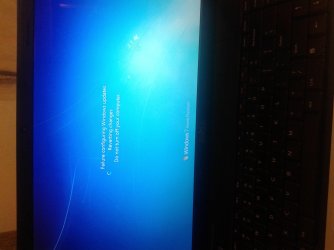
failure configuring updates unable to boot

knche0919

New member
Local time
12:08 AM
Messages
1
I keep getting this (image 2) and I am unable to boot at all if I manage to get to safe mode it immediately pops a screen with the first image and it restarts.Honestly I am not that good with computers but I cant afford to wait a week if i give it to someone :cry:

plese help!
 

Attachments

  • 20140817_212440.jpg
    20140817_212440.jpg
    382.1 KB · Views: 1
  • 1408284532774.jpg
    1408284532774.jpg
    220.5 KB · Views: 0
Last edited:

My Computer

Computer type
Laptop
Computer Manufacturer/Model Number
dell
OS
windows 7 home premium 64
CPU
intel premium
Browser
chrome
Reboot into http://www.sevenforums.com/tutorials/668-system-recovery-options.html preferably on the disk, then run Startup Repair to see what it finds and if can't resolve the issue.

Normally Startup Repair will automate System REstore, but if it doesn't offer to do so then choose System Restore from the Options list to restore to well before the Updates issue occurred. This should set it back to where it was.

Now install Updates in smaller groups. A Restore Point is set before each group so that if it fails you can roll back. Then install each Update singly until you find the one causing the problem, or perhaps it will resolve itself being installed this way.

Do not be afraid of Windows Updates which problems are one in a million. Be sure you enable http://www.sevenforums.com/tutorials/2803-device-installation-settings.html and then install all Important and Optional until there are no more. This is how the first driver-complete OS delivers its latest drivers.
 
Back
Top