Solved Failure to open saved downloads

pappi

Banned
Local time
9:55 PM
Messages
294
Location
Manhattan, New York City
It happened just today.

Before, when I tried to download anything, there were two options: RUN and SAVE. RUN allows instant installation without downloading to download folder....and SAVE allows downloading to a folder of choice (or desktop) for future installation.

Now, the options are: OPEN and SAVE. OPEN does not do anything while SAVE does download to a folder but I cannot open downloaded file. All the ten listed programs to choose from to open file does not open the file. And Windows Explorer is not listed(and I cannot find it with browse option)

I ran full antivirus scan, chkdsk and sfc /scannow scans...all to no avail. I downloaded Microsoft Windows Software Removal Tool from Microsoft Download Center but I cannot open the file. What happened here?
 

My Computer

Computer type
Laptop
Computer Manufacturer/Model Number
HP Pavilion dv7-2173cl Entertainment Notebook PC
OS
W7 pro 32-bit.
Memory
4GB
Graphics Card(s)
ATI Mobility Radeon HD 4650 (M96)
Sound Card
•Altec Lansing with SRS Premium Sound and Sub-Woofer
Monitor(s) Displays
17.3” Diagonal HD+ High-Definition HP LED BrightView W
Screen Resolution
1600 x 900
Hard Drives
500GB (5400RPM)
Keyboard
101-key compatible with full size keyboard
Antivirus
MSE
Browser
IE 11
What file are you trying to download and from where are you downloading it? Is this a Torrent download?
 

My Computer

Computer type
PC/Desktop
OS
Microsoft Windows 7 Home Premium 64-bit 7601 Multiprocessor Free Service Pack 1
CPU
Intel(R) Core(TM) i7-3770 CPU @ 3.40GHz
Motherboard
ASUSTeK COMPUTER INC. P8H77-M
Memory
8.00 GB
Graphics Card(s)
Intel(R) HD Graphics 4000
Sound Card
On Board
Monitor(s) Displays
Dell 24"
Screen Resolution
1920 x 1080
Hard Drives
(1) INTEL SSDSC2CT180A3 ATA Device (2) ST500DM002-1BD142 ATA Device (3) WDC WD3200AAKS-75L9A0 ATA Device (4) Generic- Compact Flash USB Device (5) Generic- MS/MS-Pro USB Device (6) Generic- SD/MMC USB Device (7) Generic- SM/xD-Picture USB
PSU
500w Corsair
Case
Cooler Master
Cooling
3 Fans
Keyboard
Logitech MK300
Mouse
Logitech WOM
Internet Speed
75Mb
Antivirus
Norton 360
Browser
Firefox, Opera, IE
Anything I tried to download can be downloaded(saved) but cannot be installed because I cannot open downloaded files. I tried to download MBAM from both MBAM website and Cnet. I tried to install Microsoft Windows Software Removal Tool from Microsoft Download Center but I could not open the downloaded file. Same with BIOS update (sp54629) from HP download center. I think the installer wizard is corrupt.
 

My Computer

Computer type
Laptop
Computer Manufacturer/Model Number
HP Pavilion dv7-2173cl Entertainment Notebook PC
OS
W7 pro 32-bit.
Memory
4GB
Graphics Card(s)
ATI Mobility Radeon HD 4650 (M96)
Sound Card
•Altec Lansing with SRS Premium Sound and Sub-Woofer
Monitor(s) Displays
17.3” Diagonal HD+ High-Definition HP LED BrightView W
Screen Resolution
1600 x 900
Hard Drives
500GB (5400RPM)
Keyboard
101-key compatible with full size keyboard
Antivirus
MSE
Browser
IE 11
Hi,
Is Cnet a usual place to download stuff ?
If so you most like got a bunch of stuff you didn't really want,
Review Jacee’s instructions to run Adwcleaner here on post#7,
Ignore the title of the thread,
http://www.sevenforums.com/system-security/316404-instant-savings-app.html
Or download it from bleepingcomputer.com
Screen shot of the download button to use for Adwcleaner
http://www.bleepingcomputer.com/download/adwcleaner/
Use Safe mode with networking if need be,
Post the scan results,
Shut down your machine,
Power up and Tap the F8 key continuously until you see a black page with white text,
Use the down arrow key to toggle to safe mode with networking/ hit the enter key.
Login as usual
Other advanced methods,
http://www.sevenforums.com/tutorials/69585-safe-mode.html
http://windows.microsoft.com/en-US/windows7/Advanced-startup-options-including-safe-mode
 

My Computer

Computer type
PC/Desktop
Computer Manufacturer/Model Number
Custom assembled by me :}
OS
Win-7-Pro64bit 7-H-Prem-64bit
CPU
i7-5930K 2nd i9-9940x both water blocked VRM's too
Motherboard
ASUS SABERTOOTH X99 2nd ASUS x299 Apex
Memory
Trident-z 3200C14 2nd Trident-z 3600C16
Graphics Card(s)
EVGA 1080ti ftw3 2nd Titan Xp both water blocked
Sound Card
Built-in Realtek
Monitor(s) Displays
1-AOC G2460PG 24"G-Sync 144Hz/ 2nd 1-ASUS VG248QE 24" 144Hz
Screen Resolution
1920 x 1080 144Hz
Hard Drives
2-Samsung M.2 Evo & Evo Plus
2-Samsung 850 EVO 500GB SSD's/ 3-2.5 W.D. Black 1tb-&3-1tb/3-3.5 WD Black 1tb hdd's
PSU
EVGA SuperNOVA 1000-P2 2nd 1200-P2
Case
2-Corsair Obsidian Series 450D Black ATX Mid Tower
Cooling
Custom water loops
Keyboard
Logitech G710+/ 2nd Logitech G910
Mouse
2-RedDragon M901 Perdition 16400 dpi Gaming mouse = wired
Internet Speed
Comcast Ping 19ms 89.31mbps download speed 6.12mbps upload
Antivirus
Malwarebytes Pro/ Superantispyware Pro
Browser
FireFox & Pale moon
Other Info
2nd ASUS X299 Apex/Intel i9-9940x with Custom water loop/7H-Prem-x64/Corsair 450D case/Ram Trident-z 3600C16 4x8gb / Samsung970Evo plus 500gb SSD/Dual ssd EZ swap evo/PSU EVGA SuperNova 1200w-P2 80+Platinum/GPU Titan Xp /8-ML-140 on push-pull on 2-280GTX rads
The only reason I went to Cnet was because I could not install it from MBAM site.

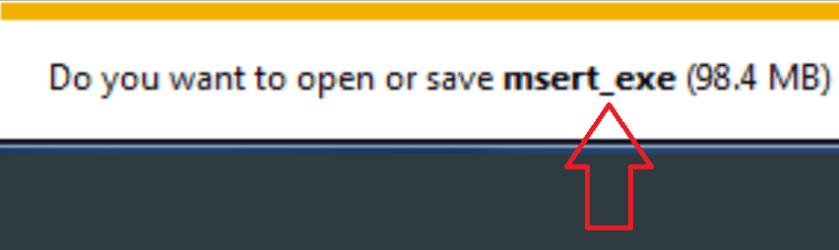
This notice is also just today. It replaced the RUN or SAVE options.

Capturedoyouwanttoopenorsave.PNG

This appears at the bottom of window while I am trying to install Microsoft safety scanner
 

My Computer

Computer type
Laptop
Computer Manufacturer/Model Number
HP Pavilion dv7-2173cl Entertainment Notebook PC
OS
W7 pro 32-bit.
Memory
4GB
Graphics Card(s)
ATI Mobility Radeon HD 4650 (M96)
Sound Card
•Altec Lansing with SRS Premium Sound and Sub-Woofer
Monitor(s) Displays
17.3” Diagonal HD+ High-Definition HP LED BrightView W
Screen Resolution
1600 x 900
Hard Drives
500GB (5400RPM)
Keyboard
101-key compatible with full size keyboard
Antivirus
MSE
Browser
IE 11
Hi,
Adding Cnet to the mix of an existing issue wouldn't help your cause much,
I made this in case it might come in handy,
It's for a .reg file from this site but the process is the same for Adwcleaner as well,
Use this method to download Adwcleaner,
Adwcleaner download process
Click the image to enlarge it,
Cheers.
mabm all you would need to do is use Open or save and run as admin from the Downloads folder.
 

My Computer

Computer type
PC/Desktop
Computer Manufacturer/Model Number
Custom assembled by me :}
OS
Win-7-Pro64bit 7-H-Prem-64bit
CPU
i7-5930K 2nd i9-9940x both water blocked VRM's too
Motherboard
ASUS SABERTOOTH X99 2nd ASUS x299 Apex
Memory
Trident-z 3200C14 2nd Trident-z 3600C16
Graphics Card(s)
EVGA 1080ti ftw3 2nd Titan Xp both water blocked
Sound Card
Built-in Realtek
Monitor(s) Displays
1-AOC G2460PG 24"G-Sync 144Hz/ 2nd 1-ASUS VG248QE 24" 144Hz
Screen Resolution
1920 x 1080 144Hz
Hard Drives
2-Samsung M.2 Evo & Evo Plus
2-Samsung 850 EVO 500GB SSD's/ 3-2.5 W.D. Black 1tb-&3-1tb/3-3.5 WD Black 1tb hdd's
PSU
EVGA SuperNOVA 1000-P2 2nd 1200-P2
Case
2-Corsair Obsidian Series 450D Black ATX Mid Tower
Cooling
Custom water loops
Keyboard
Logitech G710+/ 2nd Logitech G910
Mouse
2-RedDragon M901 Perdition 16400 dpi Gaming mouse = wired
Internet Speed
Comcast Ping 19ms 89.31mbps download speed 6.12mbps upload
Antivirus
Malwarebytes Pro/ Superantispyware Pro
Browser
FireFox & Pale moon
Other Info
2nd ASUS X299 Apex/Intel i9-9940x with Custom water loop/7H-Prem-x64/Corsair 450D case/Ram Trident-z 3600C16 4x8gb / Samsung970Evo plus 500gb SSD/Dual ssd EZ swap evo/PSU EVGA SuperNova 1200w-P2 80+Platinum/GPU Titan Xp /8-ML-140 on push-pull on 2-280GTX rads
Two things: Run option is missing and right clicking does not show option Run as administrator.

Things I had done to try solve problems(all to no avail): Several sfc /scannow(Thrice) and chkdsk(twice) scans, MBAM(thrice), MSE(twice), adwcleaner(twice), Microsoft safety scanner(once), reset IE 11, installation of newest IE 11 version.

BTW, what program is supposed to open these saved downloads? And why RUN went AWOL?

The fact that RUN shows in safe mode suggests programs conflict. I am really hoping I do not have to do clean startup. Is anyone in the mood to do remote clean startup?
 

My Computer

Computer type
Laptop
Computer Manufacturer/Model Number
HP Pavilion dv7-2173cl Entertainment Notebook PC
OS
W7 pro 32-bit.
Memory
4GB
Graphics Card(s)
ATI Mobility Radeon HD 4650 (M96)
Sound Card
•Altec Lansing with SRS Premium Sound and Sub-Woofer
Monitor(s) Displays
17.3” Diagonal HD+ High-Definition HP LED BrightView W
Screen Resolution
1600 x 900
Hard Drives
500GB (5400RPM)
Keyboard
101-key compatible with full size keyboard
Antivirus
MSE
Browser
IE 11
edit: when I read this:
...right clicking does not show option Run as administrator.
I figured that the OP might have set the UAC to off and was logged on as admin. But, once I noticed that the file had an underscore where the period should be, that also explains the absence of the Run as admin... option from Explorer's context menu.

It still won't hurt the discussion to answer these questions:

What level is your User Account Control set to?

Are you logged in using an administrator or standard account?

When you reset IE11, did you Delete personal settings?

1973d1230708731-internet-explorer-reset-reset.jpg
 
Last edited:

My Computer

Computer type
Laptop
Computer Manufacturer/Model Number
Employer provided Dell Latitude
OS
W7 Pro SP1 64bit
CPU
i7
Memory
8GB
Graphics Card(s)
Intel HD Graphics
Hard Drives
crappy SSD
Antivirus
Employer mandated Symantec Endpoint Protection
Browser
Pale Moon 64bit, IE11 64bit & Chrome 64bit
Thanks for returning this thread,
Please respond to UserNameissue's inquiries,
Then lets see what is listed here,
Click the start button and type in the search box,
msconfig
Hit the Enter key or click on the suggestion that appears,
Go to the Startup section and take some screen shots for a complete list,
Then go to the Services section,
On the bottom left Check the box to Hide all Microsoft services,
Then repeat the screen shots,
See the links above my sig if you need any help with the processes to take and upload screen shots,
Cheers.
 

My Computer

Computer type
PC/Desktop
Computer Manufacturer/Model Number
Custom assembled by me :}
OS
Win-7-Pro64bit 7-H-Prem-64bit
CPU
i7-5930K 2nd i9-9940x both water blocked VRM's too
Motherboard
ASUS SABERTOOTH X99 2nd ASUS x299 Apex
Memory
Trident-z 3200C14 2nd Trident-z 3600C16
Graphics Card(s)
EVGA 1080ti ftw3 2nd Titan Xp both water blocked
Sound Card
Built-in Realtek
Monitor(s) Displays
1-AOC G2460PG 24"G-Sync 144Hz/ 2nd 1-ASUS VG248QE 24" 144Hz
Screen Resolution
1920 x 1080 144Hz
Hard Drives
2-Samsung M.2 Evo & Evo Plus
2-Samsung 850 EVO 500GB SSD's/ 3-2.5 W.D. Black 1tb-&3-1tb/3-3.5 WD Black 1tb hdd's
PSU
EVGA SuperNOVA 1000-P2 2nd 1200-P2
Case
2-Corsair Obsidian Series 450D Black ATX Mid Tower
Cooling
Custom water loops
Keyboard
Logitech G710+/ 2nd Logitech G910
Mouse
2-RedDragon M901 Perdition 16400 dpi Gaming mouse = wired
Internet Speed
Comcast Ping 19ms 89.31mbps download speed 6.12mbps upload
Antivirus
Malwarebytes Pro/ Superantispyware Pro
Browser
FireFox & Pale moon
Other Info
2nd ASUS X299 Apex/Intel i9-9940x with Custom water loop/7H-Prem-x64/Corsair 450D case/Ram Trident-z 3600C16 4x8gb / Samsung970Evo plus 500gb SSD/Dual ssd EZ swap evo/PSU EVGA SuperNova 1200w-P2 80+Platinum/GPU Titan Xp /8-ML-140 on push-pull on 2-280GTX rads
This is what I see with IE11:

IE11-2.png


This is what you see:

IE11-3.png

Open is normal when the object handler is undefined.

Now - how to fix your issue???
 
Last edited:

My Computer

Computer type
Laptop
Computer Manufacturer/Model Number
Employer provided Dell Latitude
OS
W7 Pro SP1 64bit
CPU
i7
Memory
8GB
Graphics Card(s)
Intel HD Graphics
Hard Drives
crappy SSD
Antivirus
Employer mandated Symantec Endpoint Protection
Browser
Pale Moon 64bit, IE11 64bit & Chrome 64bit
No, I did not delete personal settings. I always use administrator account when tweaking. UAC setting is default(always notify).
 

My Computer

Computer type
Laptop
Computer Manufacturer/Model Number
HP Pavilion dv7-2173cl Entertainment Notebook PC
OS
W7 pro 32-bit.
Memory
4GB
Graphics Card(s)
ATI Mobility Radeon HD 4650 (M96)
Sound Card
•Altec Lansing with SRS Premium Sound and Sub-Woofer
Monitor(s) Displays
17.3” Diagonal HD+ High-Definition HP LED BrightView W
Screen Resolution
1600 x 900
Hard Drives
500GB (5400RPM)
Keyboard
101-key compatible with full size keyboard
Antivirus
MSE
Browser
IE 11

My Computer

Computer type
Laptop
Computer Manufacturer/Model Number
Employer provided Dell Latitude
OS
W7 Pro SP1 64bit
CPU
i7
Memory
8GB
Graphics Card(s)
Intel HD Graphics
Hard Drives
crappy SSD
Antivirus
Employer mandated Symantec Endpoint Protection
Browser
Pale Moon 64bit, IE11 64bit & Chrome 64bit

My Computer

Computer type
Laptop
Computer Manufacturer/Model Number
Employer provided Dell Latitude
OS
W7 Pro SP1 64bit
CPU
i7
Memory
8GB
Graphics Card(s)
Intel HD Graphics
Hard Drives
crappy SSD
Antivirus
Employer mandated Symantec Endpoint Protection
Browser
Pale Moon 64bit, IE11 64bit & Chrome 64bit
This has happened to others (as detailed in other forums).

Some have reported that files download normally in the safe mode with networking
(suggested in post 4 of this thread).

If file download normally in the safe mode with networking, then that puts us back to the clean boot
(suggested in post 9 of this thread).
 

My Computer

Computer type
Laptop
Computer Manufacturer/Model Number
Employer provided Dell Latitude
OS
W7 Pro SP1 64bit
CPU
i7
Memory
8GB
Graphics Card(s)
Intel HD Graphics
Hard Drives
crappy SSD
Antivirus
Employer mandated Symantec Endpoint Protection
Browser
Pale Moon 64bit, IE11 64bit & Chrome 64bit
File extension is set to default: Hide
 

My Computer

Computer type
Laptop
Computer Manufacturer/Model Number
HP Pavilion dv7-2173cl Entertainment Notebook PC
OS
W7 pro 32-bit.
Memory
4GB
Graphics Card(s)
ATI Mobility Radeon HD 4650 (M96)
Sound Card
•Altec Lansing with SRS Premium Sound and Sub-Woofer
Monitor(s) Displays
17.3” Diagonal HD+ High-Definition HP LED BrightView W
Screen Resolution
1600 x 900
Hard Drives
500GB (5400RPM)
Keyboard
101-key compatible with full size keyboard
Antivirus
MSE
Browser
IE 11

My Computer

Computer type
Laptop
Computer Manufacturer/Model Number
Employer provided Dell Latitude
OS
W7 Pro SP1 64bit
CPU
i7
Memory
8GB
Graphics Card(s)
Intel HD Graphics
Hard Drives
crappy SSD
Antivirus
Employer mandated Symantec Endpoint Protection
Browser
Pale Moon 64bit, IE11 64bit & Chrome 64bit
I set it now to NOT HIDE(there is no Show option). I downloaded to desktop. Right clicking icon on desktop does not show run as admn option. I unblocked....after this, the only relevant option is OPEN. And then it shows ten programs to open it and not one opens...wrong file for the program. I need to find the RUN option.
 

My Computer

Computer type
Laptop
Computer Manufacturer/Model Number
HP Pavilion dv7-2173cl Entertainment Notebook PC
OS
W7 pro 32-bit.
Memory
4GB
Graphics Card(s)
ATI Mobility Radeon HD 4650 (M96)
Sound Card
•Altec Lansing with SRS Premium Sound and Sub-Woofer
Monitor(s) Displays
17.3” Diagonal HD+ High-Definition HP LED BrightView W
Screen Resolution
1600 x 900
Hard Drives
500GB (5400RPM)
Keyboard
101-key compatible with full size keyboard
Antivirus
MSE
Browser
IE 11
What is the full name of the file that you want to run?

Also, did you do each of the things suggested in he previous posts?
 

My Computer

Computer type
Laptop
Computer Manufacturer/Model Number
Employer provided Dell Latitude
OS
W7 Pro SP1 64bit
CPU
i7
Memory
8GB
Graphics Card(s)
Intel HD Graphics
Hard Drives
crappy SSD
Antivirus
Employer mandated Symantec Endpoint Protection
Browser
Pale Moon 64bit, IE11 64bit & Chrome 64bit
Any file that can be downloaded can be saved to a folder or desktop. But because the only options are OPEN and Save or Save as, (RUN and Run as admn on right click are missing) any saved file is not installable.

Everything suggested in this thread has been done except any step of clean startup process (post # 9) which I had done a few times in the past.
 

My Computer

Computer type
Laptop
Computer Manufacturer/Model Number
HP Pavilion dv7-2173cl Entertainment Notebook PC
OS
W7 pro 32-bit.
Memory
4GB
Graphics Card(s)
ATI Mobility Radeon HD 4650 (M96)
Sound Card
•Altec Lansing with SRS Premium Sound and Sub-Woofer
Monitor(s) Displays
17.3” Diagonal HD+ High-Definition HP LED BrightView W
Screen Resolution
1600 x 900
Hard Drives
500GB (5400RPM)
Keyboard
101-key compatible with full size keyboard
Antivirus
MSE
Browser
IE 11
What is the name of one of the files that you cannot run?
 

My Computer

Computer type
Laptop
Computer Manufacturer/Model Number
Employer provided Dell Latitude
OS
W7 Pro SP1 64bit
CPU
i7
Memory
8GB
Graphics Card(s)
Intel HD Graphics
Hard Drives
crappy SSD
Antivirus
Employer mandated Symantec Endpoint Protection
Browser
Pale Moon 64bit, IE11 64bit & Chrome 64bit
Back
Top