So I reinstalled Windows 7 after I was having some trouble before, and it's been about a week or so but I've noticed my computer is always hot, fans working full speed most times, and this was not during me playing some game or anything. I had simply left the computer on while I was stretching my bad back. I should also note that since couple of days ago I created a second account on my computer because I read somewhere that using admin account is risky. And because I don't want to get the virus or whatever that cause me to go through HELL with Dell and reinstall Windows and everything on it again, I decided to be safe and have two accounts, standard and admin.
Anyhow, so I went Ctrl+Alt+Del, and first off I see TWO firefox.exe processes in Task Manager with different usages. I didn't know if this was related to my other account but I stopped both. I also saw TWO nvtray.exe processes two and I couldn't figure out what's going on so closed both as well. These were the ones using up most memory, one of the firefox exe using close to 2 GB of memory while the other one was like 80mb or something, and each Nvtray was using about 600mb.
Anyhow, I found a website Tech ARP - ED#152 : The NVIDIA Control Panel Memory Leak Problem that mentions Nvtray is NVIDIA related and that it's possible it's leaking memory. I tried the method of unchecking "show notification tray icon" in NVIDIA control panel. Then I decided to put it check there again ten minutes later because I do need graphic card, don't I?
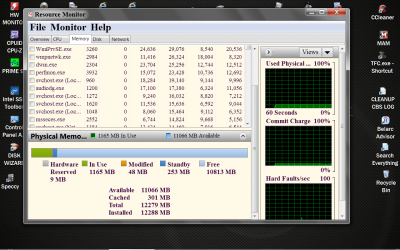
So I did and once again brought up task manager. I also reopened Firefox. At this point there was only one firefox there, called firefox.exe*32 and one nvtray.exe. So far so good. I had four tabs open and FF usage was about 300mb. NVIDIA was only 8mb. But checked it again in ten minutes and now it's 30MB! I had not started a game, done nothing different. So it's leaking for sure. I went to Resource Monitor and memory button this is what I have: (The first number is the commit, second is the working set, then shareable, then private memory)
Nvtray.exe (809mb, 446mb, 3mb, 443mb)
firefox.exe (373mb, 380mb, 68mb, 312mb)
svchost.exe (182mb, 154mb, 7mb, 146mb)
explorer.exe (108mb, 88mb, 30mb, 58mb)
Below it is dwm.exe and another explorer.exe, two more svchost.exe, perfmon.exe, nvtray.exe...again!
What is going on? I need you help. Thank you very much.
Keep in mind this computer is less than one year old and that Windows 7 was reinstalled about a week ago so I'm not running anything crazy on it.
Anyhow, so I went Ctrl+Alt+Del, and first off I see TWO firefox.exe processes in Task Manager with different usages. I didn't know if this was related to my other account but I stopped both. I also saw TWO nvtray.exe processes two and I couldn't figure out what's going on so closed both as well. These were the ones using up most memory, one of the firefox exe using close to 2 GB of memory while the other one was like 80mb or something, and each Nvtray was using about 600mb.
Anyhow, I found a website Tech ARP - ED#152 : The NVIDIA Control Panel Memory Leak Problem that mentions Nvtray is NVIDIA related and that it's possible it's leaking memory. I tried the method of unchecking "show notification tray icon" in NVIDIA control panel. Then I decided to put it check there again ten minutes later because I do need graphic card, don't I?
So I did and once again brought up task manager. I also reopened Firefox. At this point there was only one firefox there, called firefox.exe*32 and one nvtray.exe. So far so good. I had four tabs open and FF usage was about 300mb. NVIDIA was only 8mb. But checked it again in ten minutes and now it's 30MB! I had not started a game, done nothing different. So it's leaking for sure. I went to Resource Monitor and memory button this is what I have: (The first number is the commit, second is the working set, then shareable, then private memory)
Nvtray.exe (809mb, 446mb, 3mb, 443mb)
firefox.exe (373mb, 380mb, 68mb, 312mb)
svchost.exe (182mb, 154mb, 7mb, 146mb)
explorer.exe (108mb, 88mb, 30mb, 58mb)
Below it is dwm.exe and another explorer.exe, two more svchost.exe, perfmon.exe, nvtray.exe...again!
What is going on? I need you help. Thank you very much.
Keep in mind this computer is less than one year old and that Windows 7 was reinstalled about a week ago so I'm not running anything crazy on it.
My Computer
At a glance
Windows 7 64 bit
- Computer type
- Laptop
- OS
- Windows 7 64 bit