Fake nvidia geforce gt 630

yelsin

New member
Local time
2:41 AM
Messages
3
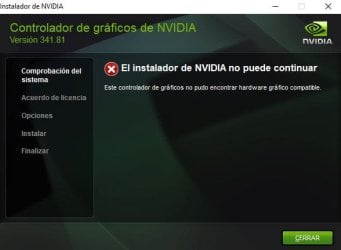
Hello, good night, I don't know what to do, no driver recognizes me this card that I bought second-hand due to inexperience, I did not know that it was a fake card. from nvidia won't let me use them because I get error 43 in device manager on display adapter and some drivers say they are incompatible, the only driver that works is 340.52. If you are so kind to help me, I would be grateful

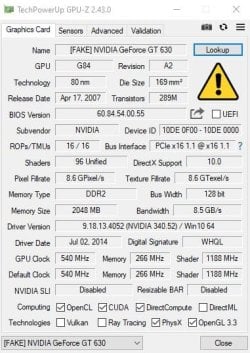
This is what I got with it Gpu-z


i need to know what video card i actually have in order to download the proper driver
1.JPG 2.JPG

THANKS
 
Last edited:

My Computers

System One System Two

  • Computer type
    PC/Desktop
    Computer Manufacturer/Model Number
    intel
    OS
    win 10 pro 64bit
    CPU
    i3 2120 3.30ghz
    Motherboard
    1155
    Memory
    6gb
    Hard Drives
    hhdd
  • Computer type
    PC/Desktop
This card has reared its ugly head before, i posted about it 6 years ago, its definately a fake based on a gt8800 or gt8600 card, you could try the driver for that. your other option go back to the seller try and get a refund

note W10 uses a driver enforce policy, you may have to dissable this to allow the driver to be installed, using an Elevated command prompt -
bcdedit.exe /set nointegritychecks on
This is the Windows 7 forum, as your running W10, please use our sister forum if you have anymore issues
Windows 10 Help Forums
 
Last edited:

My Computer

Computer type
PC/Desktop
Computer Manufacturer/Model Number
medionl/Aspire 6930G/acer x55a
OS
W7 home premium 32bit/W7HP 64bit/w10 tp insider ring
CPU
E5300 dual core
Motherboard
medion MS7366
Memory
3gb
Graphics Card(s)
Nvidia Geforce 7100 Nforce 630i
Monitor(s) Displays
avixc
Internet Speed
n (isp resticted to 72)
Antivirus
mse/pands
Browser
palemoon
Other Info
Belkin Fd7050 n USB using Railink RT2870 drivers, more upto date
yelsin:

Go into the Device Manager, then expand the Display Adapters heading.
What is the exact name of the graphic device listed there?

Double-click that graphic device to open its properties window, then click the "Details" tab, then select "Hardware Ids" in the drop-down list.
What are the exact 4-character codes that follow VEN_ and DEV_ in those strings?

Note: If that graphic device does have a NVIDIA chip, the vendor code should be 10DE.
 

My Computer

Computer type
PC/Desktop
Computer Manufacturer/Model Number
Dell OptiPlex 9020
OS
Windows 7 Professional SP1 64-bit
CPU
Intel Core i7-4790 3.60 GHz
Memory
32 GB DDR3-1600 MHz
Graphics Card(s)
Integrated Intel HD Graphics 4600
Monitor(s) Displays
Viewsonic 32" LCD
Hard Drives
Kingston SATA 3 240 GB SSD
Internet Speed
Spectrum Internet 1000 Mbps
it is a 10de, look at left hand screenshot, the more important indentitier is 00F0, which relates to the card i mentioned, not the gt630 he has
 

My Computer

Computer type
PC/Desktop
Computer Manufacturer/Model Number
medionl/Aspire 6930G/acer x55a
OS
W7 home premium 32bit/W7HP 64bit/w10 tp insider ring
CPU
E5300 dual core
Motherboard
medion MS7366
Memory
3gb
Graphics Card(s)
Nvidia Geforce 7100 Nforce 630i
Monitor(s) Displays
avixc
Internet Speed
n (isp resticted to 72)
Antivirus
mse/pands
Browser
palemoon
Other Info
Belkin Fd7050 n USB using Railink RT2870 drivers, more upto date
Before I submitted my comments, I did a search for VEN_10DE&DEV_00F0 at the Microsoft Update Catalog site, and it came back "not found".
I later did a Google search of those vendor and device codes, and it identified that graphic device as a NVIDIA GeForce GT 630.
You are correct.
 

My Computer

Computer type
PC/Desktop
Computer Manufacturer/Model Number
Dell OptiPlex 9020
OS
Windows 7 Professional SP1 64-bit
CPU
Intel Core i7-4790 3.60 GHz
Memory
32 GB DDR3-1600 MHz
Graphics Card(s)
Integrated Intel HD Graphics 4600
Monitor(s) Displays
Viewsonic 32" LCD
Hard Drives
Kingston SATA 3 240 GB SSD
Internet Speed
Spectrum Internet 1000 Mbps

My Computer

Computer type
PC/Desktop
Computer Manufacturer/Model Number
medionl/Aspire 6930G/acer x55a
OS
W7 home premium 32bit/W7HP 64bit/w10 tp insider ring
CPU
E5300 dual core
Motherboard
medion MS7366
Memory
3gb
Graphics Card(s)
Nvidia Geforce 7100 Nforce 630i
Monitor(s) Displays
avixc
Internet Speed
n (isp resticted to 72)
Antivirus
mse/pands
Browser
palemoon
Other Info
Belkin Fd7050 n USB using Railink RT2870 drivers, more upto date

My Computers

System One System Two

  • Computer type
    PC/Desktop
    Computer Manufacturer/Model Number
    intel
    OS
    win 10 pro 64bit
    CPU
    i3 2120 3.30ghz
    Motherboard
    1155
    Memory
    6gb
    Hard Drives
    hhdd
  • Computer type
    PC/Desktop
Hi

You need to get the driver for the gt8800/gt8600, unlikely theres a w10 version, and follow the instructions in my first reply
 

My Computer

Computer type
PC/Desktop
Computer Manufacturer/Model Number
medionl/Aspire 6930G/acer x55a
OS
W7 home premium 32bit/W7HP 64bit/w10 tp insider ring
CPU
E5300 dual core
Motherboard
medion MS7366
Memory
3gb
Graphics Card(s)
Nvidia Geforce 7100 Nforce 630i
Monitor(s) Displays
avixc
Internet Speed
n (isp resticted to 72)
Antivirus
mse/pands
Browser
palemoon
Other Info
Belkin Fd7050 n USB using Railink RT2870 drivers, more upto date
Hi

You need to get the driver for the gt8800/gt8600, unlikely theres a w10 version, and follow the instructions in my first reply


Hi, I followed the steps that you gave me with the command cmd -> bcdedit.exe / set nointegritychecks on restart the computer, and download the 8600 gt driver and it says that the driver is not compatible, so now if I don't know what to do


2342432.JPG
I have version 340.52 which is the only driver version that works for me
 

My Computers

System One System Two

  • Computer type
    PC/Desktop
    Computer Manufacturer/Model Number
    intel
    OS
    win 10 pro 64bit
    CPU
    i3 2120 3.30ghz
    Motherboard
    1155
    Memory
    6gb
    Hard Drives
    hhdd
  • Computer type
    PC/Desktop
try the gt8800, if that doesn't work, im sorry but theres nothing more you can do but buy a genuine version
 

My Computer

Computer type
PC/Desktop
Computer Manufacturer/Model Number
medionl/Aspire 6930G/acer x55a
OS
W7 home premium 32bit/W7HP 64bit/w10 tp insider ring
CPU
E5300 dual core
Motherboard
medion MS7366
Memory
3gb
Graphics Card(s)
Nvidia Geforce 7100 Nforce 630i
Monitor(s) Displays
avixc
Internet Speed
n (isp resticted to 72)
Antivirus
mse/pands
Browser
palemoon
Other Info
Belkin Fd7050 n USB using Railink RT2870 drivers, more upto date
Use Aida64 or Speccy to identify the GPU. Then download latest drivers from nVidia. Open the file with WinRAR or similar utility and extract the files to a folder. Open Control Panel, Device Manager, Display adapters, right-click on the card, select Update driver, select second option, again select second option. Now click on have disk and browse into the folder until you find the display driver. Open the .INF file and you should see a list of graphics adapters. Locate the first entry of your card (such as GT 630) and proceed. Windows will warn you that the driver might not match, proceed anyway. Restart the computer and then open Device Manager again to check if the Display adapter is OK.
 

My Computer

Computer type
PC/Desktop
Computer Manufacturer/Model Number
custom
OS
Windows 7 Ultimate 64-bit (now 11 24H2)
CPU
Intel Core-i3 3770 3.5GHz
Motherboard
Asus P8H61
Memory
16GB DDR3 1600Mhz
Graphics Card(s)
nVidia Geforce RTX 3050
Sound Card
Realtek HD audio
Monitor(s) Displays
Sony 19" LCD TV via VGA
Screen Resolution
1440x900
Hard Drives
WD 1TB SATA III SSD
PSU
unknown
Case
unknown
Cooling
Intel's provided with CPU
Antivirus
Windows Defender (Windows 11)
Browser
Microsoft Edge
Other Info
Previously Windows 7 Ultimate, now Windows 11 24H2
Back
Top