Fallout 3 on Windows 7.

Fallout 3 randomly crashes for me on Windows 7. Doesn't matter too much though, as I still like the originals much more.
 

My Computer My Computer

Computer Manufacturer/Model Number
Me
OS
Windows 7 32-bit
CPU
AMD Phenom Quad Core 9750 2.4GHz
Motherboard
ASUS M4A785-M
Memory
Corsair XMS2 4GB(2x2GB) DDR2
Graphics Card(s)
XFX ATi Radeon HD 4350 1GB DDR3
Screen Resolution
1024x768
Hard Drives
Seagate Barracuda 750GB
PSU
Ultra 650W Power Supply
Case
NZXT Tempest
Cooling
6 Case Fans(2x140mm,3x120mm,1x80mm)

My Computer My Computer

Computer type
PC/Desktop
Computer Manufacturer/Model Number
Custom built by me.
OS
Windows 10 Pro
CPU
Intel Core i7-4770K (3.5Ghz)
Motherboard
Gigabyte G1 Sniper 5 (F10 Bios)
Memory
32 gig Corsair Dominator Platinum (4x8Gig)
Graphics Card(s)
Sapphire Tri-X R9 Fury
Sound Card
Soundblaster ZXR
Monitor(s) Displays
NEC PA242W 24" LCD Monitor
Screen Resolution
1920 x 1200
Hard Drives
Primary - Samsung 850 Pro (512gig), Samsung 840 Pro (256gig), 2TB WD Caviar Black.
PSU
EVGA Supernova 1000 G2
Case
Cooler Master HAF X
Cooling
Corsair H100i with Corsair Air Series SP120 Quiet Fans
Keyboard
Logitech Wireless Wave
Mouse
Logitech Performance MX
Internet Speed
High Speed Cable
Antivirus
Norton Security
Browser
IE11
Other Info
Memory Timings - 1866MHz @ 9-9-9-27-1T @ 1.5 volts
sooo.. all permissions were verified, and I removed the xp compatibility mode to ensure I was operating under the same environment as before.

if I directly click on fallout3.exe, no issues. directly double click on falloutlauncher.exe (so I can tweak video settings and so on).. no issues.

If I use steam to start the game and run fallout3 launcher... fail.

that's a bad steam. a very bad steam!

create a shortcut to falloutlauncher.exe to bypass steam and run the launcher and thus the game = flawless victory.
 

My Computer My Computer

OS
Windows 7 Professional x64
CPU
AMD Phenom II x4 955 Black Edition 3.2 GHz
Motherboard
Asus Crosshair III
Memory
Corsair 4GB XMS3-1333 DHX
Graphics Card(s)
2x XFX Radeon HD 4870 1GB
Sound Card
SupremeFX X-Fi onboard sound
Monitor(s) Displays
Samsung 205BW
Screen Resolution
1680 x 1050
Hard Drives
many
PSU
Corsair 850w
Case
Antec Nine hundred Gamer
Cooling
standard + Arctic Cooling Freezer 7 Pro Rev.2 CPU Cooler
Keyboard
Microsoft Reclusa
Mouse
Logitech MX 518 Gaming-Grade Optical Mouse
The anti-stutter plug in and quick exit plug ins are excellent for Fallout and Oblivion as well.

You need the script extender however (FOSE). It does work with Steam copies.

If you have a D2D version however, it will not & never will.
 

My Computer My Computer

Computer Manufacturer/Model Number
Custom (Self Build)
OS
Windows 7 Home Premium 64bit
CPU
Intel Core i7 2700k
Motherboard
eVGA P67 SLI
Memory
8GB Mushkin Redline Ridgebacks @1866
Graphics Card(s)
EVGA GTX570 SC
Sound Card
XiFi Titanium HD
Monitor(s) Displays
LG W2453V
Screen Resolution
1920x1080
Hard Drives
Intel 320 80GB -- Intel X25-V 40GB --WD Black 1TB x2 -- WD Blue 640GB
PSU
Seasonic x750
Case
Corsair 600T SE White
Cooling
eVGA Superclocked CPU Cooler
Keyboard
Saitek Cyborg
Antivirus
Kaspersky
Browser
IE
Other Info
LG BD/DVD
Well, it's working on my Windows 7 Home Basic. ;)
 

Attachments

  • elsuirad1.gif
    elsuirad1.gif
    58.6 KB · Views: 1,774

My Computer My Computer

Computer Manufacturer/Model Number
SONY VAIO Laptop
OS
Windows® 7 Home Basic 64bit, Build 7600
CPU
Inter Core 2 Duo CPU T6600 @ 2.20GHz
Memory
4GB
Graphics Card(s)
nVidia GeForce G210M
Sound Card
Realtek HD Integrated Audio
Monitor(s) Displays
LG TV-1 (NVIDIA High Definition Audio)
Screen Resolution
1366 x 768 (Wide)
Hard Drives
320GB HDD - Internal
360GB - External
500GB (x2) - External
1TB - External
PSU
Internal
Keyboard
Integrated
Mouse
Synaptic Keypad & A4tech Cordless MOuse
Internet Speed
LAN, T1
Other Info
A4tech Analog Joypad
Oh no, another Windows 7 CO3 post! :(

Hello everyone,

Firstly my apologies for yet another Windows 7 crash, I have been following this thread with interest and held back from posting until I believe I had tried everything but its still not playing ball. Sadly I have never been able to get FO3 to run successfully.

The problem is typical of many others, click new game and Fallout crashes to black screen and desktop.

The game is Fallout 3 - GOTY Edition, bought via Steam and upgraded.

Things I have tried:

# Running Fallout.exe in various compatibility modes, currently as Windows Vista
# Disabled desktop composition
# I don't have any off the wall codec packs installed
# Disabled UAC
# ini hacks for multi core processors
# Disabled / upgraded sound drivers and devices
# Upgraded ATI GPU drivers
# Running the game in windowed mode / low res etc
# Upgraded GFWL and logged in successfully
# De-installed a number of bloatware items that came with my machine that might be causing issue (HP Media stuff mostly)
# Running the prog "InstalledCodecs" and disabling the all
# Putting the desktop into basic theme
# Deleting ini files and letting FO3 rebuild
# Downloading again and reinstalling
# Launching the game directly (not via steam)

Thank you for taking the time to read this, I don't hold out much hope as I believe I have tried anything but hopefully I have missed something. Its also good to post these things as maybe something I have tried will help others.


64bit DxDiag

Code:
------------------
System Information
------------------
Time of this report: 6/22/2010, 10:42:27
       Machine name: ENVY
   Operating System: Windows 7 Home Premium 64-bit (6.1, Build 7600) (7600.win7_gdr.100226-1909)
           Language: English (Regional Setting: English)
System Manufacturer: Hewlett-Packard
       System Model: HP Envy 15 Notebook PC
               BIOS: Default System BIOS
          Processor: Intel(R) Core(TM) i7 CPU       Q 720  @ 1.60GHz (8 CPUs), ~1.6GHz
             Memory: 4096MB RAM
Available OS Memory: 4086MB RAM
          Page File: 4183MB used, 3988MB available
        Windows Dir: C:\Windows
    DirectX Version: DirectX 11
DX Setup Parameters: Not found
   User DPI Setting: Using System DPI
 System DPI Setting: 96 DPI (100 percent)
    DWM DPI Scaling: Disabled
     DxDiag Version: 6.01.7600.16385 64bit Unicode

------------
DxDiag Notes
------------
      Display Tab 1: No problems found.
        Sound Tab 1: No problems found.
        Sound Tab 2: No problems found.
          Input Tab: No problems found.

--------------------
DirectX Debug Levels
--------------------
Direct3D:    0/4 (retail)
DirectDraw:  0/4 (retail)
DirectInput: 0/5 (retail)
DirectMusic: 0/5 (retail)
DirectPlay:  0/9 (retail)
DirectSound: 0/5 (retail)
DirectShow:  0/6 (retail)

---------------
Display Devices
---------------
          Card name: ATI Mobility Radeon HD 4830 Series
       Manufacturer: ATI Technologies Inc.
          Chip type: ATI display adapter (0x94A0)
           DAC type: Internal DAC(400MHz)
         Device Key: Enum\PCI\VEN_1002&DEV_94A0&SUBSYS_7009103C&REV_00
     Display Memory: 2805 MB
   Dedicated Memory: 1018 MB
      Shared Memory: 1787 MB
       Current Mode: 1366 x 768 (32 bit) (60Hz)
       Monitor Name: Generic PnP Monitor
      Monitor Model: LP156WH2-TLC1
         Monitor Id: LGD01DF
        Native Mode: 1366 x 768(p) (59.973Hz)
        Output Type: Internal
        Driver Name: atiumd64.dll,atidxx64.dll,atiumdag,atidxx32,atiumdva,atiumd6a.cap,atitmm64.dll
Driver File Version: 8.14.0010.0678 (English)
     Driver Version: 8.632.0.0
        DDI Version: 10.1
       Driver Model: WDDM 1.1
  Driver Attributes: Final Retail
   Driver Date/Size: 7/2/2009 21:54:54, 4059648 bytes
        WHQL Logo'd: Yes
    WHQL Date Stamp: 
  Device Identifier: {D7B71EE2-D7E0-11CF-8C73-BA0AADC2C835}
          Vendor ID: 0x1002
          Device ID: 0x94A0
          SubSys ID: 0x7009103C
        Revision ID: 0x0000
 Driver Strong Name: oem2.inf:ATI.Mfg.NTamd64.6.1:ati2mtag_M9x:8.632.0.0:pci\ven_1002&dev_94a0&subsys_7009103c
     Rank Of Driver: 00E60001
        Video Accel: ModeMPEG2_A ModeMPEG2_C 
   Deinterlace Caps: {335AA36E-7884-43A4-9C91-7F87FAF3E37E}: Format(In/Out)=(YUY2,YUY2) Frames(Prev/Fwd/Back)=(0,0,0) Caps=VideoProcess_YUV2RGB VideoProcess_StretchX VideoProcess_StretchY DeinterlaceTech_BOBVerticalStretch 
                     {5A54A0C9-C7EC-4BD9-8EDE-F3C75DC4393B}: Format(In/Out)=(YUY2,YUY2) Frames(Prev/Fwd/Back)=(0,0,0) Caps=VideoProcess_YUV2RGB VideoProcess_StretchX VideoProcess_StretchY 
                     {335AA36E-7884-43A4-9C91-7F87FAF3E37E}: Format(In/Out)=(UYVY,UYVY) Frames(Prev/Fwd/Back)=(0,0,0) Caps=VideoProcess_YUV2RGB VideoProcess_StretchX VideoProcess_StretchY DeinterlaceTech_BOBVerticalStretch 
                     {5A54A0C9-C7EC-4BD9-8EDE-F3C75DC4393B}: Format(In/Out)=(UYVY,UYVY) Frames(Prev/Fwd/Back)=(0,0,0) Caps=VideoProcess_YUV2RGB VideoProcess_StretchX VideoProcess_StretchY 
                     {5A54A0C9-C7EC-4BD9-8EDE-F3C75DC4393B}: Format(In/Out)=(YV12,0x32315659) Frames(Prev/Fwd/Back)=(0,0,0) Caps=
                     {335AA36E-7884-43A4-9C91-7F87FAF3E37E}: Format(In/Out)=(NV12,0x3231564e) Frames(Prev/Fwd/Back)=(0,0,0) Caps=VideoProcess_YUV2RGB VideoProcess_StretchX VideoProcess_StretchY DeinterlaceTech_BOBVerticalStretch 
                     {5A54A0C9-C7EC-4BD9-8EDE-F3C75DC4393B}: Format(In/Out)=(NV12,0x3231564e) Frames(Prev/Fwd/Back)=(0,0,0) Caps=VideoProcess_YUV2RGB VideoProcess_StretchX VideoProcess_StretchY 
                     {5A54A0C9-C7EC-4BD9-8EDE-F3C75DC4393B}: Format(In/Out)=(IMC1,UNKNOWN) Frames(Prev/Fwd/Back)=(0,0,0) Caps=
                     {5A54A0C9-C7EC-4BD9-8EDE-F3C75DC4393B}: Format(In/Out)=(IMC2,UNKNOWN) Frames(Prev/Fwd/Back)=(0,0,0) Caps=
                     {5A54A0C9-C7EC-4BD9-8EDE-F3C75DC4393B}: Format(In/Out)=(IMC3,UNKNOWN) Frames(Prev/Fwd/Back)=(0,0,0) Caps=
                     {5A54A0C9-C7EC-4BD9-8EDE-F3C75DC4393B}: Format(In/Out)=(IMC4,UNKNOWN) Frames(Prev/Fwd/Back)=(0,0,0) Caps=
                     {5A54A0C9-C7EC-4BD9-8EDE-F3C75DC4393B}: Format(In/Out)=(S340,UNKNOWN) Frames(Prev/Fwd/Back)=(0,0,0) Caps=
                     {5A54A0C9-C7EC-4BD9-8EDE-F3C75DC4393B}: Format(In/Out)=(S342,UNKNOWN) Frames(Prev/Fwd/Back)=(0,0,0) Caps=
       D3D9 Overlay: Not Supported
            DXVA-HD: Not Supported
       DDraw Status: Enabled
         D3D Status: Enabled
         AGP Status: Enabled

-------------
Sound Devices
-------------
            Description: Speakers and Headphones (IDT High Definition Audio CODEC)
 Default Sound Playback: Yes
 Default Voice Playback: No
            Hardware ID: HDAUDIO\FUNC_01&VEN_111D&DEV_7608&SUBSYS_103C7009&REV_1002
        Manufacturer ID: 1
             Product ID: 100
                   Type: WDM
            Driver Name: stwrt64.sys
         Driver Version: 6.10.6276.0000 (English)
      Driver Attributes: Final Retail
            WHQL Logo'd: Yes
          Date and Size: 3/23/2010 14:53:06, 505344 bytes
            Other Files: 
        Driver Provider: IDT
         HW Accel Level: Basic
              Cap Flags: 0xF1F
    Min/Max Sample Rate: 100, 200000
Static/Strm HW Mix Bufs: 1, 0
 Static/Strm HW 3D Bufs: 0, 0
              HW Memory: 0
       Voice Management: No
 EAX(tm) 2.0 Listen/Src: No, No
   I3DL2(tm) Listen/Src: No, No
Sensaura(tm) ZoomFX(tm): No

            Description: Independent*Headphones (IDT High Definition Audio CODEC)
 Default Sound Playback: No
 Default Voice Playback: Yes
            Hardware ID: HDAUDIO\FUNC_01&VEN_111D&DEV_7608&SUBSYS_103C7009&REV_1002
        Manufacturer ID: 1
             Product ID: 100
                   Type: WDM
            Driver Name: stwrt64.sys
         Driver Version: 6.10.6276.0000 (English)
      Driver Attributes: Final Retail
            WHQL Logo'd: Yes
          Date and Size: 3/23/2010 14:53:06, 505344 bytes
            Other Files: 
        Driver Provider: IDT
         HW Accel Level: Basic
              Cap Flags: 0xF1F
    Min/Max Sample Rate: 100, 200000
Static/Strm HW Mix Bufs: 1, 0
 Static/Strm HW 3D Bufs: 0, 0
              HW Memory: 0
       Voice Management: No
 EAX(tm) 2.0 Listen/Src: No, No
   I3DL2(tm) Listen/Src: No, No
Sensaura(tm) ZoomFX(tm): No

---------------------
Sound Capture Devices
---------------------
            Description: Integrated Microphone Array (IDT High Definition Audio CODEC)
  Default Sound Capture: Yes
  Default Voice Capture: No
            Driver Name: stwrt64.sys
         Driver Version: 6.10.6276.0000 (English)
      Driver Attributes: Final Retail
          Date and Size: 3/23/2010 14:53:06, 505344 bytes
              Cap Flags: 0x1
           Format Flags: 0xFFFFF

            Description: Stereo Mix (IDT High Definition Audio CODEC)
  Default Sound Capture: No
  Default Voice Capture: No
            Driver Name: stwrt64.sys
         Driver Version: 6.10.6276.0000 (English)
      Driver Attributes: Final Retail
          Date and Size: 3/23/2010 14:53:06, 505344 bytes
              Cap Flags: 0x1
           Format Flags: 0xFFFFF

            Description: External Mic (IDT High Definition Audio CODEC)
  Default Sound Capture: No
  Default Voice Capture: Yes
            Driver Name: stwrt64.sys
         Driver Version: 6.10.6276.0000 (English)
      Driver Attributes: Final Retail
          Date and Size: 3/23/2010 14:53:06, 505344 bytes
              Cap Flags: 0x1
           Format Flags: 0xFFFFF

-------------------
DirectInput Devices
-------------------
      Device Name: Mouse
         Attached: 1
    Controller ID: n/a
Vendor/Product ID: n/a
        FF Driver: n/a

      Device Name: Keyboard
         Attached: 1
    Controller ID: n/a
Vendor/Product ID: n/a
        FF Driver: n/a

Poll w/ Interrupt: No

-----------
USB Devices
-----------
+ USB Root Hub
| Vendor/Product ID: 0x8086, 0x3B34
| Matching Device ID: usb\root_hub20
| Service: usbhub
| Driver: usbhub.sys, 7/14/2009 01:07:09, 343040 bytes
| Driver: usbd.sys, 7/14/2009 01:06:23, 7936 bytes
| 
+-+ Generic USB Hub
| | Vendor/Product ID: 0x8087, 0x0020
| | Location: Port_#0001.Hub_#0001
| | Matching Device ID: usb\class_09
| | Service: usbhub
| | Driver: usbhub.sys, 7/14/2009 01:07:09, 343040 bytes

----------------
Gameport Devices
----------------

------------
PS/2 Devices
------------
+ Standard 101/102-Key or Microsoft Natural PS/2 Keyboard with HP QLB
| Matching Device ID: *pnp0303
| Upper Filters: HpqKbFiltr
| Service: i8042prt
| Driver: HpqKbFiltr.sys, 4/29/2009 16:48:32, 18432 bytes
| Driver: i8042prt.sys, 7/14/2009 00:19:57, 105472 bytes
| Driver: kbdclass.sys, 7/14/2009 02:48:04, 50768 bytes
| Driver: wdfcoinstaller01005.dll, 11/2/2006 15:04:56, 1919968 bytes
| 
+ Terminal Server Keyboard Driver
| Matching Device ID: root\rdp_kbd
| Upper Filters: kbdclass
| Service: TermDD
| Driver: i8042prt.sys, 7/14/2009 00:19:57, 105472 bytes
| Driver: kbdclass.sys, 7/14/2009 02:48:04, 50768 bytes
| 
+ Synaptics PS/2 Port TouchPad
| Matching Device ID: *syn1e0d
| Upper Filters: SynTP
| Service: i8042prt
| 
+ Terminal Server Mouse Driver
| Matching Device ID: root\rdp_mou
| Upper Filters: mouclass
| Service: TermDD
| Driver: termdd.sys, 7/14/2009 02:45:55, 62544 bytes
| Driver: sermouse.sys, 7/14/2009 01:00:20, 26624 bytes
| Driver: mouclass.sys, 7/14/2009 02:48:27, 49216 bytes

------------------------
Disk & DVD/CD-ROM Drives
------------------------
      Drive: C:
 Free Space: 127.6 GB
Total Space: 293.1 GB
File System: NTFS
      Model: ST9320423AS

      Drive: D:
 Free Space: 2.0 GB
Total Space: 11.8 GB
File System: NTFS
      Model: ST9320423AS

      Drive: H:
      Model: ELBY CLONEDRIVE SCSI CdRom Device
     Driver: c:\windows\system32\drivers\cdrom.sys, 6.01.7600.16385 (English), 7/14/2009 00:19:54, 147456 bytes

--------------
System Devices
--------------
     Name: Intel(R) QuickPath Architecture System Address Decoder - 2C81
Device ID: PCI\VEN_8086&DEV_2C81&SUBSYS_7009103C&REV_04\3&4F11E61&0&01
   Driver: n/a

     Name: Intel(R) processor Integrated Memory Controller Channel 0 Rank Registers - 2CA2
Device ID: PCI\VEN_8086&DEV_2CA2&SUBSYS_7009103C&REV_04\3&4F11E61&0&22
   Driver: n/a

     Name: Intel(R) QuickPath Interconnect - D150
Device ID: PCI\VEN_8086&DEV_D150&SUBSYS_00000000&REV_11\3&11583659&0&80
   Driver: n/a

     Name: Intel(R) 5 Series/3400 Series Chipset Family Thermal Subsystem - 3B32
Device ID: PCI\VEN_8086&DEV_3B32&SUBSYS_7009103C&REV_05\3&11583659&0&FE
   Driver: n/a

     Name: Intel(R) QuickPath Architecture Generic Non-Core Registers - 2C52
Device ID: PCI\VEN_8086&DEV_2C52&SUBSYS_7009103C&REV_04\3&4F11E61&0&00
   Driver: n/a

     Name: Intel(R) processor Integrated Memory Controller Channel 0 Address Registers - 2CA1
Device ID: PCI\VEN_8086&DEV_2CA1&SUBSYS_7009103C&REV_04\3&4F11E61&0&21
   Driver: n/a

     Name: Intel(R) processor PCI Express Root Port 1 - D138
Device ID: PCI\VEN_8086&DEV_D138&SUBSYS_7009103C&REV_11\3&11583659&0&18
   Driver: C:\Windows\system32\DRIVERS\pci.sys, 6.01.7600.16385 (English), 7/14/2009 02:45:45, 183872 bytes

     Name: Intel(R) 5 Series/3400 Series Chipset Family SMBus Controller - 3B30
Device ID: PCI\VEN_8086&DEV_3B30&SUBSYS_7009103C&REV_05\3&11583659&0&FB
   Driver: n/a

     Name: Intel(R) ICH8M-E/ICH9M-E/PCHM SATA RAID Controller
Device ID: PCI\VEN_8086&DEV_282A&SUBSYS_7009103C&REV_05\3&11583659&0&FA
   Driver: C:\Windows\system32\DRIVERS\iaStor.sys, 8.09.0000.1023 (English), 6/5/2009 03:54:36, 408600 bytes

     Name: Intel(R) processor Integrated Memory Controller Channel 0 Control Registers - 2CA0
Device ID: PCI\VEN_8086&DEV_2CA0&SUBSYS_7009103C&REV_04\3&4F11E61&0&20
   Driver: n/a

     Name: Intel(R) processor DMI - D132
Device ID: PCI\VEN_8086&DEV_D132&SUBSYS_7009103C&REV_11\3&11583659&0&00
   Driver: n/a

     Name: Intel(R) PM55 Express Chipset LPC Interface Controller - 3B03
Device ID: PCI\VEN_8086&DEV_3B03&SUBSYS_7009103C&REV_05\3&11583659&0&F8
   Driver: C:\Windows\system32\DRIVERS\msisadrv.sys, 6.01.7600.16385 (English), 7/14/2009 02:48:27, 15424 bytes

     Name: Intel(R) 82801 PCI Bridge - 2448
Device ID: PCI\VEN_8086&DEV_2448&SUBSYS_7009103C&REV_A5\3&11583659&0&F0
   Driver: C:\Windows\system32\DRIVERS\pci.sys, 6.01.7600.16385 (English), 7/14/2009 02:45:45, 183872 bytes

     Name: Intel(R) processor Integrated Memory Controller Test Registers - 2C9C
Device ID: PCI\VEN_8086&DEV_2C9C&SUBSYS_7009103C&REV_04\3&4F11E61&0&1C
   Driver: n/a

     Name: Intel(R) processor Miscellaneous Registers - D158
Device ID: PCI\VEN_8086&DEV_D158&SUBSYS_0009003C&REV_11\3&11583659&0&43
   Driver: n/a

     Name: Intel(R) processor Integrated Memory Controller Channel 1 Thermal Control Registers - 2CAB
Device ID: PCI\VEN_8086&DEV_2CAB&SUBSYS_7009103C&REV_04\3&4F11E61&0&2B
   Driver: n/a

     Name: Intel(R) WiFi Link 5100 AGN
Device ID: PCI\VEN_8086&DEV_4237&SUBSYS_13118086&REV_00\4&5BC210E&0&00E0
   Driver: n/a

     Name: Atheros AR8131 PCI-E Gigabit Ethernet Controller
Device ID: PCI\VEN_1969&DEV_1063&SUBSYS_7009103C&REV_C0\4&37DC207D&0&00E1
   Driver: n/a

     Name: Intel(R) processor Integrated Memory Controller Target Address Decoder - 2C99
Device ID: PCI\VEN_8086&DEV_2C99&SUBSYS_7009103C&REV_04\3&4F11E61&0&19
   Driver: n/a

     Name: Intel(R) processor Integrated Memory Controller Channel 1 Rank Registers - 2CAA
Device ID: PCI\VEN_8086&DEV_2CAA&SUBSYS_7009103C&REV_04\3&4F11E61&0&2A
   Driver: n/a

     Name: Intel(R) processor System Control and Status Registers - D157
Device ID: PCI\VEN_8086&DEV_D157&SUBSYS_0009003C&REV_11\3&11583659&0&42
   Driver: n/a

     Name: High Definition Audio Controller
Device ID: PCI\VEN_8086&DEV_3B56&SUBSYS_7009103C&REV_05\3&11583659&0&D8
   Driver: C:\Windows\system32\DRIVERS\hdaudbus.sys, 6.01.7600.16385 (English), 7/14/2009 01:06:13, 122368 bytes

     Name: High Definition Audio Controller
Device ID: PCI\VEN_1002&DEV_AA38&SUBSYS_7009103C&REV_00\4&FCD57A6&0&0118
   Driver: C:\Windows\system32\DRIVERS\hdaudbus.sys, 6.01.7600.16385 (English), 7/14/2009 01:06:13, 122368 bytes

     Name: Intel(R) processor Integrated Memory Controller - 2C98
Device ID: PCI\VEN_8086&DEV_2C98&SUBSYS_7009103C&REV_04\3&4F11E61&0&18
   Driver: n/a

     Name: Intel(R) processor Integrated Memory Controller Channel 1 Address Registers - 2CA9
Device ID: PCI\VEN_8086&DEV_2CA9&SUBSYS_7009103C&REV_04\3&4F11E61&0&29
   Driver: n/a

     Name: Intel(R) processor Semaphore and Scratchpad Registers - D156
Device ID: PCI\VEN_8086&DEV_D156&SUBSYS_0009003C&REV_11\3&11583659&0&41
   Driver: n/a

     Name: Intel(R) 5 Series/3400 Series Chipset Family PCI Express Root Port 2 - 3B44
Device ID: PCI\VEN_8086&DEV_3B44&SUBSYS_7009103C&REV_05\3&11583659&0&E1
   Driver: C:\Windows\system32\DRIVERS\pci.sys, 6.01.7600.16385 (English), 7/14/2009 02:45:45, 183872 bytes

     Name: ATI Mobility Radeon HD 4830 Series
Device ID: PCI\VEN_1002&DEV_94A0&SUBSYS_7009103C&REV_00\4&FCD57A6&0&0018
   Driver: C:\Windows\system32\DRIVERS\atikmdag.sys, 8.01.0001.0921 (English), 7/2/2009 22:51:30, 6036480 bytes
   Driver: C:\Windows\system32\DRIVERS\ati2erec.dll, 1.00.0000.0019 (English), 7/2/2009 21:18:08, 53248 bytes
   Driver: C:\Windows\system32\atiumd64.dll, 8.14.0010.0678 (English), 7/2/2009 21:54:54, 4059648 bytes
   Driver: C:\Windows\system32\atiumd6a.dll, 8.14.0010.0228 (English), 7/2/2009 21:49:50, 2622464 bytes
   Driver: C:\Windows\system32\atitmm64.dll, 6.14.0011.0022 (English), 7/2/2009 22:14:58, 120320 bytes
   Driver: C:\Windows\system32\atiicdxx.dat, 6/19/2009 00:29:04, 197654 bytes
   Driver: C:\Windows\system32\amdpcom64.dll, 8.14.0010.0023 (English), 7/2/2009 21:32:48, 52224 bytes
   Driver: C:\Windows\system32\atimpc64.dll, 8.14.0010.0023 (English), 7/2/2009 21:32:48, 52224 bytes
   Driver: C:\Windows\system32\atiadlxx.dll, 6.14.0010.1050 (English), 7/2/2009 21:32:18, 251904 bytes
   Driver: C:\Windows\system32\atiumd6a.cap, 7/2/2009 21:47:36, 219120 bytes
   Driver: C:\Windows\system32\atimuixx.dll, 6.14.0010.1001 (English), 7/2/2009 22:14:10, 12288 bytes
   Driver: C:\Windows\system32\atiesrxx.exe, 6.14.0011.1033 (English), 7/2/2009 22:16:06, 203264 bytes
   Driver: C:\Windows\system32\atieclxx.exe, 6.14.0011.1033 (English), 7/2/2009 22:16:40, 420352 bytes
   Driver: C:\Windows\system32\atipdl64.dll, 6.14.0010.2556 (English), 7/2/2009 22:14:38, 421376 bytes
   Driver: C:\Windows\system32\atiedu64.dll, 6.14.0010.2514 (English), 7/2/2009 22:14:04, 59392 bytes
   Driver: C:\Windows\system32\ATIDEMGX.dll, 2.00.3470.22105 (English), 7/2/2009 22:16:52, 442368 bytes
   Driver: C:\Windows\system32\atio6axx.dll, 6.14.0010.8787 (English), 7/2/2009 22:13:10, 15062016 bytes
   Driver: C:\Windows\system32\aticaldd64.dll, 6.14.0010.0344 (English), 7/2/2009 21:28:18, 4289536 bytes
   Driver: C:\Windows\system32\aticalrt64.dll, 6.14.0010.0344 (English), 7/2/2009 21:28:42, 48640 bytes
   Driver: C:\Windows\system32\aticalcl64.dll, 6.14.0010.0344 (English), 7/2/2009 21:28:30, 41984 bytes
   Driver: C:\Windows\system32\atibtmon.exe, 2.00.0000.0000 (English), 5/12/2009 02:35:30, 118784 bytes
   Driver: C:\Windows\system32\atidxx64.dll, 8.15.0010.0212 (English), 7/2/2009 22:05:30, 2921984 bytes
   Driver: C:\Windows\SysWOW64\atiumdag.dll, 8.14.0010.0678 (English), 7/2/2009 21:59:38, 3105280 bytes
   Driver: C:\Windows\SysWOW64\atiumdva.dll, 8.14.0010.0228 (English), 7/2/2009 21:44:34, 2868224 bytes
   Driver: C:\Windows\SysWOW64\amdpcom32.dll, 8.14.0010.0023 (English), 7/2/2009 21:32:42, 51712 bytes
   Driver: C:\Windows\SysWOW64\atimpc32.dll, 8.14.0010.0023 (English), 7/2/2009 21:32:42, 51712 bytes
   Driver: C:\Windows\SysWOW64\atiadlxy.dll, 6.14.0010.1050 (English), 7/2/2009 21:32:12, 184320 bytes
   Driver: C:\Windows\SysWOW64\atiumdva.cap, 7/2/2009 21:44:12, 219120 bytes
   Driver: C:\Windows\SysWOW64\atipdlxx.dll, 6.14.0010.2556 (English), 7/2/2009 22:14:30, 356352 bytes
   Driver: C:\Windows\SysWOW64\Oemdspif.dll, 6.15.0006.0005 (English), 7/2/2009 22:14:16, 274432 bytes
   Driver: C:\Windows\SysWOW64\ati2edxx.dll, 6.14.0010.2514 (English), 7/2/2009 22:14:00, 43520 bytes
   Driver: C:\Windows\SysWOW64\atioglxx.dll, 6.14.0010.8787 (English), 7/2/2009 21:51:14, 11650560 bytes
   Driver: C:\Windows\SysWOW64\atidxx32.dll, 8.15.0010.0212 (English), 7/2/2009 22:10:42, 2469888 bytes
   Driver: C:\Windows\SysWOW64\aticaldd.dll, 6.14.0010.0344 (English), 7/2/2009 21:27:28, 3264512 bytes
   Driver: C:\Windows\SysWOW64\aticalrt.dll, 6.14.0010.0344 (English), 7/2/2009 21:28:40, 53248 bytes
   Driver: C:\Windows\SysWOW64\aticalcl.dll, 6.14.0010.0344 (English), 7/2/2009 21:28:28, 53248 bytes
   Driver: C:\Windows\atiogl.xml, 6/17/2009 12:53:12, 18333 bytes
   Driver: C:\Windows\system32\ATIODCLI.exe, 1.00.0000.0001 (English), 2/4/2009 01:52:08, 51200 bytes
   Driver: C:\Windows\system32\ATIODE.exe, 1.00.0000.0001 (English), 2/18/2009 22:55:24, 332288 bytes

     Name: Intel(R) QPI Physical 0 - 2C91
Device ID: PCI\VEN_8086&DEV_2C91&SUBSYS_7009103C&REV_04\3&4F11E61&0&11
   Driver: n/a

     Name: Intel(R) processor Integrated Memory Controller Channel 1 Control Registers - 2CA8
Device ID: PCI\VEN_8086&DEV_2CA8&SUBSYS_7009103C&REV_04\3&4F11E61&0&28
   Driver: n/a

     Name: Intel(R) processor System Management Registers - D155
Device ID: PCI\VEN_8086&DEV_D155&SUBSYS_0009003C&REV_11\3&11583659&0&40
   Driver: n/a

     Name: Intel(R) 5 Series/3400 Series Chipset Family PCI Express Root Port 1 - 3B42
Device ID: PCI\VEN_8086&DEV_3B42&SUBSYS_7009103C&REV_05\3&11583659&0&E0
   Driver: C:\Windows\system32\DRIVERS\pci.sys, 6.01.7600.16385 (English), 7/14/2009 02:45:45, 183872 bytes

     Name: Intel(R) QPI Link - 2C90
Device ID: PCI\VEN_8086&DEV_2C90&SUBSYS_7009103C&REV_04\3&4F11E61&0&10
   Driver: n/a

     Name: Intel(R) processor Integrated Memory Controller Channel 0 Thermal Control Registers - 2CA3
Device ID: PCI\VEN_8086&DEV_2CA3&SUBSYS_7009103C&REV_04\3&4F11E61&0&23
   Driver: n/a

     Name: Intel(R) QuickPath Interconnect - D151
Device ID: PCI\VEN_8086&DEV_D151&SUBSYS_00000000&REV_11\3&11583659&0&81
   Driver: n/a

     Name: Intel(R) 5 Series/3400 Series Chipset Family USB Enhanced Host Controller - 3B34
Device ID: PCI\VEN_8086&DEV_3B34&SUBSYS_7009103C&REV_05\3&11583659&0&E8
   Driver: C:\Windows\system32\drivers\usbehci.sys, 6.01.7600.16385 (English), 7/14/2009 01:06:30, 51200 bytes
   Driver: C:\Windows\system32\drivers\usbport.sys, 6.01.7600.16385 (English), 7/14/2009 01:06:31, 324608 bytes
   Driver: C:\Windows\system32\drivers\usbhub.sys, 6.01.7600.16385 (English), 7/14/2009 01:07:09, 343040 bytes

------------------
DirectShow Filters
------------------

DirectShow Filters:
WMAudio Decoder DMO,0x00800800,1,1,WMADMOD.DLL,6.01.7600.16385
WMAPro over S/PDIF DMO,0x00600800,1,1,WMADMOD.DLL,6.01.7600.16385
WMSpeech Decoder DMO,0x00600800,1,1,WMSPDMOD.DLL,6.01.7600.16385
MP3 Decoder DMO,0x00600800,1,1,mp3dmod.dll,6.01.7600.16385
Mpeg4s Decoder DMO,0x00800001,1,1,mp4sdecd.dll,6.01.7600.16385
WMV Screen decoder DMO,0x00600800,1,1,wmvsdecd.dll,6.01.7600.16385
WMVideo Decoder DMO,0x00800001,1,1,wmvdecod.dll,6.01.7600.16385
Mpeg43 Decoder DMO,0x00800001,1,1,mp43decd.dll,6.01.7600.16385
Mpeg4 Decoder DMO,0x00800001,1,1,mpg4decd.dll,6.01.7600.16385
DV Muxer,0x00400000,0,0,qdv.dll,6.06.7600.16385
Color Space Converter,0x00400001,1,1,quartz.dll,6.06.7600.16490
WM ASF Reader,0x00400000,0,0,qasf.dll,12.00.7600.16385
Screen Capture filter,0x00200000,0,1,wmpsrcwp.dll,12.00.7600.16385
AVI Splitter,0x00600000,1,1,quartz.dll,6.06.7600.16490
VGA 16 Color Ditherer,0x00400000,1,1,quartz.dll,6.06.7600.16490
SBE2MediaTypeProfile,0x00200000,0,0,sbe.dll,6.06.7600.16385
Microsoft DTV-DVD Video Decoder,0x005fffff,2,4,msmpeg2vdec.dll,6.01.7140.0000
AC3 Parser Filter,0x00600000,1,1,mpg2splt.ax,6.06.7600.16385
StreamBufferSink,0x00200000,0,0,sbe.dll,6.06.7600.16385
Microsoft TV Captions Decoder,0x00200001,1,0,MSTVCapn.dll,6.01.7600.16385
MJPEG Decompressor,0x00600000,1,1,quartz.dll,6.06.7600.16490
CBVA DMO wrapper filter,0x00200000,1,1,cbva.dll,6.01.7600.16385
MPEG-I Stream Splitter,0x00600000,1,2,quartz.dll,6.06.7600.16490
SAMI (CC) Parser,0x00400000,1,1,quartz.dll,6.06.7600.16490
VBI Codec,0x00600000,1,4,VBICodec.ax,6.06.7600.16385
MPEG-2 Splitter,0x005fffff,1,0,mpg2splt.ax,6.06.7600.16385
Closed Captions Analysis Filter,0x00200000,2,5,cca.dll,6.06.7600.16385
SBE2FileScan,0x00200000,0,0,sbe.dll,6.06.7600.16385
Microsoft MPEG-2 Video Encoder,0x00200000,1,1,msmpeg2enc.dll,6.01.7600.16385
Internal Script Command Renderer,0x00800001,1,0,quartz.dll,6.06.7600.16490
MPEG Audio Decoder,0x03680001,1,1,quartz.dll,6.06.7600.16490
DV Splitter,0x00600000,1,2,qdv.dll,6.06.7600.16385
Video Mixing Renderer 9,0x00200000,1,0,quartz.dll,6.06.7600.16490
Microsoft MPEG-2 Encoder,0x00200000,2,1,msmpeg2enc.dll,6.01.7600.16385
ACM Wrapper,0x00600000,1,1,quartz.dll,6.06.7600.16490
Video Renderer,0x00800001,1,0,quartz.dll,6.06.7600.16490
MPEG-2 Video Stream Analyzer,0x00200000,0,0,sbe.dll,6.06.7600.16385
Line 21 Decoder,0x00600000,1,1,,
Video Port Manager,0x00600000,2,1,quartz.dll,6.06.7600.16490
Video Renderer,0x00400000,1,0,quartz.dll,6.06.7600.16490
VPS Decoder,0x00200000,0,0,WSTPager.ax,6.06.7600.16385
WM ASF Writer,0x00400000,0,0,qasf.dll,12.00.7600.16385
VBI Surface Allocator,0x00600000,1,1,vbisurf.ax,6.01.7600.16385
File writer,0x00200000,1,0,qcap.dll,6.06.7600.16385
iTV Data Sink,0x00600000,1,0,itvdata.dll,6.06.7600.16385
iTV Data Capture filter,0x00600000,1,1,itvdata.dll,6.06.7600.16385
DVD Navigator,0x00200000,0,3,qdvd.dll,6.06.7600.16385
Microsoft TV Subtitles Decoder,0x00200001,1,0,MSTVCapn.dll,6.01.7600.16385
Overlay Mixer2,0x00200000,1,1,,
RDP DShow Redirection Filter,0xffffffff,1,0,DShowRdpFilter.dll,
Microsoft MPEG-2 Audio Encoder,0x00200000,1,1,msmpeg2enc.dll,6.01.7600.16385
WST Pager,0x00200000,1,1,WSTPager.ax,6.06.7600.16385
MPEG-2 Demultiplexer,0x00600000,1,1,mpg2splt.ax,6.06.7600.16385
DV Video Decoder,0x00800000,1,1,qdv.dll,6.06.7600.16385
SampleGrabber,0x00200000,1,1,qedit.dll,6.06.7600.16385
Null Renderer,0x00200000,1,0,qedit.dll,6.06.7600.16385
MPEG-2 Sections and Tables,0x005fffff,1,0,Mpeg2Data.ax,6.06.7600.16385
Microsoft AC3 Encoder,0x00200000,1,1,msac3enc.dll,6.01.7600.16385
StreamBufferSource,0x00200000,0,0,sbe.dll,6.06.7600.16385
Smart Tee,0x00200000,1,2,qcap.dll,6.06.7600.16385
Overlay Mixer,0x00200000,0,0,,
AVI Decompressor,0x00600000,1,1,quartz.dll,6.06.7600.16490
NetBridge,0x00200000,2,0,netbridge.dll,6.01.7600.16385
AVI/WAV File Source,0x00400000,0,2,quartz.dll,6.06.7600.16490
Wave Parser,0x00400000,1,1,quartz.dll,6.06.7600.16490
MIDI Parser,0x00400000,1,1,quartz.dll,6.06.7600.16490
Multi-file Parser,0x00400000,1,1,quartz.dll,6.06.7600.16490
File stream renderer,0x00400000,1,1,quartz.dll,6.06.7600.16490
Microsoft DTV-DVD Audio Decoder,0x005fffff,1,1,msmpeg2adec.dll,6.01.7140.0000
StreamBufferSink2,0x00200000,0,0,sbe.dll,6.06.7600.16385
AVI Mux,0x00200000,1,0,qcap.dll,6.06.7600.16385
Line 21 Decoder 2,0x00600002,1,1,quartz.dll,6.06.7600.16490
File Source (Async.),0x00400000,0,1,quartz.dll,6.06.7600.16490
File Source (URL),0x00400000,0,1,quartz.dll,6.06.7600.16490
Media Center Extender Encryption Filter,0x00200000,2,2,Mcx2Filter.dll,6.01.7600.16385
AudioRecorder WAV Dest,0x00200000,0,0,WavDest.dll,
AudioRecorder Wave Form,0x00200000,0,0,WavDest.dll,
SoundRecorder Null Renderer,0x00200000,0,0,WavDest.dll,
Infinite Pin Tee Filter,0x00200000,1,1,qcap.dll,6.06.7600.16385
Enhanced Video Renderer,0x00200000,1,0,evr.dll,6.01.7600.16385
BDA MPEG2 Transport Information Filter,0x00200000,2,0,psisrndr.ax,6.06.7600.16385
MPEG Video Decoder,0x40000001,1,1,quartz.dll,6.06.7600.16490

WDM Streaming Tee/Splitter Devices:
Tee/Sink-to-Sink Converter,0x00200000,1,1,ksproxy.ax,6.01.7600.16385

Video Compressors:
WMVideo8 Encoder DMO,0x00600800,1,1,wmvxencd.dll,6.01.7600.16385
WMVideo9 Encoder DMO,0x00600800,1,1,wmvencod.dll,6.01.7600.16385
MSScreen 9 encoder DMO,0x00600800,1,1,wmvsencd.dll,6.01.7600.16385
DV Video Encoder,0x00200000,0,0,qdv.dll,6.06.7600.16385
MJPEG Compressor,0x00200000,0,0,quartz.dll,6.06.7600.16490

Audio Compressors:
WM Speech Encoder DMO,0x00600800,1,1,WMSPDMOE.DLL,6.01.7600.16385
WMAudio Encoder DMO,0x00600800,1,1,WMADMOE.DLL,6.01.7600.16385
IMA ADPCM,0x00200000,1,1,quartz.dll,6.06.7600.16490
PCM,0x00200000,1,1,quartz.dll,6.06.7600.16490
Microsoft ADPCM,0x00200000,1,1,quartz.dll,6.06.7600.16490
GSM 6.10,0x00200000,1,1,quartz.dll,6.06.7600.16490
CCITT A-Law,0x00200000,1,1,quartz.dll,6.06.7600.16490
CCITT u-Law,0x00200000,1,1,quartz.dll,6.06.7600.16490
MPEG Layer-3,0x00200000,1,1,quartz.dll,6.06.7600.16490

Audio Capture Sources:
Integrated Microphone Array (ID,0x00200000,0,0,qcap.dll,6.06.7600.16385
External Mic (IDT High Definiti,0x00200000,0,0,qcap.dll,6.06.7600.16385
Stereo Mix (IDT High Definition,0x00200000,0,0,qcap.dll,6.06.7600.16385

PBDA CP Filters:
PBDA DTFilter,0x00600000,1,1,CPFilters.dll,6.06.7600.16485
PBDA ETFilter,0x00200000,0,0,CPFilters.dll,6.06.7600.16485
PBDA PTFilter,0x00200000,0,0,CPFilters.dll,6.06.7600.16485

Midi Renderers:
Default MidiOut Device,0x00800000,1,0,quartz.dll,6.06.7600.16490
Microsoft GS Wavetable Synth,0x00200000,1,0,quartz.dll,6.06.7600.16490

WDM Streaming Capture Devices:
,0x00000000,0,0,,
,0x00000000,0,0,,
MicIn,0x00200000,1,1,ksproxy.ax,6.01.7600.16385
MuxedIn1,0x00200000,1,1,ksproxy.ax,6.01.7600.16385
HP Webcam,0x00200000,1,2,ksproxy.ax,6.01.7600.16385

WDM Streaming Rendering Devices:
Dock HpOut,0x00200000,1,1,ksproxy.ax,6.01.7600.16385
LineOut,0x00200000,1,1,ksproxy.ax,6.01.7600.16385
,0x00000000,0,0,,
,0x00000000,0,0,,

BDA Network Providers:
Microsoft ATSC Network Provider,0x00200000,0,1,MSDvbNP.ax,6.06.7600.16385
Microsoft DVBC Network Provider,0x00200000,0,1,MSDvbNP.ax,6.06.7600.16385
Microsoft DVBS Network Provider,0x00200000,0,1,MSDvbNP.ax,6.06.7600.16385
Microsoft DVBT Network Provider,0x00200000,0,1,MSDvbNP.ax,6.06.7600.16385
Microsoft Network Provider,0x00200000,0,1,MSNP.ax,6.06.7600.16485

Video Capture Sources:
HP Webcam,0x00200000,1,2,ksproxy.ax,6.01.7600.16385

Multi-Instance Capable VBI Codecs:
VBI Codec,0x00600000,1,4,VBICodec.ax,6.06.7600.16385

BDA Transport Information Renderers:
BDA MPEG2 Transport Information Filter,0x00600000,2,0,psisrndr.ax,6.06.7600.16385
MPEG-2 Sections and Tables,0x00600000,1,0,Mpeg2Data.ax,6.06.7600.16385

BDA CP/CA Filters:
Decrypt/Tag,0x00600000,1,1,EncDec.dll,6.06.7600.16385
Encrypt/Tag,0x00200000,0,0,EncDec.dll,6.06.7600.16385
PTFilter,0x00200000,0,0,EncDec.dll,6.06.7600.16385
XDS Codec,0x00200000,0,0,EncDec.dll,6.06.7600.16385

WDM Streaming Communication Transforms:
Tee/Sink-to-Sink Converter,0x00200000,1,1,ksproxy.ax,6.01.7600.16385

Audio Renderers:
Speakers and Headphones (IDT Hi,0x00200000,1,0,quartz.dll,6.06.7600.16490
Default DirectSound Device,0x00800000,1,0,quartz.dll,6.06.7600.16490
Default WaveOut Device,0x00200000,1,0,quartz.dll,6.06.7600.16490
DirectSound: Independent*Headphones (IDT High Definition Audio CODEC),0x00200000,1,0,quartz.dll,6.06.7600.16490
DirectSound: Speakers and Headphones (IDT High Definition Audio CODEC),0x00200000,1,0,quartz.dll,6.06.7600.16490
Independent*Headphones (IDT Hig,0x00200000,1,0,quartz.dll,6.06.7600.16490

---------------
EVR Power Information
---------------
Current Setting: {5C67A112-A4C9-483F-B4A7-1D473BECAFDC} (Quality) 
  Quality Flags: 2576
    Enabled:
    Force throttling
    Allow half deinterlace
    Allow scaling
    Decode Power Usage: 100
  Balanced Flags: 1424
    Enabled:
    Force throttling
    Allow batching
    Force half deinterlace
    Force scaling
    Decode Power Usage: 50
  PowerFlags: 1424
    Enabled:
    Force throttling
    Allow batching
    Force half deinterlace
    Force scaling
    Decode Power Usage: 0

Event Log:

Code:
Faulting application name: Fallout3.exe, version: 1.7.0.3, time stamp: 0x4a40f18b
Faulting module name: Fallout3.exe, version: 1.7.0.3, time stamp: 0x4a40f18b
Exception code: 0xc0000005
Fault offset: 0x006ddf7b
Faulting process id: 0x138
Faulting application start time: 0x01cb11efbea91272
Faulting application path: C:\program files (x86)\steam\steamapps\common\fallout 3 goty\Fallout3.exe
Faulting module path: C:\program files (x86)\steam\steamapps\common\fallout 3 goty\Fallout3.exe
Report Id: 06af8418-7de3-11df-89dc-00269e53f1a5

Crash Report:

Code:
Version=1
EventType=APPCRASH
EventTime=129216735878008350
ReportType=2
Consent=1
UploadTime=129216735891799139
ReportIdentifier=06af8419-7de3-11df-89dc-00269e53f1a5
IntegratorReportIdentifier=06af8418-7de3-11df-89dc-00269e53f1a5
WOW64=1
Response.BucketId=1926714863
Response.BucketTable=1
Response.type=4
Sig[0].Name=Application Name
Sig[0].Value=Fallout3.exe
Sig[1].Name=Application Version
Sig[1].Value=1.7.0.3
Sig[2].Name=Application Timestamp
Sig[2].Value=4a40f18b
Sig[3].Name=Fault Module Name
Sig[3].Value=Fallout3.exe
Sig[4].Name=Fault Module Version
Sig[4].Value=1.7.0.3
Sig[5].Name=Fault Module Timestamp
Sig[5].Value=4a40f18b
Sig[6].Name=Exception Code
Sig[6].Value=c0000005
Sig[7].Name=Exception Offset
Sig[7].Value=006ddf7b
DynamicSig[1].Name=OS Version
DynamicSig[1].Value=6.1.7600.2.0.0.768.3
DynamicSig[2].Name=Locale ID
DynamicSig[2].Value=2057
DynamicSig[22].Name=Additional Information 1
DynamicSig[22].Value=0a9e
DynamicSig[23].Name=Additional Information 2
DynamicSig[23].Value=0a9e372d3b4ad19135b953a78882e789
DynamicSig[24].Name=Additional Information 3
DynamicSig[24].Value=0a9e
DynamicSig[25].Name=Additional Information 4
DynamicSig[25].Value=0a9e372d3b4ad19135b953a78882e789
UI[2]=C:\program files (x86)\steam\steamapps\common\fallout 3 goty\Fallout3.exe
UI[3]=Fallout3 has stopped working
UI[4]=Windows can check online for a solution to the problem.
UI[5]=Check online for a solution and close the program
UI[6]=Check online for a solution later and close the program
UI[7]=Close the program
LoadedModule[0]=C:\program files (x86)\steam\steamapps\common\fallout 3 goty\Fallout3.exe
LoadedModule[1]=C:\Windows\SysWOW64\ntdll.dll
LoadedModule[2]=C:\Windows\syswow64\kernel32.dll
LoadedModule[3]=C:\Windows\syswow64\KERNELBASE.dll
LoadedModule[4]=C:\Windows\WinSxS\x86_microsoft.windows.common-controls_6595b64144ccf1df_5.82.7600.16385_none_ebf82fc36c758ad5\COMCTL32.dll
LoadedModule[5]=C:\Windows\syswow64\ADVAPI32.dll
LoadedModule[6]=C:\Windows\syswow64\msvcrt.dll
LoadedModule[7]=C:\Windows\SysWOW64\sechost.dll
LoadedModule[8]=C:\Windows\syswow64\RPCRT4.dll
LoadedModule[9]=C:\Windows\syswow64\SspiCli.dll
LoadedModule[10]=C:\Windows\syswow64\CRYPTBASE.dll
LoadedModule[11]=C:\Windows\syswow64\GDI32.dll
LoadedModule[12]=C:\Windows\syswow64\USER32.dll
LoadedModule[13]=C:\Windows\syswow64\LPK.dll
LoadedModule[14]=C:\Windows\syswow64\USP10.dll
LoadedModule[15]=C:\Windows\system32\d3d9.dll
LoadedModule[16]=C:\Windows\system32\VERSION.dll
LoadedModule[17]=C:\Windows\system32\d3d8thk.dll
LoadedModule[18]=C:\Windows\system32\dwmapi.dll
LoadedModule[19]=C:\Windows\system32\XINPUT1_3.dll
LoadedModule[20]=C:\Windows\syswow64\SETUPAPI.dll
LoadedModule[21]=C:\Windows\syswow64\CFGMGR32.dll
LoadedModule[22]=C:\Windows\syswow64\OLEAUT32.dll
LoadedModule[23]=C:\Windows\syswow64\ole32.dll
LoadedModule[24]=C:\Windows\syswow64\DEVOBJ.dll
LoadedModule[25]=C:\Windows\system32\xlive.dll
LoadedModule[26]=C:\Windows\WinSxS\x86_microsoft.vc90.crt_1fc8b3b9a1e18e3b_9.0.30729.4926_none_508ed732bcbc0e5a\MSVCR90.dll
LoadedModule[27]=C:\Windows\system32\Secur32.dll
LoadedModule[28]=C:\Windows\syswow64\SHELL32.dll
LoadedModule[29]=C:\Windows\syswow64\SHLWAPI.dll
LoadedModule[30]=C:\Windows\syswow64\WS2_32.dll
LoadedModule[31]=C:\Windows\syswow64\NSI.dll
LoadedModule[32]=C:\Windows\system32\IPHLPAPI.DLL
LoadedModule[33]=C:\Windows\system32\WINNSI.DLL
LoadedModule[34]=C:\Windows\system32\msidcrl40.dll
LoadedModule[35]=C:\Windows\syswow64\CRYPT32.dll
LoadedModule[36]=C:\Windows\syswow64\MSASN1.dll
LoadedModule[37]=C:\Windows\syswow64\WININET.dll
LoadedModule[38]=C:\Windows\syswow64\Normaliz.dll
LoadedModule[39]=C:\Windows\syswow64\urlmon.dll
LoadedModule[40]=C:\Windows\syswow64\iertutil.dll
LoadedModule[41]=C:\Windows\system32\OLEACC.dll
LoadedModule[42]=C:\Windows\system32\SensApi.dll
LoadedModule[43]=C:\Windows\syswow64\PSAPI.DLL
LoadedModule[44]=C:\Windows\syswow64\WINTRUST.dll
LoadedModule[45]=C:\Windows\system32\DSOUND.dll
LoadedModule[46]=C:\Windows\system32\WINMM.dll
LoadedModule[47]=C:\Windows\system32\POWRPROF.dll
LoadedModule[48]=C:\Windows\WinSxS\x86_microsoft.vc90.crt_1fc8b3b9a1e18e3b_9.0.30729.4926_none_508ed732bcbc0e5a\MSVCP90.dll
LoadedModule[49]=C:\Windows\system32\d3dx9_38.dll
LoadedModule[50]=C:\Windows\system32\WSOCK32.dll
LoadedModule[51]=C:\Windows\system32\DINPUT8.dll
LoadedModule[52]=C:\program files (x86)\steam\steamapps\common\fallout 3 goty\binkw32.dll
LoadedModule[53]=C:\program files (x86)\steam\steamapps\common\fallout 3 goty\libvorbisfile.dll
LoadedModule[54]=C:\program files (x86)\steam\steamapps\common\fallout 3 goty\libvorbis.dll
LoadedModule[55]=C:\Windows\system32\apphelp.dll
LoadedModule[56]=C:\Windows\AppPatch\AcLayers.DLL
LoadedModule[57]=C:\Windows\system32\USERENV.dll
LoadedModule[58]=C:\Windows\system32\profapi.dll
LoadedModule[59]=C:\Windows\system32\WINSPOOL.DRV
LoadedModule[60]=C:\Windows\system32\MPR.dll
LoadedModule[61]=C:\Windows\AppPatch\AcGenral.DLL
LoadedModule[62]=C:\Windows\system32\UxTheme.dll
LoadedModule[63]=C:\Windows\system32\samcli.dll
LoadedModule[64]=C:\Windows\system32\MSACM32.dll
LoadedModule[65]=C:\Windows\system32\sfc.dll
LoadedModule[66]=C:\Windows\system32\sfc_os.DLL
LoadedModule[67]=C:\Windows\AppPatch\AcXtrnal.DLL
LoadedModule[68]=C:\Windows\system32\SHUNIMPL.DLL
LoadedModule[69]=C:\Windows\system32\SortWindows6Compat.dll
LoadedModule[70]=C:\Windows\system32\IMM32.DLL
LoadedModule[71]=C:\Windows\syswow64\MSCTF.dll
LoadedModule[72]=C:\Windows\system32\atiumdag.dll
LoadedModule[73]=C:\Windows\syswow64\CLBCatQ.DLL
LoadedModule[74]=C:\Windows\system32\HID.DLL
LoadedModule[75]=C:\Windows\System32\MMDevApi.dll
LoadedModule[76]=C:\Windows\System32\PROPSYS.dll
LoadedModule[77]=C:\Windows\system32\AUDIOSES.DLL
LoadedModule[78]=C:\Windows\system32\dlumd32.dll
LoadedModule[79]=C:\Windows\system32\atiumdva.dll
LoadedModule[80]=C:\Windows\System32\msxml3.dll
LoadedModule[81]=C:\Windows\system32\XLive\sqmapi.dll
LoadedModule[82]=C:\Windows\system32\WINHTTP.dll
LoadedModule[83]=C:\Windows\system32\webio.dll
LoadedModule[84]=C:\Windows\system32\credssp.dll
LoadedModule[85]=C:\Windows\system32\dhcpcsvc6.DLL
LoadedModule[86]=C:\Windows\system32\dhcpcsvc.DLL
LoadedModule[87]=C:\Windows\system32\mswsock.dll
LoadedModule[88]=C:\Windows\System32\wshtcpip.dll
LoadedModule[89]=C:\Windows\System32\wship6.dll
LoadedModule[90]=C:\Windows\system32\DNSAPI.dll
LoadedModule[91]=C:\Windows\system32\rasadhlp.dll
LoadedModule[92]=C:\Windows\System32\fwpuclnt.dll
LoadedModule[93]=C:\Windows\system32\CRYPTSP.dll
LoadedModule[94]=C:\Windows\system32\rsaenh.dll
LoadedModule[95]=C:\Windows\system32\wdmaud.drv
LoadedModule[96]=C:\Windows\system32\ksuser.dll
LoadedModule[97]=C:\Windows\system32\AVRT.dll
LoadedModule[98]=C:\Windows\system32\msacm32.drv
LoadedModule[99]=C:\Windows\system32\midimap.dll
LoadedModule[100]=C:\Windows\system32\d3dx9_42.dll
LoadedModule[101]=C:\Windows\syswow64\imagehlp.dll
LoadedModule[102]=C:\Windows\system32\ncrypt.dll
LoadedModule[103]=C:\Windows\system32\bcrypt.dll
LoadedModule[104]=C:\Windows\SysWOW64\bcryptprimitives.dll
LoadedModule[105]=C:\Windows\system32\GPAPI.dll
LoadedModule[106]=C:\Windows\system32\cryptnet.dll
LoadedModule[107]=C:\Windows\syswow64\WLDAP32.dll
LoadedModule[108]=C:\Windows\system32\Cabinet.dll
LoadedModule[109]=C:\Windows\system32\DEVRTL.dll
LoadedModule[110]=C:\Windows\WinSxS\x86_microsoft.windows.common-controls_6595b64144ccf1df_6.0.7600.16385_none_421189da2b7fabfc\comctl32.dll
LoadedModule[111]=C:\Windows\system32\ntmarta.dll
LoadedModule[112]=C:\Windows\system32\RASAPI32.dll
LoadedModule[113]=C:\Windows\system32\rasman.dll
LoadedModule[114]=C:\Windows\system32\rtutils.dll
LoadedModule[115]=C:\Windows\system32\NLAapi.dll
LoadedModule[116]=C:\Windows\System32\winrnr.dll
LoadedModule[117]=C:\Windows\system32\napinsp.dll
LoadedModule[118]=C:\Windows\system32\pnrpnsp.dll
LoadedModule[119]=C:\Windows\system32\wshbth.dll
LoadedModule[120]=C:\Windows\SysWOW64\quartz.dll
LoadedModule[121]=C:\Windows\SysWOW64\devenum.dll
LoadedModule[122]=C:\Windows\system32\DShowRdpFilter.dll
LoadedModule[123]=C:\Windows\system32\WTSAPI32.dll
LoadedModule[124]=C:\Windows\system32\WINSTA.dll
LoadedModule[125]=C:\Windows\system32\slc.dll
LoadedModule[126]=C:\Windows\system32\msdmo.dll
LoadedModule[127]=C:\Windows\SysWOW64\qasf.dll
LoadedModule[128]=C:\Windows\SysWOW64\mp3dmod.dll
LoadedModule[129]=C:\Windows\system32\mfplat.DLL
LoadedModule[130]=C:\Windows\SysWOW64\l3codeca.acm
LoadedModule[131]=C:\Windows\SysWOW64\msmpeg2adec.dll
LoadedModule[132]=C:\Windows\system32\schannel.DLL
LoadedModule[133]=C:\Windows\system32\RpcRtRemote.dll
LoadedModule[134]=C:\Windows\system32\mssprxy.dll
State[0].Key=Transport.DoneStage1
State[0].Value=1
FriendlyEventName=Stopped working
ConsentKey=APPCRASH
AppName=Fallout3
AppPath=C:\program files (x86)\steam\steamapps\common\fallout 3 goty\Fallout3.exe
 

My Computer My Computer

Computer Manufacturer/Model Number
HP Envy 15"
OS
Windows 7 Home Professional
CPU
Intel i7
Memory
4Gb
Graphics Card(s)
ATI Radion Mobility 4800
Monitor(s) Displays
Apple Cinema Display
as near as I could figure it, once it made the ini file in my games\ fallout 3 folder, it couldn't process it for some reason. delete that ini, it goes through the "fallout 3 will now detect your video settings" song and dance again and then the game will launch... that time. exit and relaunch and the error returns.

I read through almost all of this and many other threads and found a lot of people were fixing their problem of crashing while in game by running in xp or vista mode. I have had no issues while in game (so far, knock on wood), but clicking the "more information" button when you get the stopped working error told me the fault was in the launcher itself.

I set the launcher to run in XP SP3 mode and so far I've got it to come up without fail over a dozen times. the only problem is that win7 now asks every time I launch the game "do I want this program to make changes to my computer". a little annoying, but not the end of the world.

I tried the windows basic mode suggested above, as well as many other suggestions in all that I read and this is the only thing that (seems to have) worked for me.

The weird thing about this, is indeed that everyone seems to be having different problems... for instance, I have the Steam version as well (though not GOTY, I got the DLC after I purchased the game) and the loader works fine. My black screen was after the loader had done it's thing, and would occur even if i skipped it. But, though I have not had any problems with the game's own loader, I quite often skip it, instead I use the Fallout Mod Manager, which acts as a loader in itself, bypassing the game's built in one. You could go get that, and spare yourself the hassle of deleting the file every time you launch the game. Or just use the 'Fallout3.exe' as the shortcut instead of 'FalloutLauncher.exe' or Steam's generated shortcut. (they are both in Fallout 3's install directory, under steam/steamapps/common/) See, Fallout 3's copy protection and such is tied only to the loader, but the game's exe will look directly to the DLL for settings if you skip the launcher. If you skip it, you don't even need Steam or anything running. And skipping it is perfectly doable once you have your settings the way you like them.

Also, how Steam works with compatibility mode, if you are launching through Steam, (this includes shortcuts generated by Steam, you'll note that it does not link to the game's exe if you view properties, instead it is "steam://rungameid/22300") you have to set STEAM to compatibility too, not just the game. It's weird, but that's how it works. I have Steam set to Windows XP compatibility mode for a different game, and have had no problems with leaving it that way, despite Steam warning you otherwise the first time you try launching after setting it. Just hit cancel, and continue on.

*edit - oh, heh, I see now you discovered all this on your own. I got an email with your first post, but not any subsequent ones. :p But you may still be able to use Steam to launch it if you set it to compatibility mode. as mentioned, if a game is set to compatibility mode, Steam needs to be set to it as well. Though the reverse is not true.
 
Last edited:

My Computer My Computer

OS
Windows 7 Home Premium
Memory
8 gigs
Graphics Card(s)
Radeon HD 3800
Monitor(s) Displays
Viewsonic (something :p) LCD dual monitor
Hello everyone,

Firstly my apologies for yet another Windows 7 crash, I have been following this thread with interest and held back from posting until I believe I had tried everything but its still not playing ball. Sadly I have never been able to get FO3 to run successfully.

The problem is typical of many others, click new game and Fallout crashes to black screen and desktop.

The game is Fallout 3 - GOTY Edition, bought via Steam and upgraded.

Things I have tried:

# Running Fallout.exe in various compatibility modes, currently as Windows Vista
# Disabled desktop composition
# I don't have any off the wall codec packs installed
# Disabled UAC
# ini hacks for multi core processors
# Disabled / upgraded sound drivers and devices
# Upgraded ATI GPU drivers
# Running the game in windowed mode / low res etc
# Upgraded GFWL and logged in successfully
# De-installed a number of bloatware items that came with my machine that might be causing issue (HP Media stuff mostly)
# Running the prog "InstalledCodecs" and disabling the all
# Putting the desktop into basic theme
# Deleting ini files and letting FO3 rebuild
# Downloading again and reinstalling
# Launching the game directly (not via steam)

Thank you for taking the time to read this, I don't hold out much hope as I believe I have tried anything but hopefully I have missed something. Its also good to post these things as maybe something I have tried will help others.


64bit DxDiag

Did you try to run the game without or not using Steam?
 

My Computer My Computer

Computer Manufacturer/Model Number
SONY VAIO Laptop
OS
Windows® 7 Home Basic 64bit, Build 7600
CPU
Inter Core 2 Duo CPU T6600 @ 2.20GHz
Memory
4GB
Graphics Card(s)
nVidia GeForce G210M
Sound Card
Realtek HD Integrated Audio
Monitor(s) Displays
LG TV-1 (NVIDIA High Definition Audio)
Screen Resolution
1366 x 768 (Wide)
Hard Drives
320GB HDD - Internal
360GB - External
500GB (x2) - External
1TB - External
PSU
Internal
Keyboard
Integrated
Mouse
Synaptic Keypad & A4tech Cordless MOuse
Internet Speed
LAN, T1
Other Info
A4tech Analog Joypad
Did you try to run the game without or not using Steam?

Yes, launched it directly from fallout.exe and a mod manager I downloaded, same thing.
 

My Computer My Computer

Computer Manufacturer/Model Number
HP Envy 15"
OS
Windows 7 Home Professional
CPU
Intel i7
Memory
4Gb
Graphics Card(s)
ATI Radion Mobility 4800
Monitor(s) Displays
Apple Cinema Display
*edit - oh, heh, I see now you discovered all this on your own. I got an email with your first post, but not any subsequent ones. :p But you may still be able to use Steam to launch it if you set it to compatibility mode. as mentioned, if a game is set to compatibility mode, Steam needs to be set to it as well. Though the reverse is not true.

no worries Raye - so far my "fix" of a direct shortcut to the launcher or exe is working fine but it always good to have more info in case it decides to break itself somewhere down the line.

thanks to everyone that has posted solutions in this looooong thread and those that helped me directly.
 

My Computer My Computer

OS
Windows 7 Professional x64
CPU
AMD Phenom II x4 955 Black Edition 3.2 GHz
Motherboard
Asus Crosshair III
Memory
Corsair 4GB XMS3-1333 DHX
Graphics Card(s)
2x XFX Radeon HD 4870 1GB
Sound Card
SupremeFX X-Fi onboard sound
Monitor(s) Displays
Samsung 205BW
Screen Resolution
1680 x 1050
Hard Drives
many
PSU
Corsair 850w
Case
Antec Nine hundred Gamer
Cooling
standard + Arctic Cooling Freezer 7 Pro Rev.2 CPU Cooler
Keyboard
Microsoft Reclusa
Mouse
Logitech MX 518 Gaming-Grade Optical Mouse
Fallout 3 runs flawless to me with HD textures, and i am using SLI which is a pain to get it right on Bethesda Games.
What i do:
-Install Fallout 3 Stutter Remover
-Install CF Explorer Suite, and make fallout use more than 2 GB.
-Force V-Sync and Triple Buffering in Nvidia Control Panel.
-Change some settings in the .ini to force 60 FPS with the help of TweakGuides.
-Run in Realtime Priority (Context Menu is the best way, IMO)

And finally, remember that fallout 3 is extremely moddable, if you have got a problem there might be a mod to fix it. So search Fallout 3 Nexus and go ahead and try new things. Example: HD Audio Overhaul .

EDIT: PM me if you want some cool mods.
 

My Computer My Computer

Computer Manufacturer/Model Number
Custom Built
OS
Windows 7 Professional x64
CPU
Intel Core i7 2600k - 3.4 GHz
Motherboard
Asus Maximus IV Z68 - Extreme
Memory
4x4 Ripjaws X79 Series 2133 MHz (9-11-10-28)
Graphics Card(s)
1x eVGA GTX 580 - 3GB Classified
Sound Card
Realtek ALC 889 HD Audio
Monitor(s) Displays
Full HD Philips TV 32"
Screen Resolution
1920x1080
Hard Drives
1x Crucial m4 SSD 512 GB
PSU
800W Coolermaster Silentpro Gold
Case
Sentey - Renegade GS-6200
Cooling
Stock
Keyboard
Logitech K800 Wireless
Mouse
Logitech Performance MX Laser
Internet Speed
10MB Internet Connection
Yes, stutter remover is a excellent choice unless you have the D2D version.


Just thought of this, Im wondering if it might be a sorting issue for some?
Sometimes if DLC or a mod loads in the wrong order, it can cause the game to crash.

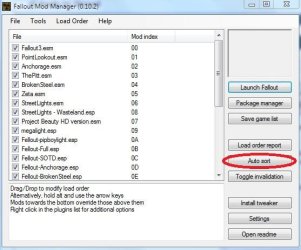
I have found for the most part, using FOMM helps a great deal. Check all the DLC you want and hit the autosort button.


2 other things I would like to mention: As it helped me with the Vanilla FO3.
When installing the game, do not let it start on its own. Browse the disc or folder for the setup.exe file, and right click it it.
Choose run in compatability mode for Vista SP2, and run it as admin.
After the game is installed, install the patch if needed.

For me, it was critical that the game installed in Vista compatability. It would install otherwise, but I had issues, as well as no Games menu shortcut.

Then , log into Windows live at the menu screen in game. Let it auto sign in for now.
Exit game, and restart.
Windows live may have additional patches, (I seem to recall one)

You do not have to play with a Live Account if you do not want too, I know many hate it. Once it patches you can log out and make a offline account.
 

Attachments

  • fomm1.jpg
    fomm1.jpg
    45.3 KB · Views: 39

My Computer My Computer

Computer Manufacturer/Model Number
Custom (Self Build)
OS
Windows 7 Home Premium 64bit
CPU
Intel Core i7 2700k
Motherboard
eVGA P67 SLI
Memory
8GB Mushkin Redline Ridgebacks @1866
Graphics Card(s)
EVGA GTX570 SC
Sound Card
XiFi Titanium HD
Monitor(s) Displays
LG W2453V
Screen Resolution
1920x1080
Hard Drives
Intel 320 80GB -- Intel X25-V 40GB --WD Black 1TB x2 -- WD Blue 640GB
PSU
Seasonic x750
Case
Corsair 600T SE White
Cooling
eVGA Superclocked CPU Cooler
Keyboard
Saitek Cyborg
Antivirus
Kaspersky
Browser
IE
Other Info
LG BD/DVD
Yes, stutter remover is a excellent choice unless you have the D2D version.


Just thought of this, Im wondering if it might be a sorting issue for some?
Sometimes if DLC or a mod loads in the wrong order, it can cause the game to crash.

I have found for the most part, using FOMM helps a great deal. Check all the DLC you want and hit the autosort button.
It crashes because if there is a file conflict, the last one overrides the first.
For example:
DLC 1 Uses original w_wasteland.dds and Mod 1 uses modded w_wasteland.dds
The mod requires the modded w_wasteland.dds, so the original won't work.
If the Mod 1 is loaded first, then it would be replaced by the original one, which makes the mod not work and makes the game not work.

Load Order:
DLC 1) w_wasteland.dds (Original)
MOD 2) w_wasteland.dds (Modded)
w_wasteland.dds (Modded)
Load Order:
MOD 1) w_wasteland.dds (Modded)
DLC 2) w_wasteland.dds (Original)
w_wasteland.dds (Original)
 

My Computer My Computer

Computer Manufacturer/Model Number
Custom Built
OS
Windows 7 Professional x64
CPU
Intel Core i7 2600k - 3.4 GHz
Motherboard
Asus Maximus IV Z68 - Extreme
Memory
4x4 Ripjaws X79 Series 2133 MHz (9-11-10-28)
Graphics Card(s)
1x eVGA GTX 580 - 3GB Classified
Sound Card
Realtek ALC 889 HD Audio
Monitor(s) Displays
Full HD Philips TV 32"
Screen Resolution
1920x1080
Hard Drives
1x Crucial m4 SSD 512 GB
PSU
800W Coolermaster Silentpro Gold
Case
Sentey - Renegade GS-6200
Cooling
Stock
Keyboard
Logitech K800 Wireless
Mouse
Logitech Performance MX Laser
Internet Speed
10MB Internet Connection
My contribution / stuttering

Over the last 3 days I have read this entire thread, I'm sorry to say I don't have a solution to everyone's unique problems. All I can do is contribute to the list in hopes that my experiences will help narrow down the culprit and help put this to rest.

I recently installed FO3 on my Win7 Pro x64, never having done so before I expected the worst. To my surprise everything went great, the only thing I had to complain about was some minor stuttering whenever I panned around too fast in the outdoor environment, or when a car exploded. As picky as I am, I decided I wanted to try and fix this irritation, I should have left well enough alone. After playing for a couple weeks, and never crashing once, I updated my FFD Show and to the newest Nvidia drivers. This quickly put a halt to any future hopes of playing FO3. In a mad panic to restore my system to a playable state, I un-installed the updates to FFD show, and rolled back my Nvidia driver. Sadly this had no effect. FO3 was toast...

So, I re-installed 7 Pro x64 on another HD. The following is the sequence in which I did things, and after doing so, FO3 was just as playable as it was before (including my outdoor/explosion stuttering).

1) Install Win7 (Pro) x64 (obviously)
2) Install the Nvidia driver (the older one I was using, 196.21, NOT the latest 257.21 one from Nvidia's site)
3) Install Klite Codec pack v2.10

At this point I verified in device manager that all my hardware was recognized and functioning, It was. Basically using Windows default drivers for everything other than the video card(s).

4) Enable SLI (if applicable)
5) Install FO3

Something to note here: I do not have an original dvd (mine was lost/broken). So, I have a copy of the contents of the disc on one of my HDs, with a no-cd exe of the Fallout3Launcher.exe. Yes, I install the game from a HD location, not a disc, to another HD.

6) Copy in the DLC packs and use the launcher to activate them (if required)
7) Install the FO3 v1.5 update
8) Install the FO3 v1.7 update

I do not know why, but in the past when installing the 1.7 update immediately after a fresh install of FO3 I have had mixed results. Going from 1.5 to 1.7 has worked every time.

9) Play the game

In my case with dual 8800 GTX's in SLI (liquid cooled) I was able to run everything on the "Ultra" setting with 4x AA and 8x AF @ 1920x1200, (further specs available in my profile) these are the same settings I was able to use when I played the game in XP. I did have to re-route my "My Documents" folder in Windows to get FO3 to see my previous save games, but once that was done, everything worked as well as I could hope for.

Sorry for this lengthy post, I hope it sheds some light on the situation. Oh, and IF anyone knows how to fix my outdoor/explosion stuttering problem, I'm all ears! I did try cleaning out my saves directory as suggested by sygnus21.

PS. Im sorry to see that some of the original posters of this thread have stopped making posts, they seemed very knowledgable in with the subject. But I guess constantly being asked the same questions over and over by new users would get annoying...


I'm experiencing what i believe is referred to as stuttering in open areas outside. All my drivers are fuly updated and GOTY is patched to version 1.7, no mods. I have tried turning of the v-sync, both in game and forced through the nvidia controls, but nothing really changed. My system should be more than able to play the game problem free. Any ideas?
<-sys specs

Two things that's been suggested by me earlier in this thread...

If you have a large save folder for the game, clean it out to no more than the last five saves.

If you have the radio turned on, turn it off.

I had a problem with both micro stuttering and crashes and both these fixes worked for me so give it a try.

Also, I would highly suggest that anyone looking for help with issues dealing with the game look through this ENTIRE thread as there are many many suggestions which may have helped someone fix their issue(s).

Good luck.
 

My Computer My Computer

Computer Manufacturer/Model Number
Custom/Home Built
OS
Windows 7 Pro x64
CPU
Intel Core2 Quad 2.4ghz
Motherboard
EVGA 122-CK-NF68-AR (nForce 680i SLI 775 AR Version)
Memory
6gb Patroit (2x 1gb PC2 6400, 2x 2gb PC2 6400)
Graphics Card(s)
Dual e-GeForce 8800 GTX 768MB in SLI (EVGA Brand)
Sound Card
On Board Azalia(HDA) 8 Channels
Monitor(s) Displays
Single 24" Dell
Screen Resolution
1920x1200
Hard Drives
250 WD OS;
500 WD Games;
750 WD Music & Media;
750 WD Movies
PSU
Corsair 750TX 750W ATX12V
Case
Thermaltake SHARK VA7000BWA
Cooling
Liquid on CPU & GPUs
Keyboard
Some POS Multimedia Keyboard
Mouse
Logitech MX Revolution
Loop

I'm 99% shure that the loop I'm getting is because of permissions. What happens is I hit new game and it loads 1 slide then "stops working." I am pretty shure the program does not have permission to make changes in the Saved Games folder, making it go into the loop. How would I assign permission to the program? :sarc:
 

My Computer My Computer

Computer Manufacturer/Model Number
Hewlett-Packard
OS
Windows 7 Home Premium 64-bit (6.1, Build 7600)
CPU
Celeron(R) Dual-Core CPU T3000 @ 1.80GHz (2 CPUs), ~1
Memory
3072MB RAM
How would I assign permission to the program? :sarc:

Answer on page 47 of this thread.... http://www.sevenforums.com/gaming/309-fallout-3-windows-7-a-47.html#post801405

BTW...

Also, I would highly suggest that anyone looking for help with issues dealing with the game look through this ENTIRE thread as there are many many suggestions which may have helped someone fix their issue(s).

I can understand it's a chore reading through the entire 49+ pages, but you "might" actually find an answer in there.

Lastly.... my guide on Tips on Troubleshooting Game Issues :)

Good luck
 

My Computer My Computer

Computer type
PC/Desktop
Computer Manufacturer/Model Number
Custom built by me.
OS
Windows 10 Pro
CPU
Intel Core i7-4770K (3.5Ghz)
Motherboard
Gigabyte G1 Sniper 5 (F10 Bios)
Memory
32 gig Corsair Dominator Platinum (4x8Gig)
Graphics Card(s)
Sapphire Tri-X R9 Fury
Sound Card
Soundblaster ZXR
Monitor(s) Displays
NEC PA242W 24" LCD Monitor
Screen Resolution
1920 x 1200
Hard Drives
Primary - Samsung 850 Pro (512gig), Samsung 840 Pro (256gig), 2TB WD Caviar Black.
PSU
EVGA Supernova 1000 G2
Case
Cooler Master HAF X
Cooling
Corsair H100i with Corsair Air Series SP120 Quiet Fans
Keyboard
Logitech Wireless Wave
Mouse
Logitech Performance MX
Internet Speed
High Speed Cable
Antivirus
Norton Security
Browser
IE11
Other Info
Memory Timings - 1866MHz @ 9-9-9-27-1T @ 1.5 volts
How would I assign permission to the program? :sarc:

Answer on page 47 of this thread.... http://www.sevenforums.com/gaming/309-fallout-3-windows-7-a-47.html#post801405

BTW...

Also, I would highly suggest that anyone looking for help with issues dealing with the game look through this ENTIRE thread as there are many many suggestions which may have helped someone fix their issue(s).

I can understand it's a chore reading through the entire 49+ pages, but you "might" actually find an answer in there.

Lastly.... my guide on Tips on Troubleshooting Game Issues :)

Good luck

Nope doesn't work.
 

My Computer My Computer

Computer Manufacturer/Model Number
Hewlett-Packard
OS
Windows 7 Home Premium 64-bit (6.1, Build 7600)
CPU
Celeron(R) Dual-Core CPU T3000 @ 1.80GHz (2 CPUs), ~1
Memory
3072MB RAM
I'm sorry to hear that. At this time I have no further suggestions other than what's already been offered in this thread.

Good luck.
 

My Computer My Computer

Computer type
PC/Desktop
Computer Manufacturer/Model Number
Custom built by me.
OS
Windows 10 Pro
CPU
Intel Core i7-4770K (3.5Ghz)
Motherboard
Gigabyte G1 Sniper 5 (F10 Bios)
Memory
32 gig Corsair Dominator Platinum (4x8Gig)
Graphics Card(s)
Sapphire Tri-X R9 Fury
Sound Card
Soundblaster ZXR
Monitor(s) Displays
NEC PA242W 24" LCD Monitor
Screen Resolution
1920 x 1200
Hard Drives
Primary - Samsung 850 Pro (512gig), Samsung 840 Pro (256gig), 2TB WD Caviar Black.
PSU
EVGA Supernova 1000 G2
Case
Cooler Master HAF X
Cooling
Corsair H100i with Corsair Air Series SP120 Quiet Fans
Keyboard
Logitech Wireless Wave
Mouse
Logitech Performance MX
Internet Speed
High Speed Cable
Antivirus
Norton Security
Browser
IE11
Other Info
Memory Timings - 1866MHz @ 9-9-9-27-1T @ 1.5 volts
Crashes just after startup

Ok, I know you get a lot of 'my fallout 3 game keeps crashing on Windows 7' complaints, and I'm not usually one to add on to something without trying to fix it myself first. I've been told I'm a nerd, so I figured it should've been easy to figure it out.

I tried running it as admin on every compatibility mode listed. I tried to make it work using previous versions of Windows. That was a helpful hint from a microsoft guy, but, alas, it didn't work for me. I even installed Virtual Box, installed XP so I could duel boot, and I got a whole new mess of errors there. It won't even let me LAUNCH the game in XP. Go figure.

I'm almost certain it has something to do with the compatibility of Fallout3/Windows 7. Maybe they had a fight and dragged me into the middle of it. Who knows?

My video drivers and sound drivers are all up to date, and every other forum I have been to, which have been a lot, offer nothing else. I really don't want to wait until October to play Fallout again. I mean, I will. That's not a problem. Yay, Vegas! I just want to play it before then.
 

My Computer My Computer

OS
windows 7
I'm not exactly sure what it is you're asking, or even what the issue is, but unfortunately, just about every suggestion to get the game going has been mentioned in this thread. If none has worked for you, sorry.

Also, it doens't help that you don't list system specs, or what the problem is....

See the first two guides in my signature.

Good luck.
 

My Computer My Computer

Computer type
PC/Desktop
Computer Manufacturer/Model Number
Custom built by me.
OS
Windows 10 Pro
CPU
Intel Core i7-4770K (3.5Ghz)
Motherboard
Gigabyte G1 Sniper 5 (F10 Bios)
Memory
32 gig Corsair Dominator Platinum (4x8Gig)
Graphics Card(s)
Sapphire Tri-X R9 Fury
Sound Card
Soundblaster ZXR
Monitor(s) Displays
NEC PA242W 24" LCD Monitor
Screen Resolution
1920 x 1200
Hard Drives
Primary - Samsung 850 Pro (512gig), Samsung 840 Pro (256gig), 2TB WD Caviar Black.
PSU
EVGA Supernova 1000 G2
Case
Cooler Master HAF X
Cooling
Corsair H100i with Corsair Air Series SP120 Quiet Fans
Keyboard
Logitech Wireless Wave
Mouse
Logitech Performance MX
Internet Speed
High Speed Cable
Antivirus
Norton Security
Browser
IE11
Other Info
Memory Timings - 1866MHz @ 9-9-9-27-1T @ 1.5 volts
Back
Top